

The phone rings for minutes and callers give up; the next day agents sit idle and someone says the team is overstaffed. Both complaints have the same root: headcount was set by instinct. Contact center software is the system that pulls requests from phone, chat and email into queues, routes each one to the right agent, ties every conversation to the customer record and measures service level. The harder question sits beyond the software: how many agents do you need? The answer comes from queueing theory, specifically the Erlang C calculation.
In this guide we explain what contact center software does, how calls flow and which metrics matter, then work out staffing for an illustrative center receiving 120 calls an hour, step by step with Erlang C. All figures are illustrative and the calculations are shown exactly as run; targets are labeled "common example targets", not industry averages.
What Is Contact Center Software?
Contact center software manages customer communication across channels in one place. It receives the incoming contact, queues it, passes it to an agent based on skill, records the conversation and gives managers a dashboard. The aim is a customer who is served without a long wait, explains the problem once and leaves with it resolved.
The layer where a request is logged, tracked and tied to a deadline is a separate topic that we covered in our help desk software guide. Here the focus is the queue and staffing problem at the moment a contact is first received.
| Channel | Concurrency | Expected response | Staffing method |
|---|---|---|---|
| Phone | One call per agent at a time | Seconds | Erlang C |
| Chat | Several conversations at once | Seconds to minutes | Erlang adjusted for concurrency |
| Email and forms | Asynchronous | Hours | Workload ÷ capacity |
Email is simple: 200 emails a day × 6 minutes = 1,200 minutes = 20 hours of workload. With an 85% occupancy target, 20 ÷ 0.85 ≈ 23.5 hours; over an eight-hour shift, 23.5 ÷ 8 ≈ 2.9, so 3 people. For phone, where an immediate answer is expected, that arithmetic is not enough and the queueing model below is needed.
How Do Call Flow, IVR and Skill-Based Routing Work?
A call reaches the voice menu (IVR) first, its reason is identified, it waits in a queue and connects to a suitable agent. The flow should be short and measurable.
- Greeting and IVR: A short menu, or recognition from the customer's number. Deep, multi-level menus raise abandonment.
- Customer recognition: The caller's number is matched to the CRM record, so the agent starts with the customer's history.
- Routing: The call goes to a queue based on reason, language and customer priority.
- Queue and waiting: Position, an estimated wait announcement or a callback option.
- Conversation and record: The agent resolves the issue; the outcome and reason are written to the customer record.
- Afterwards: An unresolved issue becomes a ticket, and a satisfaction survey can be triggered.
Skill-based routing (separate queues for billing, technical and dealer calls) gets customers to the right person, but it has a cost: splitting a queue shrinks the pool. We will see that cost in numbers below.
Which Metrics Matter in a Contact Center?
Six metrics are the language of management. Definitions differ between companies, so write them down; for instance, decide whether abandoned calls belong in the denominator of service level.
| Metric | Definition | Common example target |
|---|---|---|
| Service level (SL) | Share of calls answered within X seconds | 80% in 20 sec |
| ASA | Average speed of answer (waiting time) | Tracked together with service level |
| AHT | Average handling time (talk plus after-call work) | Set by type of work |
| Abandonment rate | Calls ended before an answer ÷ calls received | Kept low; around 5% is a common example |
| First-contact resolution | Issues closed in one conversation ÷ answered | Aim to raise it |
| Occupancy | Busy time ÷ available time | 100% is not the goal; see below |
An illustrative day: 840 calls came in, 42 were abandoned (42 ÷ 840 = 5%) and 798 were answered; 672 were picked up within 20 seconds (672 ÷ 840 = 80%). Of the 798 conversations, 560 were resolved on first contact (560 ÷ 798 = 70.2%). To measure satisfaction, see our NPS guide.
How Do You Calculate the Number of Agents? Erlang C
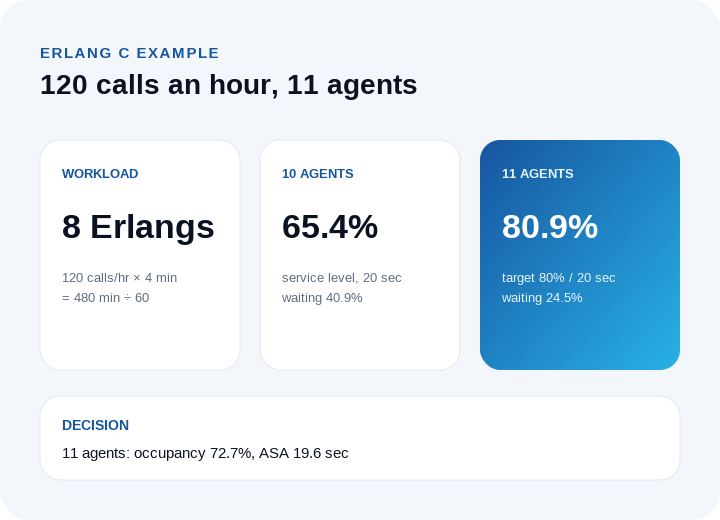
Start with the workload: traffic intensity (Erlangs) = calls per hour × AHT (hours). The illustrative center gets 120 calls an hour with a 4-minute AHT: A = 120 × (4 ÷ 60) = 8 Erlangs. On average, 8 agents will be busy at once. The number of agents c must be greater than A; with c = 8 the queue grows without limit.
Because calls arrive at random, Erlang C accounts for that randomness. First, the probability that a call has to wait:
Pw = [ A^c / c! × c ÷ (c − A) ] ÷ [ Σ(k=0..c−1) A^k / k! + A^c / c! × c ÷ (c − A) ]
Then the share answered within target time t (service level) and the average wait:
SL = 1 − Pw × e^(−(c − A) × t ÷ AHT) and ASA = Pw × AHT ÷ (c − A)
In the example t = 20 sec and AHT = 240 sec. For 11 agents Pw = 0.245; the exponent is −(11 − 8) × 20 ÷ 240 = −0.25 and e−0.25 = 0.7788. SL = 1 − 0.245 × 0.7788 = 0.809, that is 80.9%. ASA = 0.245 × 240 ÷ 3 = 19.6 sec.
How Do You Read the Erlang C Results?
For the same load (8 Erlangs, AHT 240 sec, 20 sec target), results by number of agents are below, computed with the Erlang C formula.
| Agents | Probability of waiting | Service level (20 sec) | Occupancy | ASA |
|---|---|---|---|---|
| 9 | 65.3% | 39.9% | 88.9% | 156.8 sec |
| 10 | 40.9% | 65.4% | 80.0% | 49.1 sec |
| 11 | 24.5% | 80.9% | 72.7% | 19.6 sec |
| 12 | 14.0% | 89.98% | 66.7% | 8.4 sec |
| 13 | 7.6% | 94.99% | 61.5% | 3.6 sec |
The first lesson is the slope of the curve: going from 9 to 10 agents lifts service level by 25.5 points and 10 to 11 adds 15.6, while 12 to 13 adds only 5. Every extra agent contributes less.
The second lesson is the balance between occupancy and service level. 100% occupancy is not a goal: if staffing equals workload, the queue never clears. At 11 agents occupancy is 72.7%; the remaining 27.3% is the buffer against random arrivals. The answer for an 80% in 20 sec target is 11 agents.
What Are the Limits of Erlang C?
Erlang C is a rough model. It assumes calls arrive independently and at random, handling times follow a particular distribution and callers wait forever. In real life all three break down.
- Abandonment and redialing: A caller who cannot wait leaves the queue and often calls again. The model ignores this, so it can understate the load in the busy hour.
- Small teams: In a team of a few agents, one long conversation visibly changes the result; treat it as approximate and validate in a pilot. For example, at 30 calls an hour (2 Erlangs) 4 agents suffice (SL 85.3%), but occupancy stays at 50.0%.
- Unproductive time: The computed number is agents who are available. Leave, sickness, training and breaks are added separately.
- Forecast error: The call volume input is a forecast; when the forecast drifts, staffing drifts with it. We covered how to forecast and monitor it in our demand forecasting guide.
Take Erlang C as a starting point and correct it with real abandonment and SL data.
How Do You Plan by Time of Day?
Call load is not constant through the day. Run a separate Erlang calculation for each interval; a fixed headcount is either short at the peak or idle in quiet hours. An illustrative 10-hour day and 22 working days:
| Interval | Calls/hour | Erlangs | Agents | Service level | Agent-hours |
|---|---|---|---|---|---|
| 09–11 | 60 | 4.0 | 7 | 89.5% | 7 × 2 = 14 |
| 11–14 | 120 | 8.0 | 11 | 80.9% | 11 × 3 = 33 |
| 14–17 | 90 | 6.0 | 9 | 84.7% | 9 × 3 = 27 |
| 17–19 | 45 | 3.0 | 5 | 80.0% | 5 × 2 = 10 |
Daily calls: 60 × 2 + 120 × 3 + 90 × 3 + 45 × 2 = 840. The total need is 84 agent-hours. Holding the peak-hour crew of 11 for all 10 hours would be 110 agent-hours; interval planning cuts 26 hours, or 23.6%. With a 25% allowance for leave and breaks (available time = 75% of paid time), the cost is: 84 ÷ 0.75 = 112 hours × ₺300 = ₺33,600 a day; with a fixed crew, 110 ÷ 0.75 = 146.7 hours × ₺300 = ₺44,000. The difference is ₺10,400 a day. Cost per call is ₺33,600 ÷ 840 = ₺40.00. How to lay this crew over shifts is covered in our shift and workforce scheduling guide.
How Do Service Level Targets, AHT and Queue Splitting Change the Cost?
Three decisions change staffing directly. All of them below use the same illustrative busy hour (120 calls, 8 Erlangs).
| Decision | Change | Agents needed | Effect |
|---|---|---|---|
| Service level target | 80% / 20 sec → 90% / 20 sec | 11 → 13 | +2 agents = +₺600/hour (+18.2%) |
| Longer AHT | 4 min → 5 min (10 Erlangs) | 11 → 14 | +3 agents (+27.3%) |
| Shorter AHT | 4 min → 3 min (6 Erlangs) | 11 → 9 | −2 agents = −₺600/hour |
| Queue splitting | Two separate skill queues of 60 calls/hour each | 7 + 7 = 14 (11 in one pool) | +3 agents (+27.3%) |
Tightening the service level target raises headcount quickly: for 90%, 12 agents give 89.98%, just under the target, so 13 are needed. The cost uses an illustrative ₺300 hourly rate; in the busy 3-hour interval that is 22 days × 3 hours × ₺600 = ₺39,600 extra a month. Splitting skill queues has a cost too: two separate pools need 3 more agents than one pool. Split only the calls that truly require separate expertise.
What Does an Abandoned Call Cost?
Staffing cost is visible; the cost of abandonment is not. If 5% of 840 daily calls are abandoned, 42 calls disappear. Assume half of them do not call back (21 calls) and the lost value per call is ₺300: the loss is ₺6,300 a day, or 22 days × ₺6,300 = ₺138,600 a month. One more agent costs ₺300 an hour (₺400 with the leave allowance); in the busy hour, going from 10 to 11 agents lifts service level from 65.4% to 80.9%.
How Much Can a Chatbot Reduce Call Volume?
Frequent, repetitive questions (order status, address change) can shift to a chatbot. Conversation design and handover rules are in our chatbot guide; here we look only at the staffing effect. Illustrative assumption: 25% of calls are resolved by the bot, so volume drops from 840 to 630.
- Intervals (calls/hour): 45, 90, 67.5, 33.75. Agents needed: 5, 9, 7, 5.
- Agent-hours: 5 × 2 + 9 × 3 + 7 × 3 + 5 × 2 = 68 (previously 84).
- Calls fell 25% but agent-hours fell only 19.0% (16 ÷ 84), because as the pool shrinks the buffer takes a larger share.
- Cost: 68 ÷ 0.75 ≈ 90.7 hours × ₺300 = ₺27,200 a day; saving ₺33,600 − ₺27,200 = ₺6,400 a day, or ₺140,800 a month.
If the bot costs ₺720,000 to build and ₺30,000 a month to run, the monthly net is ₺110,800 and payback is 720,000 ÷ 110,800 ≈ 6.5 months. If the deflection assumption fails, the calculation breaks; measure the rate in a pilot.
How Do You Set Up CRM Integration and Call Recording?
When the caller's number is matched to the CRM record, the customer card appears on the agent's screen before the conversation begins. The customer does not introduce themselves again; past orders, open tickets and notes are in front of the agent. This improves both AHT and first-contact resolution: in the example above, AHT falling from 4 to 3 minutes means 2 fewer agents in the busy hour. For the data flow see our CRM guide, and for the chain of touchpoints see our customer journey guide.
Call recording, listening and employee performance monitoring are subject to regulation. For details such as informing the customer, retention periods and access rights, consult your legal counsel; obligations under KVKK (Turkey's personal data protection law) should be settled before the system goes live.
How Do You Set Up a Contact Center in Six Steps?
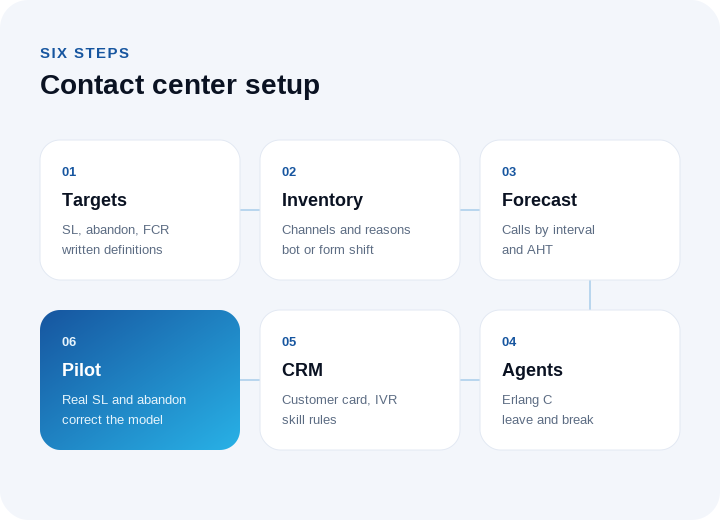
- Targets: Write down service level, abandonment and first-contact resolution targets, with their definitions.
- Channel and reason inventory: List call reasons and which could shift to chat, a bot or a form.
- Volume forecast: Forecast calls and AHT by interval.
- Agent calculation: Erlang C per interval, then the leave and break allowance.
- CRM and routing: Customer card integration, IVR menu, skill rules.
- Pilot and measurement: Correct the model with real SL, abandonment and AHT; review weekly.
We recommend reading: What is help desk software?
Customer Communication and Support Processes with İnovabil
At İnovabil we do not sell a contact center product; our focus is bespoke software built from scratch. If your customer communication has a rule specific to your business (for example, a request merging with an order or dealer record), we detail it in requirements analysis and design the integration with your CRM, ERP or existing telephony together.
We built a complaint and support management system for Sleepy, CRM, purchasing and mobile for Avcılar İnşaat, and logistics and shipment planning with wholesale order management for Karyak. If you would like to run the method in this guide on your own call load and review your processes together, send us a short summary; you can find how we work on our process page.
Frequently Asked Questions
What is contact center software?
It is a system that collects customer requests from phone, chat and email into one queue, routes them to the right agent, ties each conversation to the customer record and measures service level, waiting time and abandonment.
How do you calculate the number of agents?
First the workload: calls per hour × AHT (hours) = Erlangs. Then Erlang C gives the waiting probability and service level for each headcount; pick the first number that meets the target and add the leave and break allowance. In the example, 120 calls and 4 minutes make 8 Erlangs, and an 80% in 20 sec target needs 11 agents.
Why not staff exactly to the workload?
Calls arrive at random. With 8 agents for 8 Erlangs the queue never clears; at 9 agents service level reaches 39.9%, at 10 it is 65.4% and at 11 it is 80.9%. The extra agents form the buffer against randomness.
Is Erlang C always accurate?
No, it is a rough model. It ignores abandonment and redialing, uneven handling times and the small-team effect. Use it as a starting point and correct it with real data.
How much does a chatbot reduce agent needs?
It depends on the share of calls the bot resolves, and it is not linear. In the example, a 25% drop in calls cuts agent-hours by only 19.0%. Do not count future savings before you measure the rate in a pilot.