

When a customer calls you, can you see within seconds who last spoke with them, which quote was given and whether they have an open complaint? If this information is scattered across sales reps' notebooks, email inboxes and Excel files, most lost opportunities disappear without anyone noticing. CRM is used to gather this scattered information into a single customer record.
In this guide we explain what CRM is, which modules it consists of, how the sales funnel works, what it brings to a business and what to watch for in a successful CRM project.
What Is CRM?
CRM (Customer Relationship Management) is software that manages all of a business's interactions with customers and prospects, its sales processes and after-sales support in a single system. In a CRM, each customer's contact details, conversation history, quotes, orders and support requests are gathered on the same card.
CRM is not only a tool for the sales team. The marketing team follows campaigns, the support team follows requests and management follows sales performance in the same system. That way, everyone who touches the customer works with the same information.
What Is CRM Used For?
The core job of a CRM is to protect customer information from getting lost and to make the sales process visible. What it gives a business can be summarized as follows:
- No lost opportunities: Every lead that comes from a web form, a phone call or a trade fair is recorded and assigned to a rep.
- Follow-up discipline: Reminders ensure customers who were promised a callback are not forgotten.
- Institutional memory: When a rep leaves, the customer relationship does not leave with them; the whole history stays in the system.
- Predictable sales: The value and probability of opportunities in the sales funnel give the sales forecast for the coming period.
- A better customer experience: Customers do not have to explain themselves from scratch every time they call.
- Measurable performance: Conversion rates are visible by rep, team, campaign and product.
What Is a Sales Funnel and How Does It Work in a CRM?
A sales funnel is a visual model of the stages a prospect passes through from first contact to purchase. The number of prospects shrinks at every stage; by tracking these stages, a CRM shows at which point opportunities are lost.
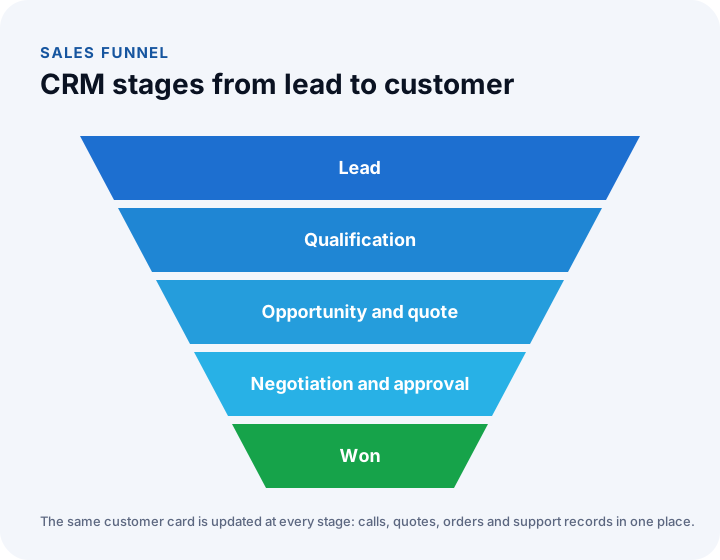
- Lead: A person or company that has shown interest is recorded in the system.
- Qualification: The prospect's need, budget and decision process are assessed.
- Opportunity and quote: A concrete sales opportunity is opened and a quote is prepared.
- Negotiation and approval: Price, terms and discounts are discussed; if required, the deal is sent for internal approval.
- Won or lost: The opportunity is concluded; if lost, the reason is recorded.
What Modules Does a CRM Consist Of?
CRMs differ in scope, but most consist of the following modules:
| Module | What it does |
|---|---|
| Customer card | Company, contacts, contact details and the full interaction history |
| Lead management | Collects leads from different channels, scores them and assigns them |
| Sales funnel | Tracks opportunities through stages and shows probability and forecast |
| Quotes and approval | Prepares quotes from the price list and obtains discount approval |
| Activities and tasks | Plans and reminds calls, meetings and tasks |
| Field sales | Collects visits, orders and collections from a mobile app |
| Support | Logs and assigns requests and tracks resolution time |
| Campaigns | Sends email and SMS to segments and measures results |
| Reports and targets | Sales performance, target attainment and profitability |
We recommend reading: Explore our CRM modules with sample screens
Who Needs a CRM?
Any business that keeps regular contact with customers and closes sales in more than one step benefits from a CRM. A CRM becomes a necessity especially in these situations:
- Your sales team has more than one person and it is unclear who is handling which customer.
- Your quoting process is long and needs more than one meeting.
- Leads come regularly from your website, ads and trade fairs.
- You have field sales or service teams.
- After-sales support and contract renewals are an important part of your revenue.
How Should Customer Records Be Organized in a CRM?
A good CRM record is built by linking four objects: company, contact, deal and activity. A company can have several contacts, a contact can have several deals and each deal can have several conversations; when these links are set up correctly, the question "what have we been through with this customer?" is answered on one screen.
| Object | What it holds | Common mistake |
|---|---|---|
| Company | Name, tax number, industry, address, responsible rep | The same company opened twice under two spellings |
| Contact | Name, role, phone, email, communication consent | A contact not linked to the company, breaking the company's history |
| Deal | Amount, stage, probability, expected close date, source | The close date left blank, which spoils the forecast |
| Activity | Call, meeting, note, task; date and outcome | Notes left in email and notebooks |
Keep the number of required fields low. Only information that drives the next step should be required: company name, the contact's phone or email, deal amount and expected close date. Every extra required field reduces usage. To prevent duplicates, the tax number or email field is treated as unique and the system warns about a similar record when a new one is created.
Pulling a list of duplicate and incomplete records once a month and handing it to record owners is the most practical way to keep data quality high at low cost.
How Is CRM Success Measured?
CRM success is measured by conversion rates at each funnel stage and by the sales forecast. The overall conversion rate is found by dividing won deals by leads; but the real insight lies in the stage conversions, which show at which step deals are lost.
Example (illustrative figures): suppose 200 leads were recorded in a period.
| Stage | Count | Conversion from previous stage |
|---|---|---|
| Lead | 200 | |
| Qualified | 120 | 60% |
| Quoted | 70 | 58.3% |
| In negotiation | 46 | 65.7% |
| Won | 23 | 50% |
Overall conversion is 23 ÷ 200 = 11.5%. The weakest link is the step after qualification, where only 58.3% of leads reach a quote; the team can improve this point by strengthening the conversation before the quote or by filtering out unsuitable leads earlier.
Two more indicators are added to these: the average sales cycle (days from a deal opening to closing) and the distribution of loss reasons. Track the indicators monthly, and update the probabilities with your own past conversion data, not with guesses.
How Are Lead Scoring and Assignment Done in a CRM?
Lead scoring gives each lead a score based on its signals so the sales team deals with the most ready leads first. The score comes from two places: who the lead is (industry, company size, role) and what it did (filled in a form, viewed the pricing page, asked for a quote).
| Signal | Example score |
|---|---|
| Filled in the quote request form | +30 |
| Visited the services and contact pages | +10 |
| A company in a target industry | +15 |
| In a decision-maker role | +15 |
| Applied with a personal email address | −10 |
The scores are illustrative; 50 and above can count as "hot" and gets a call the same day. The assignment rule is set by region, industry or rotation; a hot lead should reach its owner within an hour, and a warning should go to the manager if it is not handled. At the end of the first period, look at what the won leads have in common and update the scores.
Off-the-Shelf CRM or Custom CRM?
Off-the-shelf CRMs offer a quick start and a wide feature set; a custom CRM works in exact harmony with your sales stages, quoting rules and other systems. The decision depends on how unique your sales process is and which systems the CRM must talk to.
| Topic | Off-the-shelf CRM | Custom CRM |
|---|---|---|
| Sales stages | Configured within a set template | Designed around your process |
| Quote and approval rules | As far as the package allows | According to your discount and approval rules |
| ERP and accounting connection | Limited to ready-made connections | Built with your existing systems |
| Cost per user | Per-user licence | Development according to scope |
| Adoption | Unnecessary fields can make it harder to use | Only the screens you need |
We recommend reading: Off-the-shelf or custom software? A decision guide
6 Steps to a Successful CRM Project
- Map the sales process: Clarify your stages, quoting and approval rules, and reporting needs.
- Involve the team in design: Design the customer card and sales board screens together with the reps who will use them.
- Plan integrations: Decide the connections to web forms, email, ERP and accounting from the start.
- Clean the data before migrating: Fix duplicate and incomplete records in Excel or legacy systems before the transfer.
- Start small: Go live first with the core modules and develop according to usage habits.
- Train and measure: Watch usage closely in the first weeks and improve the screens with feedback from the team.
Common Mistakes in Using a CRM
- Too many required fields: If a rep has to fill in dozens of fields for every record, they stop using the system.
- Treating the CRM only as a management reporting tool: A CRM that does not make the team's work easier will not be adopted.
- Not connecting channels: If requests from web forms stay in email, the CRM remains incomplete.
- Not recording loss reasons: The most valuable source of learning goes to waste.
- Forgetting mobile use: Without mobile access for field teams, data is entered back at the office or never entered at all.
A Checklist for Choosing a CRM
| Check | Why it matters |
|---|---|
| Can you define your sales stages exactly? | Team adoption depends on it |
| Do web forms and campaigns open leads automatically? | Prevents opportunities from being lost |
| Are quote and discount approvals in the system? | Protects pricing discipline |
| Does it talk to the ERP and accounting? | Data does not break between sale and invoice |
| Is there mobile use? | Essential for field teams |
| Can reports be changed to fit your needs? | Speeds up management decisions |
We recommend reading: What Is Custom Software? Types, Examples, Advantages and Which Businesses It Suits
We recommend reading: What Is Digital Transformation? A Maturity, Roadmap and Payback Guide for Small and Mid-Sized Businesses
We recommend reading: How to choose a CRM: criteria, scoring, cost and demo guide
We recommend reading: What is help desk software? Ticket life cycle, priority matrix, SLA compliance and team sizing guide
Recommended reading: What is a customer portal? Self-service scope, security and payback guide
Recommended reading: CRM vs ERP
CRM with İnovabil
At İnovabil we build CRM around the way your team works: we assemble the customer card, lead management, sales funnel, quotes and approval, field sales, support, campaign and reporting modules according to your needs, and connect your web forms, ERP and accounting to the CRM. For Avcılar İnşaat we developed CRM and purchasing systems together with the mobile apps that work with them.
Frequently Asked Questions
What is the difference between CRM and ERP?
CRM focuses on the relationship with the customer: leads, opportunities, quotes, sales and support. ERP manages the company's internal resources: stock, purchasing, production and finance. When the two systems work in an integrated way, data flows without breaks from sale to shipment and invoice.
Should small businesses use a CRM?
Yes. Any business that closes sales in more than one step and keeps regular contact with customers can prevent lost opportunities with a CRM, even if the team is small.
Can we migrate our existing customer data into the CRM?
Yes. Customer, contact and history records can be cleaned and transferred from Excel files or the existing system you use.
Can the forms on our website go into the CRM automatically?
Yes. Requests from web forms, campaign pages and other channels can be opened directly in the CRM as lead records together with their source.
Can the CRM be used from a phone?
Yes. The CRM can be used in the field through a mobile-friendly interface or a separate mobile app developed for field teams.