

A customer sends an email, asks the same thing by phone the next day and writes on a messaging app a third time. The three messages land with three different people, and none of them can see the earlier conversation. The customer explains the same issue three times, the team does the same work three times and nobody knows who owns the problem. Help desk software, also called a ticketing system, collects this mess around a single record and a single owner.
In this guide we explain what help desk software is, the life cycle of a ticket, how impact and urgency set priority, the SLA compliance rate, how channels are merged, how a knowledge base reduces ticket volume, how to size the team, how customer satisfaction is measured, what the payback looks like and how to choose one. The example figures are illustrative; they are not real data or an industry average.
What Is Help Desk Software?
Help desk software turns every problem, question and complaint from a customer or internal user into a "ticket" and tracks it with an assignee, priority, time target, reply history and resolution steps. The customer side and the team side see the same record, and it does not stay ownerless until it is closed.
Its core parts are a shared inbox, the ticket record, assignment and routing rules, priority and SLA timers, canned replies, a knowledge base, internal notes and reporting. We covered the sales side of customer relationships in our what is CRM guide; a support system manages the after-sales side of the same customer and is often linked to the CRM record.
We recommend reading: Our CRM software service and its modules
What Stages Does a Support Ticket Go Through?
Every ticket should follow the same life cycle: new, assigned, replied, pending, resolved and closed. When the states are clear, you can see at a glance which ticket is with whom and for how long.
| State | Meaning | Time rule |
|---|---|---|
| New | The ticket is logged but not yet assigned | An upper limit is set for assignment |
| Assigned | The owner or team is known | The first-response timer starts |
| Replied | The first answer went to the customer | The resolution timer keeps running |
| Pending | Waiting for the customer or a third party | The timer is paused and the reason is written |
| Resolved | A solution was sent, awaiting customer confirmation | Closes automatically if there is no reply within a set time |
| Closed | The record is complete and feedback is requested | The reopening window is limited |
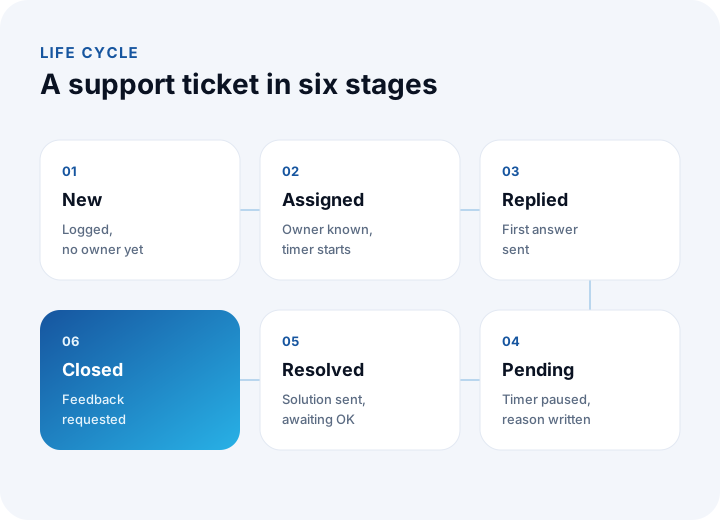
The "pending" state matters: if the timer keeps running while you wait for the customer, the team looks as if it missed the SLA because of a delay it did not cause.
How Are Ticket Priorities Set with Impact and Urgency?
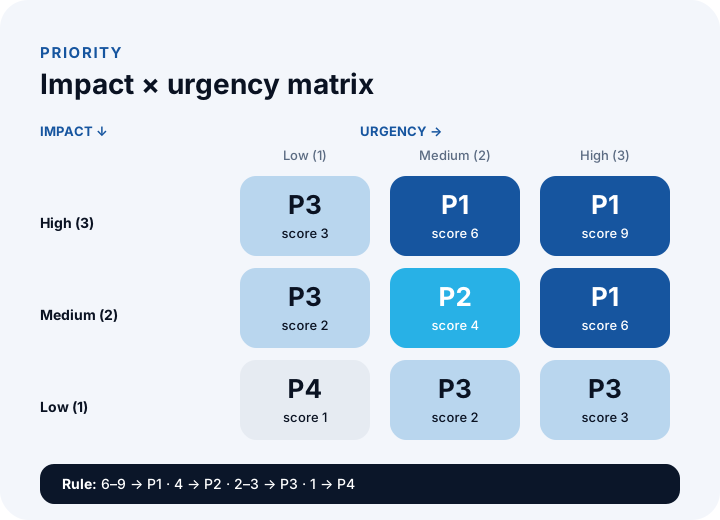
Every ticket arrives marked "urgent"; priority should be set by a rule, not by the team's feelings. The most common method scores impact (how many people or which work is affected) and urgency (the cost of waiting) on a three-point scale and multiplies them.
| Impact \ Urgency | Low (1) | Medium (2) | High (3) |
|---|---|---|---|
| High (3): many users or a critical process | 3 → P3 | 6 → P1 | 9 → P1 |
| Medium (2): one team or one customer | 2 → P3 | 4 → P2 | 6 → P1 |
| Low (1): one user, a workaround exists | 1 → P4 | 2 → P3 | 3 → P3 |
For example, an error that stops all dealers from placing orders is a P1 with impact 3 and urgency 3, a score of 9; one user asking about the format of a report is a P4 with impact 1 and urgency 1, a score of 1. Each priority is tied to a first-response and a resolution time; we explained how those times are written into a contract in our software maintenance agreement (SLA) guide.
How Are SLA Compliance and First-Contact Resolution Measured?
Two indicators form the backbone of support quality: compliance with time targets and the share of tickets resolved on first contact. Both are calculated automatically from the system.
| Indicator | How it is calculated | Example (illustrative) |
|---|---|---|
| SLA compliance rate | Tickets meeting the time target ÷ total tickets | 912 ÷ 960 = 95% |
| First-contact resolution rate | Tickets resolved in one reply ÷ total tickets | 612 ÷ 960 = 63.8% |
| Average first-response time | Average of all tickets' first-response times | 1 h 40 min |
| Reopen rate | Tickets reopened after closing ÷ closed tickets | 38 ÷ 960 = 4.0% |
Do not trust the average alone: a few badly delayed tickets distort it. Look at each priority separately; compliance on P1 tickets should be close to 100%.
How Are Multiple Channels Collected in One Inbox?
The customer writes on whichever channel they like; the team answers from one place. The channel itself is secondary; what matters is that every message is tied to the same ticket and the same customer record.
| Channel | How it enters the system | What to watch |
|---|---|---|
| Every message to the support address opens a ticket | Replies must attach to the same ticket | |
| Web form | Direct record with subject, category and attachment | Required fields, spam filtering |
| Phone | The agent opens a ticket during the call | The call note must be written to the record |
| Messaging app | An integration turns the conversation into a ticket | The platform's official terms of use |
| Customer portal | The customer logs in, opens tickets and sees history | Permissions and personal data protection |
Connecting channels to the system is an integration job; we explained the approach and its risks in our API integration guide.
How Does a Knowledge Base Reduce Ticket Volume?
A large share of incoming tickets are repeated questions. Short, searchable articles written for frequent questions answer the customer without opening a ticket; this is called self-service.
Example (illustrative): 960 tickets are opened in a month and 240 visitors find the answer in an article without opening one. The deflection rate is 240 ÷ (960 + 240) = 20%. And if one question keeps generating tickets, writing an article for it should be the first priority.
- Start from ticket tags: The five most frequently tagged topics are your first five articles.
- Write short, step by step: An article should contain the resolution steps and, if needed, a screenshot.
- Link articles to tickets: The agent should be able to attach an article to a reply in one click.
- Keep them current: An old article misleads; review articles whenever a version changes.
How Many People Should the Support Team Have?
Team size is calculated from ticket volume, average handling time and productive hours per person. Productive hours are the time actually spent handling tickets after meetings, training and leave.
Example (illustrative): 960 tickets a month, an average handling time of 18 minutes per ticket and 120 productive hours per person per month. The total workload is 960 × 18 = 17,280 minutes, or 288 hours; the people required are 288 ÷ 120 = 2.4. The half-person gap is covered with shifts or with a part-time helper. If volume is growing, investing in canned replies and a knowledge base that shorten handling time comes before hiring more people.
How Is Customer Satisfaction Measured in a Support System?
When a ticket closes, send the customer a one-question survey: "Were you satisfied with the support you received?" CSAT (customer satisfaction score) is the share of positive answers in all answers.
Example (illustrative): of 960 closed tickets, 210 customers answered and 168 were positive, so CSAT is 168 ÷ 210 = 80%; the response rate is 210 ÷ 960 = 21.9%. With a low response rate CSAT can be misleading; read the reasons behind negative answers and turn repeating topics into knowledge base and process improvements.
We recommend reading: What is business intelligence (BI)? From indicators to decisions
How Is the Payback of a Support System Calculated?
Payback is the investment divided by the monthly net benefit. The benefit comes from shorter manual tracking and chasing time, fewer repeated tickets and avoiding lost customers; in a first calculation, count only the time saving you can measure.
Example (illustrative): say the system removes 6 minutes of manual tracking and chasing per ticket. 960 × 6 = 5,760 minutes, or 96 hours; at ₺300 an hour the monthly gross benefit is ₺28,800. With a monthly running cost of ₺6,300 the monthly net benefit is 28,800 − 6,300 = ₺22,500. The payback on a ₺360,000 investment is 360,000 ÷ 22,500 = 16 months. Indirect benefits such as fewer lost customers are not included; update the figures with measured results.
What Should You Look for When Choosing Help Desk Software?
Evaluate an off-the-shelf product and a custom solution with the same six questions. We explained the weighted scoring and demo steps of a selection process in detail in our how to choose a CRM guide; the same method works for a support system.
- Channel support: Are email, form, phone and portal collected in one inbox?
- Rule engine: Can automatic assignment, priority and SLA timers be defined by category?
- Customer history: Are all of a customer's tickets and their sales record visible on one screen?
- Knowledge base: Can articles be written, searched and attached to replies?
- Reporting: Are SLA compliance, resolution time, CSAT and tag-based reports ready?
- Permissions and data: Is there role-based access, an audit log and a way to export data?
What Are Common Mistakes in Support Processes?
- Leaving tickets ownerless: In an inbox with no assignment rule, everyone assumes someone else will act.
- Treating every ticket as urgent: Without a priority rule, the truly critical ticket gets lost.
- Not writing the pending reason: If nobody knows what is awaited, a ticket stays open for months.
- Answering the same question again and again: Handling time does not fall without a knowledge base and templates.
- Looking only at averages: A report without a priority and category breakdown hides the problem.
- Not reading feedback: If satisfaction surveys are collected but not acted on, nothing improves.
We recommend reading: What is low-code? Limits, risks and cost of low-code development
Recommended reading: What is a customer portal? Self-service scope, security and payback guide
Support and Complaint Management Systems with İnovabil
At İnovabil we move support and complaint processes into software according to your own flow: ticket records and channel merging, assignment and priority rules, SLA timers, a knowledge base, a customer portal, CRM and ERP connections, and reporting. We start a project with a process map and requirements analysis, and move forward with development in parts and acceptance testing.
We built the complaint and support management system for Sleepy; we also built custom software for Karyak, Bofigo, İZBAN and Avcılar İnşaat in areas such as warehouse management (WMS), shipment planning and purchasing. Describe your support flow and the point where you struggle in a few sentences, and we will first put the process map and priorities in writing.
We recommend reading: Our software development process: step by step from analysis to release
Frequently Asked Questions
What is help desk software, in short, and what does it do?
It is software that turns incoming problems, questions and complaints into ticket records and tracks them with an assignee, priority, time target and reply history. Every ticket has an owner and a history, and the team can measure how fast and how well it works.
Is a help desk the same as a ticketing system?
In everyday use they mostly describe the same thing. Help desk is the name of the service, and a ticket is each individual request record. The software opens requests as tickets and follows them through their life cycle.
How is ticket priority set?
Impact (1–3) is multiplied by urgency (1–3). A score of 6–9 is P1, 4 is P2, 2–3 is P3 and 1 is P4. A first-response and a resolution time are tied to each priority; because the rule is written down, arguments decrease.
How is the SLA compliance rate calculated?
The number of tickets that met the time target is divided by the total number of tickets. In the example, 912 of 960 tickets met the target, so the rate is 912 ÷ 960 = 95%. It should be tracked per priority; on P1 tickets the rate should be close to 100%.
How many people should a support team have?
It is calculated from ticket volume, average handling time and productive hours per person. In the example, 960 tickets × 18 minutes is a 288-hour workload, and with 120 productive hours per person you need 2.4 people. A knowledge base and canned replies shorten handling time and reduce the need.