

In the warehouse, orders pile up after lunch, yet the morning shift is standing around. In the store, there are not enough cashiers for the weekend crowd, while Tuesday is half empty. The problem is rarely the headcount itself; it is that people are not placed at the right hour, with the right skills. Shift and workforce scheduling software calculates how busy the work will be, then assigns people to shifts in line with your rules.
In this guide we cover how to get from workload to the number of people needed, shift templates and rotation, the rules engine, the skills matrix, leave and swap handling, comparing plan with actuals, workforce cost and a six-step set-up. All example figures are representative; they are not industry averages or real wages. For working hours, rest periods, overtime pay and employee data, consult your HR team and legal counsel; this article gives no legal figures.
What Is Shift and Workforce Scheduling Software?
Shift and workforce scheduling software is an application that brings together demand forecasts, employee records, skills and company rules to produce and manage the weekly or monthly roster. After publication, leave, swaps, absence and overtime are tracked in the same system.
The need appears wherever work swings by the hour and several people work in turns: warehouses, stores, production lines and call centers. Leave balances and personnel files are a different topic, covered in our leave and employee management software guide. Here the subject is how people are placed into work, hour by hour.
We recommend reading: Our custom software service
How Do You Calculate the Number of People Needed From Workload?
You convert the workload into hours and divide by the share of time a person can actually work. The formula is: people needed = (work volume ÷ hourly output per person) ÷ occupancy, rounded up. Occupancy is the share of a shift a person can spend on the job after breaks, walking and waiting are deducted.
| Type of work | Hourly volume | Unit time / output | Occupancy | People needed |
|---|---|---|---|---|
| Warehouse picking | 900 lines | 60 lines/person-hour | 0.85 | 900 ÷ 60 = 15; 15 ÷ 0.85 = 17.65 → 18 |
| Store checkout | 60 customers | 4 min/customer | 0.80 | 60 × 4 = 240 min = 4 h; 4 ÷ 0.80 = 5 |
| Call center | 120 calls | 6 min/call | 0.80 | 120 × 6 = 720 min = 12 h; 12 ÷ 0.80 = 15 |
Calls arrive at random, so in a call center this formula is only a lower bound; a target waiting time needs queueing models. We explain how to produce the volume forecast and track its error in our demand forecasting guide. If the forecast runs 10% high, the warehouse example needs 990 ÷ 51 = 19.4 → 20 people, so you should plan a two-person buffer for the busy slot.
Why Does a Fixed Roster Fall Short in a Warehouse Example?
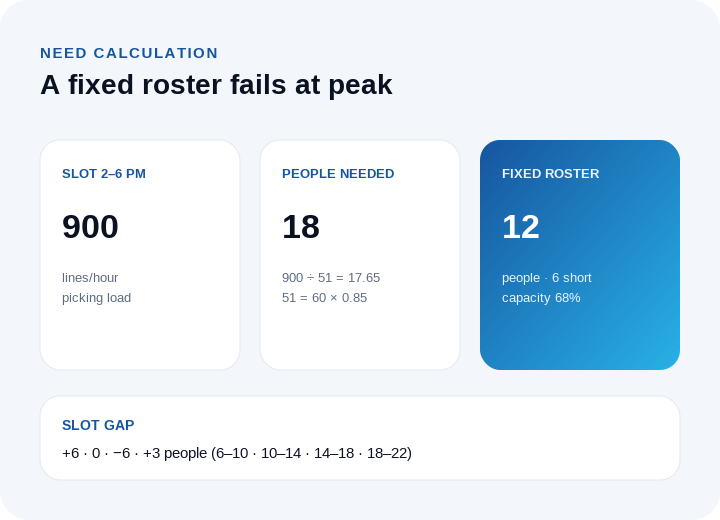
A fixed roster puts the same number of people in every hour, while demand changes from slot to slot. In the representative warehouse below, the day is split into four slots and effective output per person is 60 × 0.85 = 51 lines per hour.
| Slot | Hourly load (lines) | People needed | Fixed roster | Gap |
|---|---|---|---|---|
| 06:00–10:00 | 300 | 300 ÷ 51 = 5.88 → 6 | 12 | +6 surplus |
| 10:00–14:00 | 600 | 600 ÷ 51 = 11.76 → 12 | 12 | 0 |
| 14:00–18:00 | 900 | 900 ÷ 51 = 17.65 → 18 | 12 | −6 short |
| 18:00–22:00 | 450 | 450 ÷ 51 = 8.82 → 9 | 12 | +3 surplus |
The people-hours needed are 4 × (6 + 12 + 18 + 9) = 180. The fixed roster pays for 12 × 16 = 192 people-hours, 12 hours more in total, yet the distribution is wrong: 36 people-hours sit idle and 24 are missing. In the busy slot, capacity is 12 × 51 = 612 lines against a load of 900, so the fulfillment rate is 612 ÷ 900 = 68.0%. The gap is closed either with overtime or with late orders.
How Do You Build Shift Templates and Rotation?
A shift template covers the demand curve with overlapping shifts. Rotation spreads hard hours such as nights and weekends fairly.
In the example, the need is 6, 12, 18 and 9 people. One template: shift A from 06:00 to 14:00 (6 people), shift B from 10:00 to 18:00 (6 people), shift C from 14:00 to 22:00 (9 people), plus a 3-person half shift from 14:00 to 18:00. Slot by slot that gives 6, 6 + 6 = 12, 6 + 9 + 3 = 18 and 9 people, an exact match. Total hours are 8 × (6 + 6 + 9) + 4 × 3 = 168 + 12 = 180 people-hours. Whether half shifts suit your contract types and working arrangements is for HR and legal counsel to decide.
- Rotation: Teams take morning, afternoon and night shifts in turn at set intervals, so nobody is stuck with the same hard hours.
- Weekend fairness: If 8 weekend days a month each need 6 people, that is 48 person-shifts; in a pool of 24 people the average is 2 each.
What Does a Rules and Constraints Engine Do?
A rules engine writes down the conditions a plan must meet to be valid and checks every draft automatically. Rules fall into two groups: a hard rule can never be broken, a soft rule is respected where possible.
| Type | Example rule (company policy, representative) | On violation |
|---|---|---|
| Hard | At least two forklift-certified people in every slot | Plan cannot be published |
| Hard | Minimum rest between two shifts, as set by the company | Plan cannot be published |
| Hard | A person on approved leave cannot be rostered | Assignment rejected |
| Soft | Consecutive night shifts stay within the company's own limit | Warning; passes with manager approval |
| Soft | Personal shift preferences are met where possible | Preference score drops |
Statutory working and rest limits and overtime rules are written by your legal counsel and HR; the software carries them as parameters, so a change in the law is updated in one place.
A number shows why trying by hand fails: with 24 people, 7 days and 5 options per day (off or four shifts) there are 5168 ≈ 10117 possible arrangements. A rules engine narrows this space from the start; arrangements that break the rules are never generated. We explain why and how rules should be written down in our requirements analysis guide.
How Does a Skills Matrix Put the Right Person on the Right Job?
A skills matrix is a table showing who is qualified for which job: picking, forklift, packing, counting, checkout. A plan must meet not only how many people are needed but how many of each skill.
- Minimum skills per slot: In the example, if 8 forklift-certified people are split into groups of 3, 2 and 3, every shift has at least two, so the rule holds even when one person is on leave.
- Dependence on one person: If a skill lacks the required number plus one, there is a risk. The matrix flags it as a gap and shows the cross-training need.
- Skill validity: Expiry dates of certified skills are tracked; someone whose certificate has lapsed is not assigned to that job.
How Are Leave, Swaps and Plan Changes Managed?
Life goes on after the plan is published: someone falls ill, someone wants to change shifts. These moves have to be handled without breaking the rules.
- Approved leave: Once leave is approved, the plan locks that day; the person cannot be assigned.
- Swap requests: When two employees want to exchange shifts, the system checks the rules (skills, rest) as they would be after the swap; with no violation it goes to manager approval, with a violation it is rejected with the reason. For approval chains, see our workflow and approval software guide.
- Clash and gap warnings: Rostering one person in two places is a clash; falling below the need in a slot is a gap. Both appear as red warnings before the plan is published.
- Publishing and notices: Employees are notified when the plan is published and at every later change, and a record is kept. HR sets the notice periods.
How Are Overtime and a Standby Pool Used?
An unplanned shortfall is covered by standby staff or by overtime.
- Standby pool: A list of people holding a given skill who are ready to be called in. Its size comes from average absence: if 24 person-shifts are planned a day and 2 people on average do not show up, the absence rate is 2 ÷ 24 = 8.3%; the pool should cover at least two skilled people a day.
- Overtime: Missing hours are covered first from the standby pool, then with voluntary overtime. Overtime limits and pay are set by legal counsel and HR; the software applies them as parameters.
How Do You Compare Plan With Actuals?
A plan is only an intention; it gains meaning when compared with what happened. The software links clock-in records to the plan and calculates absence, lateness and coverage.
Coverage rate = people-hours covered ÷ people-hours required. In the example, two people from shift C did not show up. In slot 3, 16 people worked, in slot 4, 7; slots 1 and 2 ran as planned. Hours covered: 24 + 48 + 64 + 28 = 164. With 180 required, coverage is 164 ÷ 180 = 91.1%. Had two standby people been called, it would have returned to 100%. If three people arrived 15 minutes late, the extra loss is 3 × 15 = 45 minutes (0.75 hours). We explain how to choose and read such indicators in our KPI guide.
How Are Workforce Cost and Payback Calculated?
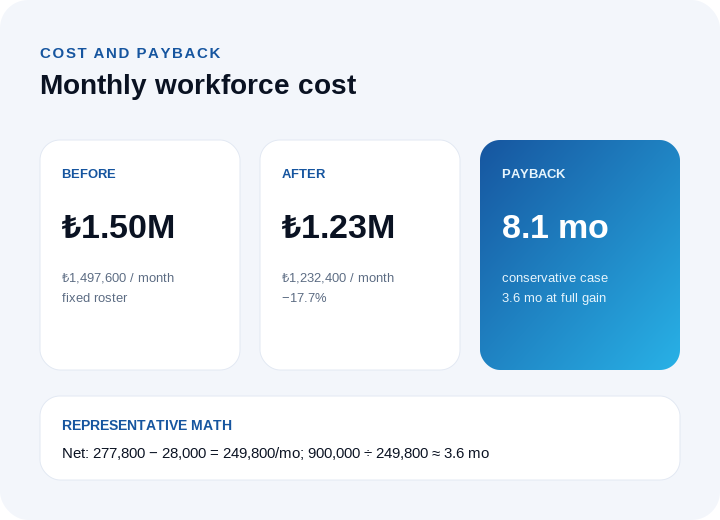
Cost is normal-hour pay plus overtime cost. Representative assumptions: a normal hour costs ₺250, an overtime hour ₺400 (not a statutory rate, just an example all-in cost) and a month has 26 working days. Before, with the fixed roster, the 24-person-hour shortfall in the busy slot is covered by overtime. After, the plan matches demand and only 6 person-hours of overtime remain, from sudden load and absence.
| Item (26 days a month) | Before (fixed roster) | After (demand-based plan) |
|---|---|---|
| Normal hours: 192 and 180 h × ₺250 × 26 | ₺1,248,000 | ₺1,170,000 |
| Overtime: 24 and 6 h × ₺400 × 26 | ₺249,600 | ₺62,400 |
| Total | ₺1,497,600 | ₺1,232,400 |
| Overtime share: 24 ÷ 216 and 6 ÷ 186 | 11.1% | 3.2% |
The difference is ₺265,200 (17.7%). Planning effort falls too: if three shift supervisors spend 4 hours a week, that is 3 × 4 × 4 = 48 hours a month; at 1 hour a week in the system it is 12. The 36 hours saved × ₺350 = ₺12,600. Total monthly gain is ₺265,200 + ₺12,600 = ₺277,800.
Let the investment be 100 person-days × ₺9,000 = ₺900,000 and the monthly running cost ₺28,000. Net monthly gain is ₺277,800 − ₺28,000 = ₺249,800, and payback is ₺900,000 ÷ ₺249,800 ≈ 3.6 months. Do not trust so optimistic a result: if only half of the gain materializes, net is ₺138,900 − ₺28,000 = ₺110,900 and payback is ₺900,000 ÷ ₺110,900 ≈ 8.1 months. Recalculate with your own wages, overtime and demand data.
How Do You Set Up a Shift Scheduling System?
Set-up starts with settling rules and data before software. A six-step path works.
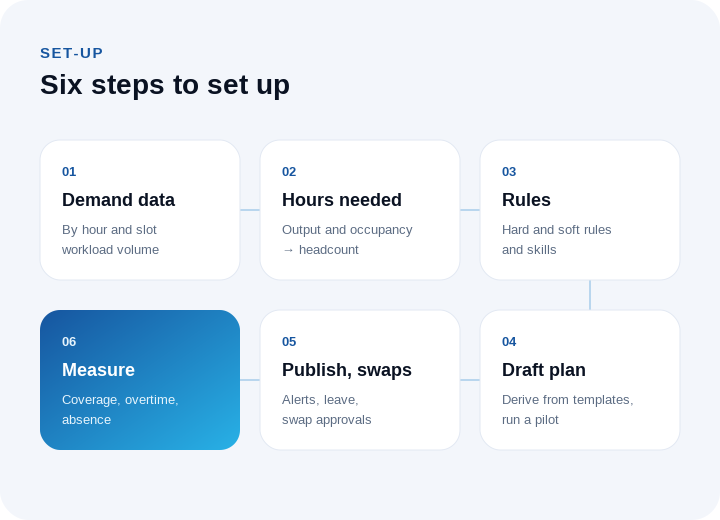
- Demand data: Collect work volume by hour and slot, and define the workload unit (lines, customers, calls).
- Hours needed: Calculate people needed per slot with output and occupancy rates.
- Rules and skills: Put hard and soft rules, the skills matrix, leave and rest parameters in writing together with HR.
- Draft plan: Derive it from templates, clear clash and gap warnings and run a pilot in one warehouse or one store.
- Publish and swaps: Switch on notifications, leave and swap flows; give employees short training.
- Measure: Track coverage, absence and overtime share weekly and adjust rules and templates accordingly.
Getting people to use a new system is harder than the technical set-up; see our software adoption guide. For storing and showing employee data and for KVKK (Turkey's personal data protection law) duties, work with your legal counsel.
What Mistakes Are Common in Shift Planning?
- Planning without calculating demand: Copying last week's plan does not cover this week's load.
- Looking only at headcount: If a skill is missing, the work cannot be done even when total people look sufficient.
- Leaving rules in people's heads: A rule that is not written down cannot enter the engine; the violation is noticed after publication.
- Trusting averages: A daily average coverage hides the gap in the busy hour; track it per slot.
We recommend reading: What is a warehouse management system (WMS)? A guide from receiving to shipping
We recommend reading: What Is Employee Training and Competency Management Software? Skills Matrix, Certificate Tracking, Gap Analysis and Payback Guide
We recommend reading: What Is Contact Center Software? Agent Staffing, Queues and the Erlang C Calculation
We recommend reading: How to Set Up Time Tracking and Timesheet Software: Time Entry, Utilization and Payback Guide
We recommend reading: How to Design Business Day Calendars and SLA Time Calculation in Software: Holiday Data, Pausing and Due-Date Guide
We recommend reading: How to Do Resource and Capacity Planning for Project Teams: Net Capacity, Heat Map and Overload Guide
Custom Software and Process Digitalization with İnovabil
At İnovabil our focus is building software from scratch for your company: custom software, ERP, CRM, e-commerce, web, mobile and integration. We do not claim to have a ready-made shift scheduling product; this guide is meant to help you assess the topic for your own operation. If you need scheduling, we suggest writing down rules and skills in requirements analysis and comparing a ready-made tool with a custom solution, cost included.
We built a warehouse management system and a complaint and support management system for Sleepy; logistics and shipment planning with wholesale order management for Karyak; shipment planning for Bofigo; CRM, purchasing and mobile for Avcılar İnşaat; and a purchasing system for İZBAN. Send us a short summary of your shift pattern; we will first work through the hours-needed calculation together and produce a written assessment.
We recommend reading: Our software development process: step by step from analysis to launch
Frequently Asked Questions
What is shift and workforce scheduling software, in short?
It is software that calculates how many people are needed from demand, assigns employees to shifts in line with rules and skills, and tracks leave, swaps, absence and overtime in one place. The aim is to reduce being short at the busy hour and overstaffed at the quiet one.
When does a spreadsheet roster stop being enough?
When employees, shift types and rules multiply, when swaps and leave change often and nobody can check violations by hand. A spreadsheet does not warn about clashes or missing skills on its own; a system shows them before the plan is published.
How do you calculate the staff needed?
Divide work volume by hourly output per person, divide by occupancy and round up. In the example, 900 lines ÷ 60 = 15 person-hours, 15 ÷ 0.85 = 17.65, so 18 people are needed. The volume itself should come from a demand forecast.
How are working-time and overtime rules entered into the software?
As parameters. Statutory limits, rest periods and overtime pay are set by your legal counsel and HR; the software applies them as rules. Hard-coding the figures causes problems when the law changes.
How long does this kind of system take to pay back?
In the example, about 3.6 months if net monthly gain is ₺249,800, and about 8.1 months if only half the gain materializes. The figures are representative; calculate with your own wages, overtime and demand data.