

Order-status messages that arrive after closing time wait until the next morning, the same returns question is answered dozens of times a day, and the support team never finds time for the customers who really need an expert. A chatbot is software that answers these repetitive questions instantly and hands over to a person whatever it cannot answer. But setting one up is more than adding a chat window: you have to decide in advance what the bot will resolve, when it must pass the conversation to a human and which data it may touch.
In this guide we cover the three types of bot, which questions a bot can resolve, the confidence cutoff and handoff rules, connecting to a knowledge base and an order system, channels, metrics, the payback calculation, wrong-answer and KVKK (Turkey's personal data protection law) risks, and a six-step setup. The example figures are representative; they are not a product price or an industry average.
What Is a Chatbot?
A customer service chatbot is software that talks to customers in text, answers frequently asked questions, reads information such as order and shipping status from the relevant system and passes the conversation to an agent when needed.
A chatbot is not a replacement for the support team; it is the first filter in front of it. Repetitive questions with clear rules stay with the bot, while ambiguous, emotional or money-related decisions go to a person. We explained how a request is tracked after the conversation in our help desk software guide; the chatbot is the front door placed in front of that system.
We recommend reading: What Is Help Desk Software?
What Is the Difference Between Rule-Based, Intent-Based and Language-Model Bots?
The three types answer the same question in different ways: a rule-based bot follows a menu drawn in advance, an intent-based bot classifies what the customer wants, and a language-model bot writes a free-form answer from the content in a knowledge base.
| Topic | Rule-based | Intent-based | Language-model |
|---|---|---|---|
| How it works | Buttons, menus and keyword rules | Classifies the message into an intent; each intent has a prepared answer | Finds the relevant content in the knowledge base and writes the answer as a sentence |
| Strength | Predictable; makes no mistakes, quick to build | Understands free-text questions, answers stay controlled | Flexible language, covers many topics with little effort |
| Weakness | Customers who leave the menu get stuck | Example sentences must be prepared and kept up to date for every intent | Risk of wrong or invented answers; needs constant review |
| Build effort | Low | Medium | Medium; depends on knowledge base quality |
| Typical job | Order status lookup by order number, simple routing | A few dozen frequent questions, returns and shipping topics | Large knowledge base, long and free-form questions |
In practice the types are mixed: a rule or intent flow for topics that need an exact answer, such as order status, and a language model for the wide FAQ. We covered connecting a language model to business software, the confidence cutoff and retrieval from a knowledge base in our guide to integrating AI into business software; here we focus on the customer service side.
Which Customer Questions Can a Bot Resolve?
A bot resolves questions that are high in volume and whose answer can be read from a system. Take this representative distribution: 3,000 conversations a month and a 45% firm resolution rate.
| Topic | Conversations | Bot resolution rate | Resolved by bot |
|---|---|---|---|
| Order and shipping status | 1,050 (35%) | 80% | 840 |
| FAQ: products, delivery, return terms | 750 (25%) | 60% | 450 |
| Return and exchange requests | 450 (15%) | 10% | 45 |
| Invoices and payments | 300 (10%) | 5% | 15 |
| Complaints and complex issues | 450 (15%) | 0% | 0 |
| Total | 3,000 | 45% | 1,350 |
The arithmetic: 840 + 450 + 45 + 15 = 1,350; 1,350 ÷ 3,000 = 45%. (840 + 450) ÷ 1,350 = 95.6% of the resolutions come from two topics: status lookups and the FAQ. On returns and invoices the bot only explains the terms and does not start the transaction; that goes to a person or to an approval step. We covered the returns process itself in our returns management guide.
When Should a Bot Hand Over to a Human?
A bot should hand over when its confidence falls below the set cutoff, when the customer asks, or when the topic is risky.
- Low confidence: If the confidence score is under the cutoff, hand over instead of guessing.
- Misunderstood twice: Hand over after two "I did not understand" replies in a row.
- Customer request: When the customer says "connect me to an agent", hand over without further questions.
- Risky topics: Returns above a set amount, disputes, complaints and personal data requests.
- System did not respond: If the order system does not answer, hand over instead of guessing.
At handoff, the conversation summary and the verified customer details must pass to the agent so the customer does not have to explain everything a second time. Outside working hours, if a handoff is not possible, the bot opens a ticket and says when the customer will hear back.
How Is the Confidence Cutoff Chosen?
As the cutoff rises, the bot answers fewer questions but its answers are more accurate. The representative example below is the result of a 200-question test set.
| Cutoff | Answered automatically | Correct | Accuracy | Wrong per 1,000 automatic answers |
|---|---|---|---|---|
| 0.60 | 120 (60%) | 108 | 90.0% | 100 |
| 0.80 | 90 (45%) | 85 | 94.4% | ≈ 56 |
| 0.90 | 60 (30%) | 59 | 98.3% | ≈ 17 |
At a 0.80 cutoff, 85 of 90 answers are correct (85 ÷ 90 = 94.4%); in 1,000 automatic answers you expect about 5 ÷ 90 × 1,000 ≈ 56 wrong ones. Raising the cutoff to 0.90 cuts wrong answers to about 17 but drops the automatic answer rate from 45% to 30%. The right cutoff depends on what a wrong answer costs: higher for topics involving money and commitments, lower for general information. The 0.80 cutoff in the example is the starting point for the 45% resolution rate used in the payback calculation.
How Does the Bot Connect to the Knowledge Base and the Order System?
The bot draws on two sources: an approved knowledge base and the systems that hold live data such as orders and shipping. From the first it reads text; from the second it queries the customer's own record.
- Knowledge base: Return terms, delivery times, product information and campaign rules are kept in one source, with an owner and a last-updated date. The bot answers only from this content and, where possible, shows the source.
- Order and shipping system: The connection is read-only: status, shipment tracking, estimated delivery date. Write actions such as cancelling an order or changing an address stay with a person in the first release and are added later behind an approval step.
- Customer verification: To avoid showing someone else's order, the order number is accompanied by a code sent to the phone or e-mail.
- Access and logging: The access account the bot uses is defined with least privilege and every query is logged. We explained these principles in detail in our role-based access control guide.
Keeping order data in a single place makes the connection easier; we explained the order lifecycle across channels in our order management system guide. A panel where customers find answers themselves draws on the same data; see our customer portal guide for that.
Which Channels Does a Chatbot Work On?
A chatbot should work where the customer already is; the two most common channels are the chat window on your website and a messaging app.
| Channel | Strength | Watch out for |
|---|---|---|
| Website chat window | Visitors can ask without signing in; page context is known | A verification step is needed |
| Messaging app | Customers write where they are used to, and get notifications | Terms of use and rules vary by platform |
| E-mail reply | Suits long, documented requests | Not instant; the bot's role stays at classification and drafts |
The conditions, message templates and pricing for running a bot on a messaging app are set by the platform and change over time; check the current rules from that platform's official source. When several channels are used, conversations should be gathered in a single support queue.
Which Metrics Show Whether a Chatbot Works?
Four measures are enough: firm resolution rate, handoff rate, first response time and satisfaction. In the 3,000-conversation example the values are as follows.
| Metric | Formula | Example |
|---|---|---|
| Firm resolution rate | Bot resolutions not reopened ÷ all conversations | 1,350 ÷ 3,000 = 45% |
| Handoff rate | Handed to a person ÷ all conversations | 1,200 ÷ 3,000 = 40% |
| Abandonment rate | Left without an answer ÷ all conversations | 300 ÷ 3,000 = 10% |
| First response time | Bot ≈ 5 s; human in working hours ≈ 12 min | 720 ÷ 5 = 144× faster |
| Satisfaction (CSAT) | Satisfied responses ÷ survey responses | Bot 225 ÷ 300 = 75.0%; human 170 ÷ 200 = 85.0% |
The distribution adds up like this: firm resolution 1,350, reopened 150, handoff 1,200, abandoned 300; total 3,000. If the bot first closed 1,500 conversations and 150 were reopened, the reopen rate is 150 ÷ 1,500 = 10% and firm resolution is 1,500 − 150 = 1,350. Looking at raw closures misleads you; if a customer comes back with the same issue within a week, that conversation was not resolved.
Do not confuse satisfaction with post-order NPS; we explained the difference in our NPS guide. A weekly review is part of measurement too: reading 50 conversations at 5 minutes each is 250 minutes, about 4.2 hours.
How Is the Payback of a Chatbot Calculated?
Payback is found by taking the money value of the support time the bot frees up, subtracting the running cost and dividing the investment by that net gain. The assumptions below are representative.
- Volume and resolution: 3,000 conversations a month, 45% firm resolution = 1,350 conversations.
- Time and hourly cost: Handling a conversation with a person takes 6 minutes on average; a support employee costs ₺300 an hour.
- Investment: 38 person-days × ₺9,000 = ₺342,000 (topic analysis and conversation design 6, knowledge base preparation 8, read-only order system connection 10, chat window and channel 6, handoff and agent screen 4, testing 4).
- Monthly running cost: ₺12,000 (hosting and model usage, knowledge base upkeep, monitoring).
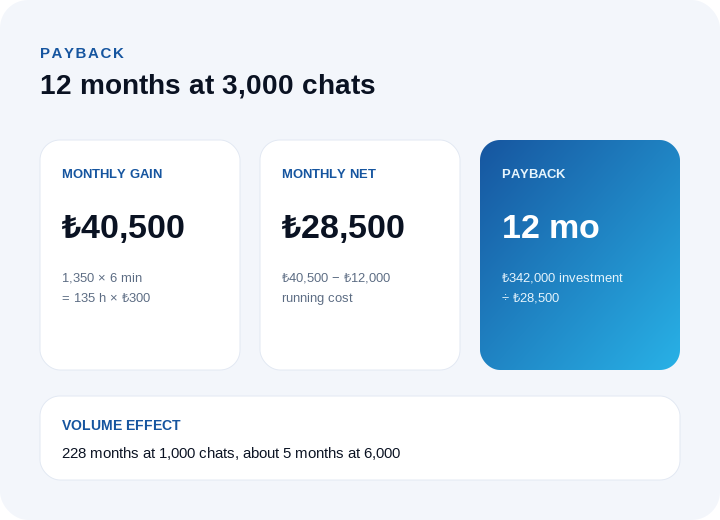
Monthly gain: 1,350 × 6 min = 8,100 min = 135 h; 135 × ₺300 = ₺40,500. Net gain ₺40,500 − ₺12,000 = ₺28,500. Payback ₺342,000 ÷ ₺28,500 = 12 months. The gain here is staff time freed up; total payroll does not shrink by itself, and real savings appear only if a new hire or overtime is avoided.
| Monthly conversations | Resolved (45%) | Gain | Net (₺12,000 running) | Payback |
|---|---|---|---|---|
| 1,000 | 450 | ₺13,500 | ₺1,500 | 228 months |
| 3,000 | 1,350 | ₺40,500 | ₺28,500 | 12 months |
| 6,000 | 2,700 | ₺81,000 | ₺69,000 | ≈ 5.0 months |
At 1,000 conversations: 450 × 6 min = 45 h × ₺300 = ₺13,500; net ₺1,500; ₺342,000 ÷ ₺1,500 = 228 months. At 6,000: 2,700 × 6 = 16,200 min = 270 h = ₺81,000; net ₺69,000; payback ≈ 5.0 months (at 6,000 conversations model usage grows, so the running cost would rise somewhat). The lowest volume at which the bot covers its own running cost, with an expected gain per conversation of 0.45 × ₺30 = ₺13.5, is ₺12,000 ÷ ₺13.5 ≈ 889 conversations. If the resolution rate falls to 30%, the gain at 3,000 conversations is ₺27,000, net ₺15,000 and payback 22.8 months; at 60%, net ₺42,000 and ≈ 8.1 months. If volume is small, a good FAQ page and a single chat button may be the better choice than a bot.
What Are the Wrong-Answer and KVKK Risks?
The biggest risk is the bot giving the customer wrong information. Quoting the wrong return period or confirming a campaign that does not exist is, in the customer's eyes, a commitment by the business.
- Approved content only: The bot does not generate an answer on a topic missing from the knowledge base; it says "I don't know, I'm passing you to an agent".
- Fixed texts: Answers involving money, legal terms and warranty are given as approved fixed text rather than free generation.
- Say it is a bot: Customers should know they are talking to a bot and be able to reach a person at any moment.
- Test set and weekly review: A sample question set before launch and a weekly conversation review afterwards.
- Personal data: Conversations contain names, phone numbers and order details. The privacy notice, retention period, whether data is passed on to a service provider and deletion requests fall under KVKK (Turkey's personal data protection law); consult your legal advisor for the legal details.
Think also about the bot's exposed ends: the connection behind your chat window is an API, and securing it is a separate subject. We explained authentication, rate limiting and logging principles in our API security guide.
How Is a Chatbot Set Up? Six Steps
Setting up a chatbot is a project that starts small and grows by measuring. The six steps below aim to open the first release on a single topic, in a short time and under control.
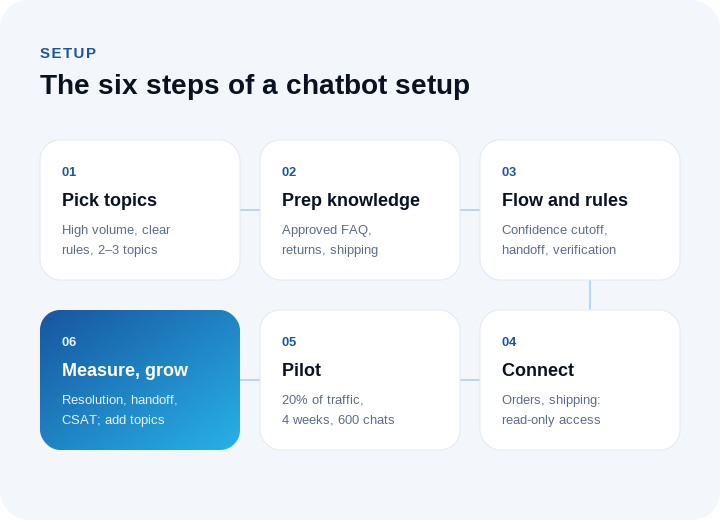
- Pick topics: Count the last three months of conversations by topic; start with two or three topics that are high in volume with clear rules (in the example, order status and FAQ).
- Prepare knowledge: Gather the approved FAQ text and the returns and shipping rules in one source; assign an owner and an update date.
- Flow and cutoff: Write down the confidence cutoff, the handoff rules and the customer verification step; set target metrics.
- Connect: Connect the order and shipping system with read-only access; pass the conversation summary to the agent screen.
- Pilot: Run it for four weeks on 20% of traffic (3,000 × 20% = 600 conversations); watch accuracy, firm resolution and CSAT.
- Measure and expand: If the targets hold, add a new topic; if not, fix the cutoff and the content.
Write the pilot targets in advance, for example accuracy of 94% or more, firm resolution of 35% or more, CSAT of 75% or more. These figures are representative; set yours from your own history. We explained the logic of starting small and growing by measurement in our MVP guide.
We recommend reading: How to Integrate AI into Business Software
We recommend reading: What Is Marketing Automation? Email and SMS Flows, Triggers, Consent and Payback Guide
We recommend reading: What Is Appointment Booking Software? Calendar Model, Double-Booking Prevention, No-Show Rate and Payback Guide
We recommend reading: What Is Contact Center Software? Agent Staffing, Queues and the Erlang C Calculation
We recommend reading: How to Build a Knowledge Base: Article Template, Staleness Audit, Metrics and Payback Guide
We recommend reading: How to Build an Order Tracking Page and Reduce "Where Is My Order?" Tickets: Status Model, Delay Notices and Payback Guide
We recommend reading: How to Build Enterprise Search and Document Q&A with RAG: Chunking, Access Filters, Threshold and Payback Guide
Customer Service and Custom Software with İnovabil
At İnovabil our focus is building company-specific software from scratch: custom software, ERP, CRM, e-commerce, web, mobile and integration. A chatbot is not our off-the-shelf product, and we make no claim of such a product or reference. If your customer service process needs a chat layer, we suggest evaluating it during requirements analysis together with volume, payback and handoff rules, and making your order and customer data safely readable.
We built a complaint and support management system and warehouse management for Sleepy; CRM, purchasing and mobile for Avcılar İnşaat; a purchasing system for İZBAN; and logistics and shipment planning with wholesale order management for Karyak. Send us a short summary of your conversation volume and support process; let us first work out together whether you really need one.
We recommend reading: Our software development process: step by step from analysis to launch
Frequently Asked Questions
What is a chatbot, and what does it do in short?
It is software that chats with customers in text, answers frequently asked questions, reads order and shipping status from the relevant system and hands over what it cannot answer to a person. It also works outside working hours and takes the load of repetitive questions off the support team.
What is the difference between a rule-based bot and a language-model bot?
A rule-based bot follows a menu and keywords drawn in advance; it is predictable but not flexible. A language-model bot writes free-form answers from the knowledge base; it is flexible but needs a confidence cutoff and review because of the risk of wrong answers. For exact topics such as order status, the two are often used together.
When should a chatbot hand over to a human?
When its confidence score falls below the cutoff, when the customer asks for an agent, after two misunderstandings in a row, when the topic carries risk such as money or a complaint, and when the order system does not respond. The conversation summary should be passed along at handoff.
How long does a chatbot take to pay for itself?
It depends on volume. In the representative example, with 3,000 conversations a month, 45% firm resolution, a 6-minute conversation and a ₺300 hourly cost, a ₺342,000 investment pays back in 12 months; at 1,000 conversations it takes 228 months and at 6,000 about 5 months. Recalculate with your own figures.
What should a chatbot watch out for under KVKK?
You should define the privacy notice for personal data in conversations, the retention period, whether data is passed on to a service provider and how deletion requests are handled. Avoid asking for unnecessary data in chat and do not show order details before verifying the customer. Consult your legal advisor for the legal details.