

The software goes live, and on day one a dealer orders 501 units and the system accepts it, even though the warehouse can ship 500 at most. Or the invoices add up wrong at month end, or nobody can finish an order on a phone. Such bugs look fine to the author, who uses the software the way they know it works, while customers use it in ways nobody expected. Software testing is the work of finding that gap before customers do.
In this guide we answer how to do software testing step by step, using one example screen, from test types to bug reports and the release decision. It works like a short course: seven lessons, each explaining a concept, showing it with an example and ending with a small exercise for your own project. You don't need a technical background to follow it.
What Is Software Testing?
Software testing is the process of checking, with predefined scenarios, whether software behaves as expected, and recording where it doesn't as bugs. Its purpose is to find defects before users do and to base the release decision on data.
Two terms are often confused. A defect (bug) is a flaw in the software or its design; a failure is that flaw showing up in front of a user while the software runs. Testing means triggering the failure before the user does, in order to find the defect.
Testing can show that defects exist but cannot prove they don't, and trying every combination is impossible. So good testing isn't trying everything; it's choosing, cleverly, the cases most likely to reveal bugs. The lessons below teach exactly that.
Recommended reading: Our custom software development service
How Should You Use This Guide?
Follow the lessons in order. Every example tests the same screen: the order screen of a manufacturer's dealer portal. The rules: a dealer orders by product code; quantity per line must be between 1 and 500; the order total must be at least ₺1,000; orders of ₺10,000 or more get an extra 5% discount; an inactive dealer cannot order. Amounts and rules are illustrative.
| Lesson | Topic | What you will be able to do |
|---|---|---|
| 1 | Test types and the test pyramid | Know which bug is caught by which test, and how cheaply |
| 2 | Writing test scenarios and test cases | Write a test anyone else can run |
| 3 | Equivalence classes and boundary value analysis | Test with a few clever values instead of hundreds |
| 4 | Decision tables | Test rule combinations completely and simply |
| 5 | Writing bug reports | Write a report a developer understands on first read |
| 6 | Regression and automation | Check that a change hasn't broken what worked |
| 7 | Metrics and the release decision | Answer "can we ship?" with numbers |
Lesson 1: What Are the Types of Software Testing?
Test types depend on which layer is being checked: unit tests check the smallest piece of code, integration tests check that parts work together, system tests check the whole application, and acceptance tests check that it meets the business need. Non-functional tests (speed, security, usability, compatibility) come on top.
| Test type | What it checks | Who does it | Dealer portal example |
|---|---|---|---|
| Unit test | A single function or piece of code | Developer | Does the discount function apply 5% at exactly 10,000? |
| Integration test | Parts and systems working together | Developer, tester | Does an order reach the ERP with the right amount and product code? |
| System test | End-to-end behavior of the whole application | Tester | Log in, pick a product, place an order, see it in history |
| Acceptance test | That the software meets the business need | Customer, business unit | A real dealer places a real order through the portal |
| Performance test | Speed and resilience under load | Tester | What happens when hundreds of dealers order at once on a campaign morning? |
| Security test | Unauthorized access and data leaks | Tester, security specialist | Can one dealer see another dealer's orders? |
What is the test pyramid?
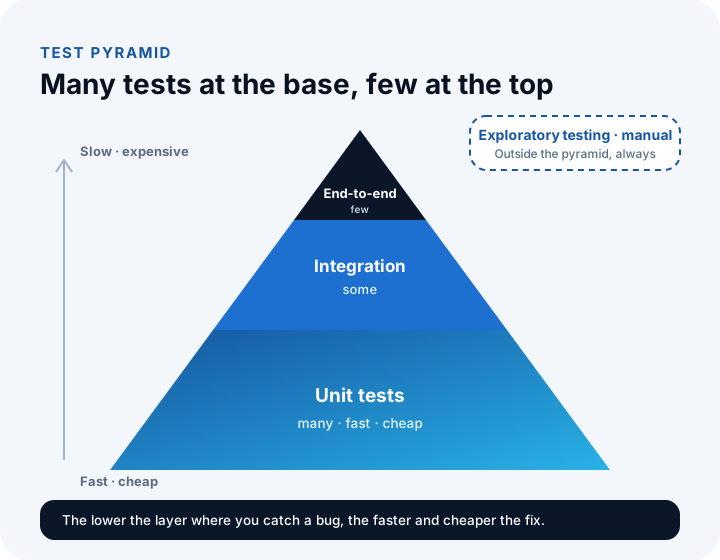
The test pyramid says you need many fast, cheap unit tests at the base, fewer integration tests in the middle and a small number of slow, expensive end-to-end tests at the top. Base-layer tests run in seconds and point to the exact spot; upper-layer tests are slow and hard to diagnose.
Lesson 2: How Do You Write Test Scenarios and Test Cases?
A test scenario says in one sentence what will be tested; a test case says how to run it, step by step, with inputs and expected results. A good test case is clear enough that someone who didn't write it gets the same result.
Example: "A dealer can order by product code" is a scenario. One test case derived from it:
| Field | Example |
|---|---|
| ID | TC-012 |
| Scenario | A dealer can order by product code |
| Precondition | Logged in with an active dealer account; product MUT-TRM-500-CLK has at least 10 units in stock |
| Steps | 1) Open the order screen. 2) Type MUT-TRM-500-CLK in the product code field. 3) Type 10 in the quantity field. 4) Press "Add to cart". |
| Expected result | The product name and dealer-specific unit price appear; the cart has 1 line and 10 units; the total equals quantity × unit price. |
| Priority | High (main workflow) |
| Result | Passed / Failed (filled in when run) |
Follow three rules: write the expected result concretely ("works correctly" is not an expected result; "the total must be ₺4,800" is); let each test case check one thing, or you won't know why it failed; and write negative cases too (wrong code, empty field, non-existent product). Users don't only walk the happy path.
Recommended reading: How to do software requirements analysis: where acceptance criteria come from
Lesson 3: How Do You Apply Boundary Value Analysis and Equivalence Classes?
An equivalence class is a group of values the software should treat the same way. Boundary value analysis, starting from the fact that bugs cluster at boundaries, tests the values at and around the edge of each class. Together they give almost the same confidence as hundreds of values with only a handful.
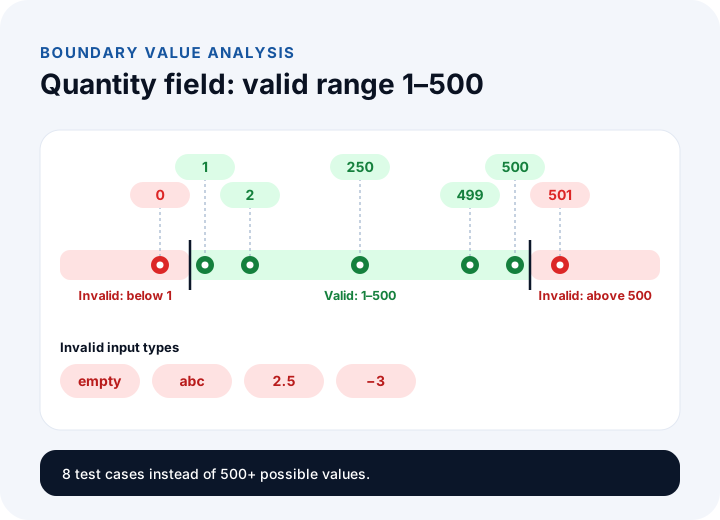
The valid range of the quantity field is 1–500, giving three equivalence classes: values below 1 (invalid), values from 1 to 500 (valid) and values above 500 (invalid). One value per class isn't enough, because confusing "less than" with "less than or equal to" is a common mistake, so we test the boundaries and the values beside them.
| Input | Class | Expected result | Why this value? |
|---|---|---|---|
| 0 | Invalid (below) | Rejected, "Quantity must be at least 1" | Just below the lower boundary |
| 1 | Valid | Accepted | The lower boundary itself |
| 2 | Valid | Accepted | Just above the lower boundary |
| 250 | Valid | Accepted | A typical value from the middle |
| 499 | Valid | Accepted | Just below the upper boundary |
| 500 | Valid | Accepted | The upper boundary itself |
| 501 | Invalid (above) | Rejected, "Quantity can be 500 at most" | Just above the upper boundary |
| empty, "abc", 2.5, −3 | Invalid input types | Rejected with a clear message | Non-numeric and decimal input |
More than 500 possible values shrank to 8 test cases. The same logic applies to the order total rules (at least ₺1,000; 5% off from ₺10,000): try ₺999.99 (rejected), ₺1,000.00 (accepted, no discount), ₺9,999.99 (no discount) and ₺10,000.00 (discount ₺500.00; total ₺9,500.00). Only the ₺10,000.00 value shows whether the discount applies at exactly 10,000; that single value catches the difference between "10,000 or more" and "more than 10,000", and a boundary bug like this turns directly into a money difference once it's found in production.
Lesson 4: How Do You Test Rule Combinations with a Decision Table?
A decision table tests rules that give different results depending on a combination of conditions by writing out every combination. With n conditions there are 2ⁿ combinations; the table makes sure none is forgotten and lets you merge combinations with the same outcome to reduce the number of tests.
The order screen has three conditions: is the dealer active, is the credit limit sufficient, is stock sufficient? Three conditions make 2³ = 8 combinations. The business rule: an inactive dealer's order is always rejected; if the limit is exceeded, the order goes to manager approval; if the limit is fine but stock is short, the order is put on hold; if all three are fine, it is approved.
| Combination | Dealer active? | Limit sufficient? | Stock sufficient? | Outcome |
|---|---|---|---|---|
| 1 | Yes | Yes | Yes | Order approved |
| 2 | Yes | Yes | No | Put on hold |
| 3 | Yes | No | Yes | Sent to manager approval |
| 4 | Yes | No | No | Sent to manager approval |
| 5 | No | Yes | Yes | Rejected |
| 6 | No | Yes | No | Rejected |
| 7 | No | No | Yes | Rejected |
| 8 | No | No | No | Rejected |
Now merge by outcome. In rows 3 and 4 stock doesn't change the result; in rows 5 to 8 only the dealer being inactive matters. These "don't care" cases are shown with a dash, and the table shrinks to four:
| Rule | Dealer active? | Limit sufficient? | Stock sufficient? | Outcome |
|---|---|---|---|---|
| R1 | Yes | Yes | Yes | Order approved |
| R2 | Yes | Yes | No | Put on hold |
| R3 | Yes | No | - | Sent to manager approval |
| R4 | No | - | - | Rejected |
Eight combinations became four tests, but writing all eight first is essential, since only the full table shows whether you merged correctly. It also lets you ask the business, before coding: "An inactive dealer is rejected regardless of limit and stock, correct?"
Lesson 5: How Do You Write a Good Bug Report?
A good bug report lets the developer understand the problem on first read and reproduce it on their own machine. If the reader can't reproduce the bug, fixing can't begin; the clearer the report, the sooner it does.
| Field | Bad example | Good example |
|---|---|---|
| Title | Order screen broken | Quantity field accepts 501 (maximum should be 500) |
| Steps | I tried to order | 1) Log in as an active dealer. 2) On the order screen, enter MUT-TRM-500-CLK. 3) Type 501 in quantity. 4) Press "Add to cart". |
| Expected result | Should work properly | A "Quantity can be 500 at most" message should appear and the product should not be added |
| Actual result | There's a bug | The product was added with 501 units and no message appeared |
| Environment | - | Test environment, version 1.4.2, phone (Android), browser version |
| Severity and priority | Very urgent! | Severity: High. Priority: fix before release |
Are severity and priority the same thing?
No. Severity is how big the bug's impact is on the system and the business; priority is when it will be fixed. The tester sets severity; the project manager and business unit set priority, weighing the number of users and the release schedule. They often point the same way, but not always.
For example, a wrongly calculated order total is critical severity and urgent; a crash in a report used once a year is high severity but low priority (big impact, rare use, a workaround exists); a misspelled company name on the home page is low severity but high priority (it doesn't break function, but everyone sees it and it is quick to fix).
Lesson 6: What Are Regression Testing and Test Automation?
Regression testing checks that old, working features haven't been broken by a new change. A fix in one place often breaks another; regression testing catches that before release.
Repeating every test by hand after each change takes time and invites mistakes, so frequently repeated tests are automated and run on their own after each change. But not everything needs automating: flows that repeat every release, have clear inputs and expected results and rarely change (discount calculation, boundary values, login and ordering) suit automation, while one-off tests, subjective judgments and screens whose design is still changing are better done by hand.
Recommended reading: How to create a project plan: putting testing in the schedule
Lesson 7: How Do Test Metrics Support the Release Decision?
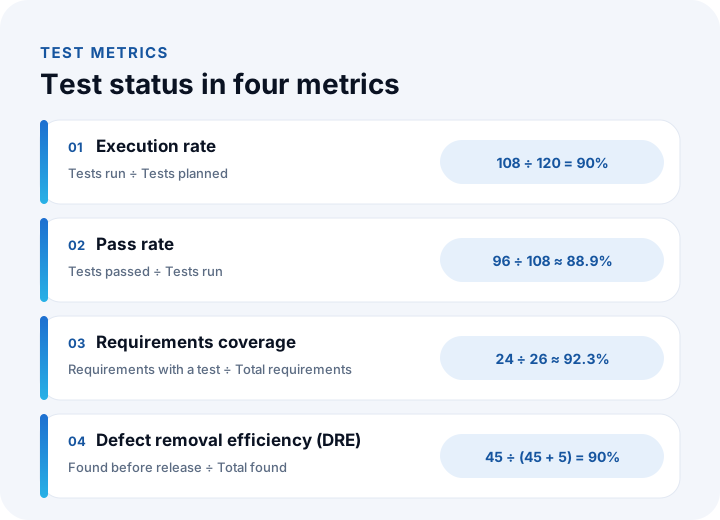
"Is testing done?" is answered with simple metrics and exit criteria set in advance, not with "I think so". The example below calculates the results of a release with 26 requirements. Figures are illustrative.
| Metric | Formula | Worked example |
|---|---|---|
| Execution rate | Tests run ÷ Tests planned | 108 ÷ 120 = 90% |
| Pass rate | Tests passed ÷ Tests run | 96 ÷ 108 ≈ 88.9% |
| Requirements coverage | Requirements with a test ÷ Total requirements | 24 ÷ 26 ≈ 92.3% |
| Defect density | Defects found ÷ Size (for example thousand lines of code) | 18 ÷ 6 = 3 defects per 1,000 lines |
| Defect removal efficiency (DRE) | Defects found before release ÷ (Found before + after release) | 45 ÷ (45 + 5) = 90% |
Reading the table: 10% of planned tests haven't been run, 11% of those run have failed and two requirements have no test at all; we're not ready to ship. Defect density shows which module needs the most attention, and defect removal efficiency shows how many defects were found before customers did, that is, how well the test process works.
How do you set exit criteria for release?
Exit criteria are the conditions for calling testing done and releasing, written down before testing. Criteria set after seeing the results turn the decision into a defense of the result; set in advance, they give you a threshold to decide against. The thresholds below are examples; set yours for your own risk.
| Criterion | Example threshold |
|---|---|
| Open critical and high-severity bugs | Zero |
| Pass rate of main workflows (login, ordering, ERP transfer) | 100% |
| Execution rate of all tests | 100%, with a pass rate of at least 95% |
| Acceptance test approval | Written, from the customer or business unit |
What Are the Most Common Software Testing Mistakes?
Most testing mistakes come not from missing tools but from missing perspective. The most frequent are:
- Leaving testing to the end: When time runs out, testing is cut first. Plan it at the requirements stage.
- Authors testing their own work: Developers try the cases they thought of; the rest go untested. System and acceptance tests should be someone else's job.
- Trying only the happy path: Empty fields, wrong input, a dropped connection and pressing the same button twice get skipped, and customers hit exactly those.
- Not writing expected results: If the expected result isn't known in advance, every outcome looks "correct".
- Using real customer data in the test environment: Once real names, phone numbers and addresses are accessible in test, you have a data security and personal data (KVKK) problem. Use sample or anonymized data.
We recommend reading: How to Get Custom Software Developed: Choosing a Company, Quotes, Contract and Payment Plan
We recommend reading: How to secure an API: authentication, authorization, tokens and rate limiting
Recommended reading: What Is Technical Debt?
Software Testing with İnovabil
At İnovabil we treat testing not as a check at the end of development but as a step planned from the start of the project. The acceptance criteria we write during requirements analysis form the basis of test scenarios. We test the software with real business scenarios, including different roles, devices and edge cases, and add performance and security checks to scenario-based functional tests. We run acceptance tests together with you and deliver test scenarios and acceptance sign-off as outputs.
Tell us in a few sentences how your software project will be tested and what your acceptance criteria are, and we will prepare a test plan outline tailored to you.
Recommended reading: Our software development process: from analysis to launch, step by step
Frequently Asked Questions
How do you do software testing, and what are the steps?
In seven steps: choose test types and approach, write test scenarios and cases, pick test data with boundary value and equivalence class analysis, check rule combinations with decision tables, report bugs, run regression tests and decide on release against exit criteria.
What is the difference between a test scenario and a test case?
A scenario says in one sentence what to test, such as "a dealer can order by product code". A test case records how to run it, with preconditions, steps, input and expected results. One scenario usually yields several test cases.
What is boundary value analysis and why is it used?
It tests the values at and just beside the edges of the valid range, because bugs cluster at boundaries. For a quantity field of 1–500, you try 0, 1, 2, 499, 500 and 501.
What is the difference between severity and priority?
Severity is how large the bug's impact is, usually set by the tester. Priority is when it will be fixed, set by the project manager and business unit. A bug on a rarely used screen can be high severity but low priority.
When is software testing done?
When the exit criteria written down in advance are met: no open critical or high-severity bugs, main workflows passing and acceptance sign-off received. Set criteria before testing, not after seeing results; testing cannot prove the absence of bugs, only that the remaining risk is acceptable.