

Where and in what shape your data will be stored is one of the earliest decisions in a software project, and one of the most expensive to change later. So, how do you choose a database? The short answer: by the queries your application will run, the relationships between your records and the consistency you need, not by product names or fashion. A wrong choice rarely shows in the first weeks. It comes back as slowness or inconsistent numbers once the data has grown and the reports have multiplied.
This guide covers the main database types, the query-first method, the data model decision, what consistency means in business terms, the effect of indexes with worked numbers, a six-question decision test, hosting and backup points, migration risk and the common mistakes. All example figures are illustrative; they are not measurements of any product or industry averages, and we do not name products.
What Are the Main Types of Databases and When Does Each Fit?
There are five main families: relational, document, key-value, search, and time-series or analytical. Each works best for a different kind of query, so there is no "best" database, only the one that fits the job.
| Type | How it stores data | When it fits | Watch out for |
|---|---|---|---|
| Relational | Tables, rows and links between tables | Orders, stock, customer and supplier accounts, invoices; multi-field filters and reports | The schema is designed up front; very high write volumes need a scaling plan |
| Document | Each record is a self-contained, nested document | Data with a variable schema that is mostly read as a whole: product attributes, content | Links between records and multi-record transactions can be weak; data gets duplicated |
| Key-value | One value stored under one key | Sessions, caches, counters, temporary data; very fast lookup by key | Querying by anything other than the key is extremely limited |
| Search | Stores text in an inverted index | Full-text search, typo tolerance, multi-field filtering and ranking | Should not be the system of record; use it as a rebuildable copy of the main data |
| Time-series / analytical | Ordered by time or stored by column | Sensor readings, logs, large batch reports | Not suited to updating individual records |
In the large majority of business software, the system of record is a relational database, and the other types are helper stores next to it. We cover the extra overhead of splitting a system into parts in our microservices architecture guide.
We recommend reading: Our custom software service
What Does "Write the Queries First" Mean?
Writing the queries first means listing the ten most frequent and most critical questions your application will ask, with their frequencies, before you pick a database. The choice then comes out of that list.
Take the dealer portal from our customer portal guide as an example. The list below is illustrative.
| Query | Daily frequency | Requirement | Suitable structure |
|---|---|---|---|
| A dealer's orders from the last 30 days | 60,000 | Related records, date filter | Relational |
| Create an order and deduct stock | 8,000 | Two records must change together | Relational with transaction support |
| Validate a session key | 100,000 | Very fast, temporary data | Key-value |
| Free-text search on product names | 25,000 | Typo tolerance, ranking | Search |
| Monthly sales totals | 7,000 | Large aggregation | Relational or an analytical copy |
That is 200,000 requests ÷ 86,400 seconds ≈ 2.3 requests per second on average. If we take a peak factor of 10 to allow for daily bursts, that is ≈ 23 requests per second. A single relational server carries this load comfortably, so in this example there is no need to move to a different database for the sake of "scale". To turn requirements into written form, the query and acceptance-criteria logic in our requirements analysis guide helps.
How Do You Make the Data Model Decision?
Three questions shape the model: are there relationships between records, which operations must succeed or fail as a whole, and how variable is the schema?
- Relationships: If customers, orders, order lines and products are linked and you query across those links, a relational model is the natural fit. If a record is complete in itself, such as a product's full attribute list, a document model works well.
- Consistency: In areas such as money, stock and invoices, a wrong number is direct damage. Transaction support is not negotiable here.
- Schema flexibility: If half of your records carry different fields, a document model is convenient. If 80% of the fields are shared, defining the schema up front catches mistakes early.
Flexibility is not free: when the schema lives in code rather than in the database, every piece of code that reads the data has to know every variant.
What Does ACID Consistency Mean in Business Terms?
ACID means a transaction either happens completely or not at all. Eventual consistency means an update reaches the copies after a short delay. Which one you need depends on how much a wrong number can hurt.
Example: there are 5 units in stock and two dealers order 4 units each at the same moment. Without transaction support or locking, both checks see "5 ≥ 4", both orders are accepted and stock becomes 5 − 4 − 4 = −3. In a transactional setup, the second order sees the result of the first (1 left, less than 4) and is rejected.
| Aspect | ACID (strong consistency) | Eventual consistency |
|---|---|---|
| Guarantee | A transaction is applied as a whole or rolled back | Copies may differ for a short time |
| Suitable for | Orders, stock deduction, payments, invoices | View counters, recommendation lists, catalog display |
| Cost of being wrong | Negative stock, double payment | A number that is a few seconds old |
| Write speed | Locking and validation have a cost | Higher and scales more widely |
A practical rule: if a wrong number is merely annoying, eventual consistency is enough; if a wrong operation loses money or stock, you need transaction support. Both can live in one application: the order is finalized in the relational database, while the storefront page reads from a slightly delayed copy.
How Do Indexes Affect Query Speed?
An index is an extra structure that lets the database find a record without reading the whole table. It works like a book's index, and when built correctly it can cut query time by hundreds of times.
An illustrative example: we search for one dealer's orders in an order table of 10,000,000 rows. Without an index, the database reads all 10 million rows; say that takes 1,200 ms. With an index, a tree structure with high branching finds the record in a few page reads: about 4 pages × 2 ms = 8 ms. The difference is 1,200 ÷ 8 = 150 times.
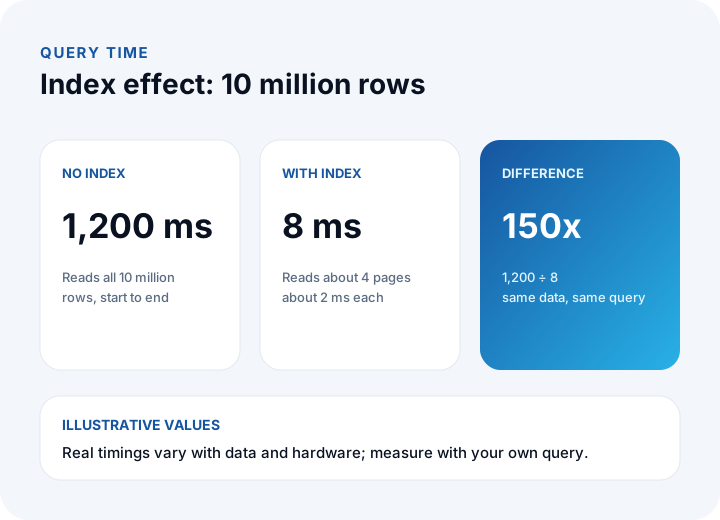
Indexes have a price too. If the table holds 200 bytes per row, 10,000,000 × 200 = 2,000,000,000 bytes ≈ 2 GB; an index of 24 bytes per row needs another 10,000,000 × 24 = 240 MB. And every write updates the indexes along with the table: with 5 indexes, adding one record means 1 + 5 = 6 writes.
| Situation | Index decision |
|---|---|
| A field that is often filtered or joined on (dealer number, date) | Add an index |
| A field with very few distinct values (active or inactive) | Usually of little use on its own |
| A table that is written often and queried rarely | Keep indexes to a minimum |
| A complaint about slowness | Look at the query plan first, then add an index |
So the reflex "it is slow, so we need another database" is often wrong. Ten million rows is a small table for a modern server, and a missing index is the most common cause of slowness that can be fixed without changing the database type.
A Six-Question Database Selection Test
Answer the questions below for the application's main data. Each "yes" is one point in favor of a relational database.
- Are there relationships between records, and do you query across those links?
- Are there operations that change several records together and must never be left half-done (orders, payments, stock)?
- Will you need filters and reports on field combinations you do not know today?
- Do most records carry the same fields, so the schema can be defined in advance?
- Does your team know the query language, and is that skill easy to find in the market?
- Is the load within what a single server can handle (for example ≈ 23 requests per second at peak, as in our example)?
| Number of "yes" answers | Meaning | Suggested step |
|---|---|---|
| 5–6 | Relational is a strong candidate | Choose relational as the system of record and write the index plan |
| 3–4 | Relational base with one special need | Relational plus a helper store for that need (search or cache) |
| 0–2 | Mixed or specialized workload | Write out the query list and test candidates with real data |
The test is a starting point, not a verdict; the decision should be confirmed by measuring with real data. To break the cost of the choice into line items, see our software project cost guide.
Why Do Most Business Applications Start with a Relational Database?
Because business data is related by nature: a customer places an order, an order is made of lines, a line points to a product, an invoice points to an order. Keeping those links in the database layer reduces errors and makes report queries easier.
- Mature and well known: The query language is widespread, so it is easy to find people and to hand the system over.
- Reporting: When an unplanned report request appears, you write a new query on the same data.
- Integrity rules: Mistakes such as writing an order for a customer that does not exist are blocked at the database level.
- Room for flexibility: Many relational databases can also hold semi-structured fields in a document-like form, so a small need for flexibility does not require a separate type.
Helper stores are added as needs arise, under one rule: there is a single source of truth, the system of record, and the search index and the cache are rebuildable copies of it. That rule lets you regenerate the copies if they are damaged without rebuilding the whole system. For data flows between systems, our API integration guide is a good reference.
What Should You Check for Hosting, Backup and KVKK?
The choice is not purely technical; where the data sits, who operates it and how it will be restored are part of the decision as well.
- Managed service or your own server: A managed service reduces the maintenance load, but data location and cost are tied to the contract. On your own server you keep control, and you also keep the operating burden.
- Data location and access: Where records containing personal data are kept, who can reach them and how they are encrypted are assessed under KVKK (Turkey's personal data protection law); consult your legal counsel for the details.
- Backup and restore: Does the chosen type's backup method match your target RPO and RTO? We explain these terms step by step in our data backup guide.
- Access control and audit: Role-based access, a record of changes and separate test and live environments are planned from the start. For access over an API, the layers in our API security guide apply.
What Are the Risk and Cost of Changing a Database Later?
Changing a database is not just moving data; queries, business rules and reports have to be rewritten too. That is why the cost of a wrong choice is paid late.
An illustrative example: if the data access layer and 25% of the queries of a 60 person-day system must be rewritten, that is 60 × 0.25 = 15 person-days; at ₺9,000 per day, 15 × ₺9,000 = ₺135,000. Data verification, parallel running and possible downtime come on top.
- Keep data access in one layer: If queries are scattered across the application, the cost of migration multiplies.
- Verify the migration: Compare record counts, totals and sample records between source and target.
- Run in parallel: The new setup runs alongside the old one for a while, and you switch once no differences appear.
- Write a rollback plan: If the switch fails, the way back to the old setup should be documented.
Which Six Steps Should You Follow When Choosing a Database?
Six steps are enough to turn the choice from a debate into a measurable process.
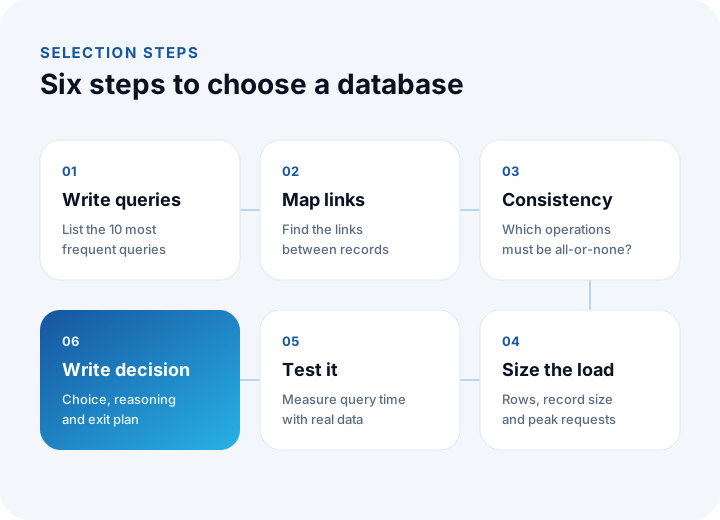
- Write the queries: List the 10 most frequent and most critical queries with their daily frequencies.
- Map the relationships: Identify the links between records and which of them are queried together.
- Set the consistency need: Mark the operations that must succeed or fail as a whole.
- Size the load: Write down row count, record size and peak requests per second (200,000 ÷ 86,400 × 10 ≈ 23).
- Test the candidate: With realistic data, measure the time of the critical queries and the behavior under load.
- Write the decision: Document the choice, the reasoning, the index plan, the backup target and the exit plan.
What Are the Most Common Mistakes When Choosing a Database?
- Choosing by fashion: What worked at another company may not suit your queries.
- Overestimating scale: Moving to a distributed setup before you have millions of requests a day multiplies complexity. A peak of 23 requests per second is a single server's job.
- Skipping the index: Blaming the database for slowness without looking at the query plan.
- Keeping money and stock in an inconsistent store: Where there is no transaction support, negative stock and duplicate records are unavoidable.
- Adding a separate database for every need: Each new store means one more backup, monitoring and security job.
- Having no exit plan: Choosing without ever testing that the data can be exported.
We recommend reading: What is custom software? Types, layers and a decision guide
Recommended reading: Cloud vs On-Premise Software
Custom Software and Data Architecture with İnovabil
At İnovabil, our focus is building bespoke software from scratch for your company: custom software, ERP, CRM, e-commerce, web, mobile and integrations. We recommend writing the data structure decision down during requirements analysis together with the query list, the consistency need and the backup target, so the choice does not turn into a debate later.
We have built CRM, purchasing and mobile for Avcılar İnşaat; a purchasing system for İZBAN; logistics and shipment planning with wholesale order management for Karyak; and warehouse management plus a complaint and support management system for Sleepy. Send us a short summary of your current system and expected usage, and we will work out the query list and the data model together.
We recommend reading: Our software development process: from analysis to launch, step by step
Frequently Asked Questions
How do you choose a database, and what criteria matter most?
Look at the application's queries, the relationships between records, the consistency need, schema flexibility and the expected load. Write down the 10 most frequent queries and the volume first, and choose from that list rather than by product popularity.
What is the difference between a relational and a document database?
A relational database stores data in tables with links between them and is strong at multi-record transactions and flexible queries. A document database stores each record as a nested document and is convenient for data with a variable schema that is read as a whole.
Should every new project start with a relational database?
For most business applications it makes sense, because business data is related and money or stock operations need consistency. If the six-question test gives 5–6 yeses it is a strong candidate; if there is a special workload, a helper store is added.
If queries are slow, do you need to change the database?
Most of the time, no. In the example, an index on a 10-million-row table brings the time from 1,200 ms to 8 ms (150 times). Look at the query plan and the missing index first; changing the type should be the last resort.
How does the choice of database affect KVKK and backup?
Where the data is kept, access rights, encryption and the backup method all depend on the choice. Write your target RPO and RTO from the start, and consult your legal counsel for the legal details.