

Sooner or later every new business software or ERP decision lands on the same question: cloud vs on-premise. Should the system run on a provider's infrastructure and be consumed as a service, or on hardware in your own office or data center? The answer is not hiding in slogans such as "cloud is more modern" or "on-premise is safer". It sits in your cost structure, your capacity to operate systems, your legal and contractual constraints, and what the system has to talk to.
In this guide we define the three hosting models, give a comparison table, work out a three-year cost with real arithmetic, and show what flips the result. We then cover security and data location, availability and backup, performance, integration, vendor lock-in, a six-question decision test, migration steps and common mistakes. Every figure is illustrative; none is a price of a specific service or an industry average.
What Do Cloud, On-Premise and Hybrid Mean?
Cloud means the application and data run on a third party's infrastructure; on-premise means they run on hardware you own or rent and control yourself. Hybrid is a setup that uses both together.
- Cloud: The provider owns the hardware and you pay a monthly fee or pay for what you use. Depending on the service layer, you manage the operating system, the application, or only the usage. We explain software delivered as a service in our SaaS guide.
- On-premise: Servers, storage, network and backup are yours; installation, patching and fault response are your responsibility.
- Hybrid: For example, the part tied to a production line runs locally while reporting and mobile access run in the cloud, linked by a secure connection.
We recommend reading: Our custom software service
What Are the Differences Between Cloud and On-Premise?
Both do the same job. The differences show up in when and where the money goes, who holds the responsibility, and how quickly you can adapt to change.
| Topic | Cloud | On-premise |
|---|---|---|
| Upfront investment | Low; you start with a monthly fee | High; hardware is bought upfront |
| Cost structure | Ongoing expense; may grow with usage | Investment first, then upkeep and staff time |
| Time to start | Short | Ordering, installation and testing needed |
| Scaling | Resources can be raised quickly | New hardware required |
| Operating load | Infrastructure with the provider; application with you | All with you |
| Data location and control | Depends on the contract with the provider | Full control, full responsibility |
| Internet dependence | High | Low on the local network |
| Exit | Depends on data export and contract terms | Hardware and know-how stay with you |
How Do You Calculate the Three-Year Total Cost?
Total cost of ownership is the upfront investment plus every recurring cost over three years. Looking only at the first invoice misleads, because the monthly fee looks small and the hardware price looks large.
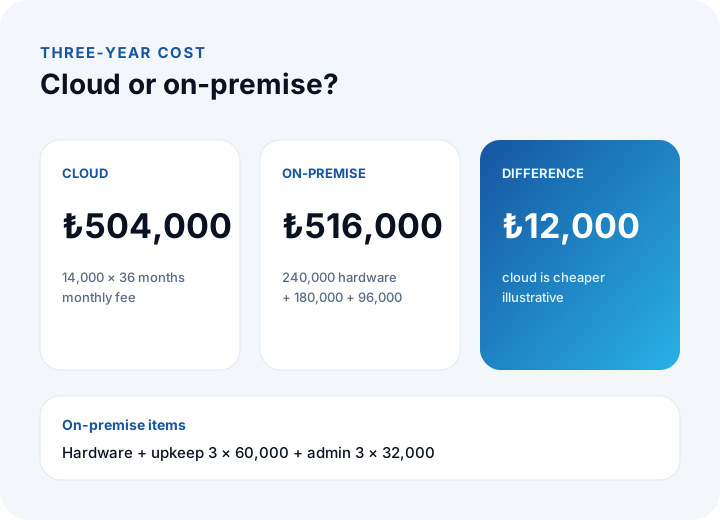
Illustrative example: a mid-sized business application. In the cloud the monthly fee is ₺14,000. On-premise, the hardware costs ₺240,000, annual hardware upkeep and renewal allowance is ₺60,000, and the share of an administrator's time assigned to this system is ₺32,000 a year.
| Item | Cloud | On-premise |
|---|---|---|
| Hardware (upfront) | - | ₺240,000 |
| Monthly fee: 14,000 × 36 | ₺504,000 | - |
| Upkeep: 60,000 × 3 | - | ₺180,000 |
| Administrator share: 32,000 × 3 | - | ₺96,000 |
| Three-year total | ₺504,000 | ₺516,000 |
The difference is ₺516,000 − ₺504,000 = ₺12,000, so in this example the two models are almost level. The real finding is how small that gap is: the decision turns on conditions that never appear in the table.
Some items are missing from the table: electricity, cooling, network lines, software licenses, a disaster recovery copy and migration cost. Add them to both columns using your own numbers, and remember to ask about backup and data egress fees on the cloud side.
Which Factors Change the Result?
Three variables flip the result quickly: growth in usage, the cost of the system administrator, and how many years the hardware will be used. In the same example, we change each one separately.
| Scenario | Cloud | On-premise | Result |
|---|---|---|---|
| Base example | ₺504,000 | ₺516,000 | Cloud ₺12,000 cheaper |
| Usage grows 20% each year | ₺611,520 | ₺516,000 | On-premise ₺95,520 cheaper |
| Administrator share doubles (₺64,000/year) | ₺504,000 | ₺612,000 | Cloud ₺108,000 cheaper |
| Hardware used 5 years, 3-year share | ₺504,000 | ₺420,000 | On-premise ₺84,000 cheaper |
The arithmetic: in the growth scenario the annual fees are 14,000 × 12 = ₺168,000, then ₺201,600 (after a 20% rise) and ₺241,920, for a total of ₺611,520. On the on-premise side we assume the hardware has spare capacity, so its cost stays flat. When the administrator share doubles, 32,000 × 2 × 3 = ₺192,000, so the on-premise total is 240,000 + 180,000 + 192,000 = ₺612,000. If the hardware is used for five years, the share falling in the first three is 240,000 × 3 ÷ 5 = ₺144,000, giving 144,000 + 180,000 + 96,000 = ₺420,000.
Over five years the cloud costs 14,000 × 60 = ₺840,000, while on-premise costs 240,000 + 5 × (60,000 + 32,000) = ₺700,000. In other words, with a steady and predictable load, on-premise can become cheaper in the long run; when growth is uncertain or administrators are expensive, cloud pulls ahead. To redo this with your own numbers, use the method in our software development cost guide.
Which Is Better for Security and Data Location?
A general verdict that "cloud is more secure" or "on-premise is more secure" is not correct. Security is set not by where the infrastructure sits but by who operates it and which controls are applied. A well-run cloud can be sturdier than a badly run server room, and the reverse is also true.
Whichever you choose, ask these questions:
- Access: Who can reach which data, and who holds administrator rights? Is there role-based permission and an audit log?
- Patching and updates: Who applies operating system and application updates, and how often?
- Encryption: Is data encrypted on disk and over the network? Who holds the keys?
- Physical security: On-premise, is the server room locked, with fire and power protection? In the cloud this is the provider's responsibility, and you look for it in the contract and documentation.
- Monitoring: Are unusual logins and changes detected and reported?
Data location is a separate matter. The country where data is stored, where backups sit and whether personal data is transferred abroad fall under specific rules in KVKK (Turkey's personal data protection law); settle the details with your legal counsel. Ask the provider in writing where data and backups are kept. To protect the application interfaces you expose, see our API security guide.
How Do Availability and Backup Compare?
Availability is how long the system stays up; backup is the ability to restore data after corruption or loss. Treat them separately: high availability does not replace a backup.
Uptime = (total time − downtime) ÷ total time. A 30-day month has 43,200 minutes; 99.9% means at most 43.2 minutes of downtime and 99.5% means at most 216 minutes (43,200 × 0.001 and × 0.005). In the cloud this figure is usually written into the service level of the contract; on-premise it depends on your own power, network line and spare hardware. We explain how to read service level clauses in our maintenance and SLA guide.
The same backup rules apply in either model: keep the copy in a separate place, test restores regularly, and write down the target data loss and recovery time. In the cloud, check that "backups are taken" is backed by a contract that states scope, retention and restore time. For the detailed method, see our data backup guide.
When Do Performance and Latency Decide?
For most office applications the difference goes unnoticed. The problem appears when a screen makes many small requests, or in systems that talk to devices in real time. A round trip to a server on the local network takes a few milliseconds; to a distant server over the internet it takes longer and varies with line quality.
Illustrative calculation: if a screen runs 40 separate queries and each round trip takes 20 ms, the wait is 40 × 20 = 800 ms; at 2 ms it is 40 × 2 = 80 ms. Users feel that difference. The fix is usually to reduce the number of queries or bring the system closer to the user. Parts that work with local equipment such as scales, barcode readers or a production line often stay on-premise or hybrid, because they must keep running even when the internet drops. Before deciding, measure from where your real users sit.
How Is Integration With Existing Systems Affected?
If the new system must talk to existing ones such as ERP, accounting, warehouse and marketplace systems, the hosting location decides how easy the integration is. A cloud application that must reach a database in your office needs a secure connection and managed open ports; an on-premise application that must reach outside channels needs network rules and an internet line.
A practical rule: draw every system and where it runs, and keep systems that exchange frequent, high-volume data close to each other. We discuss how to treat the hosting model as a criterion in our guide to choosing an ERP.
How Do You Handle Vendor Lock-In and an Exit Plan?
Lock-in means moving your data and application elsewhere is expensive or impossible. It can happen in the cloud and on-premise alike: in the cloud, data sits in the provider's format; on-premise, a custom setup known by one person creates the dependency.
- Export: Test from the start that you can take your data out completely, in an open, readable format.
- Contract: Put the termination period, the time to return data after termination and a confirmation of deletion in writing.
- Documentation: Keep installation and configuration knowledge in files, not in one person's head.
- Source code: For custom software, state clearly in the contract who owns the source code.
Also calculate how long an exit takes. For example, 200 GB of data over a 100 Mbit/s line takes ideally 200 × 8,000 = 1,600,000 Mbit ÷ 100 = 16,000 seconds, about 4.4 hours; in practice line efficiency is lower, so it takes longer. For large data sets you may need physical transfer or a phased move.
What Is the Six-Question Test for Cloud vs On-Premise?
Answer the six questions for your own situation and see which way the answers point. Four or more in one direction shows a lean; if it comes out 3 to 3, look at hybrid.
| Question | Points to cloud | Points to on-premise |
|---|---|---|
| 1. Will the system be used from outside the office and from several locations? | Yes | No, single location |
| 2. Do you have someone to run servers, patching and backup? | No | Yes |
| 3. Does law, contract or a customer require data to stay in your own environment? | No | Yes |
| 4. Will user count and load stay steady for years? | No, variable | Yes, steady |
| 5. Must it work in real time with local equipment (scales, readers, a line)? | No | Yes |
| 6. Do you plan to buy hardware upfront and use it for five years? | No | Yes |
A "yes" on question 3 can outweigh the rest on its own; in that case, settle the reasoning with legal counsel and consider keeping only the part tied to that condition on-premise or hybrid. The result is not a decision but a starting point for discussion; read it together with your cost table.
What Steps Take You From Decision to Migration?
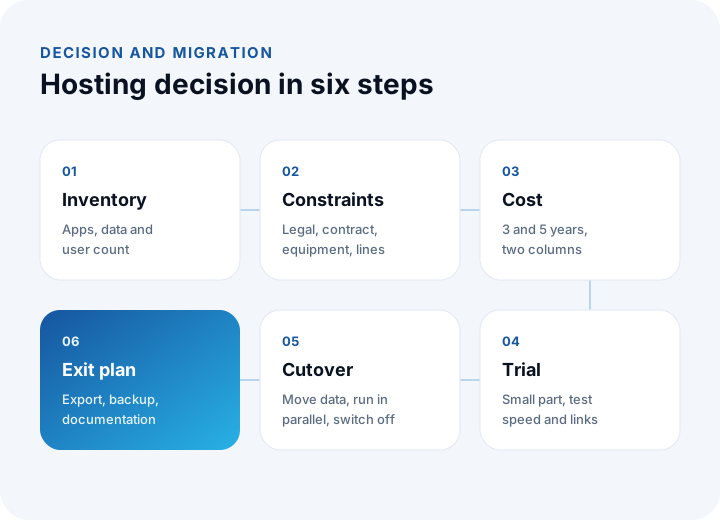
The hosting choice is not a one-off preference but a project step. The six steps below fit a new installation as well as moving an existing system.
- Inventory: Which applications, data and integrations exist, where do they run and how many users depend on them?
- Constraints: Write down legal, contractual, equipment and network-line constraints.
- Cost: Calculate three-year and five-year total cost in two columns.
- Trial: Run a small part or a copy in the target environment and measure speed and integration.
- Cutover: Move the data, run old and new systems in parallel for a set period, then switch the old one off.
- Exit plan: Put data export, backup restore and documentation in writing.
What Mistakes Are Common in Cloud vs On-Premise Decisions?
- Looking only at the monthly fee: A small monthly amount becomes a large total in three years, and the hardware price alone does not decide either.
- Counting operating effort as zero: On-premise, the administrator's time is a cost; in the cloud, configuration and monitoring also take effort.
- Tying security to a place: What matters is who operates it and how, not where the server sits.
- Assuming a backup exists: "The cloud already has backups" is not reliable until you have tested a restore.
- Ignoring growth: As usage rises the cloud bill grows; as load rises on-premise hardware falls short.
- Not thinking about the exit: If getting your data back is not tested on day one, it becomes expensive later.
We recommend reading: What is custom software? Types, layers and the cost logic
Hosting Decisions and Custom Software With İnovabil
At İnovabil our focus is building software from scratch, specific to the company: custom software, ERP, CRM, e-commerce, web, mobile and integration. In custom software, the hosting environment is a decision to settle during requirements analysis. We recommend comparing cloud, on-premise and hybrid in writing, with three-year cost, constraints and an exit plan.
We have built CRM, purchasing and mobile for Avcılar İnşaat; a purchasing system for İZBAN; logistics and shipment planning with wholesale order management for Karyak; and warehouse management with a complaint and support management system for Sleepy. Send us a short summary of your existing systems, user count and constraints, and we will prepare the comparison table together.
We recommend reading: Our software development process: step by step from analysis to launch
Frequently Asked Questions
Is cloud or on-premise cheaper?
It depends. In the illustrative example, three years cost ₺504,000 in the cloud and ₺516,000 on-premise. If usage grows, on-premise tends to win; if the administrator's share rises, cloud tends to win. Calculate it with your own numbers.
Is the cloud more secure than on-premise?
There is no general rule. Security is set by who handles access management, patching, encryption, monitoring and physical protection, and how. Ask the same questions in both models.
When does a hybrid model make sense?
When one part must work in real time with local equipment or keep its data with you, and another part needs remote access and reporting. The price is more work to connect and monitor the two environments.
Is keeping personal data in the cloud compliant with KVKK?
What matters more than the hosting model is where the data is kept, who can access it and whether it is transferred abroad. Consult your legal counsel for the details, and get the location in writing from the provider.
Is it hard to move from cloud to on-premise, or the other way round?
It depends on data export, contract terms and the number of integrations. Testing and documenting the exit from day one noticeably lowers the cost of moving.