

The most expensive sentence in a software project is "That is not how I wanted it." It is usually said in the middle or at the end of the project, because the need was never written down fully and everyone understood something different from the same word. The answer to how to do software requirements analysis is the way to avoid having to say that sentence: put into writing, before any code is written, what is expected from the software, who will use it, what goes into the first release and how you will decide the work is done.
We built this guide like a course. There are seven lessons; each one explains a step, shows it on the same example project and ends with a small task for your own project. When you finish, you will have a requirements document you can hand to a software company or your own team. No technical knowledge is needed.
What Is Software Requirements Analysis and Why Is It Done?
Software requirements analysis is the process of defining the purpose of the software to be built, its users, the jobs it must do and the rules it must follow, and turning them into something written and verifiable. Its output is a requirements document that proves the business side and the development team understand the same thing.
The value rests on one fact: the later you find a mistake, the more it costs to fix. A misunderstanding is fixed with one sentence in analysis, a screen in design, a module in development, and live software after launch. Analysis pays this price at the cheapest point.
Analysis also makes possible a realistic quote and schedule (a price cannot be given before the scope is written) and a yardstick for saying "done". A project whose requirements are not written is never fully finished, because nobody knows what finished means.
How Should You Use This Guide?
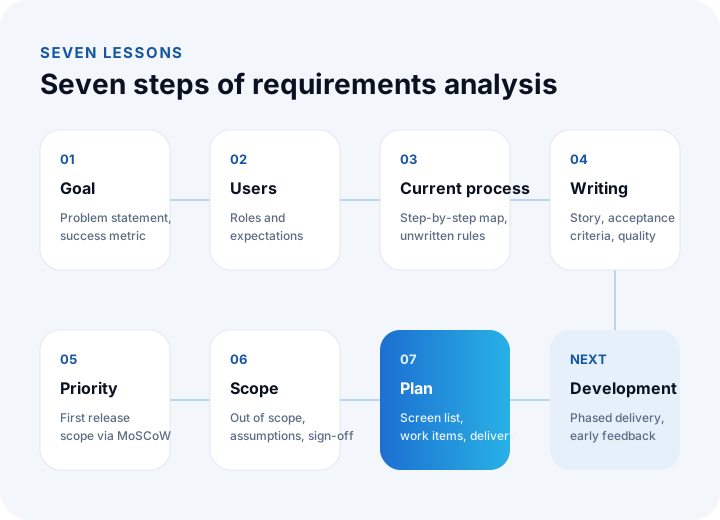
Follow the lessons in order; each uses the previous one's output. We use a manufacturer's dealer order portal as the example; its names and details are representative. The table below summarizes the seven lessons and the output of each.
| Lesson | Topic | Output |
|---|---|---|
| 1 | Goal and success metric | One-sentence problem statement and a measurable goal |
| 2 | Stakeholders and users | Table of user roles and expectations |
| 3 | Current process | Step-by-step map of today's workflow and a list of problems |
| 4 | Writing requirements | User stories, acceptance criteria, non-functional requirements |
| 5 | Prioritization | Scope of the first release via MoSCoW |
| 6 | Scope and sign-off | Out-of-scope list, assumptions and a signable document |
| 7 | Estimate and plan | Screen list, work items and a phased delivery plan |
We recommend reading: Our custom software development service: one team from analysis to launch
Lesson 1: How Do You Write the Goal and Success Metric?
Analysis starts not with a feature list but with a problem. Reduce it to one sentence: "[Who] suffers [this harm] because of [this problem]; the solution is successful if it brings [this much] improvement." If you cannot write the sentence, the project is not yet ready for analysis.
Example: "The dealer order team types in every order by hand and corrects wrong prices. If dealers place orders themselves, a large reduction in manual entry and price corrections counts as success."
The success metric must be verifiable: not "faster", but "entering an order in the portal should take less than the average minutes it takes by phone today". Measuring today's value is the only way to prove the improvement later.
Lesson 2: How Do You Identify Stakeholders and Users?
A stakeholder is anyone affected by the software or with a say in it; a user actually uses it. Requirements are collected from stakeholders but written around the user's work. Many projects go wrong by overlooking the difference between the manager who will not use the software and the employee who will use it every day.
| Role | What do they do with the software? | What do they expect? |
|---|---|---|
| Dealer (external user) | Places orders, sees orders and balance | Fast ordering, correct prices, stock information |
| Sales representative | Tracks and approves dealer orders | No manual entry, dealer information on a single screen |
| Warehouse manager | Prepares the order, enters shipping information | A clear picking list, no missing information |
| Accounting | Tracks invoices and collections | The order flowing automatically into ERP and the invoice |
| Manager | Monitors sales and dealer performance | Up-to-date reports, target-versus-actual view |
Talk once with a person from each role and ask "walk me through your day; what tires you out most in this job?" The answers are the raw material for requirements. If possible, include a real user from each role in the analysis.
Lesson 3: How Do You Map the Current Process?
Before designing the new system, write down today's workflow step by step ("as-is" analysis). The aim is to see where time is lost, where mistakes happen and which rules exist only in people's heads.
Example: the dealer phones → the representative notes product and quantity → checks the price list → enters it into ERP → checks stock → calls the dealer back → the warehouse prepares the order → a delivery note is issued. Next to each step write who does it, with what tool, how long it takes and which mistake is common.
The questions to ask when mapping a process are:
- Who does this job, and who gives them information?
- Where is each piece of information kept (program, Excel, email)?
- What happens in exceptional cases? (returns, cancellations, missing stock, different prices)
- Which rule is not written down but known by everyone?
The last question is the most valuable. Unwritten rules are what later make people say the software "works wrong": "We always give that dealer an extra 5% discount", "No shipments go out on Friday".
Lesson 4: How Do You Write Requirements? User Stories and Acceptance Criteria
Functional requirements are the jobs the software does ("a dealer can place an order"). Non-functional requirements are quality conditions on how ("the order page must open in 3 seconds"). Without both, software "works but cannot be used".
User story
The most common way to write functional requirements is the user story. The pattern is fixed: "As a [role], I want to [do something] so that [goal]." A story describes value, not a feature.
Example: "As a dealer, I want to order quickly by entering a product code and quantity, so that I do not have to wait to order by phone."
Acceptance criteria
Under every story, write verifiable conditions that show it is complete. A common format is "Given – When – Then":
- Given the dealer is logged in, when they enter a valid product code and quantity, then a line priced with their own dealer price is added to the cart.
- Given the product is out of stock, when the dealer tries to order it, then the estimated lead date is shown and the order goes to open orders.
- Given the dealer's credit limit is exceeded, when they try to confirm the order, then the order goes to the sales representative for approval.
A story without acceptance criteria leaves "done" to interpretation. Written criteria tell the developer what to build and the tester what to try.
Non-functional requirements
| Type | Question to ask | Example requirement |
|---|---|---|
| Performance | How fast, how many concurrent users? | Order page opens quickly on mobile; carries campaign-day load |
| Security and permissions | Who can see or change what? | Dealers see only their own orders and prices |
| KVKK and records | How is personal data stored, who accessed it? | User actions are logged; a data retention period is defined |
| Devices | Which devices and browsers? | Works on phone and desktop |
| Integration | Which systems does it talk to? | Stock and prices come live from ERP; orders are transferred to ERP |
| Backup and continuity | What happens if data is lost? | Daily backup; a defined recovery time |
Lesson 5: How Do You Prioritize Requirements with MoSCoW?
MoSCoW is a prioritization method that sorts requirements into four groups: Must (non-negotiable), Should (important), Could (nice to have) and Won't (not in this release). It reduces a list where everything is "very important" to what the first release truly needs.
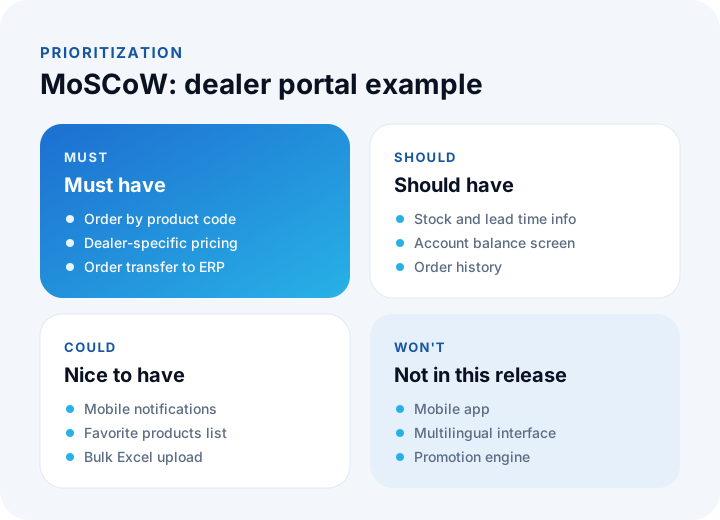
Two questions help: "Does the software solve the problem without this?" and "Will something break if we leave this for later?" If the first answer is "no", it is a Must; if the second is "no", it can be a Should or a Could.
A common practice from the DSDM method is that Must should not exceed about 60% of total effort, leaving room for Should and Could. If every requirement comes out as a Must, ask of each one: "what will we tell the dealer on day one without this?"
We recommend reading: What is B2B e-commerce? A guide to dealer portals and wholesale online sales
Lesson 6: How Do You Limit and Approve the Scope?
Scope is the written record of what will and will not be done in the first release. The out-of-scope list matters as much as the scope list, because most "let us do this too" requests come from an expectation never written down at the start.
A requirements document consists of the following sections:
| Section | Content |
|---|---|
| 1. Purpose and success metric | Problem statement, today's measures, goal |
| 2. Stakeholders and users | Role table |
| 3. Current process | Step-by-step map, problems, unwritten rules |
| 4. Scope | What will be done in the first release (Must and selected Should) |
| 5. Out of scope | What will not be done in this release (Won't) and candidates for the next release |
| 6. Requirements | User stories, acceptance criteria, non-functional requirements |
| 7. Integrations and data | Systems to connect, data to migrate |
| 8. Assumptions and risks | Conditions taken as true, uncertainties |
| 9. Approval | Approval record of the business owner and the development side, version and date |
Saying scope will never change after approval is not realistic, but change must not be uncontrolled. When a request comes, ask three questions: is it in scope, if not what does it affect (time, budget, priority), and who approves it? This makes change a managed decision rather than an enemy.
We recommend reading: Off-the-shelf or custom software? A decision guide
Lesson 7: How Do You Move from Requirements to an Estimate and Plan?
Approved requirements turn into three concrete outputs: a list of screens and functions, an estimate broken into work items, and a phased delivery plan. A software company or team needs exactly these lists to give a realistic schedule and budget.
- Screen list: Login, product search, cart, order history, balance, admin panel... Mark which stories each screen satisfies.
- Work items: Split each story into design, development, integration and testing effort; flag the most uncertain items.
- Phased delivery: The Must group goes into the first release and the Should group into the second. The first working release is seen before the project ends.
Phased delivery is the second safeguard against mistakes. People cannot foresee everything until they see working software; small, frequent deliveries catch early what analysis missed.
We recommend reading: Our project process: step by step from analysis to launch
Which Methods Are Used for Requirements Analysis?
There is no single method for gathering requirements; several are used together. Interviews give in-depth information one-on-one, workshops let roles reach agreement, observation shows the gap between what people say and do, document review extracts real rules, and prototypes test the screen without writing code.
| Method | Best when | Watch out for |
|---|---|---|
| Interview | Understanding a role's day | People miss what they are unaware of |
| Workshop | Roles deciding together | A dominant person steers the room |
| Observation | Seeing real workflow and unwritten rules | Observed people change behavior |
| Document review | Extracting real rules from forms and Excel | Old documents may be outdated |
| Prototype | Validating screens before code | Mistaken for finished software |
A practical rule: until you have verified a piece of information with two different methods, it is still an assumption.
What Are the Most Common Mistakes in Requirements Analysis?
The most common mistakes are mistaking a solution for a requirement, talking only to managers, skipping acceptance criteria, making everything a priority, and treating the approved document as either unchangeable or unimportant.
- Mistaking a solution for a requirement: "There should be an Excel upload button" is a solution; the requirement is "dealers can add products to the cart in bulk".
- Talking only to management: A manager knows the summary; the detail and exceptions are known by the person who uses the software.
- Vague adjectives: "Fast", "easy" and "user-friendly" cannot be measured; write a number or an observable condition.
- Making everything a Must: An unprioritized list bloats the first release and delays delivery.
- Leaving integration to the end: Talking to other systems is usually the most uncertain and longest item; put it on the table from day one.
- Archiving the document: It is a living document; version and update it as scope changes.
How Do You Run Requirements Analysis in Two Weeks?
With focused work, a mid-sized project's requirements analysis can reach its first approved version in two weeks. The plan below fits the seven lessons into that time.
| Day | What to do | Output |
|---|---|---|
| 1–2 | Write the goal, problem statement and today's measures; list stakeholders and roles | Outputs of Lessons 1 and 2 |
| 3–5 | Interview each role; map the current process | Process map, problem list |
| 6–8 | Write stories, acceptance criteria and non-functional requirements | Requirements list |
| 9–10 | Prioritize with MoSCoW; clarify scope and out of scope | First-release scope |
| 11–12 | Show users a prototype; work in feedback | Validated scope |
| 13–14 | Consolidate the document, write assumptions and risks, hold approval meeting | Approved document |
What Should You Give a Software Company?
Even without a full document, collecting these five things before talking to a software company sharpens the quote: the problem and a measure of today's situation, the roles that will use the software, the current process and tools (Excel, ERP, accounting, e-commerce), the systems to connect, and the three to five functions the first release must have.
With this information, a good software team will deepen the analysis with you and write the document. Without it, that is fine; analysis is part of the project, and you can work through these steps together with that team.
We recommend reading: How to Get Custom Software Developed: Choosing a Company, Quotes, Contract and Payment Plan
How to Do UX Design: A Step-by-Step Course from User Research to Usability Testing
We recommend reading: What Is Custom Software? Types, Examples, Advantages and Which Businesses It Suits
We recommend reading: How to choose a CRM: criteria, scoring, cost and demo guide
We recommend reading: How to move from Excel to software: signs, cost and data migration
We recommend reading: What is low-code? Limits, risks and cost of low-code development
Recommended reading: What Is an MVP?
Requirements Analysis with İnovabil
At İnovabil we start every project with analysis. We map your processes by listening to users, write stories and acceptance criteria with you, define the first release with MoSCoW, and let you decide with clickable screens before any code is written. You end up with an approved scope, a screen list, a schedule and a written quote.
Because we develop in pieces, you see the first working release before the project ends, and whatever the analysis missed is caught early. We have worked this way on dealer portals, CRM, ERP, shipment planning and warehouse management; see our projects page.
Tell us the problem you want to solve, who will use it and which tools you run it with today; let us start the analysis together.
Frequently Asked Questions
How is software requirements analysis done, and what steps does it consist of in short?
Requirements analysis is done by writing the goal and success metric, identifying stakeholders and user roles, mapping the current process, writing requirements as user stories with acceptance criteria, prioritizing with MoSCoW, approving the scope and out-of-scope, and planning by turning them into a screen list and work items.
What is a user story and how is it written?
A user story is a short sentence that describes a requirement from the user's point of view: "As a [role], I want to [do something] so that [goal]." Under each story, verifiable acceptance criteria are written to show the story is complete. A story describes the value delivered, not the feature.
What is MoSCoW prioritization?
MoSCoW is a method that sorts requirements into four groups: Must (non-negotiable), Should (important), Could (nice to have) and Won't (not in this release). It is used to define the scope of the first release and to reduce a list where everything looks important to what is truly needed.
How long does requirements analysis take?
The time depends on the size of the project, the number of user roles and the complexity of the integrations. In a mid-sized project, focused work can reach the first approved version in around two weeks. In large projects with many stakeholders, the analysis is split into stages and the most critical part is clarified first.
Does the software company do requirements analysis, or should I?
Both do it together. The business knowledge is yours; the software company asks the right questions, writes the requirements in a form that can be turned into software and points out technical limits. Coming prepared (the problem, roles, current process, systems to connect) speeds up the analysis and sharpens the quote.