

The order is confirmed, and now someone logs in to the carrier's panel, retypes the recipient's address, calculates the volume weight for the parcel, opens the shipment record, prints the label and sends the tracking number to the customer. With ten shipments a day that is a habit; with a hundred it is a whole shift of work. Shipping integration is the software connection that opens the shipment record, prints the label and writes the tracking information back to your system automatically from the order.
In this guide we explain how shipping integration works, what data it carries, how volume weight (desi) and charges are handled, working with more than one carrier, cash on delivery and the returns flow, integration routes, common problems and a six-step setup. Example figures are illustrative.
What Is Shipping Integration?
Shipping integration is your e-commerce site, ERP or admin panel talking to a carrier's system through an API. Your system sends the shipment details to the carrier, the carrier returns the shipment record and tracking number, the label is printed from your system, and delivery status is written back to you over time.
Without integration, each shipment is entered by hand on a separate screen; the address, phone and desi information are typed a second time. With integration, order data turns directly into a shipment and the tracking information goes to the customer automatically.
We recommend reading: Our integration and API development service
How Does Shipping Integration Work?
It works in six steps: the order is confirmed, the carrier is chosen, the shipment record is opened, the barcode and label are printed, the tracking information is passed to the customer, and the delivery status is written back to the system.
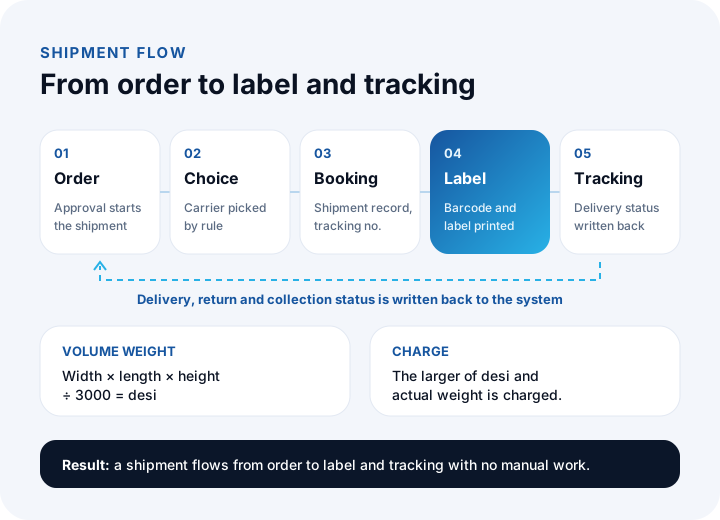
- Order approval: An order that is paid or confirmed triggers the shipping process.
- Carrier selection: The carrier is picked by rules such as desi, region or cash on delivery.
- Shipment record: Recipient, address and parcel details are sent to the carrier's API; the carrier returns the shipment and tracking numbers.
- Barcode and label: The label is printed from your system; the warehouse team labels the package and hands it over.
- Customer notification: The tracking number and link go to the customer and, if needed, to the marketplace.
- Status write-back: Events such as in transit, delivered, return or damage are posted to the order.
What Data Does Shipping Integration Carry?
A shipment consists of four data groups: recipient, parcel, service and reference. Most rejected shipments and delivery problems come from this data being missing or wrong.
| Data group | Fields | Common problem |
|---|---|---|
| Recipient | Full name, phone, province, district, neighborhood, street address | The province and district names do not match the carrier's list; the phone is in the wrong format |
| Parcel | Number of pieces, dimensions, desi, actual weight | Desi missing or wrongly calculated, creating a charge difference |
| Service | Cash on delivery amount, insurance, delivery type, carrier and service code | The cash on delivery amount does not match the order |
| Reference | Order number, shipment number, tracking number, barcode | Return and collection records cannot be tied to the shipment |
That is why the reference fields matter: the order number, shipment number and tracking number should be kept linked in your system. Returns, damage and collection records are matched through that link.
How Are Desi and Shipping Charges Handled in the Integration?
Carriers charge the larger of desi (volume weight) and actual weight. For domestic shipments, desi is found by dividing the parcel's volume by 3000; the divisor can vary by carrier and service, so use the value in your agreement.
Example: a 40 × 30 × 25 cm parcel is 30,000 ÷ 3000 = 10 desi. Even if the parcel weighs 4.5 kg, the carrier charges for 10. A 30 × 20 × 15 cm parcel is 9,000 ÷ 3000 = 3 desi, and a 50 × 40 × 30 cm parcel is 60,000 ÷ 3000 = 20 desi.
In an integration, a product's dimensions and weight are kept on the product card; the system works out the parcel and desi from the cart, writes it to the shipment and derives the expected charge from the tariff. A product with missing dimensions means a wrong charge and an invoice difference from the carrier. To try desi and shipping cost quickly, you can use our desi calculator and shipping cost calculator (Turkish interface).
How Do You Work with More Than One Carrier?
Working with several carriers means picking the carrier for each shipment by a rule. Instead of applying the rule by hand, the integration does it automatically.
| Rule | Example |
|---|---|
| Desi band | Small parcels go with one carrier, larger ones with the carrier whose agreement is better |
| Region | The carrier strong in delivery to certain cities is chosen |
| Cash on delivery | Cash-on-delivery orders are routed to the carrier that offers the service |
| Order amount | High-value orders are shipped insured |
| Marketplace requirement | If a marketplace asks for a contracted carrier code, the shipment is opened with that code |
Rules have priorities; a rule can also define a backup carrier for when a carrier cannot be reached. That way, when one carrier's API is down for a short time, shipments do not wait.
We recommend reading: What is marketplace integration? A guide to managing products, stock and orders in one place
How Is Tracking Information Passed to the Customer and the Marketplace?
Tracking information should reach the customer the moment the shipment record is opened; the customer should not have to ask "where is my parcel?" The integration sends the tracking number and link together with the order status by email, SMS or the account page.
For marketplace orders, the tracking number and the carrier are also written back to the marketplace. An order that is not reported in time can hurt the seller's performance, so the write-back is not left to polling but done automatically as soon as the shipment record succeeds. When the delivered status arrives, the order closes automatically and, if wanted, the customer receives an invitation to leave a review.
How Are Cash on Delivery Collection and Reconciliation Done?
In cash-on-delivery shipments the carrier collects the payment and pays you later, so shipments and collections must be matched one by one. Reconciliation is comparing the expected collection with the payment that comes from the carrier.
Example (illustrative): in a period, 40 cash-on-delivery shipments went out, 38 were delivered and 2 came back as returns. If each delivered one was ₺850, the expected collection is 38 × 850 = ₺32,300. If the payment from the carrier is also ₺32,300, you are reconciled; if there is a difference, the shipment number is used to find which record is missing or in excess.
Because the integration writes the delivery status back, which shipments were collected and which were returned shows up automatically, and the collection is matched to the customer account. For how to book this in accounting, consult your financial advisor (certified accountant).
How Are Returns and Damaged Shipments Managed?
A return is an extra shipment and needs its own record. When the customer opens a return request, a return shipment code is created, the carrier picks up the package, and when it is delivered the stock and customer account records are corrected.
- Return shipment: Linked to the original order and shipment; the return reason is recorded.
- Stock decision: When the package reaches the warehouse and passes inspection it is added to stock; if damaged, it is kept apart.
- Damage and loss: Reported to the carrier with the shipment number and damage photos; the amount is settled through shipping insurance or by agreement with the carrier.
What Are the Routes for Shipping Integration?
There are three: connecting directly to a carrier's own API, using a ready-made shipping tool that gathers several carriers in one interface, or building a custom integration. The choice depends on shipment volume and the number of your systems.
| Route | How it works | When it suits |
|---|---|---|
| Carrier's panel | Shipments are opened by hand or by bulk upload in the carrier's own panel | Few shipments; small businesses that need no system integration |
| Ready-made shipping tool | Several carriers are managed from one panel; orders come in from the site | Medium volume; a standard flow and a few carriers |
| Custom integration | Your system talks directly to the carriers' APIs; rules are written around your business rules | High volume; businesses whose shipping must move in the same flow as ERP, warehouse, invoice and marketplace |
What Problems Come Up Most Often in Shipping Integration?
| Problem | Why it happens | Fix |
|---|---|---|
| The shipment record is rejected | Province-district names do not match, or a required field is missing | Validate the address against the carrier's list; let it land in the error list and be fixed |
| The same shipment is opened twice | A request whose answer never arrived is retried | Mark each shipment with a unique identifier; do not process a processed identifier twice |
| The carrier's API goes down | Maintenance or an outage | Queue the requests and retry; define a backup carrier rule |
| Tracking status arrives late | No notification, infrequent polling | Use notifications and regular polling together |
| A charge difference appears | Desi or dimensions are wrong | Verify the dimensions on the product card; report differences per shipment |
Tracking the shipment-record success rate shows data quality. Example: if 985 of 1,000 shipments are accepted on the first try, the rate is 985 ÷ 1,000 = 98.5%; the other 15 shipments wait in the error list and their causes are classified.
What Should You Ask When Choosing a Shipping Integration?
- Which carriers does it connect to? Are the carriers you have agreements with on the list?
- Does it support cash on delivery and return shipments?
- Can carrier selection rules be written? Is there automatic selection by desi, region and amount?
- Where do errors show up? Are rejected shipments listed and is the owner alerted?
- Are the label formats suitable? Does it work with the label printer you use?
- Does it support marketplace carrier codes?
- Does tracking information go to the customer automatically? By email, SMS or through the marketplace.
- Is adding a new carrier easy? Is the integration flexible when an agreement changes?
How Is Shipping Integration Set Up? A Six-Step Plan
A healthy setup starts with getting API access from the carrier and moves on by clarifying the data fields.
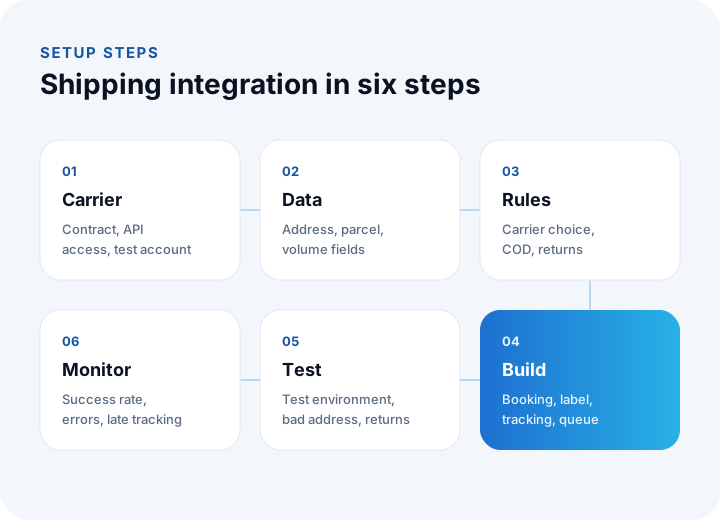
- Carrier: Decide the contracted carriers and get API access and a test account for each.
- Data: Define the sources of the address, parcel and desi fields; complete the dimensions on product cards.
- Rules: Write the carrier selection, cash on delivery, return shipment and backup carrier rules.
- Build: Set up shipment records, labels, tracking, the error queue and retries.
- Test: In the test environment try standard, bad-address, cash-on-delivery and return shipments.
- Monitoring: After go-live, watch the record success rate, the error list and late tracking.
We recommend reading: How to Build an E-commerce Website: Platform, Legal Requirements, Cost and Break-Even Guide
We recommend reading: How to secure an API: authentication, authorization, tokens and rate limiting
We recommend reading: What is shipment planning software? Routes, vehicle load and proof of delivery
Shipping Integration with İnovabil
At İnovabil we design shipping integration not merely as label printing but as part of the chain that runs from order to collection. We start a project with a data map and shipping rules and build the integration with an error queue, retries, logging and monitoring.
We built Kredili Kargo, a prepaid shipping system for Sürat Kargo, and in Faprika, NetKasam and custom e-commerce projects we have built payment, shipping, e-invoice and marketplace connections. Tell us in a few sentences which carriers you use and how your shipping process runs, and we will prepare a custom integration roadmap.
We recommend reading: E-commerce software: with marketplace, shipping and payment integrations
Frequently Asked Questions
What is shipping integration, in short, and what is it for?
Shipping integration automatically opens the shipment record, prints the label and writes the tracking information back between your system and the carrier's system. The address and parcel details are not typed a second time.
How is desi calculated?
Desi is found by multiplying the parcel's width, length and height (cm) and dividing by 3000; the divisor can vary by carrier and service. The carrier charges the larger of desi and actual weight.
Can you integrate with more than one carrier?
Yes. For each shipment the carrier can be picked automatically by rules such as desi, region, cash on delivery or order amount, and a backup carrier can be defined for when one carrier's API is down.
How is cash on delivery collection tracked?
The total of delivered cash-on-delivery shipments gives the expected collection; you compare it with the payment from the carrier through the shipment number. Because the integration writes the delivery status back, this matching becomes automatic.
How long does it take to set up shipping integration?
It depends on the number of carriers, the quality of the API documentation and the complexity of the rules. With a test account and a data map ready, integration with a single carrier reaches testing quickly, and adding each new carrier is faster after that.