

At eight in the morning three vehicles wait in front of the warehouse. Orders sit in one spreadsheet, addresses in another list, and which customer receives at what hour lives in the dispatcher's head. The plan is made by hand; when a customer changes an address at the last minute the whole sequence breaks, a vehicle drives needless distance and a parcel is loaded onto the wrong truck. Shipment planning software, also called dispatch or delivery planning software, groups orders, places them on the right vehicle in the right sequence, guides the driver and records the delivery.
In this guide we explain what shipment planning software is, how it differs from shipping integration, the six-step dispatch flow, how vehicle load is calculated, the effect of route planning on distance and cost, time windows, proof of delivery, performance indicators, payback and how to choose one. The example figures are illustrative; they are not measurements of a real business or an industry average.
What Is Shipment Planning Software?
Shipment planning software groups the orders leaving the warehouse by zone, time window and vehicle capacity, assigns them to vehicles and drivers, sets the stop sequence and tracks delivery status. Its outputs are a load list per vehicle, a route with ordered stops and records after delivery. Manufacturers, wholesalers and distributors that run their own fleet or work with carriers use it.
The software takes order and stock data from the ERP, talks to the warehouse on loading and collects delivery through a mobile app. We covered the general structure of ERP in our ERP guide and the warehouse side in our warehouse management system (WMS) guide.
We recommend reading: Our ERP software service and modules
What Is the Difference Between Shipment Planning and Shipping Integration?
The two are often confused. Shipping integration passes the parcel to a carrier and gets a tracking number; the carrier does the transport. Shipment planning designs a delivery done with your own vehicles or contracted ones; you decide which order goes on which vehicle in which sequence.
| Topic | Shipping integration | Shipment planning |
|---|---|---|
| Who transports? | The carrier | Your own fleet or contracted vehicles |
| Main decision | Which carrier and which label | Which vehicle, which sequence, which time |
| Constraint | Volumetric weight, weight, tariff | Vehicle capacity, time window, driver time |
| Output | Label and tracking number | Route, load list, proof of delivery |
We covered the carrier side in detail in our shipping integration guide; many businesses use both: they deliver within big cities with their own vehicles and reach distant regions by carrier.
What Steps Turn an Order into a Delivery?
A good dispatch flow moves in six steps. The output of each step is the input of the next; when a step is skipped, the error shows up at loading or delivery.
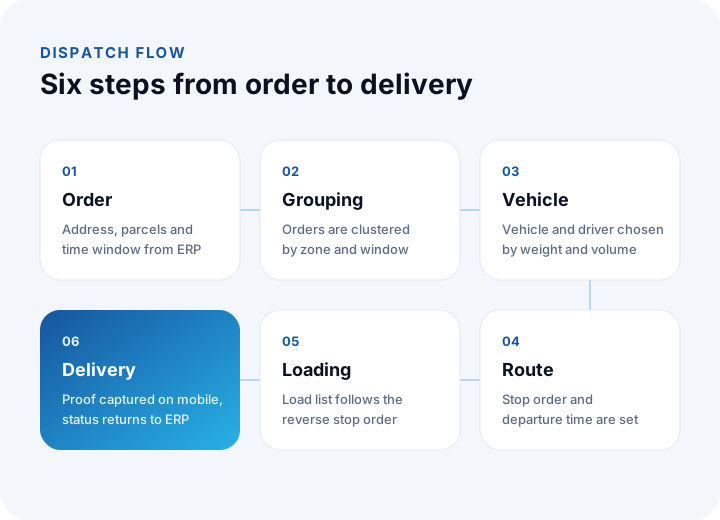
- Order: Address, parcel count, weight, volume and the customer's delivery window arrive from the ERP.
- Grouping: Orders are clustered by zone and time window.
- Vehicle assignment: Each cluster is assigned to a vehicle and driver that fit the weight and volume limits.
- Route: Stops are sequenced and departure time and estimated arrival times are calculated.
- Loading: The load list is produced in reverse order so the last stop's parcels are loaded first.
- Delivery: The driver confirms delivery on mobile; the status is written back to the ERP.
In this flow data is entered once; entering the same information twice, in a spreadsheet and in a system, is a source of errors. We explain how to move from spreadsheets to a system in our Excel to software guide.
How Is Vehicle Load Calculated?
A vehicle is limited by both weight and volume. Whichever fills first makes the vehicle full, so both ratios are watched together.
Example (illustrative): the vehicle's payload capacity is 1,200 kg and its cargo volume is 8 m³. With a load of 960 kg and 6.2 m³, weight load is 960 ÷ 1,200 = 80% and volume load is 6.2 ÷ 8 = 77.5%. The larger is 80%, so the vehicle counts as 80% full and weight sets the limit for extra orders: another 240 kg can be taken. For light but bulky goods (packaging material, for example) the limit usually comes from volume; a plan that looks only at weight assigns loads that will not fit.
- Keep parcel dimensions on record: Without length, width, height and weight on the product card, volume estimates fail.
- Leave a safety margin: If a vehicle is planned at 100%, a late order will not fit.
- Plan the loading order: The last stop's parcels go on first, the first stop's last.
- Define vehicle types: Orders that need cold chain or fragile handling go to a suitable vehicle.
How Does Route Planning Affect Distance and Cost?
Route planning aims to visit the same stops with a shorter total distance. Even in small fleets, differences in sequencing and grouping reduce daily distance noticeably; but calculate the gain from your own measurements, not from assumptions.
Example (illustrative): three vehicles cover 420 km a day in total with a manual plan. With planned dispatch the same stops are completed in 340 km. The difference is 420 − 340 = 80 km, or 80 ÷ 420 ≈ 19%. If the unit cost per kilometre (fuel, maintenance, depreciation) is ₺18, daily savings are 80 × 18 = ₺1,440 and over 22 working days 1,440 × 22 = ₺31,680.
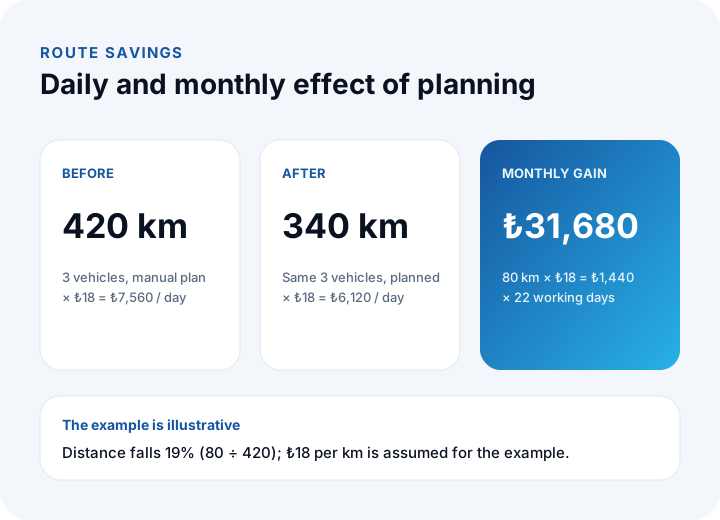
If the software's monthly running cost is ₺6,000, the net benefit is 31,680 − 6,000 = ₺25,680; an investment of ₺420,000 pays back in 420,000 ÷ 25,680 ≈ 16.4 months. The effect of on-time delivery on customer satisfaction, more jobs per vehicle and less overtime are not counted. We explain the general cost method in our software project cost guide.
How Do Time Windows and Driver Time Enter the Plan?
Not every customer receives at every hour. A time window is the range of hours in which delivery can be made, and it directly determines the route order. A driver's working and break times are also a limit on the plan under the relevant regulation; check current regulations and a legal adviser for the rules, and define them as parameters in the software.
Example (illustrative): a vehicle will cover 114 km at an average speed of 38 km/h. Driving time is 114 ÷ 38 = 3 hours. If each of 12 stops takes about 15 minutes, stop time is 12 × 15 = 180 minutes, or 3 hours. The trip takes 6 hours in total; a vehicle leaving at 08:00 returns at 14:00. A stop whose customer window is 09:00–11:00 must sit early in the route. A plan that ignores stop time is the real cause of vehicles running late.
| Constraint | Effect on the plan | How it is defined in software |
|---|---|---|
| Customer time window | Sets the stop sequence | Start and end time on the customer card |
| Vehicle capacity | Sets how orders split across vehicles | Weight and volume on the vehicle card |
| Driver working time | Limits the length of a trip | Maximum duration and break as parameters |
| Stop time | Extends total trip time | Average by customer or parcel count |
| Vehicle type | Fit for cold chain and fragile loads | Matching product and vehicle attributes |
We recommend reading: What is business process automation? A step-by-step guide
Why Do Proof of Delivery and Live Tracking Matter?
Proving that a delivery was made is the basis of payment and dispute processes. The driver app captures a signature or photo at each stop, records time and location and asks for a reason when a parcel is not delivered (not at the address, refused, closed).
- Proof of delivery: Signature, photo or code verification, stamped with time and location.
- Exception reason: A reason list for undelivered parcels, as selectable codes rather than free text.
- Live status: On the way, delivered and rescheduled statuses reach the office screen and the ERP.
- Customer notification: Estimated arrival and delay messages go out automatically; follow the relevant regulation when using personal data.
- Offline operation: In areas with no connection the app stores records and sends them when the connection returns.
The app must suit field use: large buttons that work with gloves or on the move and as few steps as possible. For screen design see our UX design guide.
Which Indicators Measure Dispatch Performance?
A plan is proven to work only when measured. Five indicators form a sufficient core for most businesses and are produced automatically by the system.
| Indicator | How it is calculated | Example (illustrative) |
|---|---|---|
| On-time delivery rate | Delivered within the window ÷ total deliveries | 188 ÷ 200 = 94% |
| First-attempt delivery rate | Delivered on the first visit ÷ total deliveries | 176 ÷ 200 = 88% |
| Vehicle load | The larger of weight and volume load | 80% |
| Cost per delivery | Daily dispatch cost ÷ number of stops | 6,120 ÷ 36 = ₺170 |
| Route deviation | Actual km ÷ planned km | 348 ÷ 340 = 102.4% |
Track the indicators not as an average but by zone, vehicle and day; a single late zone disappears in the average. We explain turning indicators into dashboards in our business intelligence (BI) guide.
What Should You Look for When Choosing Shipment Planning Software?
Off-the-shelf programs and custom solutions are assessed with the same questions. We explain the weighted scoring and demo method in our how to choose an ERP guide; the same method applies here.
- Constraint support: Can capacity, time window, vehicle type and driver time be defined together?
- ERP connection: Do order and stock data arrive automatically, and is delivery status written back?
- Manual override: Can the plan be changed by drag and drop and recalculated?
- Driver app: Are there proof of delivery, exception reasons and offline operation?
- Map and address quality: Are address validation and geocoding reliable?
- Reporting: Are on-time delivery, load and cost indicators ready?
- Data and permissions: Are there role-based access, audit logs and a way to export your data?
What Are Common Mistakes in Shipment Planning?
- Looking only at the short path: If time windows and capacity are ignored, the short route becomes a route that cannot be delivered.
- Forgetting stop time: Driving time is counted but unloading and signing time is left out; vehicles end the day late.
- Ignoring volume: A plan that looks only at weight cannot fit light and bulky loads.
- Neglecting address quality: A wrong address breaks the best plan; address validation belongs in the process.
- Treating the plan as fixed: Late orders and cancellations will come, so re-planning must be easy.
- Leaving drivers out: An app that is not used in the field leaves data incomplete.
- Not measuring: If planned and actual are not compared, there is no improvement.
Recommended reading: What Is a Barcode System and How Do You Set One Up?
Shipment and Logistics Planning Software with İnovabil
At İnovabil we move shipment and logistics processes into software built for your business: order intake and management, shipment planning, warehouse connection, a mobile driver app, ERP and shipping integrations and reporting. We start with a process map and requirements analysis and proceed with incremental development and acceptance testing.
We built logistics planning, shipment planning and wholesale order intake and management for Karyak, shipment planning for Bofigo, a warehouse management system (WMS) for Sleepy and a prepaid shipping system for Kredili Kargo. Describe your dispatch flow and where you struggle in a few sentences; we first put the process map and constraints in writing.
We recommend reading: Our software development process: from analysis to release
Frequently Asked Questions
What is shipment planning software and what does it do?
It groups orders by zone, time window and vehicle capacity, assigns them to vehicles and drivers, sets the stop sequence and tracks delivery. It reduces needless distance, prevents loading errors and records every delivery.
Are shipment planning and shipping integration the same?
No. Shipping integration passes the parcel to a carrier and gets a tracking number. Shipment planning designs deliveries made with your own vehicles: which order, which vehicle, which sequence, which time. Many businesses use both together.
How is vehicle load calculated?
Weight load and volume load are calculated separately and the larger one is the vehicle load. In the example, 960 ÷ 1,200 = 80% by weight and 6.2 ÷ 8 = 77.5% by volume, so the vehicle is 80% full.
How much does route planning save?
It depends on your own measurements. In the example daily distance falls from 420 km to 340 km (19%), and with ₺18 per km the monthly saving is ₺31,680. Calculate the real gain by comparing mileage records from planned and unplanned periods.
Which indicators track dispatch performance?
On-time delivery rate, first-attempt delivery rate, vehicle load, cost per delivery and route deviation are a sufficient core for most businesses. Look not at the average but by zone, vehicle and day.