

A product sells out on Trendyol but keeps selling on Hepsiburada. In the morning you log in to one panel after another to change a price, and in the afternoon you retype the same order into the warehouse screen and the invoicing program. Every extra channel multiplies the work. Marketplace integration is the connection that lets product, stock, price and order data flow automatically between the marketplaces and your own system: you define a product once and sell it on every channel with the right stock and price.
This guide covers what marketplace integration synchronizes, how product matching works, the calculation that prevents overselling, how to price each channel, how orders, shipping, invoices and returns flow, off-the-shelf versus custom integration, and a six-step setup plan. All example figures are illustrative.
What Is Marketplace Integration?
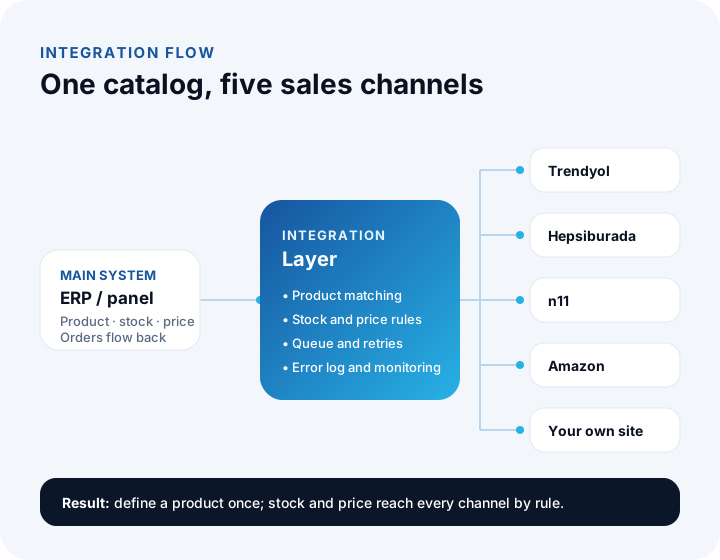
Marketplace integration is the automatic exchange of product, stock, price and order data between your system and sales channels such as Trendyol, Hepsiburada, n11, Amazon and ÇiçekSepeti, using the marketplaces' APIs. Your system can be an ERP, an e-commerce platform or a custom admin panel; what matters is that there is one main place where products and stock are managed.
Without integration every marketplace is a separate shop: the product card, price and stock are entered in each panel, and orders are downloaded one by one. With integration you get a two-way flow. Product, stock and price go from you to the marketplace; orders, cancellations and returns come from the marketplace to you.
Unlike our general guide to API integration, which covers connecting systems of every kind, this article focuses only on the daily operation of sales channels: the catalog, stock, price and order flow.
We recommend reading: Our integration and API development service
What Does Marketplace Integration Synchronize?
Seven kinds of data are synchronized: product cards, stock, price, orders, shipping, invoices and returns. Each has its own direction and speed; stock and price update within minutes, while product cards change far less often.
| Data | Direction | How often? | What happens when done by hand? |
|---|---|---|---|
| Product card | You to marketplace | On a new product or content change | The same title and images are uploaded to every panel separately |
| Stock | You to marketplace | On every sale and stock movement, within minutes | A sold-out product keeps selling |
| Price | You to marketplace | When a price or campaign changes | Prices drift apart between channels |
| Order | Marketplace to you | Every few minutes, or by notification | Orders are downloaded from panels one at a time |
| Shipping | Both ways | On order confirmation and delivery events | Labels are taken by hand from the carrier's panel |
| Invoice | You to marketplace | When the order is prepared | Each invoice is issued and uploaded separately |
| Cancellation and return | Marketplace to you | When a request arrives | Stock and customer account records are corrected late and wrongly |
How Does Product Matching Work?
Product matching defines the counterpart of your product on each marketplace, and the sturdiest key is the barcode (GTIN). Products with the same barcode are treated as the same product; for products without a barcode, a manual mapping table links your stock code to the marketplace code.
Matching runs in three layers:
- Product and variant: Sizes, colors or pack options of the same product are matched as separate lines. If stock is not kept at variant level, one size running out closes the whole product, or the other way around.
- Category: Each marketplace has its own category tree. Your "Kitchen > Cookware" category maps to a different path on Trendyol and on Hepsiburada; a mapping table defines this once.
- Attributes: Required attributes such as color, material and volume are requested with different values in each category. A product sent without a required attribute is not published.
You can track the success of matching with a single ratio:
The target is 100%, reached by shortening the missing list a little every day. An unmatched product cannot be sold.
How Does Stock Synchronization Work, and How Is Overselling Prevented?
Every sale reduces stock, and the new value is pushed to all channels. What prevents overselling is reporting sellable stock to the channels instead of physical stock.
Example: there are 40 units in the warehouse, orders awaiting shipment have reserved 6, and you keep 4 units of safety stock. A total of 40 − 6 − 4 = 30 units is reported to the channels. If you want to split those 30 units between channels, you define a channel allocation rule:
| Channel | Share | Reported stock |
|---|---|---|
| Trendyol | 50% | 15 units |
| Hepsiburada | 30% | 9 units |
| Your own site | 20% | 6 units |
| Total | 100% | 30 units |
Allocation prevents a sudden spike on one channel from consuming the stock of the others. If one channel's share runs out while another's remains unused, the rule can also be written to move the unused share to another channel automatically.
How is safety stock determined?
The lower bound of safety stock is the quantity that can be sold during the synchronization delay: the channel's hourly sales speed × the sync interval (in hours). If a channel receives 30 orders an hour during a campaign and stock is updated every 15 minutes, the risk is 30 × (15 ÷ 60) = 7.5 units, roughly 8. If you cut the interval to 1 minute, it drops to 30 × (1 ÷ 60) = 0.5 units.
That is why, in campaign periods, you both shorten the sync interval and raise safety stock.
We recommend reading: How to track inventory: a practical guide with formulas
How Is the Price for Each Marketplace Determined?
Because each channel's commission differs, getting the same profit means a different price on each channel. The basic formula divides the target payout by the complement of the commission rate.
Example: you want to keep ₺680 from a product. On a channel with a 12% commission the price is 680 ÷ 0.88 ≈ ₺772.73, and on a channel with 18% it is 680 ÷ 0.82 ≈ ₺829.27. The rates are illustrative, and this calculation assumes the commission is taken on the VAT-inclusive price; depending on the marketplace, commission may be charged excluding VAT or with VAT added on top.
For real rates, use the marketplace's official commission list; do not type an unsourced rate into the system. Our commission calculators (Turkish interface) work out commission, the VAT difference and net profit by category and make this easier.
How are price rules written into the integration?
Instead of entering prices product by product, you define them as rules: "protect the target payout", "the channel price may be at most 10% above the price on your own site", "the campaign price must not fall below this floor". When a product breaks a rule, the system does not send the price and raises a warning, which stops a wrong price from going live by accident.
How Are Orders, Shipping, Invoices and Returns Managed?
The moment an order arrives, the following steps start on their own in sequence: the order is pulled, stock is reserved, a picking list reaches the warehouse, a shipment record is created, the invoice is issued and tracking information is written back to the marketplace. At no step is the same information typed in a second time.
- Pulling orders: The integration polls for new orders at set intervals, or listens if the marketplace sends notifications.
- Reserving stock: As soon as the order enters the system, reserved stock rises and the stock reported to other channels falls.
- Preparing and shipping: A picking list goes to the warehouse screen, a shipment record is opened with the carrier, and the barcode and label are printed from your system.
- Invoice: An e-invoice (e-Fatura) or e-archive invoice (e-Arşiv) is generated from the order data, uploaded in the format the marketplace requires, and the accounting entry is posted.
- Status updates: The tracking number and delivery status are reported to the marketplace; an order not reported in time lowers the seller's performance score.
How do cancellations and returns affect stock?
If cancellations and returns are not tied to rules, stock looks wrong. A clear stock behavior is defined for each situation:
| Situation | Stock decision | Extra action |
|---|---|---|
| Cancelled before shipping | Reservation is released and stock reopens | Invoice cancellation or a return invoice if already invoiced |
| Return after delivery, product intact | Added to stock after inspection | Return invoice, customer account correction |
| Damaged or used return | Not added to sellable stock; moved to a separate store | Damage record, supplier claim if needed |
| Partial return | Only the returned quantity goes back to stock | Partial return invoice |
Adding a returned product to sellable stock without inspection leads to the same damaged item being sold a second time. That is why returning stock is tied to an approval step.
We recommend reading: Accounting software: e-invoice, e-archive and customer account flow
Off-the-Shelf Panel or Custom Marketplace Integration?
If you have a standard flow and a few channels, an off-the-shelf panel is often enough; if your rules are your own, you have many channels, or you need a deep link to your ERP, a custom integration is the better fit.
| Topic | Off-the-shelf panel | Custom integration |
|---|---|---|
| Setup | Fast; connect the account and map products | Needs analysis and development time |
| Stock and price rules | Limited to the options the package offers | Written around your business rules |
| ERP and warehouse link | Limited fields, if a ready connector exists | One-to-one with your order, cost and stock systems |
| Adding a new channel | Limited to channels the vendor supports | Any channel that has an API can be added |
| Error visibility | As much as the panel shows | Error queue, alerts and retries as needed |
| Best suited to | Few channels, standard flow, little uniqueness | Many channels, high volume, unique rules and an ERP link |
We recommend reading: Off-the-shelf or custom software? A decision guide
Which Questions Should You Ask When Choosing a Marketplace Integration?
The most common mistake when choosing a solution is to look only at how many marketplaces it supports. The real difference appears when things go wrong. Ask these questions while collecting quotes:
- How fast is stock updated? Minutes or hours? Can the interval be shortened for campaign periods?
- Is stock kept at variant level? By size and color, or by product?
- Can channel allocation and safety stock be defined?
- Can price rules be written per channel? Does it accept rules such as a target payout or a floor price?
- Where do errors show up? Are rejected products, unmatched categories and failed orders collected in a list, and is the responsible person notified?
- Who tracks API changes? When a marketplace retires an old version, whose job is it to update the integration?
- Does the data belong to you? If you want to leave the solution, can you take your product mapping tables and order history with you?
- Is there a link to ERP, accounting and shipping?
How Is Marketplace Integration Set Up? A Six-Step Plan
A healthy setup first puts the catalog in order, then writes the rules, and opens the channel last. Opening a channel is easy; with a messy catalog, errors multiply on every channel you open.
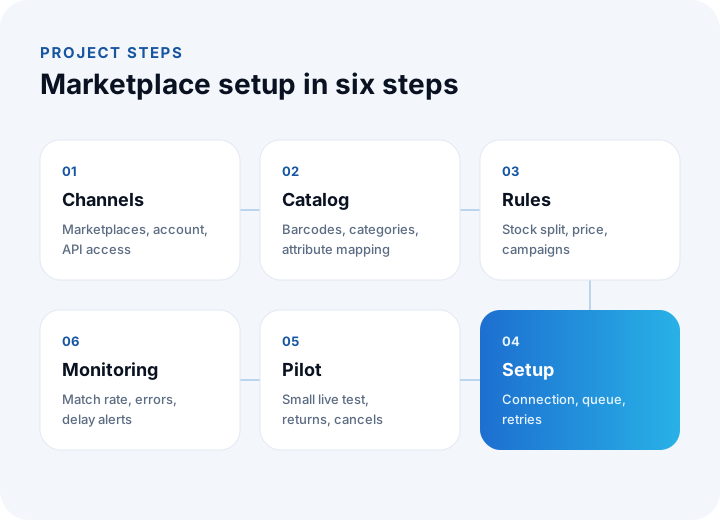
- Channel selection: Decide which marketplaces you will sell on and check the seller account and API access on each. Starting with one channel lets you carry what you learn to the next.
- Catalog order: Complete barcodes, standardize product names and images, and prepare category and attribute mapping tables. The match rate is measured at this step.
- Rules: Write the sellable stock formula, channel allocation, safety stock, price rules and campaign limits.
- Setup: Build the connections, the message queue, retries and the logging structure. Connect order, shipping and invoice flows to your ERP or admin panel.
- Pilot: Sell for real with a small number of products. Deliberately try edge cases such as orders, cancellations, partial returns and running out of stock.
- Monitoring: Track indicators such as match rate, error count, sync delay and late-reported orders every week, so a problem reaches the team before the customer.
What Problems Come Up Most Often in Marketplace Integration?
Most problems come not from the connection itself but from the marketplaces' rules and from data quality. These four situations are the most common.
A product is held for approval or rejected
Marketplaces do not publish a product with a missing required attribute, the wrong category or a breach of image rules. A rejected product must land in the error list with its reason visible; otherwise you may not notice for weeks why a product is not selling.
Category and attribute schemas change
Marketplaces update their category trees and required attributes from time to time. If mapping tables are not refreshed to follow these changes, products that used to go through cleanly start returning errors one day.
Request limits and API versions
Trying to push the stock of thousands of products at once hits the request limit. The fix is to queue only the changed records and send them at a pace that stays under the limit. When a marketplace announces it will retire an old API version, the move should be planned in advance.
Campaign price and stock conflicts
The price of a product enrolled in a marketplace campaign can collide with your own price rule. Setting a limit that stops the campaign price from falling below the floor price, and shortening the sync interval during the campaign, reduces this risk.
We recommend reading: What Is E-Invoice Integration and How Is It Done? A Guide for Orders, ERP and Accounting
How to Set Up a Shopify Store: A Step-by-Step Guide, Including Selling from Turkey
We recommend reading: How to Choose Pre-Accounting Software: A Guide to Comparison, Scoring and Cost
We recommend reading: What Is Shipping Integration and How Is It Done? A Guide to Shipments, Labels and Tracking for E-commerce
We recommend reading: How to Build an E-commerce Website: Platform, Legal Requirements, Cost and Break-Even Guide
We recommend reading: How to secure an API: authentication, authorization, tokens and rate limiting
Marketplace Integration with İnovabil
At İnovabil we do not treat marketplace integration as merely pulling orders; we treat it as a single design of the product, stock, price, order, shipping and invoice flow. We start a project with the catalog and a data map, write the sellable stock and price rules together with you, and then build the integration with an error queue, retries, logging and monitoring.
In our own products we have built integrations with channels such as Trendyol, Hepsiburada, n11, Amazon, Etsy, AliExpress, Ozon, ÇiçekSepeti and Shopify. The technologies we use in these projects include .NET and ASP.NET Core, REST and SOAP services, message queues with RabbitMQ and MassTransit, and monitoring with Prometheus. We also built the prepaid shipping system for Sürat Kargo (Kredili Kargo).
If you want to manage your marketplace channels from one place, bring stock and price together with your ERP, or move to a custom integration after hitting the limits of your current panel, tell us in a few sentences which channels you sell on and where you work by hand, and we will prepare a roadmap for you.
We recommend reading: E-commerce software: with marketplace, shipping and payment integrations
Frequently Asked Questions
What is marketplace integration, in short, and what is it for?
Marketplace integration lets product, stock, price and order data flow automatically between channels such as Trendyol, Hepsiburada, n11 and Amazon and your own system. You define a product once, manage stock and price from the center, and collect orders on a single screen.
Does marketplace integration update stock instantly?
In most cases it updates within minutes, but there is no "instant" guarantee; the marketplace's request limit and your sync interval decide. To avoid overselling during that delay, the sellable stock formula, channel allocation and safety stock are used together.
Should I sell at the same price on every marketplace?
It is not required. Commission, shipping and campaign terms differ from channel to channel, so if you want the same profit the price changes as well. The channel price is the target payout divided by (1 − commission rate); what matters is managing any difference by rule.
Should I choose an off-the-shelf panel or a custom integration?
If you sell on a few channels with a standard flow, an off-the-shelf panel may be enough. If you have many channels, special stock and price rules, or orders that must move through ERP, warehouse and accounting in one flow, a custom integration is the better choice.
How long does it take to set up marketplace integration?
It depends on the number of channels, the order of the catalog and the complexity of the rules. If barcode and category mapping tables are ready, a single channel reaches the pilot stage in a few weeks, and each new channel opens faster with what you have learned. After the analysis, each channel is planned as a separate work item.