

The order has arrived, the goods are packed, and now it is time for the invoice: someone opens the accounting program, retypes the customer details, issues the invoice, uploads it to the integrator portal and then sends it to the customer. For a few invoices a day that is acceptable; with hundreds it is a source of lost time and errors. E-invoice integration is the connection that generates the invoice automatically from order and sales data, sends it as an e-invoice (e-Fatura) or e-archive invoice (e-Arşiv), and writes the result back into your system.
In this guide we explain what e-invoice integration is, the difference between e-invoice, e-archive and e-waybill, how the integration works step by step, how a private integrator differs from the tax authority's portal, which data is carried, invoice statuses and error handling, the cancellation and return flow, what to ask when choosing an integrator, and a six-step setup. This article is not financial or legal advice; for regulatory details, turn to the Revenue Administration (GİB) and your financial advisor (certified accountant). Example figures are illustrative.
What Is E-Invoice Integration?
E-invoice integration is the software connection between your system (an ERP, e-commerce platform, accounting program or custom system) and the system of a private integrator offering e-document services, so that invoices are generated and sent automatically. Your system prepares the invoice data, the integrator converts the invoice into the standard format and delivers it to the buyer through GİB, and reports the invoice status back to you.
Without integration, invoices are written by hand on a separate portal. With integration, sales or order data turns directly into an invoice; the customer name, tax number, product, VAT and amount are not typed a second time.
We recommend reading: Accounting software: customer accounts, e-invoice, cash and bank in one system
What Is the Difference Between E-Invoice, E-Archive and E-Waybill?
All three are electronic documents, but the buyer and the transaction they serve differ. Which one you must issue depends on the buyer's status, and the integration should make that distinction automatically.
| Document | What is it used for? | Who is the buyer? |
|---|---|---|
| E-invoice (e-Fatura) | Sales invoice; delivered to the buyer through the GİB system | Businesses registered in the e-invoice system |
| E-archive invoice (e-Arşiv) | Sales invoice; issued and archived electronically and reaches the buyer by email or link | Buyers not registered in the e-invoice system, and end consumers |
| E-waybill (e-İrsaliye) | Electronic dispatch note that accompanies a shipment of goods | The parties concerned in the shipped goods |
Which businesses must move to e-invoice or e-archive, and the thresholds and exceptions, are set by regulation and change from time to time; get this information from GİB and your financial advisor. A well-built integration checks whether the buyer is an e-invoice taxpayer and issues the invoice of the right type.
How Does E-Invoice Integration Work?
It works in six steps: a sales or order record is created, the system prepares the invoice data, the buyer type is looked up, the invoice is generated in the standard format and sent to the integrator, the integrator delivers it through GİB, and the status is written back to your system.
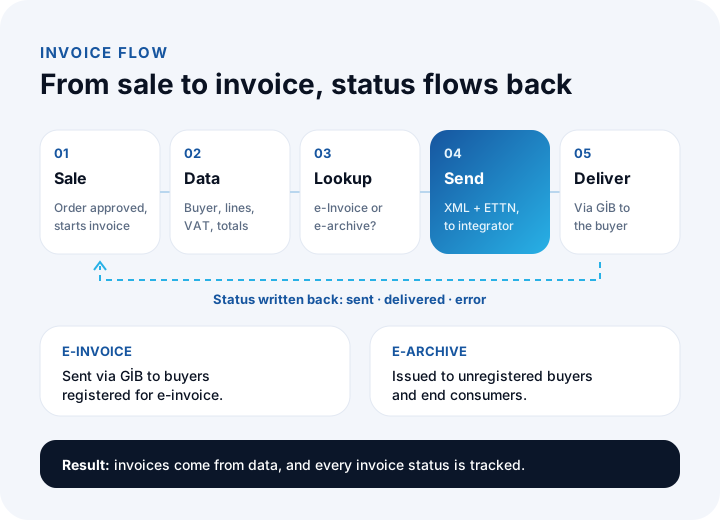
- Sales record: An order from a marketplace, website or ERP is confirmed and triggers the invoice.
- Invoice data: Buyer details, product lines, VAT rates and totals are gathered from the system.
- Buyer lookup: E-invoice or e-archive is chosen depending on whether the buyer is an e-invoice taxpayer.
- Generation and sending: The invoice is generated in the standard XML format, each invoice gets a unique identifier (ETTN), and it is passed to the integrator.
- Delivery: The integrator delivers the invoice to the buyer through the GİB system; for e-archive, a link or email goes to the buyer.
- Status write-back: Whether the invoice was sent, delivered or hit an error returns to your system and appears on the invoice record.
Private Integrator, GİB Portal or Your Own Integration?
There are three routes. For a handful of invoices the portal may be enough; as invoice volume and the number of systems grow, connecting your own software through the integrator's API is the most sustainable route.
| Route | How it works | When it suits |
|---|---|---|
| GİB portal | Invoices are written by hand in the free interface GİB provides | Very few invoices; small businesses that need no system integration |
| Private integrator's panel | Invoices are created in the integrator's own panel or by bulk upload | Medium volume; invoice data does not come from other systems |
| Integration through the integrator's API | Your software sends the invoice to the integrator through the API and receives the status back | High volume; businesses whose invoices must move in the same flow as orders, ERP and accounting |
Private integrators are organizations authorized by GİB to provide e-document services. The current list of authorized integrators is on GİB's official page; when choosing, work only with organizations on that list.
What Data Does E-Invoice Integration Carry?
An invoice consists of four data groups: buyer, product line, tax and total. Most problems come from mapping this data, so the fields are defined one by one at the start of the project.
| Data group | Fields carried | Common problem |
|---|---|---|
| Buyer | Company name or full name, tax or national ID number, tax office, address | An incorrect or missing number gets the invoice rejected |
| Product line | Product name, quantity, unit code, unit price, discount | The system's "piece" does not match the invoice unit code |
| Tax | VAT rate and amount, exemption reason | The exemption reason is entered incompletely |
| Total and payment | Taxable amount, VAT, grand total, currency, exchange rate | Total differences from rounding and exchange-rate gaps |
Return and cancellation invoices also need a reference to the original invoice. To keep that reference, your system should keep the invoice number, the ETTN and the order number linked to each other.
How Are Invoice Statuses and Errors Managed?
Every invoice has a status, and the integration makes that status visible. The biggest risk of integration is an erroneous invoice sitting unnoticed for days.
| Status | Meaning | What to do |
|---|---|---|
| Prepared | The invoice was generated in the system but not yet sent | Monitor the send queue |
| Sent | Handed to the integrator | Wait for the result; raise an alert if the time runs over |
| Delivered | Reached the buyer | Done; close the record |
| Error | Rejected in validation (for example an incorrect number) | Lands in the error list; the owner fixes it and resends |
A good integration runs a pre-check before sending: number format, required fields and tax codes are validated. Example: if 968 of 1,000 invoices are delivered successfully on the first try, the first-try success rate is 968 ÷ 1,000 = 96.8%; the other 32 invoices wait in the error list. Tracking this rate weekly shows data quality problems early.
Never issue the same invoice twice
When a send whose answer never arrived because of a network break is retried, the same invoice can be created twice. To prevent this, each invoice is marked with a unique identifier and an identifier that has already been sent is not processed a second time. This property (technically called idempotency) is one of the things to ask your integrator about.
We recommend reading: What is API integration? A guide to connecting your systems
How Are Cancellations, Returns and Corrections Handled?
You cannot take back a sent invoice by deleting it from your system; cancellation, return and correction are done through separate documents and procedures under the rules in the regulation. Settle with your financial advisor which route applies to which situation.
What matters on the integration side is the counterpart of those actions in your system: a return invoice is tied to the original invoice, stock and customer account records correct together, and a return request from a marketplace triggers the relevant invoice action. When these links are missing, stock, accounts and invoices drift apart.
How Does E-Invoice Work Together with Marketplaces, E-Commerce and ERP?
Whichever channel the sale comes from, the invoice is generated in the same place, giving one invoice flow, one numbering scheme and one record. When a marketplace order arrives, your ERP or e-commerce system issues the invoice, uploads it in the format the marketplace asks for and posts the accounting entry.
- Order → invoice: A confirmed order triggers the invoice by itself; no manual trigger is needed.
- Invoice → marketplace: The invoice information or file that marketplaces ask for is passed on together with the order status.
- Invoice → accounting: The invoice is posted as a customer account movement and an accounting entry.
- Return → invoice: When a return is approved, the related return invoice or correction process starts.
We recommend reading: What is marketplace integration? A guide to managing products, stock and orders in one place
What Should You Ask When Choosing an E-Invoice Integrator?
The integrator is the gateway through which your invoices pass; when choosing, look not only at price but at what happens when things go wrong.
- Is it approved by GİB? Is it on the list of authorized integrators?
- Does it offer an API with clear documentation? Is there a test environment?
- Which document types does it support? E-invoice, e-archive, e-waybill and any others you need.
- How is it priced? Credits, packages or subscription; how does cost change as volume grows?
- Are error messages understandable? Is the reason for a rejected invoice returned clearly?
- Archive and retention: How long, where and with what access are invoices stored? Retention periods are set by regulation; consult your financial advisor.
- What is support like? Is there a channel you can reach on a day when you cannot issue invoices?
- Is switching easy? If you want to change integrator, can you take your archive and move your systems to the new connection easily?
How Is E-Invoice Integration Set Up? A Six-Step Plan
A healthy setup starts not with code but with a data map: first it must be clear which field from which system goes onto the invoice.
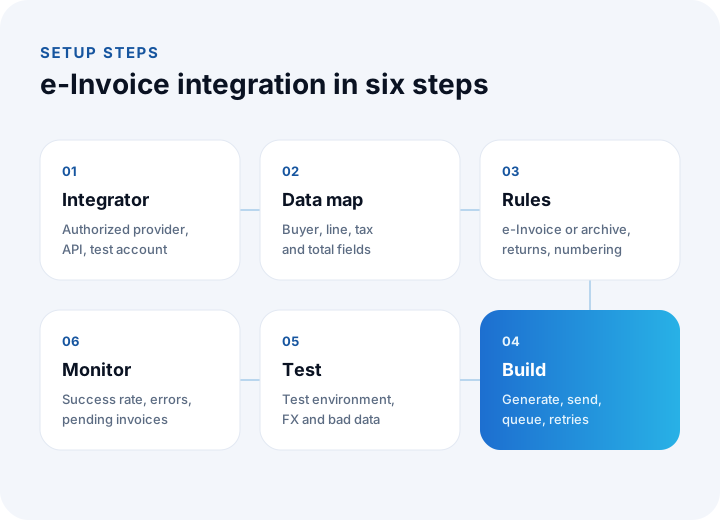
- Integrator selection: Choose an authorized integrator using the questions above, and get API access and a test account.
- Data map: Define the source systems and mappings of the buyer, product line, tax and total fields.
- Rules: Write the e-invoice versus e-archive distinction, the return and cancellation flow, numbering and exemption reasons.
- Build: Set up generation, sending, status tracking, the error queue and retries.
- Test: In the integrator's test environment, try standard, return, discounted, foreign-currency and bad data; show the output to your financial advisor.
- Monitoring: After go-live, watch the first-try success rate, the error list and pending invoices.
How Are Security and Records Handled in E-Invoice Integration?
Invoices contain personal and commercial data; integrator keys and invoice data must be protected. Integrator credentials are kept in encrypted settings rather than in source code, the connection runs over HTTPS, and access to invoices is authorized by role. Who created which invoice and when is logged, and unusual activity raises an alert. Processing customer data must comply with KVKK (Turkey's personal data protection law) obligations.
We recommend reading: How to Choose Pre-Accounting Software: A Guide to Comparison, Scoring and Cost
We recommend reading: What Is Shipping Integration and How Is It Done? A Guide to Shipments, Labels and Tracking for E-commerce
We recommend reading: What is procurement software? Process, approval matrix, quote scoring and three-way matching guide
We recommend reading: How to secure an API: authentication, authorization, tokens and rate limiting
Recommended reading: How to Track Customer Accounts
E-Invoice Integration with İnovabil
At İnovabil we design e-invoicing not merely as a sending connection but as part of the same flow as orders, stock, customer accounts and accounting. We start a project with a data map and invoice rules and build the integration with an error queue, retries, logging and monitoring.
The experience we have gained in customer account, stock, cash, bank and e-invoice processes in our cloud pre-accounting product NetKasam carries straight into our custom ERP and e-commerce projects. In Faprika and in custom e-commerce projects we have built payment, shipping, e-invoice and marketplace connections. Tell us in a few sentences about your systems and where you issue invoices by hand, and we will prepare a custom integration roadmap.
We recommend reading: Our integration and API development service
Frequently Asked Questions
What is e-invoice integration, in short, and what is it for?
E-invoice integration makes invoices generate and send automatically between your software and a private integrator's system, and brings the status back. Order or sales data turns into an invoice without being typed a second time.
What is the difference between an e-invoice and an e-archive invoice?
An e-invoice is delivered through GİB to businesses registered in the e-invoice system; an e-archive invoice is issued to buyers who are not registered and to end consumers. Which one is issued depends on the buyer's status, and a good integration makes that distinction automatically.
Is a private integrator required?
It is possible to write e-invoices and e-archive invoices by hand on the GİB portal; but for high volume and a flow that works with your systems, most businesses integrate through an authorized private integrator's API. Settle the route that suits your situation with your financial advisor.
How is a wrongly issued invoice corrected?
A sent invoice is not undone by deleting it; cancellation, return and correction are done through separate documents under the rules in the regulation. Decide with your financial advisor which route applies; on the integration side these actions are tied to the original invoice.
How long does it take to set up e-invoice integration?
It depends on the number of systems, data quality and the complexity of the rules. With the integrator's test environment and a data map ready, integration with a single system reaches testing quickly; your financial advisor's approval and the go-live are planned separately.