

Orders arrive from the marketplace, the invoice is issued in the accounting program, the shipping label is pulled from the carrier's panel, and stock is deducted in the warehouse software. If these systems do not talk to each other, someone does every step in between by hand. API integration is the way to connect those disconnected systems automatically: data created in one system flows to the others without anyone touching it.
In this guide we explain what an API is, how API integration works, how REST, SOAP and webhooks differ, which systems businesses integrate most often, ready-made versus custom integration, project steps, common problems and security.
What Is an API?
An API (Application Programming Interface) is the set of rules that defines how one piece of software talks to another. It specifies which information can be requested from which address, in which format, and how the answer comes back.
Think of an API as a waiter in a restaurant. You do not walk into the kitchen (the system's database); you place your order with the waiter in the form written on the menu, and the waiter brings back the answer from the kitchen. The menu is the API documentation: it says what you can ask for and what you will get.
Most of the software you use today offers an API. Marketplaces give sellers order and product APIs, carriers give shipment creation and tracking APIs, banks give payment APIs, and e-invoice service providers give invoice-sending APIs.
What Is API Integration?
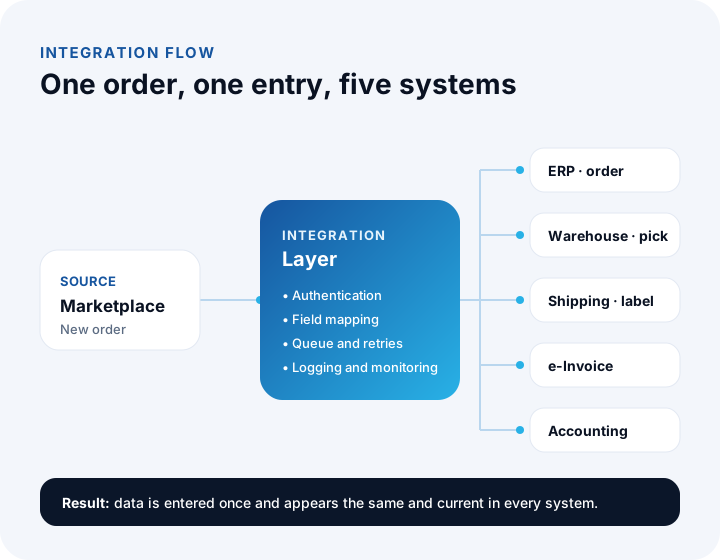
API integration is two or more pieces of software connecting through their APIs and exchanging data automatically. For example, a new order that lands on a marketplace shows up within seconds as an order in your ERP, a picking list on your warehouse screen, a shipment record at the carrier and an invoice draft in your accounting program.
Without integration, the same transaction is typed again and again on several screens. API integration removes this repetition and creates a single source of truth across your systems.
We recommend reading: Our integration and API development service
How Does API Integration Work?
In short: one system sends a request to the other's API address, the other side verifies the request, processes it and returns a response. This cycle completes in under a second and can repeat thousands of times a day.
Endpoint
Every API offers specific addresses for specific jobs. "List new orders", "create a shipment" and "update stock" are each a separate address. The team writing the integration learns from the API documentation which endpoint to call for which job.
Request and response
The system sending the request states what it wants to do with a method: GET to read data, POST to create a new record, PUT or PATCH to update, DELETE to remove. The data sent and returned is usually in JSON format; XML is also common in older systems. A status code comes with the response: from this code you learn whether the operation succeeded, the request was faulty, or the other system could not respond at that moment.
Authentication
No serious API answers requests from unknown parties. The requesting system proves who it is with an authorization method such as an API key issued to it, a username and password, or OAuth. This information is the most sensitive part of the integration and should be stored in a secure settings area, not in the code.
How it is triggered
An integration is triggered in two ways. The first is polling: your system asks at regular intervals, "Is there a new order?" The second is notification (webhook): when a new event occurs, the other system informs an address you specified on its own.
What Are the Types of APIs? REST, SOAP, GraphQL and Webhooks Compared
Most of the APIs businesses run into are REST; SOAP is still common in banking, the public sector and older enterprise systems. GraphQL is a newer approach, and a webhook is less a type of API than a notification method. The table below summarizes the approaches you may meet in an integration project.
| Type | How it works | Data format | Where you meet it |
|---|---|---|---|
| REST | Every resource is an address; operations use GET, POST, PUT and DELETE methods | Mostly JSON | Marketplaces, carriers, e-commerce platforms, modern SaaS products |
| SOAP | Messaging with strictly defined rules, based on a contract (WSDL) | XML | Banks, public services, older enterprise systems |
| GraphQL | The client states from a single address exactly which fields it wants | JSON | Modern applications that want data from many resources in one query |
| Webhook | When an event occurs, the other system sends a notification to your address | Mostly JSON | Payment confirmation, order status and shipment movement notifications |
| File transfer | A file (CSV, XML, Excel) is dropped and read at regular intervals | CSV, XML, XLSX | Older systems without an API, bulk product and price lists |
A single project can contain several of these types at once. A setup that pulls orders over REST, receives payment confirmation by webhook, talks to the bank over SOAP and reads the supplier's price list from a file every morning is quite ordinary.
Which Systems Do Businesses Integrate Most Often?
The systems integrated most often are sales channels, shipping, e-invoice and e-archive invoice (e-Fatura and e-Arşiv), payment, accounting and ERP. Which integration comes first is decided by where the most manual work happens.
Marketplace integration
For businesses selling on marketplaces such as Trendyol, Hepsiburada, n11, Amazon, ÇiçekSepeti, Pazarama, PttAVM and Etsy, automating the flow of products, stock, prices and orders is not a luxury but a necessity. If stock does not drop on all channels at the same moment when a product sells out, you oversell; if price changes are made by hand in every panel, mistakes are inevitable. Marketplace integration lets you define a product card once and distribute it to all channels, collect orders on one screen, and manage stock and prices centrally.
Shipping integration
With shipping integration, when an order is confirmed the shipment record is created at the carrier automatically, the barcode and label are printed from your system, the tracking number is sent to the customer automatically and delivery statuses flow back into your system.
e-Invoice, e-archive and accounting integration
Moving from order to invoice is one of the most time-consuming steps when done by hand. With integration, the invoice is created from order data, sent as an e-invoice (e-Fatura) or e-archive invoice (e-Arşiv), and the accounting entry is posted automatically. That way the sales team and accounting look at the same number.
Payment and bank integration
Taking payment through a virtual POS, posting payment confirmation to the order, starting refunds automatically and matching bank movements to customer and supplier accounts (current accounts) all fall under this heading.
ERP and CRM integration
The ERP, the center of sales, production, stock and finance, is the meeting point of most integrations.
We recommend reading: What is ERP and what is it used for? An ERP guide for businesses
What Are the Benefits of API Integration for a Business?
The biggest benefit is that the same data is entered once and appears correctly everywhere.
- No more manual data entry: Teams spend their time on customers, production and sales instead of moving data around.
- Fewer errors: Mistakes such as copy and paste slips, mistyped addresses and forgotten stock deductions disappear.
- Speed: Order, invoice and shipping steps are completed in minutes instead of hours, and customers receive their orders faster.
- Current stock and prices: All sales channels see the same stock and price information, preventing overselling and price inconsistencies.
- One-glance reporting: Because data from different systems comes together in one place, sales, cost and profitability reports are produced without merging files in Excel.
- Scalability: When order volume grows, you do not need to grow the team at the same rate; adding a new sales channel becomes an integration job.
Ready-Made Integration or Custom Integration?
If the ready-made connection offered by the software you use meets your need, use it first; if your business rules differ from what the ready-made connection allows, or you need to bring several systems together in one flow, you need a custom integration.
Ready-made integrations are packaged connections of a piece of software to a particular system. They are quick to set up but designed for the "average" need: which field goes where and what happens in which situation is fixed. A custom integration is written according to your business rules; for example, rules such as selling products in a certain category only on certain channels, sending orders above a certain amount for approval, or choosing the carrier by order region are defined in code.
| Topic | Ready-made integration | Custom integration |
|---|---|---|
| Setup time | Short; settings and mapping are enough | Needs analysis, development and testing time |
| Business rules | Limited to the options the package offers | Written to the business's own rules |
| Systems it can connect | Systems the package supports | Any system with an API or a data output |
| Error handling and monitoring | As visible as the package allows | Error queue, retries and alerts are built as needed |
| Adapting to changes | Depends on the vendor's update calendar | Updated according to your priorities |
| Best suited for | Standard flows, few systems | Unique rules, many systems, high volume |
We recommend reading: Off-the-shelf or custom software? A decision guide
How Is an API Integration Project Run?
A healthy integration project starts not with code but with a data map. A typical project proceeds in six steps.
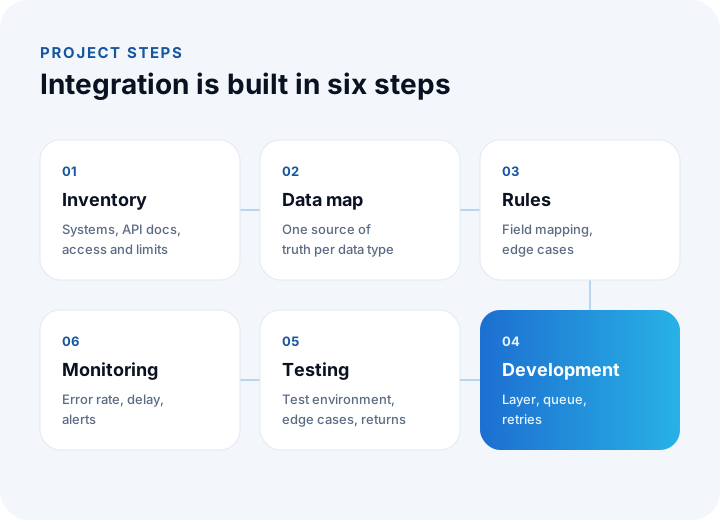
- System inventory: All software in use is listed, along with whether each has an API, its API documentation, access permissions and usage limits.
- Data map: For each data type such as product, customer, order, stock, price and invoice, the master source system is determined. The question "Where is the truth about stock?" should have a single answer.
- Field mapping and business rules: The counterparts of category, unit, tax rate, status and address fields in one system are defined in the other. What happens when missing or mismatched data arrives is tied to a rule.
- Development: The integration layer is written; requests, responses, retries and error logs are managed in this layer.
- Testing: It is tried first in the other systems' test environments, then with real data in a limited scope.
- Launch and monitoring: After the integration goes live, transaction counts, error rates and delays are monitored; when a problem occurs, the team knows before the customer does.
We recommend reading: Our software development process: step by step from analysis to launch
What Problems Are Common in API Integration?
What makes integration hard is not establishing the connection but managing what happens when things go wrong. The other system may slow down, its rules may change or it may send unexpected data. The most common problems and how to approach them are as follows:
Rate limits
Most APIs limit how many requests they accept in a given time. An integration trying to update the stock and price of thousands of products at once hits this limit and its requests are rejected. The solution is to put requests in a queue and send them at a speed that stays under the limit, and to transfer only the data that has changed.
The other system not responding
No system is up at every moment. When the other side fails to respond briefly, data must not be lost. In a setup that uses a message queue, the failed transaction is held and retried at intervals; a transaction that still cannot be completed after retries goes to an error list and the responsible person is notified.
The same operation performed twice
When a request whose response was lost to a network interruption is sent again, the same order may be created twice or the same invoice issued twice. To prevent this, every operation is marked with a unique ID and the system does not process an ID it has already processed. In technical terms this property is called "idempotency".
API version changes
Marketplaces, carriers and other service providers update their APIs from time to time and shut down old versions after a certain date. An integration that does not follow these announcements can stop working one morning. Maintenance of an integration should include following the other systems' announcements and planning version transitions.
Data mismatch
What is a "unit" in one system may be a "package" in another, and the category tree of one system can be completely different from another's.
What to Watch for in API Integration Security?
An integration is a door that opens your company's data to outside systems; the keys and records of this door must be managed strictly. The basic security principles are:
- Do not keep keys in code: API keys and passwords are written into encrypted settings areas, not into source code, and only authorized people can access them.
- Least privilege: The integration is given permission only for the operations it needs; a connection that only reads orders should not have permission to delete products.
- Encrypted connection: All data exchange takes place over HTTPS; unencrypted connections are not accepted.
- Webhook verification: That notifications sent to you really come from the relevant system is verified with a signature or secret key; a request that cannot be verified is not processed.
- Protecting personal data: Personal data such as customer name, address and phone number is transferred only to the systems that need it, is not kept in plain form in logs, and is processed in line with KVKK (Turkey's personal data protection law) obligations.
- Logging and monitoring: Which request was made when and with what result is recorded; unusual activity generates alerts.
When Do You Need API Integration?
If you are typing the same data into several screens by hand, your need for integration has already begun. If two or more of the signs below apply to you, it is time to prioritize integration:
| Sign | Recommended integration |
|---|---|
| Marketplace orders are typed one by one into another system | Marketplace and order integration |
| A product that sells out on one channel keeps selling on the others | Central stock integration |
| Shipping labels are taken by hand from the carrier's panel | Shipping integration |
| Invoices are issued separately by looking at orders | e-Invoice, e-archive and accounting integration |
| The sales report is merged from different files every month | Data integration and reporting |
| When a quote is approved, the order is re-entered into the ERP | CRM and ERP integration |
| Dealers send their orders by phone and email | B2B portal and ERP integration |
We recommend reading: E-commerce software: with marketplace, shipping and payment integrations
We recommend reading: What Is E-Invoice Integration and How Is It Done? A Guide for Orders, ERP and Accounting
What Is Marketplace Integration? A Guide to Managing Products, Stock and Orders in One Place
We recommend reading: What Is Custom Software? Types, Examples, Advantages and Which Businesses It Suits
We recommend reading: What Is Shipping Integration and How Is It Done? A Guide to Shipments, Labels and Tracking for E-commerce
We recommend reading: What Is Business Process Automation? Which Process to Automate First and How to Calculate Savings
We recommend reading: How to choose a CRM: criteria, scoring, cost and demo guide
We recommend reading: What is help desk software? Ticket life cycle, priority matrix, SLA compliance and team sizing guide
We recommend reading: How to secure an API: authentication, authorization, tokens and rate limiting
We recommend reading: What is low-code? Limits, risks and cost of low-code development
Recommended reading: What is a customer portal? Self-service scope, security and payback guide
Recommended reading: What is microservices architecture? Monolith difference, cost and decision guide
Recommended reading: CRM vs ERP
Recommended reading: How to Choose a Database?
API Integration with İnovabil
At İnovabil we treat integration not as a one-time connection job but as the job of designing your company's data flow. We start the project with a system inventory and a data map, and determine the single source of truth for each data type together with you. Then we build the integration layer with an error queue, retries, logging and monitoring.
In our own products we have developed integrations with channels such as Trendyol, Hepsiburada, n11, Amazon, Etsy, AliExpress, Ozon, ÇiçekSepeti and Shopify. .NET and ASP.NET Core, REST and SOAP services, message queues with RabbitMQ and MassTransit, and monitoring with Prometheus are among the technologies we use in these projects; depending on the need, we also work with Node.js and other open-source technologies. In the Kredili Kargo project, we developed the prepaid shipping system for Sürat Kargo.
If you are tired of moving data between marketplaces, carriers, e-invoicing, banks, ERP, CRM or systems you built yourself, tell us in a few sentences which systems you use and where manual work happens, and we will prepare a custom integration roadmap for you.
Frequently Asked Questions
What is API integration, in short?
API integration is two or more pieces of software connecting through interfaces called APIs and exchanging data automatically.
Does my software need an API for integration?
The healthiest route is to connect through an API. For older systems without an API, integration can be built with methods such as a database connection or regular file transfer (CSV, XML, Excel); which method is suitable is determined during the analysis phase.
What is the difference between a REST API and a SOAP API?
REST is a lighter approach that treats every resource as an address and usually uses JSON; most modern services offer REST. SOAP is an XML-based method whose rules are strictly defined by a contract, and it is common in banking, the public sector and older enterprise systems.
How long does an API integration take to complete?
The duration depends on the number of systems to be connected, the quality of the API documentation and the complexity of the business rules. At the end of the analysis phase, each integration is planned as a separate work item and brought live piece by piece, starting with the connection that involves the most manual work.
Is maintenance needed after an integration is built?
Yes. Marketplaces, carriers and other services update their APIs from time to time and shut down old versions. The maintenance scope of the integration should be planned from the start so that these changes are monitored, error logs are followed and new business rules can be added.