

ERP projects usually go wrong at the selection stage, not in the software. The demo is impressive, the price looks reasonable and the references shine; but six months later the production recipes do not fit the program, the team has gone back to the old spreadsheet, and the project lives under the question "how much longer will this take?" Choosing an ERP is not about finding the program with the most modules; it is about choosing the structure that will run your own processes with the least adaptation, together with a rollout plan to match.
In this guide we explain how to draw a process map before choosing, which module to start with, which criteria to look at, how to watch a demo with your own scenarios, how to calculate the payback time, why an implementation can fail and whether to go live in one go or in phases. If you are not sure what an ERP is, start with our what is ERP guide. Example figures are illustrative.
How Do You Choose an ERP Program?
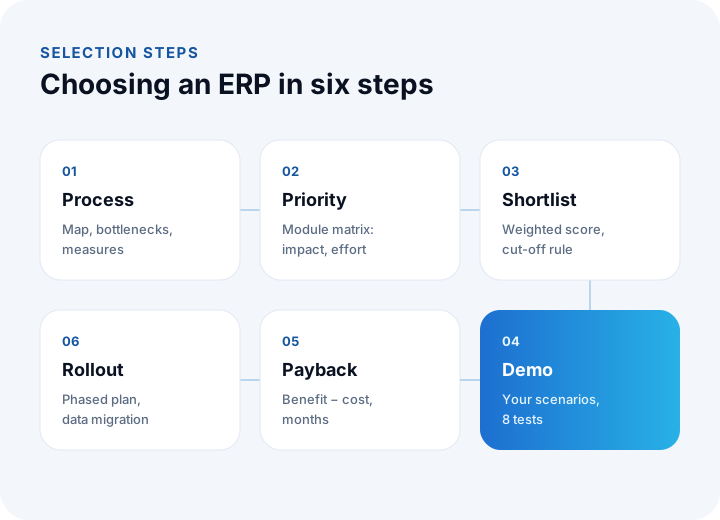
In six steps: draw the process map and measure the bottlenecks, set module priorities, eliminate candidates against criteria, watch the demo with your own scenarios, calculate the payback time and decide the rollout plan.
We recommend reading: ERP software: recipes, MRP, production, costing and stock in one system
How Do You Draw a Process Map Before Choosing?
A process map shows which steps a piece of work passes through from start to finish, whose hands it goes through and which tools it uses. The most common map is the order flow: taking the order, checking stock and production, shipping, invoicing and collection.
At each step, note three things: who does it, in which tool, and how long it takes. If the same data is typed into two places by hand, that step is a bottleneck candidate. Identify bottlenecks by measurement, not by guesswork:
| Measure | How to measure | What it shows |
|---|---|---|
| Order entry time | How many minutes does it take to receive an order and enter it into the system? | The load of manual data entry |
| Stock accuracy | Of the items counted, how many match between system and shelf? | Reliability of stock |
| On-time delivery | What share of orders ships on the promised date? | Health of planning and production |
| Cost visibility | In how many days do you learn a product's real cost? | Delay in reporting |
| Report preparation time | How many hours does it take to assemble the monthly report? | How scattered the data is |
These measures are also the baseline against which you will later judge the ERP's success. To be able to say "it used to take 12 minutes, now it takes 3," record today's figures.
Which Module Do You Start With? An Impact and Effort Matrix
Instead of building everything at once, start with the module whose impact is high and whose setup is relatively easy. Score each module with two questions: how much does it help solve the bottleneck, and how hard is it to set up?
| Module | Impact | Effort | Suggested order |
|---|---|---|---|
| Stock and warehouse | High | Medium | Usually the first step; the data base for other modules |
| Sales and shipping | High | Medium | Together with stock; the order flow speeds up |
| Purchasing | Medium | Low | Can be added early; supply visibility improves |
| Bill of materials and MRP | High (in manufacturing) | High | After the recipes are verified |
| Production and work orders | High (in manufacturing) | High | Once stock and recipes are settled |
| Costing | High | Medium | If recipe and production data are reliable |
| Finance and accounting link | Medium | Medium | With your financial advisor (certified accountant), in a separate phase |
For a business that does no manufacturing, the recipe and MRP rows drop out; for a trading and distribution business, stock, sales and purchasing are the core of the first phase.
Which Criteria Matter When Choosing an ERP?
Eight criteria decide most ERP choices. Compare candidates with a weighted score: give each criterion an importance weight, give each candidate 1-5 points, multiply and add (we explained the method with an example in our pre-accounting software selection article).
| Criterion | Question to ask |
|---|---|
| Process fit | Can your own order, production and shipping flow be set up directly in the program, or is your process bent to fit the program? |
| Module depth | Are the modules critical to you, such as recipes, MRP, work orders and costing, shallow or detailed? |
| Adaptability | How easy is it to add fields, screens, approval flows and reports? How long does a change that needs code take? |
| Integration | Are there links to marketplaces, e-commerce, e-invoice, shipping, banks and your current systems? Does it offer an open API? |
| Reporting | Are the reports you need ready-made, or can you define them yourself? |
| Ease of use | How soon can the user in the field, the warehouse and the office work with the program after training? |
| Scalability | How do performance and cost change as users, warehouses, companies and transactions grow? |
| Support and sustainability | What are support, updates and the roadmap like after implementation? Can you export your data? |
How Do You Watch a Demo with Your Own Scenarios?
Do not leave the demo to the vendor; run it yourself. A demo the vendor prepared shows what the ERP does best; your hard scenarios are not in the prepared flow.
Prepare eight scenarios in advance and ask the vendor to run them with examples close to your own data:
- Follow the order → stock check → shipping → invoice flow from start to finish.
- Enter an order for a product that is out of stock and see how the system produces a production or purchasing suggestion.
- For a product with a recipe, have it calculate material requirements (MRP) and the cost including scrap.
- Open a work order, and record the raw material consumption and the completion of production.
- Enter a return or cancellation and verify that stock, account and invoice movements correct together.
- Define a report from scratch (for example profitability by customer) and see how long it takes.
- Add an approval flow (a purchase above a certain amount goes to approval) and ask whether code is needed.
- Connect external data: see how an integration such as a marketplace order or e-invoice sending works.
How Is the Payback Time of an ERP Calculated?
Payback time shows in how many months the upfront investment is covered by the monthly net benefit. A simple model is enough for the decision.
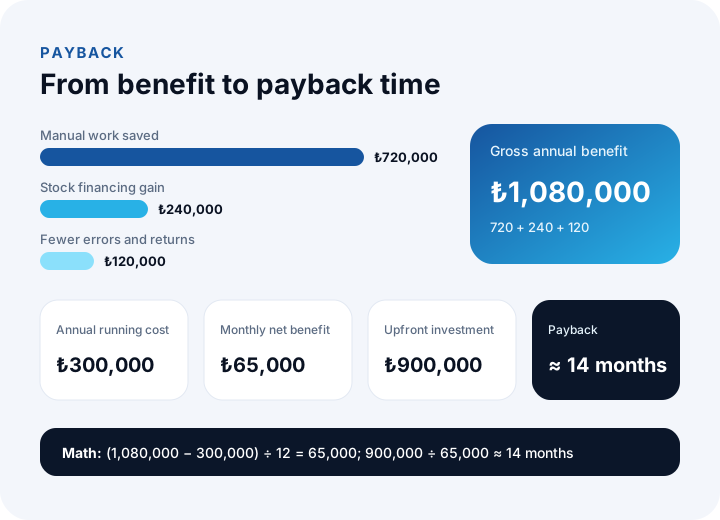
Example (illustrative figures): the team's manual work falls by 200 hours a month at ₺300 an hour; in a business with ₺4,000,000 of stock, stock falls 15% and the freed cash carries an annual financing cost of 40%; wrong shipments and returns save ₺120,000 a year.
| Item | Calculation | Annual benefit |
|---|---|---|
| Manual work saved | 200 h × ₺300 × 12 | ₺720,000 |
| Financing gain from lower stock | ₺4,000,000 × 15% × 40% | ₺240,000 |
| Fewer errors and returns | Estimate | ₺120,000 |
| Gross annual benefit | ₺1,080,000 |
If the annual running cost (license, upkeep, infrastructure) is ₺300,000 and the upfront investment (implementation, data migration, training and the first year's license) is ₺900,000, the monthly net benefit is (1,080,000 − 300,000) ÷ 12 = ₺65,000, and the payback time is 900,000 ÷ 65,000 ≈ 14 months.
Feed the benefit items with the measures from the first section, not with guesses; do not write an assumption such as "stock falls 15%" into the budget without measuring anything. The more solid the figures, the more defensible the decision.
Why Do ERP Implementations Fail, and How Can You Prevent It?
Failure often comes from data, people and scope rather than the software. Six risks appear in most projects:
| Risk | Why it happens | Prevention |
|---|---|---|
| Dirty data | Product, recipe, customer account and stock data is migrated without cleaning | Cleaning before migration and a trial migration; a stock count |
| User resistance | The team does not take part and the program is seen as "management's job" | Involve users in analysis and the demo; name an owner in each department |
| Scope creep | Every department adds its own wishes and the timeline stretches | A phase plan; new requests go into the next phase |
| Installing software without changing the process | A broken process is carried into the software | Simplify the process first, then program it |
| Dependence on one person | Knowledge stays with one individual | Documentation, a backup owner, spreading it through training |
| Vague success measure | "Does it work?" stays subjective | Write the measures from the first section down together with targets |
We recommend reading: What is the software development life cycle (SDLC)?
Do You Go Live in One Go or in Phases?
For most mid-sized businesses a phased rollout is safer; going live in one go should be considered only when processes are simple and the data is clean.
| Method | How it works | Upside | Watch out for |
|---|---|---|---|
| All at once | All modules go live together on a set date | Short total time; a single cutover | High risk; errors appear everywhere at the same time |
| Phased | Moving module by module or unit by unit | You learn as you go; risk is spread | Old and new systems live side by side during the transition |
| Parallel run | Old and new systems run together for a while and figures are compared | Errors are caught early | The team does double work; keep the period short |
An example order for a phased rollout: stock and warehouse, then sales and shipping, then purchasing, and last recipes, MRP and production. At the end of each phase, the measures are retaken and the result feeds the next phase.
Off-the-Shelf ERP, Adapted ERP or Custom ERP?
If your processes are standard, an off-the-shelf ERP; if they are partly unique, an adapted one; if your competitive advantage lies in your process, a custom ERP. The difference between the three is how much of the change stays within the package's limits.
| Route | When it suits | Risk |
|---|---|---|
| Off-the-shelf ERP | Processes are close to the industry standard and a quick setup is wanted | Your process is bent to fit the package |
| Adapted ERP | Most processes are standard, a few are unique | Adaptations can clash with updates and upkeep gets complicated |
| Custom ERP | Your production, costing or order flow is unique; several systems must be joined in one flow | High upfront investment and needs a good analysis |
We recommend reading: Off-the-shelf or custom software? A decision guide
How Do You Plan Data Migration into an ERP?
Data migration is the most under-budgeted job in ERP projects. The main items to move are product cards, recipes, customer accounts, stock and opening balances.
- Take an inventory: Which data sits in which file and system, how many records, and how current?
- Clean it: Weed out duplicate accounts, unused products and wrong units before migrating.
- Set a coding scheme: Without a coding rule for products and accounts, migration creates new confusion.
- Run a trial migration: Load a small slice into a test environment first and compare the results with the old records.
- Set a cutoff date: Take opening stock and balances on a set date, with a count and your financial advisor's approval.
We recommend reading: What Is Digital Transformation? A Maturity, Roadmap and Payback Guide for Small and Mid-Sized Businesses
We recommend reading: How to choose a CRM: criteria, scoring, cost and demo guide
We recommend reading: What is procurement software? Process, approval matrix, quote scoring and three-way matching guide
We recommend reading: What is shipment planning software? Routes, vehicle load and proof of delivery
Recommended reading: CRM vs ERP
Recommended reading: What Is a Barcode System and How Do You Set One Up?
Recommended reading: Cloud vs On-Premise Software
ERP Selection and Development with İnovabil
At İnovabil we treat an ERP not as a one-size-fits-all package but as the design of a business's order, production, stock, costing and finance flow. At the selection stage we draw out your process map and measures together with you and state clearly what an off-the-shelf solution can and cannot cover. When a custom ERP is needed, we set up the modules for recipes, MRP, production and work orders, costing, stock, purchasing, sales and shipping, quality, finance and maintenance around your needs.
We have built operations software such as warehouse management (WMS) for Sleepy, logistics and shipment planning for Karyak and shipment planning for Bofigo, and the experience we gained in customer account, stock, cash, bank and e-invoice processes in NetKasam carries into our ERP projects. Describe your current process and bottlenecks in a few sentences, and we will first send you an ERP roadmap in writing.
We recommend reading: Our software development process: step by step from analysis to release
Frequently Asked Questions
What should you do first when choosing an ERP program?
Before looking for a program, draw the process map and measure the bottlenecks: order entry time, stock accuracy, on-time delivery and cost visibility. These measures are both the yardstick for selection and the baseline against which you later judge success.
Which module should you start with in an ERP?
Start with the module whose impact is high and whose setup is relatively easy; in most businesses that is stock, warehouse, sales and shipping. Recipes, MRP and production are added once stock and recipe data have become reliable.
How is the payback time of an ERP calculated?
The upfront investment is divided by the monthly net benefit, and monthly net benefit is found by subtracting annual running cost from gross annual benefit and dividing by 12. Feed the benefit items with measured data, otherwise the calculation stays an optimistic guess.
Why do ERP projects fail?
The most common causes are uncleaned data, users who do not take part, scope that keeps growing and software installed before the process is fixed. A phased rollout, trial migration and measurable targets reduce these risks.
What do you do if an off-the-shelf ERP is not enough?
If your production, costing or order flow is unique and several systems must be joined in one flow, an adapted or custom ERP is considered. Which one fits is decided after an analysis based on your process map and measures.