

Software used to come in a box. You installed it on the company's computers and used the same version for years. Today most email, accounting, CRM and e-commerce software opens in a browser, is paid for monthly or yearly and updates itself without you noticing. This model is called SaaS, short for Software as a Service. In this guide we explain what SaaS is, how it works and, if you want to build your own SaaS product, which steps you need to go through.
We wrote this for two readers. A business thinking about using a SaaS product will find how it differs from installed software and what to look out for. An entrepreneur or company planning to build a SaaS product will find multi-tenant architecture, the subscription layer, the metrics that matter with worked examples and a six-step development roadmap.
What Is SaaS?
SaaS (Software as a Service) is a software delivery model in which the software runs on the provider's servers, users access it over the internet and usually pay by subscription. Installation, hosting, backups, security and updates are the provider's responsibility.
On the user's side, all that is needed is a browser or mobile app and an internet connection. The company does not buy servers, install software or launch a project to upgrade versions. When the number of users grows, the subscription grows with it; when it shrinks, so does the subscription. Familiar examples include cloud email and office suites, CRM software, online accounting tools and e-commerce platforms such as Shopify.
SaaS is not only a technical architecture but also a business model. Revenue comes from recurring subscriptions rather than one-off licence sales, and that changes the economics for both the people who use the software and the people who build it.
Recommended reading: Our web development service: from corporate websites to SaaS products
What Is the Difference Between SaaS, PaaS and IaaS?
All three are cloud service models; the difference is how much responsibility stays with the provider. With IaaS you get only the infrastructure, with PaaS you get the infrastructure plus an environment to run applications, and with SaaS you get the complete software ready to use.
| Model | What you get | What you manage | Who it suits |
|---|---|---|---|
| IaaS (Infrastructure as a Service) | Virtual servers, storage, networking | Operating system, database, application, updates | Technical teams that want to run their own infrastructure |
| PaaS (Platform as a Service) | Application runtime, managed databases | Your application's code and data | Teams building their own software |
| SaaS (Software as a Service) | Ready-to-use software | Users, settings and the data you enter | Businesses that want to use software |
An analogy: IaaS is renting an empty plot of land, PaaS is a building with the structure in place, and SaaS is a furnished office with services included. A company building a SaaS product usually runs it on top of IaaS or PaaS.
What Is the Difference Between SaaS and On-Premise Software?
On-premise software runs on the company's own servers and is usually bought with a one-off licence; SaaS runs on the provider's servers and is used by subscription. That basic difference affects everything from cost and updates to data and customization.
| Topic | On-premise software | SaaS |
|---|---|---|
| Upfront cost | Licence, servers and installation | Low; starts with a subscription |
| Ongoing cost | Maintenance contract, hardware refresh, IT staff | Subscription per user or per plan |
| Time to start | Weeks or months | Ready as soon as the account is created |
| Updates | Through upgrade projects | Continuously, by the provider |
| Access | Mostly from the company network | Anywhere with an internet connection |
| Data | On the company's own servers | On the provider's infrastructure, as defined in the contract |
| Customization | Deep customization possible | Limited to the product's settings and integrations |
Recommended reading: Off-the-shelf or custom software? A decision guide
How Does SaaS Work?
A SaaS product runs on a multi-tenant architecture in which a single application serves many customers at once. Each customer's data is isolated from the others, while subscriptions, billing, updates, security and monitoring are run centrally for everyone.
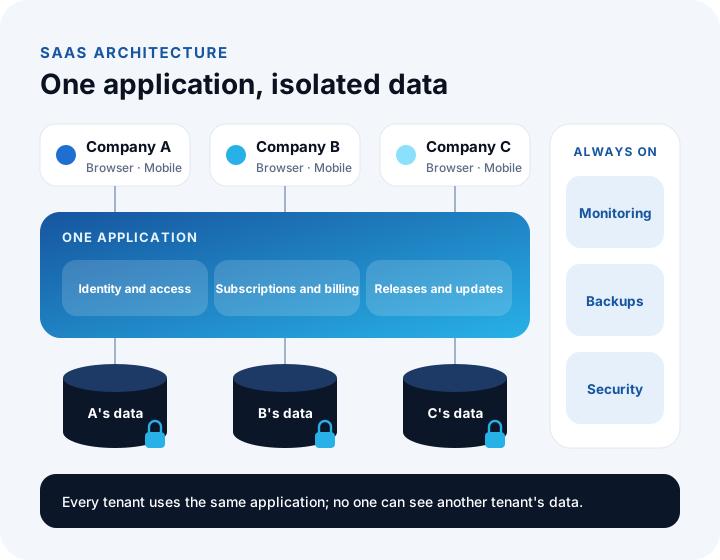
Multi-tenant architecture
In SaaS, each customer company is called a tenant. All tenants use the same application but can never see each other's data. There are three common ways to separate tenant data, each with a different balance of cost, isolation and maintenance:
| Approach | How it works | Advantage | Drawback |
|---|---|---|---|
| Shared database, shared tables | Every record carries a tenant ID | Lowest cost, easy updates | Isolation depends entirely on the code |
| Shared database, separate schemas | Each tenant has its own set of tables | Stronger isolation | Schema changes are repeated for every tenant |
| Separate database per tenant | Each tenant lives in its own database | Strongest isolation, per-tenant backups | Highest infrastructure and operating cost |
Many products take a hybrid path: smaller customers share the common structure while large enterprise customers get their own database. Decide which approach to use in the product's early days, based on your customer profile and regulatory requirements; changing it later is expensive.
Subscriptions and billing
The subscription layer manages plans, trial periods, payment methods, renewals, upgrades and downgrades, retries for failed payments and invoicing. Rules such as prorating the remaining days when a customer changes plan mid-cycle also live here.
Identity, access and user management
Each tenant invites its own users, assigns their roles and manages their permissions. Enterprise customers usually want single sign-on (SSO) with their company accounts. The access model controls both access between tenants and access within a tenant.
Updates, monitoring and backups
Because every customer runs the same version, an update reaches everyone at once. That is why new features are first released to a limited group of users, error rates are watched and, if all is well, the feature is rolled out to everyone. The system is monitored continuously so the team knows about an outage, slowdown or error before customers do. Backups are taken regularly and restores are rehearsed regularly too.
Which Metrics Matter in a SaaS Business?
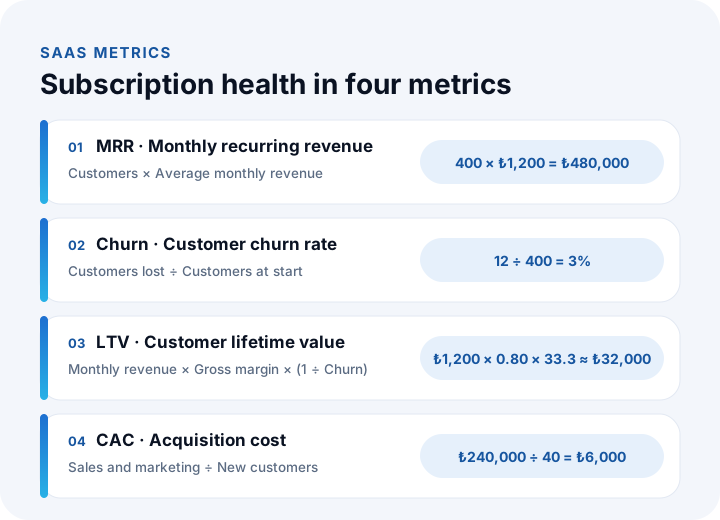
The health of a SaaS business is measured not by one-off revenue but by recurring revenue, customer churn, customer lifetime value and customer acquisition cost. In the example below we calculate a SaaS product with 400 customers paying an average of ₺1,200 per month. Figures are illustrative.
| Metric | Formula | Worked example |
|---|---|---|
| MRR (monthly recurring revenue) | Number of customers × Average monthly revenue per customer | 400 × ₺1,200 = ₺480,000 |
| ARR (annual recurring revenue) | MRR × 12 | ₺480,000 × 12 = ₺5,760,000 |
| Churn (customer churn rate) | Customers lost in the period ÷ Customers at the start of the period | 12 ÷ 400 = 3% (monthly) |
| Average customer lifetime | 1 ÷ Monthly churn | 1 ÷ 0.03 ≈ 33.3 months |
| LTV (customer lifetime value) | Average monthly revenue × Gross margin × Customer lifetime | ₺1,200 × 0.80 × 33.3 ≈ ₺32,000 |
| CAC (customer acquisition cost) | Sales and marketing spend ÷ New customers | ₺240,000 ÷ 40 = ₺6,000 |
| LTV / CAC | LTV ÷ CAC | ₺32,000 ÷ ₺6,000 ≈ 5.3 |
The story this table tells is simple: you spend ₺6,000 to win a customer, and that customer leaves ₺32,000 of gross profit over their lifetime. If the LTV/CAC ratio drops below 1, every new customer loses the company money. A small rise in churn cuts customer lifetime, and therefore LTV, quickly: when monthly churn rises from 3% to 5%, average lifetime falls from 33 months to 20.
Recommended reading: What is business intelligence? From data to decisions
What Are the Main SaaS Pricing Models?
SaaS products are most often priced with four models: per user, tiered plans, usage-based and freemium. The right model is the one that lets what customers pay grow together with the value they get from the product.
| Model | How it works | Best suited to | Watch out for |
|---|---|---|---|
| Per user | A monthly or annual fee for each user | Team software whose value grows with the number of users | Customers may share logins to keep costs down |
| Tiered plans | Starter, standard and enterprise plans with different features and limits | Products serving customers of different sizes | Differences between tiers must be clear; too many tiers create indecision |
| Usage-based | Pay per transaction, document, order or data volume | Infrastructure and integration products whose value is measured in volume | Caps and alerts are needed so customers can predict their monthly bill |
| Freemium | Core features free, advanced features paid | Products that need to spread quickly to a wide audience | Track the infrastructure cost of free users and the free-to-paid conversion rate |
Models are often combined: each tier includes a user or transaction limit, and usage beyond the limit is charged on top. Offering a discount for annual payment strengthens cash flow and reduces churn. You don't need perfect pricing on day one, but you should decide up front how price changes will apply to existing customers.
How Do You Build a SaaS Product?
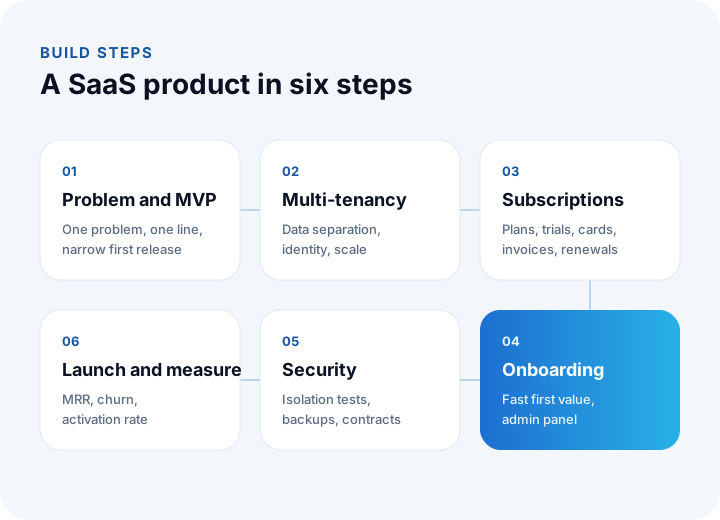
A SaaS product is built in six steps: the problem and first-release scope, multi-tenant architecture, the subscription and payment layer, an onboarding flow that gets users to value from day one, security and compliance, and finally launch and measurement. Each step relies on the decisions made in the one before.
- Problem and first release (MVP): Write down in one sentence which customer's problem you solve. Put only the features that solve that problem into the first release and leave the rest to later releases driven by customer feedback.
- Multi-tenant architecture: Decide how tenant data will be separated, how identity and access will work and how the product will scale. These are the most expensive decisions to change later.
- Subscriptions and payments: Set up plans, trial periods, monthly and annual pricing, recurring card billing, the failed-payment flow and automatic invoicing.
- Onboarding and admin panel: Make sure a new customer sees their first valuable result as soon as possible after signing up. Build an admin panel for the team running the product too, showing tenants, subscriptions and support requests.
- Security and compliance: Encrypted connections, tenant isolation tests, access logs, regular backups and restore drills, privacy notices and data processing agreements.
- Launch and measurement: Launch with a limited group of customers, track MRR, churn, activation rate and support requests, and update the roadmap based on the data.
Recommended reading: How to do software requirements analysis: a training guide with templates
What Should You Watch Out for When Selling SaaS in Turkey?
A SaaS product sold in Turkey needs to solve four things from the start: recurring payment collection, an invoice for every billing period, personal data protection and the currency of its pricing.
- Recurring payments: Storing a card and charging it automatically each period requires a payment provider that offers this service. Card details are never kept in the product's own database; the provider's secure vault is used instead.
- Invoicing: An invoice has to be issued to the customer at every renewal. Integrating the subscription layer with the e-invoice or e-archive invoice system prevents hundreds of invoices being issued by hand at the start of each month.
- Personal data (KVKK): A SaaS provider processes the personal data customers enter into the product on their behalf, so it acts as a data processor. Data processing agreements, where data is stored and transfers abroad should be clarified with a legal adviser.
- Currency: Domestic customers can be offered prices in Turkish lira and international customers in foreign currency. How exchange-rate changes affect existing subscriptions should be spelled out in the contract.
Recommended reading: What is API integration? Payments, e-invoicing and other integrations
What Are the Most Common Mistakes When Building a SaaS Product?
Most SaaS products struggle not because of technology but because the business model and customer journey were designed wrongly. The most frequent mistakes are:
- Putting everything into the first release: Launching late delays learning what customers will actually pay for.
- Leaving multi-tenancy for later: Turning an application written for one customer into a multi-tenant one later is close to rewriting the product.
- Ignoring churn: Focusing on new customers without asking why existing ones leave is like filling a bucket while the hole keeps getting bigger.
- Neglecting onboarding: Customers who don't see value in the first days leave before the trial ends.
- Running subscriptions by hand: When renewals, failed payments and invoices are tracked manually, errors grow with the customer base.
- Postponing monitoring and backups: An outage or data loss affects every customer at once.
We recommend reading: How to Build a Mobile App: A Step-by-Step Guide from Idea to Store Launch
We recommend reading: What Is Custom Software? Types, Examples, Advantages and Which Businesses It Suits
We recommend reading: Mobile App Development Cost: A Guide to Effort, Scope, MVP and Three-Year Total Cost
We recommend reading: What Is a Software Maintenance and Support Agreement (SLA)? Scope, Response Times and Fees
We recommend reading: What is low-code? Limits, risks and cost of low-code development
Recommended reading: What is microservices architecture? Monolith difference, cost and decision guide
Recommended reading: How to Choose a Database?
Recommended reading: Cloud vs On-Premise Software
Recommended reading: What Is a Web Application?
Building a SaaS Product with İnovabil
At İnovabil we don't just build SaaS; we run it every day with our own products. Our cloud accounting software NetKasam and our multilingual e-commerce platform Shopiyz both run as SaaS products serving many customers from a single application. Multi-tenant architecture, subscription and payment infrastructure, e-invoice integration, monitoring and release management are everyday work for us, not theory.
If you are planning a SaaS product, we build it end to end: from product scope and architecture to the subscription layer and admin panel, the product website and the mobile app. Tell us your product idea and target customer in a few sentences, and we will prepare a SaaS roadmap tailored to you.
Frequently Asked Questions
What is SaaS, in short?
SaaS (Software as a Service) is a software model in which the software runs on the provider's servers, users access it over the internet and usually pay by subscription. Installation, hosting, updates and backups are the provider's responsibility.
Is SaaS the same as cloud software?
They are close but not the same. Cloud is the general name for infrastructure, platform and software services delivered over the internet; SaaS is ready-to-use software delivered from the cloud. Not every application running in the cloud is SaaS: a company running its own software on rented cloud servers is using IaaS.
Is my data safe in a SaaS product?
Security depends on the provider's infrastructure and contract. When choosing, check where data is stored, whether it is encrypted, how often it is backed up, whether access is logged and how you can take your data with you if you cancel.
What are MRR and churn?
MRR (monthly recurring revenue) is the number of customers multiplied by the average monthly revenue per customer. Churn is the share of customers who cancel in a given period relative to the customers at the start of that period. Together they show whether a SaaS product is growing.
How long does it take to build a SaaS product?
It depends on the product's scope, integrations and platforms. The healthy path is to launch with a first release that solves one problem and grow from customer feedback. After requirements analysis, a schedule broken into work items is produced, and the first working version can be seen before the project ends.