

One morning the server won't start, or someone accidentally deletes the orders table, or your files' extensions change and a ransom note appears. Three questions arrive at once: "Do we have a backup?", "How much can we get back?" and "How long will it take?" In many businesses the first answer is "yes" and the other two are met with silence, because taking a backup and being able to rely on it are different things. In this guide we answer how to back up business data step by step, using one example system, from deciding what to back up to testing a restore.
We built the guide like a short course: seven lessons, each with a concept, a worked calculation and an exercise. Our example system is the dealer portal's database: 200 GB of data, changing by about 3% a day. Figures are illustrative. If you commission, manage or run a software project, by the end you will also know which questions to put to your developer.
What Is Data Backup?
Data backup is keeping a separate copy of data, independent of the original, against loss, corruption, deletion or seizure, so the data can be brought back when needed. A backup's value is measured by how independent it is from the original.
Three things are often confused with backup. Disk mirroring (RAID) protects against a disk failing but deletes an accidentally deleted record everywhere at once. Real-time replication keeps the system running but quickly copies corrupted or encrypted data to the standby too. Cloud folder sync puts a file elsewhere, but when a file is deleted or encrypted that change is synced. All three provide continuity, but none lets you go back in time; a backup lets you return to a clean state at a specific moment.
Recommended reading: Our web development service: secure hosting, access control and audit logs
How Should You Use This Guide?
Follow the lessons in order; each uses the result of the previous one.
| Lesson | Topic | What you will be able to do |
|---|---|---|
| 1 | Data inventory and criticality | Decide what gets backed up and how often |
| 2 | RPO and RTO | Put acceptable data loss and downtime into numbers |
| 3 | The 3-2-1 rule | Decide how many backup copies go where |
| 4 | Backup types and storage | Choose between full, incremental and differential, and calculate storage |
| 5 | Protecting backups | Secure backups against ransomware and unauthorized access |
| 6 | Restore testing | Measure the real recovery time |
| 7 | Cost-benefit and a written plan | Justify the backup investment with numbers |
Lesson 1: How Do You Decide What to Back Up?
The first step is writing down what data the business has and what happens if it's lost: a data inventory. Not every piece of data is backed up equally often; critical data is backed up frequently and in a way that restores quickly, while easily recreated data is backed up rarely.
| Data | What happens if it's lost? | Criticality | Backup approach |
|---|---|---|---|
| Order, customer account and stock database | Work stops, records can't be recreated | Very high | Frequent backups with an extra location; fast restore |
| Invoices and financial documents | Legal retention duties, financial loss | Very high | Frequent backups, long retention (set the period with your accountant) |
| Customer and dealer documents | Loss of contracts and delivery records | High | Daily backup |
| Source code and configuration | The system can't be rebuilt | High | Version control and a separate backup |
| Log files | Loss of traceability | Medium | Weekly backup or a central log system |
| Temporary and cache data | Easily regenerated | Low | Usually not backed up |
The inventory shouldn't stop at the server: employees' spreadsheets, mailboxes and data in cloud services (accounting, CRM, e-commerce) face the same question: "If we lose this, what happens and what do we have to get it back?"
Lesson 2: What Are RPO and RTO and How Are They Calculated?
RPO (Recovery Point Objective) is the longest stretch of data you're willing to lose when an incident hits; RTO (Recovery Time Objective) is the longest time you accept between the incident and the system working again. Together they shape your backup strategy.
RPO reflects backup frequency: if you back up once a day, your RPO is 24 hours, because if the incident lands just before the backup, a day of data is lost. RTO reflects how fast restoring is: however long it takes to find the backup, build the server, restore the data and verify it, that is your RTO.
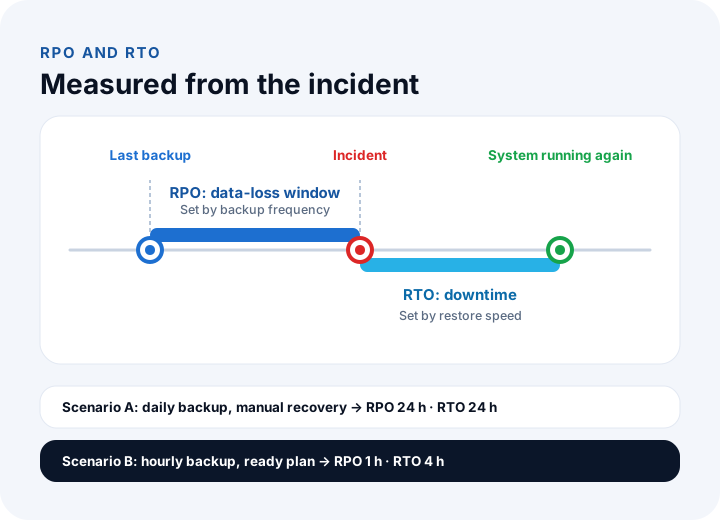
When setting targets, ask the business two questions: "How many hours of data can you afford to lose at most?" and "How many hours can the system be down at most?" The answer for the dealer portal may vary by time of day; a campaign morning isn't a Friday evening. In the example, assume the portal carries an average of ₺35,000 of orders per hour in working hours. Compare two scenarios:
| Scenario | RPO | RTO | Upper bound per incident: (RPO + RTO) × ₺35,000 |
|---|---|---|---|
| A: daily backup, manual recovery | 24 hours | 24 hours | 48 × ₺35,000 = ₺1,680,000 |
| B: hourly backup, ready recovery plan | 1 hour | 4 hours | 5 × ₺35,000 = ₺175,000 |
This is an upper-bound estimate: some lost orders can be retrieved from dealers, and some work can be postponed during an outage. But the difference in scale is clear: the same incident costs a prepared business roughly a tenth as much.
Lesson 3: What Is the 3-2-1 Backup Rule?
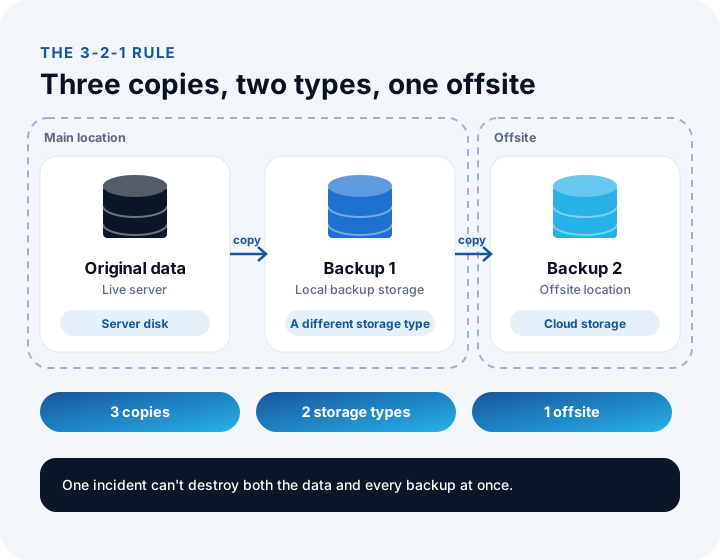
The 3-2-1 rule says: keep at least three copies of your data (the original and two backups), on two different types of storage, with one copy in a different location (another building, city or cloud). The aim is that a single incident can't destroy both the data and its backups.
| Rule | Meaning | Risk it covers |
|---|---|---|
| 3 copies | Original + two independent backups | One copy being corrupted or faulty |
| 2 different types | For example server disk and a separate backup storage or cloud | A failure or error affecting one kind of storage |
| 1 offsite | Another building, city or cloud region | Fire, flood, theft, building inaccessible |
A commonly used extension today is 3-2-1-1-0: one copy offline or immutable, and backups verified to restore with zero errors. The first addition guards against ransomware; the second makes you test a backup before you trust it.
Lesson 4: Which Backup Type Should You Choose and How Much Storage Do You Need?
The backup type decides what is copied each time: a full backup copies all the data, an incremental backup copies what changed since the last backup, and a differential backup copies what changed since the last full backup. The choice balances storage, backup time and ease of restoring.
| Type | What it copies | Storage and time | Parts needed to restore |
|---|---|---|---|
| Full | All data | Most space, longest time | One part; easiest |
| Incremental | Changes since the last backup (full or incremental) | Least space, shortest time | Last full + all incrementals in between |
| Differential | Changes since the last full backup | Medium space; grows each day | Last full + last differential; two parts |
In our example the data is 200 GB and changes 3% a day: daily change is 200 × 0.03 = 6 GB. Compare three strategies for four weeks (28 days) of retention. A full backup is taken on the first day of each week, with incremental or differential backups on the other six.
| Strategy | Calculation | 4-week storage |
|---|---|---|
| Full backup every day | 28 × 200 GB | 5,600 GB |
| Weekly full + daily differential | 4 × (200 + 6 + 12 + 18 + 24 + 30 + 36) = 4 × 326 | 1,304 GB |
| Weekly full + daily incremental | 4 × (200 + 6 × 6) = 4 × 236 | 944 GB |
The incremental strategy takes about a sixth of the space of a daily full backup (944 ÷ 5,600 ≈ 0.17). The 3-2-1 rule needs two backup copies, so storage doubles: 944 × 2 = 1,888 GB, about 1.9 TB. In practice compression and deduplication can cut this considerably, but calculate without them to know the upper bound you're planning for.
You pay for it at restore time: on the worst day with incrementals (the sixth), the last full backup and six incrementals, seven parts, must be restored in order, and if one link in the chain is bad, everything after it is unusable. With differentials, two parts always suffice. If your RTO target is short, choose differentials or more frequent full backups.
Recommended reading: What is SaaS? Who is responsible for backup and monitoring?
Lesson 5: How Do You Protect Backups from Ransomware and Unauthorized Access?
Backups can be targeted in ransomware attacks; a business with no backups is under more pressure to pay. So the security of the backup matters as much as the backup itself.
| Measure | What it provides | How it's applied |
|---|---|---|
| Separating the backup from the network | Even if an attacker gets into the main system, they can't reach the backup | Keep backup storage on a separate network, offline or in a different account |
| Immutable copy | The backup can't be deleted or changed for a set period | Storage with write-once or retention-lock features |
| Encryption | A stolen backup can't be read | In transit and at rest; keep the key apart from the backup |
| Separate credentials | The main system's password doesn't open the backup | A separate account for backup management, multi-factor authentication |
| Alerts and monitoring | A failed or incomplete backup is noticed immediately | A success report after every backup, an alert on a missing one |
Backups and personal data (KVKK)
Backups contain personal data too, so the protection duties that apply to the original data apply to backups. Watch out: the backup must be encrypted and access-controlled, retention periods must fit the purpose (including how expired data gets deleted from backups) and, if the backup sits in a cloud abroad, transfer rules must be respected. Consult your legal adviser for the legal detail. Restoring a backup with real customer data into a test environment is also a risk; use sample or anonymized data for testing.
Lesson 6: How Do You Run a Restore Test?
A restore test brings data back from backups to prove both that the backup is sound and what the real recovery time is. A backup that has never been tried is tried for the first time on the day of the incident, and if it turns out to be incomplete or corrupt then, it is too late.
- Pick a scenario: a realistic incident such as "the orders table was accidentally deleted", "the server was lost entirely" or "we need to return to last night's state".
- Restore to a separate environment: a test environment, without affecting the live system. If the backup contains real customer data, restrict access to the environment.
- Measure the time: from finding the backup until the system is running and checked. That is your real RTO.
- Verify the data: compare record counts, the latest order date and a few sample records with the source. A data restore doesn't prove the data is correct.
- Find the real RPO: the gap between the last record in the restored data and the incident time is what you actually lost.
- Record the findings: compare targets with reality, list gaps (a missing backup, an unknown password, an unwritten step) and fix them.
For example, if the target RTO is 4 hours and the test takes 7, that's a good finding: the problem surfaced on test day rather than incident day, so it can be fixed. Repeat the test at regular intervals (every three months, say) and after major changes.
Recommended reading: How to do software testing: from test cases to bug reports
Lesson 7: How Do You Justify the Backup Investment and Write a Backup Plan?
Better backup costs more; that cost is justified by comparing it with the reduction in the incident's expected annual cost: Expected annual loss = Annual probability of an incident × Cost per incident. The probability is an estimate, but writing the estimate down beats never calculating.
Take the two scenarios from Lesson 2. Assume a 20% chance per year of a serious incident (illustrative). The extra investment for scenario B (hourly backups, a second location, monitoring and a ready recovery plan) is ₺120,000 a year.
| Item | Scenario A (daily, manual) | Scenario B (hourly, ready plan) |
|---|---|---|
| Upper bound per incident | ₺1,680,000 | ₺175,000 |
| Expected annual loss (20%) | ₺336,000 | ₺35,000 |
| Extra yearly backup cost | - | ₺120,000 |
| Yearly total (loss + cost) | ₺336,000 | ₺155,000 |
Scenario B reduces the expected yearly total cost by ₺181,000 (336,000 − 155,000). Drop the probability to 5% and the decision flips: A has an expected loss of ₺84,000, B has ₺8,750 + ₺120,000 = ₺128,750, and the extra investment doesn't pay off. So the calculation matters less as a single right answer than as a way of showing which assumptions the decision rests on.
Write the backup plan as a document: scope, RPO and RTO per system, method (type, frequency, retention, copies and locations), security measures, responsibilities, test frequency and incident-day steps (whom to call, what to do in which order). The plan becomes binding with management's approval.
What Are the Most Common Data Backup Mistakes?
Backup mistakes usually stay invisible until incident day. The most frequent are:
- Never trying a restore: A backup job that looks successful doesn't mean a restorable backup.
- Keeping the backup in the same place as the original: A backup on the same server, in the same room or under the same account is lost in the same incident.
- Mistaking sync for backup: A deleted or encrypted file gets synced; any solution without a way back in time isn't a backup.
- Not encrypting backups or keeping the key beside them: A stolen backup is an open data leak.
- Leaving a cloud service's backup to the provider: The provider keeps the service running but may not guarantee restoring data you deleted yourself. Read the scope in the contract.
What Backup Questions Should You Ask Your Software Supplier?
If a company builds or runs your software, ask these at the quote stage and have the answers written into the contract: what are the target RPO and RTO; how many copies are kept, of which types and where; are backups encrypted, and who can access and delete them; how often is restoring tested and are results reported to you; how long are backups kept; is backup included in the maintenance fee?
Recommended reading: How to estimate software development cost: infrastructure and maintenance items
We recommend reading: What Is a Software Maintenance and Support Agreement (SLA)? Scope, Response Times and Fees
We recommend reading: How to secure an API: authentication, authorization, tokens and rate limiting
Recommended reading: What Is Role-Based Access Control (RBAC)?
Recommended reading: How to Choose a Database?
Recommended reading: Cloud vs On-Premise Software
Data Security and Backup with İnovabil
The software we build at İnovabil includes security components such as role-based access, audit logs and secure hosting within our service scope. We recommend clarifying your backup and restore expectations, meaning your data-loss tolerance, the downtime you can accept and where backups will be kept, together during requirements analysis, and adding them to the maintenance scope in writing.
Tell us in a few sentences what data your project will hold and how much loss or downtime you can absorb in an incident, and we will prepare a backup and security outline tailored to you.
Recommended reading: Our custom software development service
Frequently Asked Questions
How do you back up business data, and what are the steps?
First draw up a data inventory and set criticality; then set RPO and RTO targets, plan copies and locations with the 3-2-1 rule, calculate backup type and storage, encrypt backups and restrict access, test restores regularly and gather all of it in a written backup plan.
What is the 3-2-1 backup rule?
Keep at least three copies of the data (the original and two backups), on two different storage types, with one copy in a different location. The extended 3-2-1-1-0 adds one offline or immutable copy and verification that backups restore without errors.
What are RPO and RTO and how do they differ?
RPO is the longest stretch of data you can afford to lose and sets backup frequency. RTO is the longest time you accept between the incident and the system working again and sets restore speed. A daily backup means a 24-hour RPO.
Do cloud folder sync or RAID replace backup?
No. Both provide continuity but no way back in time: a file deleted by mistake or encrypted by ransomware is synced immediately and mirrored to the second disk. A backup is an independent copy that lets you return to a clean state at a specific moment.
How often should restores be tested?
At regular intervals, for example every three months, and after major changes to the system. The frequency depends on how critical the data is. Each test should measure real recovery time and data accuracy against targets, and gaps should be fixed.