

A purchasing clerk logs into the dealer portal and finds they can edit the price list. A warehouse employee can open invoices. A sales rep who left months ago still has an active account. This picture rarely comes from bad intent; it comes from permissions handed out one at a time, with nobody keeping track. Role-based access control (RBAC) brings order to this by attaching permissions to roles instead of to individual people.
In this guide we explain what role-based access control is, how it differs from ACLs and attribute-based models, the principles of least privilege and separation of duties, the six steps of role design, the role explosion problem, the user lifecycle, audit logs and regular access reviews. All example figures are illustrative; they are not measurements from a specific product or company.
What Is Role-Based Access Control (RBAC)?
Role-based access control is a permission model in which an application grants rights to roles that match job duties, not to users one by one. A user is assigned one or more roles and can only perform the actions those roles contain.
The model has four concepts: the user (a person or account), the role (a job duty such as "Dealer accountant"), the permission (a single action such as "view invoice") and the scope (which records the action applies to, for example only the user's own dealership). Authentication establishes who the user is; authorization decides what they may do. We cover API-level identity and tokens separately in our guide to securing an API; this article focuses on the role model inside a business application.
We recommend reading: Our custom software service
What Is the Difference Between RBAC, ACL and Attribute-Based Access Control?
The three models solve the same problem from different angles. An ACL looks at the resource, RBAC at the job duty, and an attribute-based model at the conditions. Most business applications use RBAC as the base and add attributes when scope is needed.
| Topic | ACL (access list) | RBAC (role-based) | Attribute-based (ABAC) |
|---|---|---|---|
| What is access tied to? | A list of people per resource | A role that matches a job duty | User, resource and context attributes |
| Management effort | Grows heavy as resources multiply | Bounded by the number of roles | Rules must be written and maintained |
| Flexibility | Very fine-grained control | Medium; scope needs an extra layer | High; region, amount or time conditions |
| Ease of auditing | Hard; lists are scattered | Easy; the role matrix is readable | Medium; combined rule effects need tracking |
| Typical use | File and folder sharing | Business apps, portals, ERP | Access that varies by amount or region |
In practice a hybrid works well: the role answers "what can they do?" and the attribute answers "on which records?" For example, a "Dealer order clerk" role can create orders, while a region attribute shows only the customers in that clerk's own region.
Why Is RBAC Needed? How Does It Change the Number of Assignments?
The reason is manageability. Granting permissions person by person becomes unmanageable as users and permissions multiply. In our illustrative example the portal has 50 users and 20 permissions.
- Individual assignment: 50 × 20 = 1,000 possible assignment decisions.
- Role-based: 6 roles × 20 permissions = 120 role-permission links, plus 50 user-role assignments = 170.
- Difference: 1,000 − 170 = 830 fewer records; 830 ÷ 1,000 = an 83% reduction.
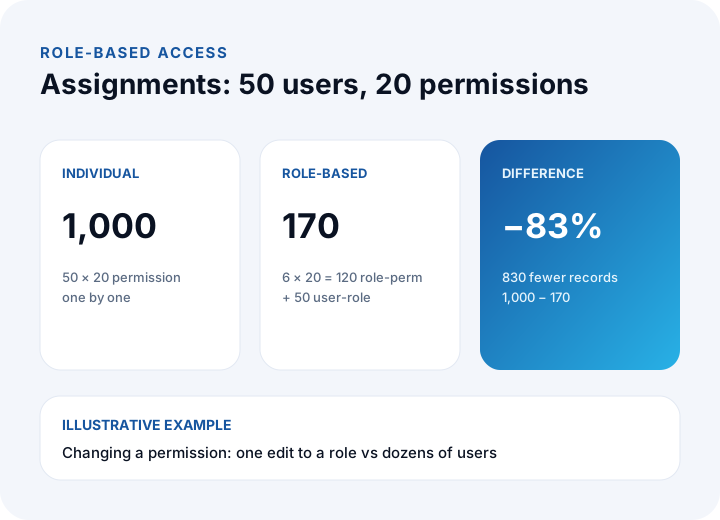
The real gain is less the count than the ease of change: when a permission has to be removed, the individual model means touching dozens of users, while the role model means editing one role definition. We describe multi-user dealer portals in our B2B e-commerce guide.
What Is the Principle of Least Privilege?
Least privilege means giving each user only the permissions needed to do their job; anything extra is risk. If an account is compromised, an action is made by mistake or an employee acts in bad faith, the damage is limited to what that account could do.
- Deny by default: What is not explicitly granted does not exist. A new role starts empty and permissions are added as needed.
- Separate read from write: Viewing a report is a different permission from changing a record.
- Keep the administrator role small: Keep fully privileged accounts as few as possible and do not use them for daily work.
- Time-bound access: Give temporary permissions an end date, or they quietly become permanent.
What Is Separation of Duties and Why Does It Matter?
Separation of duties means that no single person controls a risky task from start to finish. If the same person both opens and approves a request, an error or abuse can pass through without anyone seeing it.
The rule is simple: define the pairs of permissions that conflict and never give them together to one role or one user. Typical pairs are creating and approving an order, editing the price list and opening orders, preparing and approving a payment, and creating users and assigning permissions. In a review you then measure the number of users who hold a conflicting pair. We discuss approval-chain processes in our business process automation guide.
How Do You Design Roles? Six Steps
A good role model starts from jobs, not from screens. The six steps below work both for a new application and for cleaning up an existing system.
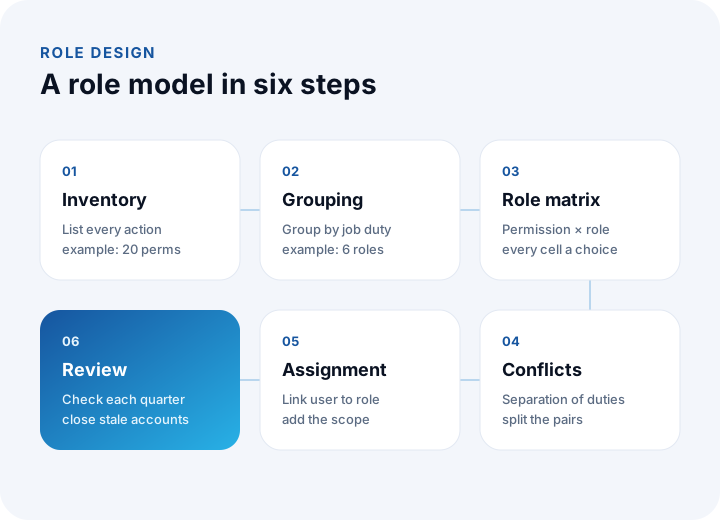
- Permission inventory: List every action in the application one by one (view order, download invoice, edit price). In our example this produced 20 permissions.
- Grouping: Bring together what people doing the same job need and name the roles. The example has 6 roles: Dealer owner, Dealer order clerk, Dealer accountant, Internal sales rep, Warehouse lead and System administrator.
- Role matrix: Draw a table with permissions in rows and roles in columns; every cell should be a deliberate decision.
- Conflict check: Mark the pairs that need separation of duties in the matrix and prevent them from combining in one role.
- Assignment: Link users to roles and add the scope attribute (dealership, region).
- Review: Re-check roles and assignments every three months.
| Permission (examples from the 20) | Dealer order clerk | Dealer accountant | Warehouse lead | Internal sales | System admin |
|---|---|---|---|---|---|
| Create order | Yes | — | — | — | — |
| Approve order | — | — | — | Yes | — |
| View invoice | — | Yes | — | Yes | — |
| Enter stock movement | — | — | Yes | — | — |
| Edit price list | — | — | — | — | — |
| Assign users and roles | — | — | — | — | Yes |
Notice what the matrix shows: the "Dealer order clerk" who creates orders cannot approve them (separation of duties), the system administrator cannot perform commercial transactions (least privilege), and the price list can be left to a separate "Price manager" role. To get requirements down to this level of detail, see our requirements analysis guide.
What Is Role Explosion and How Do You Prevent It?
Role explosion happens when a new role is created for every exception until the number of roles approaches the number of users; the model slides back into scattered individual permissions. It usually comes from baking conditions such as region, amount limit or customer into the role itself.
In an illustrative example, multiplying 6 base roles by 4 regions gives 6 × 4 = 24 roles, and adding three amount-limit tiers gives 24 × 3 = 72 roles. The same job can be done with 6 roles and two attributes (region and limit): the role says what a person does, the attribute says where and up to how much.
- Count roles regularly; if they exceed a third of the number of users, review the design.
- Flag single-person roles as exceptions and write down the reason.
- In a role hierarchy (a senior role inheriting a junior one), keep the inheritance simple.
- Name roles after the job, not after a screen.
How Do You Manage Access Across the User Lifecycle?
Most access problems appear at three moments in the user lifecycle: joining, changing jobs and leaving. Each one needs a written step.
| Moment | What happens | What to do | Typical mistake |
|---|---|---|---|
| Joiner | A new account is created | Assign a role that fits the job and nothing more | Copying another person's access "to be the same" |
| Mover | The user changes jobs | Remove the old role and add the new one | The old role stays and access piles up |
| Leaver | Employment ends | Close the account the same day and end sessions | The account stays open for months |
Accumulating access when people change jobs ("permission creep") is the sneakiest problem: a user who has moved twice carries the permissions of three roles at once. Assigning and removing roles should follow an HR or manager request through a defined process, not be left to one person's memory.
Where Should the Access Rule Be Enforced?
Every access check must be made on the server; hiding a button in the interface is only a usability choice. If the server does not check, someone who sends the request directly can perform the hidden action.
- Check on every request: Role and scope are verified on the server for each action; the state of the screen is never trusted.
- Central rule: Keep access logic in one layer; scattered screen-level checks create inconsistencies.
- Record scope: Even if the role allows the action, the user reaches only their own dealership's records. Typing someone else's record number should not work.
- Effect of changes: When a role changes, open sessions must also start working with the new access.
To verify these checks during testing, apply the scenario thinking from our software testing guide to access control: for each role, what it can and cannot do are separate test cases.
How Do Audit Logs and Regular Access Reviews Work?
An audit log records who changed which record and when, plus every permission change; an access review is the regular check of that data and of the assignments. They work together.
- What to record: Login attempts, role assignment and removal, access to sensitive records, deletions and bulk operations.
- Tamper resistance: Even an administrator should not be able to delete their own trail.
- Personal data: What the log holds and how long it is kept should be settled with your legal counsel under KVKK (Turkey's personal data protection law).
- Backup: Access and log data belong in the backup plan too; apply the RPO and RTO logic from our data backup guide.
A quarterly review yields four measures. In our illustrative portal with 50 accounts:
| Measure | Calculation | Result | Target |
|---|---|---|---|
| Stale accounts (no login for 90+ days) | 7 ÷ 50 | 14% | 0% |
| Users with more access than their job needs | 4 ÷ 50 | 8% | 0% |
| Users holding a conflicting permission pair | 2 ÷ 50 | 4% | 0% |
| Leaver accounts closed the same day | 2 ÷ 3 | 66.7% | 100% |
In this example, closing the seven stale accounts leaves 50 − 7 = 43 active accounts and shrinks the attack surface by 14%. The fourth measure (one of three leavers) is the most important finding: a departed person's open account is a hidden door.
What Are the Common RBAC Mistakes?
- Checking only in the interface: A hidden button is not an access check.
- Making everyone an administrator: Broad access "to make it work" breaks least privilege.
- Creating a role per person: A new role for every exception leads to role explosion.
- Copying access: Giving a newcomer "the same as the last person" carries over unneeded permissions.
- Forgetting leavers: If closing the account is not a written step, it stays open for months.
- Never reviewing: If roles are not looked at even once a year, they drift away from how jobs change.
- Keeping no audit log: When an incident happens, nobody knows who did what.
We recommend reading: What is a customer portal? Self-service scope, security and payback guide
Role-Based Access Control with İnovabil
At İnovabil our focus is software built from scratch for the individual company: custom software, ERP, CRM, e-commerce, web, mobile and integration. Among the recorded capabilities of the business applications we build are role-based permissions, audit logs and secure hosting. We recommend writing the role model down during requirements analysis, before any screen is drawn, so that the permission inventory, role matrix and separation-of-duties rules are clear from the start.
We have built CRM, purchasing and mobile for Avcılar İnşaat; a purchasing system for İZBAN; logistics and shipment planning with wholesale order management for Karyak; and warehouse management plus a complaint and support management system for Sleepy. Send us a short summary of your user groups and risky operations, and we will draft the first role matrix together.
We recommend reading: Our software development process: from analysis to launch, step by step
Frequently Asked Questions
What is role-based access control (RBAC) and how does it work in short?
It is a model where permissions are granted to roles that match job duties instead of to users one by one. A user is assigned to a role and can use only that role's permissions; changes are made in the role definition.
What is the difference between RBAC and an ACL?
An ACL lists who can access each resource, which gets heavy to manage as resources grow. RBAC ties access to the job duty, stays bounded by the number of roles and is easier to audit. When record-level scope is needed, attributes are added to RBAC.
What is the principle of least privilege?
It means giving each user only the permissions required for their job. If an account is compromised or a mistake is made, the damage is limited to that account's access. A new role starts empty and needed permissions are added one by one.
What is role explosion and how do you avoid it?
It is when a role is created for every exception until the role count approaches the user count. In our example 6 roles × 4 regions × 3 limits would be 72 roles. Keeping region and limit as attributes and solving it with 6 roles prevents the explosion.
How often should access be reviewed?
A common practice is every three months, and more often for high-risk systems. Track the stale account rate, over-privileged users, separation-of-duties conflicts and how quickly leaver accounts are closed, and keep the results on record.