

When someone hears about a business for the first time, they search for its name online before they pick up the phone. If the page they land on loads slowly, breaks on a phone or shows information from years ago, the business loses trust before it has said a single word. A corporate website is the digital hub that explains who a company is, what it does and why it deserves to be chosen, and that turns a prospective customer into an inquiry.
In this guide we explain how to build a corporate website from start to finish: from defining the goal to the sitemap, from content to design, from speed to search engine readiness, from security to KVKK (Turkey's personal data protection law) and on to maintenance after launch. We also cover the difference between a ready-made template and a custom design, the questions to ask when evaluating a website proposal, and the mistakes we see most often.
What Is a Corporate Website?
A corporate website is a company's official site that presents its services, products, references, contact details and corporate identity, and directs visitors toward a quote or contact request.
It differs from an e-commerce site because its main purpose is not to sell products directly, but to build trust and collect inquiries. For an industrial firm, a new dealer or export contact; for a consultancy, a meeting request; for a construction company, a project discussion: these inquiries are the corporate site's "sales".
A good corporate site is also the hub of the company's other digital assets. Visitors from search engines, social media, ads, email signatures and QR codes on printed material all end up in the same place: this site.
We recommend reading: Our web development service: from corporate sites to SaaS products
Which Pages Should a Corporate Website Have?
The basic skeleton of a corporate site is a home page, service or product pages, references, an about page, a contact page and legal pages; blog, industry pages and careers are added according to the company's goals. The table below summarizes the job of each page.
| Page | Its job | Required? |
|---|---|---|
| Home page | Explains what you do on the first screen and sends visitors to the right page | Essential |
| Service or product pages | Presents each service on its own page, with its benefits, scope and frequently asked questions | Essential |
| References | Builds trust with real projects | Essential |
| About | Tells the company's story, team and values | Essential |
| Contact and quote form | Turns visitors into customers with address, phone, map and a request form | Essential |
| Legal pages | KVKK privacy notice, privacy policy and cookie policy | Essential |
| How we work | Reduces uncertainty by explaining how a project runs | Recommended |
| Blog and guides | Brings traffic from search engines and AI search | Recommended |
| Industry pages | Speaks to different industries in their own language | Depends on goals |
| Careers | Presents open positions and company culture | Depends on goals |
How Do You Build a Corporate Website? The Step-by-Step Process
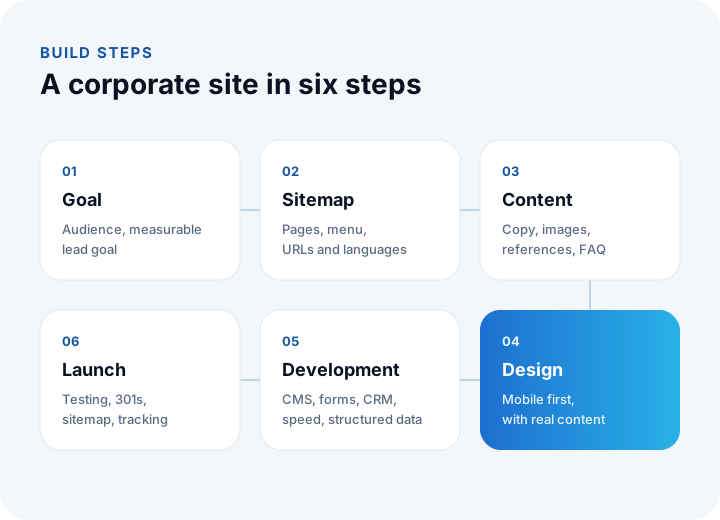
A corporate website is built through a process that starts with a goal and a sitemap and ends with content, design, development, testing and launch. Starting with design is a common mistake; what you will say must be decided before how it will look.
1. Goal and target audience
Who is the site for, and what do you expect that person to do? New customers, dealers, investors, job candidates and overseas partners each look for different information. The measurable goal of the site should also be written down from the start: a quote form, a phone call, a catalog download or a meeting request.
2. Sitemap and URL structure
You decide which pages will exist, how the menu will be organized and how page addresses will be written. URLs are planned to be short, readable and free of special-character problems. If a multilingual site is planned, the language structure is set up at this stage; adding it later is both laborious and risky for search engines.
3. Content
Copy, images, references and frequently asked questions are prepared. This is the step where corporate sites are delayed most often; content should be started before design, not in parallel with it. On every page, use short, clear language that answers the visitor's question in the first paragraph.
4. Design
Colors, typefaces and components that fit the corporate identity are defined; the design starts with the phone screen and is then expanded to larger screens. Before approval, the design is tried with real content; a page that looks good with placeholder text can fall apart when the real text arrives.
5. Development and integrations
Pages are coded, a content management panel is set up, forms are connected to your CRM or email, and analytics and structured data are added. Speed, accessibility and search engine readiness should not be a layer added at this stage; they should be part of the code itself.
6. Testing, launch and measurement
The site is tested on different phones, tablets and browsers; forms, links and redirects are checked. If there is an old site, permanent redirects from the old addresses to the new ones are set up. After launch, the sitemap is submitted to search engines and visits and inquiries begin to be tracked.
We recommend reading: Our software development process: step by step from analysis to launch
Why Does Speed Matter So Much for a Corporate Website?
Speed directly affects whether a visitor leaves the site and how high search engines rank it. A slow site makes even the best design and the strongest content invisible.
Most visitors come to a site from a phone, and often over mobile data. That is why speed should be measured on an average phone, not on a powerful computer. Google's Core Web Vitals, which measure page experience, look at how quickly the main content of a page appears, how fast the page responds to a tap and whether elements shift around while loading.
The following principles are applied to build a fast corporate site:
- Little JavaScript: Heavy scripts and unnecessary plugins are not used on marketing pages; where possible, pages are served as pre-built (static) files.
- The right images: Images use modern formats (such as WebP), are sized to the dimensions at which they are displayed, and those below the fold are loaded lazily.
- Self-hosted fonts: Fonts are loaded from the site's own server, with only the character set that is needed.
- Content delivery network: The site is served from servers geographically close to the visitor.
- Regular measurement: Speed is measured not only on launch day but after every content and design change.
Our own site, built on these principles, scores 97–100 in Lighthouse speed measurements on mobile. This is not a target but a measured result, and we apply the same approach to the corporate sites we build.
How Does a Corporate Site Appear in Search Engines and AI Search?
For a corporate site to appear in search, its technical foundation must be crawlable, each page must answer a single search clearly and company information must be consistent everywhere. Today there is one more requirement: being cited as a source in AI search.
- Technical SEO: Clean URLs, canonical tags, a sitemap, a correct heading hierarchy (a single H1 per page) and hreflang tags on multilingual sites.
- Page titles and descriptions: The title and description shown in search results are written separately for each page; the same title is not used across all pages.
- Structured data: Company, address, service, frequently asked questions and articles are marked up with JSON-LD, so search engines and AI systems understand the page more accurately. We use 12 types of structured data on this site.
- Quotable content: Short, clear paragraphs under each heading that answer the question in the first sentence.
- llms.txt: A file that summarizes the site's content for AI systems.
- Consistent company information: The company name, address, phone and email are written identically on the site, on maps and on social media.
We recommend reading: What is GEO? A guide to being visible in AI search
What Should You Do for Security and KVKK on a Corporate Website?
Because a corporate site carries the company's reputation and collects personal data through forms, security and KVKK compliance should be planned from the start. The basic requirements are:
- HTTPS: The whole site is served over an encrypted connection; unencrypted addresses are permanently redirected to the encrypted one.
- Up-to-date software: The content management system, plugins and libraries are kept current. Outdated plugins are among the most common reasons corporate sites get attacked.
- Form security: Forms include spam and automated-submission protection, field validation and server-side checks.
- KVKK privacy notice: Next to the form, it is clearly stated which data is processed and for what purpose, and the necessary consents are obtained.
- Cookie management: Consent is obtained from visitors for non-essential cookies, and a cookie policy is published.
- Backups and monitoring: The site and its content are backed up regularly, and an alert is raised when the site becomes unreachable.
- Security headers: Security headers that tell the browser how the site should behave are configured.
The content of KVKK texts is a legal matter; we recommend having them prepared with a legal advisor according to your company's data processing activities.
Ready-Made Template or Custom-Designed Corporate Site?
A ready-made template works for a site with a limited budget, few pages and a need to launch quickly; custom design and development is the better investment for businesses that want to stand apart, care about speed and search performance, or need a multilingual or integrated site.
Because templates are designed for thousands of sites, they usually load many features you never use, which makes pages heavier. The look resembles other sites, and going beyond the template's limits becomes difficult. In a custom-built site, only the code that is needed is present; design, content structure and integrations are built around the company's needs.
| Topic | Ready-made template | Custom design and development |
|---|---|---|
| Time to start | Short | Design and development time is required |
| Brand distinction | Limited; sites that look alike | Design specific to the corporate identity |
| Speed | Can get heavy with unused features | Only the code that is needed; speed is designed in from the start |
| Search engine readiness | Only as far as the template and plugins allow | URL structure, structured data and content planned from the start |
| Multilingual structure | Via plugins, often incomplete | Language structure and hreflang are part of the architecture |
| Integration | Limited to plugins | With CRM, ERP, dealer portal and other systems |
| Maintenance and security | Many plugins must be kept up to date | Few dependencies, controlled updates |
We recommend reading: Off-the-shelf or custom software? A decision guide
What Questions Should You Ask When Evaluating a Website Proposal?
When website proposals are compared on price alone, jobs of different scope end up in the same basket. The questions below help you see what each proposal really covers:
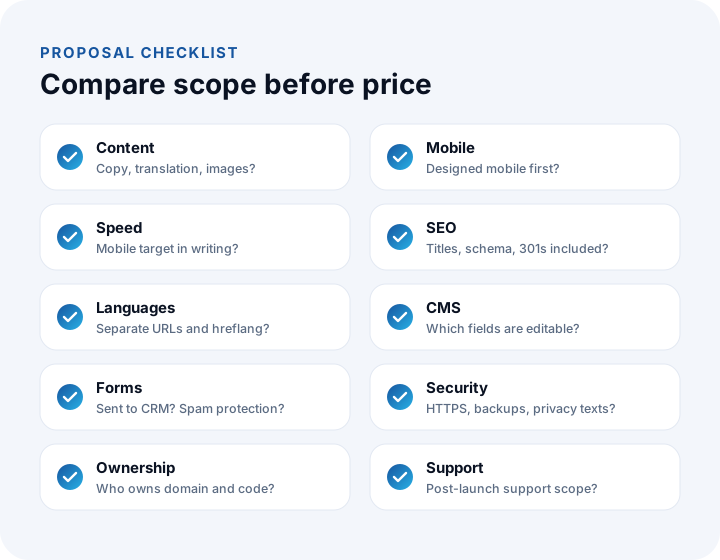
- Who prepares the content? Are copywriting, translation and image production included in the proposal?
- How will speed be measured? Is it written down which measurement will be used on mobile and which target will be reached?
- What does search engine readiness include? Are titles, descriptions, structured data, the sitemap and redirects from old addresses included?
- Will we be able to update the content ourselves? Which areas can be changed from the panel?
- Where do the forms go? To email or to a CRM? Is there spam protection?
- Who owns the domain name, hosting and source code? Is the domain registered in the company's name? If you want to change provider, will you be able to take the site with you?
- What happens after launch? What do updates, security patches, backups and support cover?
What Are the Most Common Mistakes When Building a Corporate Website?
Most mistakes on corporate sites come from planning, not from technology. The most common are:
- Talking about the company and forgetting the customer: Pages that open with "Who we are" leave the visitor's question, "will this solve my problem?", unanswered.
- An unclear next step: What the visitor should do (request a quote, call, book a meeting) must be visible on every page.
- Leaving mobile for later: Sites designed for the desktop and squeezed onto a phone give most visitors a poor experience.
- Heavy images and videos: A large video on the landing screen or an uncompressed image can delay the site's opening by seconds.
- Not redirecting old addresses: If old pages are not redirected to new addresses when a site is renewed, the search visibility earned over the years is lost.
- Forgetting the site after launch: Outdated news, old references and wrong phone numbers damage trust; a site should be treated as a living asset.
We recommend reading: How to Do UX Design: A Step-by-Step Course from User Research to Usability Testing
Recommended reading: What Is a Web Application?
Corporate Websites with İnovabil
At İnovabil, we build corporate websites starting from the goal and the sitemap, and we run content, design and development in a single team. We treat speed, visibility in search engines and AI search, accessibility and security not as a layer added afterwards, but as part of the code itself. This site was built with the same approach: lightweight pre-built pages, structured data, llms.txt and a multilingual structure with hreflang.
We connect your corporate site to your CRM through quote forms and, where needed, to your dealer or customer portal, and we stay with you after launch with maintenance and development.
Describe your current site's address and the goal you want to reach with the new site in a few sentences, and we will prepare a corporate website roadmap tailored to you.
Frequently Asked Questions
How do you build a corporate website, and what are the steps in short?
A corporate website is built in six steps: defining the goal and target audience, the sitemap and URL structure, preparing the content, design, development and integrations, and testing and launch. Content should be started before design.
How long does it take to build a corporate website?
The time depends on the number of pages, whether the content is ready, the number of languages and the integrations. In corporate site projects, the most frequent delay is in content preparation; when content starts early, the project timeline shortens noticeably.
Can I update my corporate site's content myself?
Yes. Corporate sites usually include a content management panel in which areas such as news, blog, references, team and contact details can be updated. Which areas can be changed from the panel should be clarified at the start of the project.
Should a corporate website be multilingual?
If you are targeting customers, dealers or investors abroad, yes. A multilingual structure must be planned from the start; each language should have its own addresses and hreflang tags, and the texts should be prepared with professional translation, not machine translation.
Will I lose my search engine rankings if I redo my site?
Not if it is done correctly. Every important address on the old site should get a permanent (301) redirect to its equivalent on the new site, the new sitemap should be submitted to search engines, and errors and traffic should be monitored in the weeks after launch.