

Your dealers place orders by phone, your team keeps customer records in a spreadsheet, and managers wait for reports by email. All of that can move into one system that opens in a browser. A web application is software that runs in the browser, takes input from the user, processes and stores that data, and shows different content to different people. Nothing is installed; the user opens an address and signs in.
In this guide we explain what a web application is, how it differs from a website and a mobile app, how it works behind the screen, its strengths and limits, the security basics, the cost difference, how to choose between a web app and a mobile app, and the project steps. The example numbers are illustrative (temsilî); they are not a price list or an industry average.
What Is a Web Application?
A web application is software used through a browser that produces results based on what the user enters. The screens appear in the browser; business rules, permission checks and data storage run on a server. The user needs only an address and an account.
Everyday examples: a panel where a dealer checks stock and places an order, a CRM screen where your team updates customer records, a dashboard where a manager follows sales figures, an account page where a customer downloads an invoice. Screens like these are also one of the most common interfaces of business systems such as ERP and CRM. We cover the customer-facing version in our customer portal guide.
We recommend reading: Our web development service
What Is the Difference Between a Web Application, a Website and a Mobile App?
A website provides information, a web application gets work done, and a mobile app is installed on the device and can use the phone's features. All three can live in one project: a marketing site, a dealer panel and a field team's phone app.
| Topic | Website | Web application | Mobile app |
|---|---|---|---|
| Purpose | Inform, promote | Process transactions, manage data | Transactions plus device features |
| User interaction | Mostly reads, fills in forms | Creates records, approves, reports | Same, plus camera, location, notifications |
| Sign-in (account) | Usually none | Yes; content depends on the user | Usually yes |
| Access | Browser | Browser | Installed from a store |
| Updates | Done on the server, everyone sees them | Done on the server, everyone sees them | A release is published; users may need to update |
| Number of platforms | One | One codebase | May need separate work per platform |
| Example | Corporate marketing site | Dealer order panel | Field team app |
The line is blurry: a site with sign-in, transactions and continuous updates is a web application in practice. We cover the marketing-site side in our corporate website guide and store-installed apps in our mobile app guide.
How Does a Web Application Work?
Four parts work together on every action: the browser, the server, the database, and the API that connects them. Knowing them helps you speak the same language as a developer.
- Browser (client): Draws the screen and captures everything the user clicks and types.
- Server: Runs the business rules and checks who is allowed to do what.
- Database: Stores records such as orders, customers and stock permanently.
- API: The defined path for requests like "fetch this" and "save that" between browser and server. The same API can let other systems connect; we explain the basics in our API integration guide.
An example: a dealer clicks "Confirm order". The browser sends the request to the server; the server checks the session and permission, writes the order to the database and reduces stock if there is enough, and returns the result. The screen says "Your order has been received." The user sees none of this; speed and a correct result make the experience.
In architecture terms, the work is usually split into three layers: the interface the user sees, the application layer holding the business rules, and the data layer where data lives. Keeping the layers separate means you do not have to touch the business rules when you change a screen, or the screens when you change a rule. The same application layer can later serve a mobile app or another system, so designing the API properly at the start lowers the cost of later changes.
Where and how data is stored also needs an early decision: which records are linked to each other, which fields are mandatory and how much history is kept are among the hardest things to change later. These decisions belong in the requirements stage, before the screens.
Where Do Businesses Use Web Applications?
The most common uses are processes where several people work on the same data.
- Admin panel: Managing products, orders, users and content.
- Dealer and customer portal: Orders, account balance, invoices and support requests, as self-service.
- CRM and ERP screens: Customer tracking, stock, purchasing, production and finance screens.
- Reporting dashboards: Following sales and stock indicators as they change.
- Approval and request flows: Leave, purchase and expense requests.
- Subscription services: Cloud software that many customers use as the same application; see our SaaS guide.
What Are the Advantages and Limits of a Web Application?
Its strength is easy release and access; its weakness is work that depends on device hardware or offline use.
On the user side there is another difference: because a web application opens at the same address on every device, nobody has to ask "which version should I install?". This makes the first sign-in easier for outside users such as dealers, suppliers and customers. You create an account and share a link.
| Topic | Web application | Mobile app |
|---|---|---|
| Installation | Not needed; an address is enough | Installed from a store |
| Updates | Once on the server; everyone uses the same version | Users need to update; old versions may linger |
| Device features | As far as the browser allows | Camera, location, notifications, sensors with broad access |
| Offline use | Limited; needs extra design | Easier to build |
| Performance | Enough for most business screens | Better for heavy graphics and processing |
| Development load | One codebase | Grows with the number of platforms |
That is why a web application is often sufficient and economical for form, list, approval and report work. If you need barcode scanning, the camera, location tracking or work where there is no internet, a mobile app comes into play.
What Is a PWA (Progressive Web App)?
A PWA is a web application approach that can be added to the home screen from the browser and opens like an app. In some browsers it can also offer features such as limited offline use and notifications. Support varies by browser, operating system and device.
So it is right to treat a PWA as a middle option between web and mobile, not as something that always replaces a store app. Before you decide, test on real target devices that the features you need actually work.
How Is Web Application Security Ensured?
Security is enforced on the server, not on the screen; a button hidden on the screen is not protection. The basic measures are these.
- HTTPS: Encrypts traffic between the browser and the server.
- Sign-in and sessions: A strong password rule, a session time limit and, where needed, a second verification step.
- Roles and permissions: Everyone sees only the data their job needs, and the check runs on the server. See our role-based access control guide.
- Input validation: Everything the user sends is checked again on the server.
- API protection: Authentication, authorization and rate limits; see our API security guide.
- Logs and backups: An audit log for critical actions and regular backups.
For applications that process personal data, KVKK (Turkey's personal data protection law) obligations need separate assessment; consult your legal counsel for the legal details.
Web App or Mobile App? A Decision Table
The user's job and environment decide it. The table below is useful for a first screening.
| Need | Suitable option |
|---|---|
| Work centered on forms, lists, approvals and reports | Web application |
| Users sit at a desk and have internet | Web application |
| Users have a wide variety of devices and operating systems | Web application |
| Camera, barcode, location or sensors are required | Mobile app |
| Work happens where there is no internet | Mobile app (or a carefully designed offline setup) |
| Goal is to bring users back often with notifications | Mobile app; the web can support this in a limited way |
| Validate quickly first, then grow | Start with a web application and add mobile if needed |
You can also plan both: a web admin screen and mobile field work. With a shared server and API, the two interfaces use the same data. We explain how to design and test the interface in our UX design guide.
Is a Web App or a Mobile App Cheaper to Build?
For the same set of features, a web application usually needs less effort because the screens are written once. The example below is illustrative.
Assumptions: 25 person-days for the server, database and API; 25 person-days for each platform's screens (assumed equal across platforms); a 20% uncertainty margin; a team day rate of ₺9,000.
| Option | Effort (person-days) | Effort with 20% margin | Development cost |
|---|---|---|---|
| Web application | 25 + 25 = 50 | 50 × 1.2 = 60 | 60 × ₺9,000 = ₺540,000 |
| Mobile app on two platforms | 25 + 2 × 25 = 75 | 75 × 1.2 = 90 | 90 × ₺9,000 = ₺810,000 |
| Web plus two mobile platforms | 25 + 3 × 25 = 100 | 100 × 1.2 = 120 | 120 × ₺9,000 = ₺1,080,000 |
If we assume yearly maintenance at 15% of development cost (infrastructure fees left out to keep it simple): for the web app ₺540,000 × 0.15 = ₺81,000, for the two-platform mobile app ₺810,000 × 0.15 = ₺121,500. The three-year total is ₺540,000 + 3 × ₺81,000 = ₺783,000 for the web app and ₺810,000 + 3 × ₺121,500 = ₺1,174,500 for mobile. The ratio is 1,174,500 ÷ 783,000 = 1.5, so in this example the two-platform mobile app costs half as much again as the web app.
The difference also shows at release time. If building, testing and submitting for each platform takes 1.5 days, one release on three platforms is 3 × 1.5 = 4.5 days; the same release on the web is 1 day. The reduction is (4.5 − 1) ÷ 4.5 = 77.8%, about 78%. With two releases a month, that is 2 days instead of 9. Waiting time for store review is not included in this calculation.
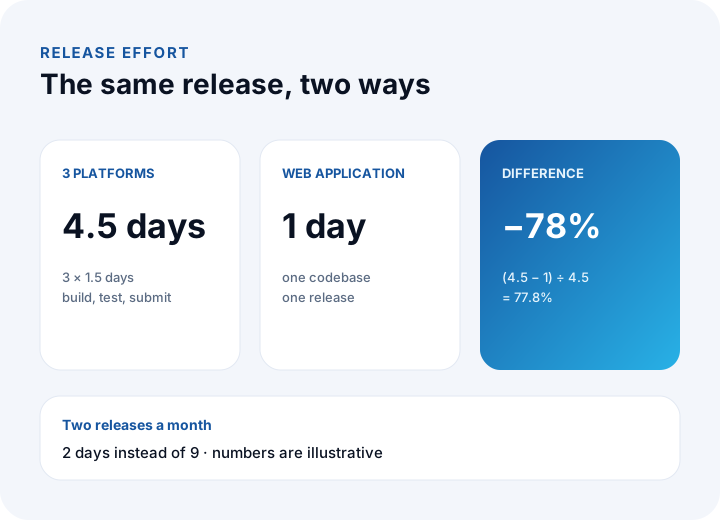
These figures are not a quote for your project. Effort, rate and margin must be recalculated for your own scope; we show the method step by step in our mobile app cost guide.
What Steps Does a Web Application Project Follow?
Six steps are enough: requirements, design, development, testing, release and maintenance.
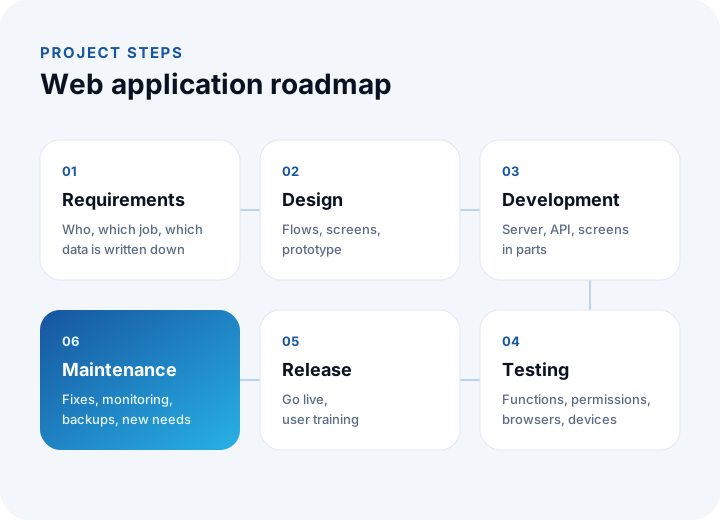
- Requirements: Write down who does which job, which data is kept and which systems it connects to.
- Design: Produce user flows and screen sketches, and try a clickable prototype.
- Development: The server, database, API and screens are written in parts, and each part is demonstrated.
- Testing: Check functions, permissions and behavior across browsers and devices.
- Release: Move to the live environment and train users.
- Maintenance: Bug fixes, monitoring, backups and new needs.
Keeping the output of each step in writing reduces scope arguments. For our general method, see our software development process page.
What Are the Common Mistakes with Web Applications?
- Confusing a website with an application: Asking for sign-in, permissions and data management on a marketing-site budget.
- Hiding permissions only on the screen: Hiding a button does not close access; the check must be on the server.
- Not trying it on a phone: A screen that looks good on a desktop but is unusable on a small display.
- Leaving offline needs for last: If there is no internet in the field, the architecture has to be built for it from the start.
- Loading everything into the first release: If the core flow ships and is used first, feedback arrives early.
- Leaving maintenance out of the budget: Release is not the end; plan the yearly maintenance share from the start.
Building Web Applications with İnovabil
At İnovabil our focus is bespoke software built from scratch for your company: custom software, ERP, CRM, e-commerce, web, mobile and integration. To decide whether a web application or a mobile app fits better, we recommend comparing them in writing during requirements analysis, looking at the environment users work in and the device features they need.
We have built CRM, purchasing and mobile for Avcılar İnşaat; a purchasing system for İZBAN; logistics and shipment planning plus wholesale order management for Karyak; and warehouse management plus a complaint and support management system for Sleepy. Send us a short summary of your need and we will first clarify the scope and the right approach together.
We recommend reading: Our custom software service
Frequently Asked Questions
What is a web application, in short?
It is software that runs in the browser, takes input from users, and processes and stores it. It runs business processes such as order panels, CRM screens and report dashboards without any installation.
Is a website the same as a web application?
No. A website mostly provides information; a web application includes sign-in, permissions and data processing and lets users get work done. The two can also live together under one domain.
Does a web application work on mobile?
Yes, it opens in a phone or tablet browser, but the screens must be designed for small displays. If you need the camera, location or offline use, consider a mobile app or a carefully designed PWA.
Is a web application cheaper than a mobile app?
For the same set of features, usually yes, because the screens are written once. In the example the web app costs ₺540,000, the two-platform mobile app ₺810,000, and the three-year total ratio is 1.5. Recalculate with your own scope.
Can a PWA replace a mobile app?
Not always. A PWA is a web application that can be added to the home screen; offline and notification support varies by browser and device. Decide after testing the features you need on your target devices.