

You built your site and entered the content, but you are nowhere in search results. Or one of your pages sits on the first page while another is on the third, and you do not know why. The answer to "how to do SEO?" is not a magic setting or a handful of keywords; it is seven connected jobs done in order and on a regular basis: finding the word people search for, building the page around that intent, making the site technically crawlable and fast, producing good content, linking pages together, earning trust, and measuring the result.
We built this guide like a course. There are seven lessons; each one explains the concept, shows it with an example and ends with a task for your own site. When you finish, you will have a 90-day action plan and a list of indicators to measure the outcome. You can start without any software or agency.
What Is SEO and How Does It Work?
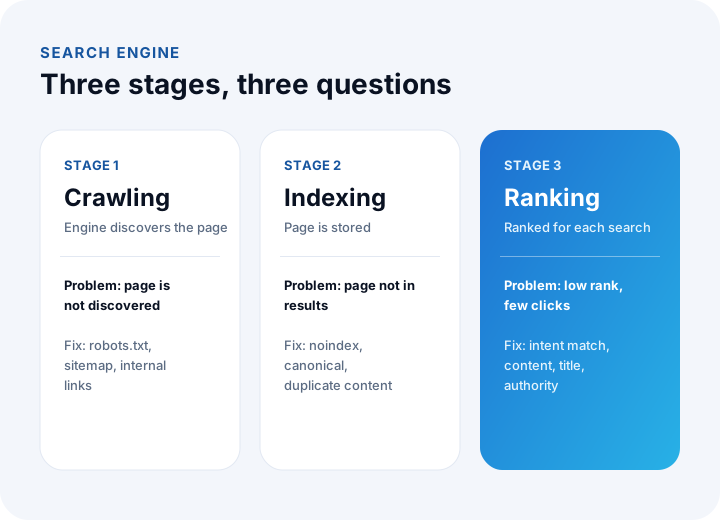
SEO (Search Engine Optimization) is the set of work that makes a website more visible in search engines such as Google for relevant searches. A search engine works in three stages: it crawls (discovers) pages, indexes (stores) them, and ranks them against the user's search. SEO clears the way for your site at each of these three stages.
These stages are also the order of troubleshooting. If a page cannot be crawled, it cannot be indexed; if it is not indexed, it cannot rank; if it ranks but is not clicked, the title and description are weak.
How Should You Use This Guide?
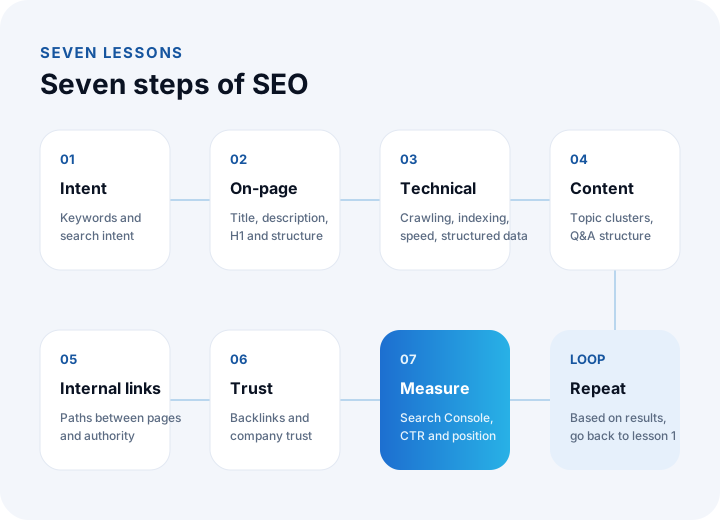
Follow the lessons in order; each one uses the output of the previous one. The table below summarizes what the seven lessons teach and what you will be able to do at the end of each.
| Lesson | Topic | What you can do afterwards |
|---|---|---|
| 1 | Keywords and search intent | Choose which searches you will write pages for |
| 2 | On-page SEO | Set up title, description, H1 and page structure correctly |
| 3 | Technical SEO | Verify that your site is crawlable, fast and indexable |
| 4 | Content strategy | Plan regular, distinctive content with topic clusters |
| 5 | Internal linking | Build authority and paths between pages |
| 6 | Backlinks and trust | Produce credibility signals |
| 7 | Measurement | Read progress in Search Console and decide on improvements |
We recommend reading: Our web development service: fast sites built for SEO and GEO
Lesson 1: How Do You Do Keyword Research and Understand Search Intent?
Keyword research means identifying the words your target audience searches for and the intent behind them. A good keyword is one that people search for, that you can actually offer, and that you can realistically rank for. More important than the word itself is why the person is searching.
Search intent falls into four groups, and each intent points to a different page type:
| Intent | What does the person want? | Example search | Suitable page |
|---|---|---|---|
| Informational | To learn | what is erp | Guide, blog post |
| Comparison | To evaluate options | off-the-shelf erp vs custom erp | Comparison article |
| Transactional | To buy or get a quote | erp software quote | Service or product page |
| Navigational | To reach a specific site | inovabil blog | Home page, relevant section |
The practice is simple: give each page one main keyword and one intent. Showing a service page to someone searching "what is ERP", or a long article to someone saying "get a quote", gets you nowhere. The search engine reads this mismatch from click behavior.
Four sources are enough to find keywords: your existing queries in Search Console, the autocomplete suggestions of the search box, the "People also ask" section, and the questions customers ask in sales calls. The last one is often the most valuable, because it is tied to a real need.
Lesson 2: How Do You Do On-Page SEO?
On-page SEO is the set of adjustments that make it clear to both the search engine and the reader what a single page is about. The title, description, main heading, subheadings, URL and images must all say the same thing about the page's topic.
| Element | Rule | Example |
|---|---|---|
| Page title (title) | Main keyword near the start, about 60 characters; different on every page | How to Track Inventory? Step-by-Step Guide |
| Meta description | 110–160 characters that summarize the page and persuade a click | From stock card to stock count, explained with example calculations. |
| Main heading (H1) | Only one per page; contains the main keyword | How to Track Inventory? |
| Subheadings (H2, H3) | Question form, each answering a sub-intent | How is minimum stock calculated? |
| URL | Short, readable, contains the main keyword | /blog/how-to-track-inventory |
| Images | Meaningful file name, descriptive alt text, correct size | alt="Inventory formulas and example calculations" |
| First paragraph | Main keyword and a short answer to the question | Inventory tracking is monitoring ... |
The title and description are also your storefront in the search result; a cut-off title loses clicks. You can see how your title and description will appear in search results while you write them, with our meta tag preview tool (Turkish interface).
Writing subheadings as questions helps in two ways: search engines and AI summaries bring forward the sections that answer the question directly. Write a short two- or three-sentence answer right under each question; give the detail afterwards.
Lesson 3: How Do You Do Technical SEO?
Technical SEO is the set of infrastructure adjustments that make a site crawlable, indexable, fast and secure for search engines. However good the content is, a page will not appear in results if there is a technical barrier.
| Area | What is checked? | Symptom of a problem |
|---|---|---|
| Crawlability | Does robots.txt block important pages? Is there an up-to-date sitemap? | Page is not discovered |
| Indexability | Was a noindex tag left by mistake? Is the canonical address correct? | Page exists but is not in results |
| Speed | Core Web Vitals values | Page opens late, users leave |
| Mobile friendliness | Is it readable and tappable on a phone? | Broken layout on mobile |
| Security | Is the whole site on HTTPS? Is there mixed content? | Browser security warning |
| Redirects | Do old URLs go to new ones with 301? Are there redirect chains? | 404 errors, lost rankings |
| Structured data | Markup suited to the page type (article, FAQ, product, organization) | No rich results |
| Multilingual setup | Are language versions linked with hreflang? | Results in the wrong language |
On the speed side, Google publishes three core indicators: the time the largest content element appears (LCP, a "good" threshold of 2.5 seconds), the response time to interaction (INP, 200 milliseconds) and visual stability (CLS, 0.1). You can measure these for free with PageSpeed Insights. Speed mostly depends on image size, unnecessary scripts and plugins, and server response time.
A slow page does not automatically stay off the first page, but it loses users, and with equal content the faster one comes out ahead. Technical SEO is less about building an advantage and more about removing an obstacle.
We recommend reading: How to build a corporate website? A guide from planning to launch
Lesson 4: How Do You Build a Content Strategy for SEO?
SEO content is not about writing individual posts; it is about building a connected content network that covers a topic from every angle. This is called a topic cluster: a main page explains the subject in general, the posts around it answer sub-questions in depth, and all of them link to each other.
For example, at a software company the main page is the "ERP software" service page; around it sit posts such as "what is ERP", "what is a warehouse management system", "how to track inventory" and "off-the-shelf or custom". Each post serves a different intent and links to the service page. From this network the search engine reads the site's expertise on the topic.
Ask five questions of good content:
- Does it answer the question directly? Is the answer in the first paragraphs or at the end of the page?
- Is it distinctive? Is there information, an example, a calculation or a visual that the top five results on the same topic do not have?
- Is it evidence-based? Are the sources of numbers and claims clear? A number without a source damages trust.
- Is it clear who wrote it? Are signs of experience, expertise and trust (author, company information, references) visible?
- Is it up to date? Is outdated information refreshed regularly?
Lesson 5: How Do You Build Internal Links?
Internal links are the links your pages give to each other. They show the search engine which pages matter and how pages relate, and they show the user the next step. On most sites this is one of the fastest-yielding pieces of work for the least effort.
- Anchor text should be meaningful: "our ERP software service" instead of "click here". The text should state the topic of the target page.
- Let important pages receive links: Link to the service pages that bring sales from blog posts and from the home page.
- Do not leave orphan pages: A page that receives no link from any page is hard for the search engine to discover.
- Clean up broken links: An internal link that returns 404 harms both the user and crawling.
Lesson 6: How Do You Earn Backlinks and Trust?
A backlink is a link from another site to yours, and it is one of a site's credibility signals. What matters is not the number but whether the source is relevant and trustworthy. Bulk links that are bought or swapped bring no benefit and can do harm.
Healthy ways to earn natural links are producing content worth citing (data, guides, tools), appearing on industry and partner sites, building mutual references with customers and partners, and giving expert comments to industry news. Free tools are among the most lasting ways to earn links, because people share a useful tool on their own.
Trust is not only links. Clear company details, contact address, privacy and KVKK (Turkey's personal data protection law) texts, and author and reference information give trust to both users and search engines.
Lesson 7: How Do You Measure SEO Results?
SEO results are measured with impressions, clicks, click-through rate (CTR) and average position in Google Search Console, and with organic sessions and conversions in analytics tools. Search Console is free; once you verify your site, it shows which searches you appeared for and how many clicks you received.
| Indicator | What does it tell you? | What to do if it is low? |
|---|---|---|
| Impressions | How many times the page appeared in search results | Expand the content, answer new questions |
| Clicks | How many times the result was visited | Improve the title and description |
| Click-through rate (CTR) | Clicks ÷ Impressions | Bring the title closer to the query intent |
| Average position | Average rank across searches | Strengthen the content, add internal links |
| Indexed pages | Number of indexed pages and their errors | Remove technical barriers |
| Organic conversion | Quotes, sign-ups and sales from search visitors | Review the on-page call to action and intent match |
A sample reading: a page has 2,400 impressions and 96 clicks in a month; CTR is 96 ÷ 2,400 = 4%. If the average position is 8, the page is in the lower half of the first page. There are two moves here: raise CTR by making the title and description more clickable, and raise the position by strengthening the content. Looking at CTR first is often fastest, because fixing a title can be enough.
Measure once a month and ignore weekly fluctuations. SEO effects show after a few weeks, so comparing with the previous period is healthier than watching daily changes.
We recommend reading: What is business intelligence (BI)? A guide from data to decisions
How Do You Run SEO and GEO Together?
SEO aims to get your site found in search results; GEO (Generative Engine Optimization) aims to get it cited as a source in the answers of AI tools such as ChatGPT and Gemini and in Google's AI summaries. The two are not alternatives but a continuation: the foundations of good SEO are also the precondition for being cited in AI answers.
In practice the difference is small: a site that does the work in this guide is already prepared for GEO. Short direct answers, structured data, clear company and author information, and a summary file (llms.txt) for AI bots strengthen it further.
We recommend reading: What is GEO? A guide to becoming visible in AI search
What Are the Most Common SEO Mistakes?
The most common mistakes are writing content without defining the keyword and intent, giving every page the same title, missing technical barriers, covering the same topic on more than one page, and not measuring the result.
- Content without intent: A page written without thinking about who will search and why answers no one.
- Splitting the same topic: Writing two pages for the same keyword makes them compete with each other (cannibalization).
- Forgetting redirects when moving to a new site: Not redirecting old URLs to new ones with 301 loses rankings.
- Accidental noindex: Indexing that was switched off during development and not switched on again at launch is a well-known reason a site does not appear in results.
- Not measuring: SEO done without knowing what works proceeds by guesswork.
How Do You Start SEO in 90 Days?
Spreading the seven lessons over three months is the realistic way to build a solid routine. Each month builds on the previous one.
| Period | What to do | Output |
|---|---|---|
| Month 1: Foundation | Set up Search Console; produce the keyword and intent list; run the technical audit (crawling, indexing, speed, redirects) | Fix list, keyword-to-page mapping |
| Month 2: Pages | Fix the title, description and structure of your 10 most important pages; add internal links; add structured data | Optimized core pages |
| Month 3: Content and measurement | Publish the posts of the first topic cluster; set up the measurement dashboard; make the first CTR improvements | New content, monthly SEO report |
After three months, ask: which searches are we shown for, and which has moved closer to a sale? With an answer, SEO has become a measurable channel.
We recommend reading: How to Set Up a Shopify Store: A Step-by-Step Guide, Including Selling from Turkey
SEO with İnovabil
At İnovabil we treat SEO not as an add-on to a site but as a part of the software. We build websites and e-commerce infrastructures SEO- and GEO-ready from the start, with crawling, speed, structured data, multilingual structure and sitemaps; after launch we grow them with audits, a content plan and measurement.
We apply this approach to our own site too: it scores 97–100 on mobile in Lighthouse speed, accessibility and best practices; its pages carry 12 different structured data types, a two-language hreflang structure and an llms.txt file for AI bots. In our e-commerce and web development services, we set up the same infrastructure for your site.
Tell us in a few sentences your site's address, which searches you want to appear for and what problem you have today; we will prepare an SEO and GEO roadmap for you.
Frequently Asked Questions
How is SEO done, and what steps does it consist of in short?
SEO is done by defining the target keyword and search intent, arranging on-page elements (title, description, H1, structure), making the site technically crawlable, fast and indexable, producing regular and distinctive content, building internal links, producing credibility signals, and measuring the result with Search Console.
How long does SEO take to produce results?
The time varies with the age of the site, the intensity of competition and the scope of the work. Removing technical barriers and improving titles can show an effect within a few weeks; the rankings gained from new content and authority usually take months. That is why SEO is not a one-time job but a regular practice.
What is the difference between technical SEO and on-page SEO?
Technical SEO is about the site's infrastructure: crawling, indexing, speed, mobile friendliness, security and structured data. On-page SEO is about the content of a single page: title, description, heading structure, text and images. The first makes the page findable; the second makes it presented correctly for the right searches.
Is Search Console necessary for SEO?
It is not mandatory, but it is the first tool you should set up. It is free and shows which searches your site appears for, how many clicks it gets, which pages are indexed and crawl errors. Sitemap submission and index checks are also done there.
What is the difference between SEO and Google Ads?
With SEO you appear in organic results and do not pay per click, but results take time and effort. With ads you pay for every click; results are fast, but when the budget ends, so does visibility. The two complement each other: ads give fast data, SEO builds a long-term channel.