

The order is in, the warehouse seems to have the material, and the shop floor is busy, yet as the due date approaches it turns out that one component is short and one workstation is badly overloaded. Production planning is the process that exists to catch these surprises early: it turns demand into work orders you can actually execute, using material, capacity and time calculations. In this guide we explain how to do production planning step by step, with the formulas and worked numbers for one example product.
The example product is a simple shelf unit with a two-level bill of materials. All figures are illustrative; they are not data from any particular company or industry.
What Is Production Planning and What Levels Does It Cover?
Production planning is deciding which product is made, in what quantity, in which week and with which resources. It is not a one-off task but a cycle that runs at three levels, each with its own frequency.
| Level | Horizon | Decisions made | Output |
|---|---|---|---|
| Long term | 1–3 years | Machine and labor investment, product range | Capacity target |
| Mid term | 3–12 months | Monthly output by product family, shifts, subcontracting share | Sales and operations plan |
| Short term | Days to weeks | Which job runs on which machine, in what order | Master schedule, work orders, sequence |
This article concentrates on the short-term level, meaning the calculations that run from the master schedule down to the work order. For the wider system that planning sits on, see our guide on what ERP is.
We recommend reading: Our ERP development service
What Are the Steps of Production Planning?
The flow has six steps, and the output of each step is the input of the next.
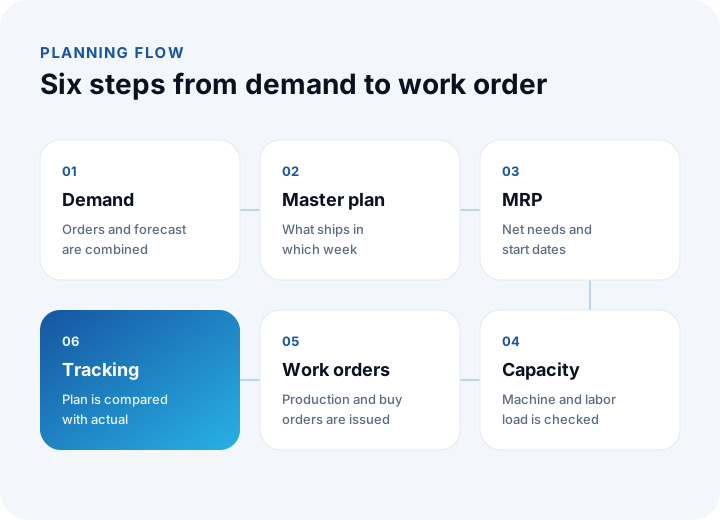
- Demand: Confirmed orders and the sales forecast are merged into one list. The more realistic the forecast, the sturdier the plan.
- Master production schedule: For each finished product, you write down how much ships in which week.
- MRP (material requirements planning): The bill of materials is exploded, on-hand and on-order quantities are subtracted, and net requirements and start dates are calculated.
- Capacity check: The resulting workload is compared with machine and labor capacity.
- Work orders: Production orders are released for made items and purchase orders for bought items.
- Tracking: Plan and actual are compared, and the variance feeds the next planning cycle.
How Do You Calculate Net Requirements?
The net requirement is the quantity that still has to be made or bought after the on-hand stock and the quantities already on order are subtracted from the gross requirement.
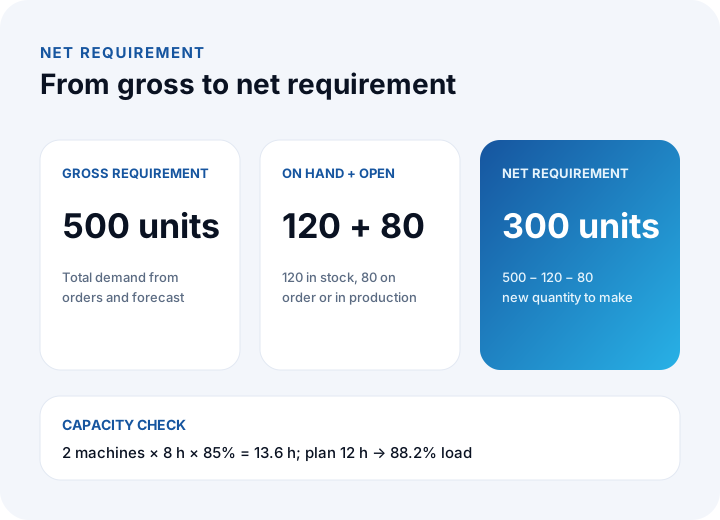
Net requirement = gross requirement − on-hand stock − open orders (on order or in production)
In our example the master schedule shows a gross requirement of 500 shelf units. There are 120 in the warehouse and 80 on an open production order: 500 − 120 − 80 = 300 units. If the company keeps safety stock (say 20 units), it is added: 300 + 20 = 320.
How Do You Find Component Requirements From the Bill of Materials?
MRP pushes the finished product's net requirement down the bill of materials to the components. The key rule: a component's gross requirement is derived from the parent's net requirement, not its gross. In our example one shelf unit needs 2 side panels and 1 hardware kit, and one side panel is cut from 2 MDF boards.
| Item | Source | Gross | On hand | Open orders | Net | Lead time |
|---|---|---|---|---|---|---|
| Shelf unit | Make (assembly) | 500 | 120 | 80 | 300 | 1 week |
| Side panel (2 per unit) | Make (cutting) | 2 × 300 = 600 | 150 | 100 | 350 | 1 week |
| Hardware kit (1 per unit) | Buy | 300 | 40 | 0 | 260 | 3 weeks |
| MDF board (2 per panel) | Buy | 2 × 350 = 700 | 90 | 200 | 410 | 2 weeks |
Check: panels 600 − 150 − 100 = 350; hardware kits 300 − 40 − 0 = 260; boards 700 − 90 − 200 = 410. The panel's gross requirement was calculated from the unit's net requirement of 300, not 500; otherwise the panels for the 120 units already in stock would be made twice. We cover the purchasing side separately in our procurement software guide.
How Do Lead Times Set the Start Dates?
Each item's need date is counted backwards from its parent's start date, which is called lead-time offsetting. The rule: release date = need date − lead time. Suppose delivery is at the start of week 6:
- Shelf unit assembly: 6 − 1 = start of week 5.
- Side panels must be ready when assembly starts; cutting: 5 − 1 = start of week 4.
- MDF boards must be in the warehouse when cutting starts; purchase order: 4 − 2 = start of week 2.
- Hardware kits are needed when assembly starts; purchase order: 5 − 3 = start of week 2.
The longest chain (boards 2 weeks, cutting 1, assembly 1) adds up to 4 weeks, so the purchase order must be planned at least 4 weeks before delivery. Lead times should come from suppliers or real records; guessed lead times break the plan from the start.
How Does Lot Size Affect the Plan?
MRP gives you the net requirement, but production and purchasing usually happen in fixed batches. There are three basic approaches: lot-for-lot (exactly what is needed), fixed lot size, and minimum order multiples.
If side panels are cut in fixed lots of 200, a net requirement of 350 means ⌈350 ÷ 200⌉ = 2 lots, so 400 panels are made and 50 surplus panels stay in stock. The effect cascades down the structure: the boards' gross requirement becomes 2 × 400 = 800 and the net 800 − 90 − 200 = 510. If boards are sold in packs of 100, ⌈510 ÷ 100⌉ = 6 packs, so 600 boards are bought. Bigger lots mean fewer setups but tie up stock and cash; smaller lots do the opposite.
To connect these quantities to cost, see the unit cost and capacity effect calculations in our product cost guide.
How Do You Check Capacity?
By default MRP assumes unlimited capacity, so the plan it calculates may not be feasible. A capacity check compares the planned load with the capacity actually available.
Available capacity = number of machines × shift hours × availability rate
Suppose the cutting department has 2 machines, 8 hours a day and 85% availability (after allowing for breakdowns, setups and maintenance): 2 × 8 × 0.85 = 13.6 hours. If cutting one panel takes 1.8 minutes, 400 panels need 400 × 1.8 = 720 minutes = 12 hours. Load: 12 ÷ 13.6 = 88.2%. Feasible, but the margin is thin.
If another 3-hour job lands on the same day, the load becomes 15 hours and 15 ÷ 13.6 = 110.3%, an overrun of 1.4 hours. The options are overtime, moving the job to another day, splitting the lot or subcontracting. What matters is seeing the overrun before the work starts.
What Are Bottlenecks and Finite Capacity Planning?
A bottleneck is the slowest station, the one that sets the output of the whole line. Finite capacity planning places jobs according to a workstation's real limit, while unlimited-capacity MRP does the calculation first and shows conflicts afterwards.
| Station | Daily capacity | In shelf units |
|---|---|---|
| Cutting | 13.6 h × 60 ÷ 1.8 ≈ 453 panels | 453 ÷ 2 ≈ 226 units |
| Edge banding | 400 panels | 400 ÷ 2 = 200 units |
| Assembly | 180 units | 180 units |
The line can produce only as much as its lowest value, assembly: 180 units a day. Finishing 300 units takes 300 ÷ 180 ≈ 1.7 days, in practice 2 days. Speeding up cutting does not raise output; investment and shift changes belong at the bottleneck. Work piles up in front of a bottleneck and gaps appear behind it, so the place on the shop floor where you see a queue is usually where the problem is.
Which Rule Should You Use to Sequence Jobs?
When several jobs wait at the same workstation, the order changes the result. Three common rules are first come first served, shortest job first, and earliest due date first. Example: job A takes 2 days (due day 5), job B takes 1 day (due day 2), job C takes 3 days (due day 4).
| Rule | Order | Finish days | Late jobs | Total lateness | Average finish |
|---|---|---|---|---|---|
| First come first served | A, B, C | 2, 3, 6 | 2 (B, C) | 1 + 2 = 3 days | (2+3+6) ÷ 3 = 3.67 |
| Shortest job first | B, A, C | 1, 3, 6 | 1 (C) | 2 days | (1+3+6) ÷ 3 = 3.33 |
| Earliest due date first | B, C, A | 1, 4, 6 | 1 (A) | 1 day | (1+4+6) ÷ 3 = 3.67 |
In all three orders the last job finishes on day 6; the difference is who is late and by how much. Shortest job first lowers the average waiting time, while earliest due date first reduces lateness. Because long jobs can be pushed back again and again, it is good practice to put a cap on how long any job may wait. Choose the rule by the company's priority: customer commitments or workstation efficiency.
What Data Does an Accurate Plan Need?
MRP is only as accurate as its inputs. Four records are critical: stock quantities, the bill of materials, lead times and routings (processing times).
Take stock records: if the system shows 120 units but only 90 really exist, the net requirement should be 500 − 90 − 80 = 330. The system tells you to make 300 and you end up 30 units short, and the error stays invisible until shipping. For measuring stock accuracy and setting up counts, see our inventory tracking guide; for fast, error-free data capture on the floor, see the barcode system and warehouse management system guides. The bill of materials and processing times must be kept current by engineering and the shop floor.
How Do You Measure Plan Against Actual?
A plan does not improve unless it is measured. Four indicators are enough for most companies, and all of them show the gap between planned and actual.
| Indicator | Formula | Example |
|---|---|---|
| On-time delivery (OTD) | Orders delivered on time ÷ total orders | 184 ÷ 200 = 92% |
| Capacity utilization | Hours actually worked ÷ available hours | 11.2 ÷ 13.6 = 82.4% |
| Schedule adherence | Work orders started on the planned day ÷ total work orders | 34 ÷ 40 = 85% |
| Forecast error | |actual − forecast| ÷ actual | |560 − 500| ÷ 560 = 10.7% |
Read the indicators together, not alone: if OTD is high but utilization is also very high, deliveries may be rescued by overtime; if schedule adherence is low, the cause is often late material or stock records. A rising forecast error means the master schedule needs to be reviewed more often.
We recommend reading: How to choose an ERP: process map, demo scenarios and payback period
What Are the Most Common Production Planning Mistakes?
- Trusting stock records blindly: Records that are never counted produce wrong net requirements.
- Skipping the capacity check: Releasing work orders just because the material plan is complete creates pile-ups on the floor.
- Assuming 100% availability: A plan without allowance for breakdowns, setups and maintenance slips every week.
- Not updating lead times: The supplier's lead time changed but the plan still holds the old value.
- Letting variances pass silently: A company that does not record why work ran late will repeat the same mistake.
- Forgetting scrap in the bill of materials: If scrap is left out, the net requirement always comes out too low.
- Running everything in a spreadsheet: Beyond a few products, a spreadsheet cannot track the dependencies of a multi-level structure.
How Do You Start Production Planning in 30 Days?
Do not try to set up everything at once; start with one product family.
- Days 1–7: Pick one product family; write down and verify its bill of materials, routing and processing times.
- Days 8–14: Verify the stock records of those items with a count; confirm lead times with suppliers.
- Days 15–21: Calculate net requirements and start dates; build a capacity table for the bottleneck station.
- Days 22–30: Run the first plan; record OTD, schedule adherence and capacity utilization every week and write down the causes of variance.
When a spreadsheet stops being enough for this job, you need a system that brings the records together in one place and calculates the plan automatically.
Production and Shipment Planning Software with İnovabil
At İnovabil our focus is building software from scratch for the specific company: ERP, integrations and custom software are all part of that. We built logistics and shipment planning with wholesale order management for Karyak, shipment planning for Bofigo and a warehouse management system for Sleepy, and we worked on purchasing for Avcılar İnşaat and İZBAN. We suggest settling, during the requirements phase, which part of production planning should move from spreadsheets into a system and where the bill of materials, stock and purchasing data will flow from.
Send us a short summary of your bill of materials, stock structure and planning cycle, and we will turn the scope into a written analysis. You can read how we work on our process page.
Frequently Asked Questions
What is production planning?
It is the process of deciding which product is made, in what quantity, in which week and with which resources. Demand, material requirements, capacity and work orders come together in a single flow.
What is MRP, and is it the same as production planning?
No. MRP is one step of planning: it explodes the bill of materials and calculates net requirements and start dates. Capacity checking, sequencing and tracking are separate steps.
How do you calculate the net requirement?
Subtract available stock and open orders from the gross requirement. In the example it is 500 − 120 − 80 = 300 units; if there is safety stock, it is added to the requirement.
What capacity utilization should you aim for?
There is no single universal figure. Available capacity is already calculated after allowing for breakdowns and setups, and as load approaches 100% the smallest disruption turns into a delay. The 88.2% in the example is feasible but thin; set your threshold from your own data.
Is a spreadsheet enough for production planning?
For a few products and a simple structure it can be enough at the start. With a multi-level structure, several stations and frequently changing orders, dependencies cannot be tracked by hand, and you need a system that calculates the plan automatically.