

Every time a dealer portal opens the product list, it queries the database, and the same 2,000 products get the same answer recomputed all day long. At peak hours the page slows down. Caching is the technique of keeping a frequently requested, expensive-to-produce answer in a faster place for a while and reusing it. Done right, it speeds up responses and takes load off the source system; done wrong, it shows stale prices or even serves one user's data to another.
In this guide we cover the cache layers, what to cache, read and write strategies, time to live and invalidation, the average access time calculation, cache stampede, cold start, sizing, security and the payback calculation. The example figures are representative; they are not the performance of any particular product or an industry average.
What Is Caching?
Caching means keeping the result of a query or a calculation in a fast store so the same request can be answered without going back to the source. If the request is found in the cache it is a hit; if not, it is a miss, and the answer is fetched from the source and written to the cache for next time.
Users get answers sooner and the expensive source is called less often. The price is maintaining a second copy of the data; once the copy and the original drift apart, staleness appears. To speed up the source itself, see our database indexing guide; for the wider picture of growing load, see our software scalability article.
We recommend reading: Our custom software service
Which Layers Can a Cache Run In?
A request can be caught by a cache in four places on its way from the user to the data. The closer to the user, the faster, but the harder it is to purge.
| Layer | Typical access (representative) | Shared by | Purge | Suitable content |
|---|---|---|---|---|
| Browser | No network, ≈ 0 ms | One user | Hard; depends on lifetime | Images, scripts, unchanging files |
| Network edge (content delivery network) | ≈ 20 ms | Everyone in the region | Possible by command | Pages and files identical for everyone |
| In-application | ≈ 0.1 ms | One application instance | Inconsistent across instances | Small, fixed tables; settings |
| Shared cache | ≈ 1–2 ms | All instances | Central; easy | Query results, sessions, computed lists |
With an in-application cache each instance keeps its own copy; when several servers run, a shared layer is safer for data that can change. We covered where a cache should sit across service boundaries in our microservices guide.
What Should You Cache and What Should You Not?
Cache data that is read often, changes rarely, is expensive to produce and can tolerate being stale for a short time. If any one of these four conditions is missing, the gain shrinks or the risk grows.
| Data | Reads / writes (representative) | Staleness tolerance | Decision |
|---|---|---|---|
| Product catalog | 1,000 : 1 | 15 min | Cache it |
| Dealer price list | 200 : 1 | 5 min | Cache; separate by dealer group |
| Stock quantity (listing) | 50 : 1 | 30 s | Cache briefly; ask the source at checkout |
| Credit limit, balance | 10 : 1 | ≈ 0 | Do not cache |
A practical threshold: if a record is not read about 10 times before it changes, a cache is usually not worth the effort. Stock uses two tiers: the listing shows briefly cached data, while adding to the cart and checkout verify against the source.
How Do You Choose a Read and Write Strategy?
There are three basic strategies; the difference is when and in what order data enters the cache.
| Strategy | Read | Write | Risk |
|---|---|---|---|
| Cache-aside | Cache first; on a miss read the source and fill the cache | Writes to the source, deletes the key | Deletion and a read can race |
| Write-through | Always from the cache | To the cache and the source together | Writes slow down; unread data fills the cache |
| Write-back | Always from the cache | Writes to the cache, flushes to the source in batches | A crash loses unflushed data |
For most business applications the starting point is cache-aside: it is simple, and the system keeps running from the source even if the cache goes down. With write-back and a 30-second buffer at 400 writes per minute, a crash loses at most 400 ÷ 60 × 30 = 200 records; that is unacceptable for orders and finance, but may be considered for counters. For safer asynchronous writes, see our message queue guide.
How Do You Design Time to Live (TTL) and Invalidation?
Time to live (TTL) sets the longest a record may stay in the cache; invalidation removes a record before that time when the source changes. This is the hardest part of caching, because keeping two copies equal is difficult.
- TTL only: Simple; average staleness is TTL ÷ 2, the worst case is the TTL itself.
- Event-based purge: When the source changes, the related key is deleted; staleness drops to seconds, but any code path that forgets to purge leaves stale data.
- Versioned key: A version is added to the key (
product:42:v7); when data changes the version rises and the old record is no longer used.
There is also a race: a reader reads the old value from the source, the writer updates it and deletes the key in the meantime, and the reader then writes the old value into the cache, so the record stays stale. That is why every record gets a TTL as a safety net.
Cost of stale data (representative): an average product page is read 0.5 times per minute, there are 40 price updates a day, 10% of those who see a stale price place an order, and fixing a wrongly priced order costs ₺200. With a TTL of 300 s the average staleness is 2.5 min; per update that is 0.5 × 2.5 = 1.25 stale reads, so 50 stale reads a day, 5 orders and ₺1,000 of cost. With event-based purge and a 2 s delay (1 ÷ 30 min), that is 40 × 0.5 × 1 ÷ 30 ≈ 0.7 stale reads a day and about ₺13 left. Choose the lifetime by this loss, not by habit.
How Much Does a Cache Reduce Average Access Time?
Average access time = h × t_cache + (1 − h) × t_source, where h is the hit ratio. In the representative example the cache answers in 2 ms, the source in 180 ms, and peak read rate is 120 requests per second.
| Hit ratio (h) | Calculation | Average time | Requests to source |
|---|---|---|---|
| 40% | 0.40 × 2 + 0.60 × 180 | 108.8 ms | 72 / s |
| 60% | 0.60 × 2 + 0.40 × 180 | 73.2 ms | 48 / s |
| 80% | 0.80 × 2 + 0.20 × 180 | 37.6 ms | 24 / s |
| 95% | 0.95 × 2 + 0.05 × 180 | 10.9 ms | 6 / s |
| 99% | 0.99 × 2 + 0.01 × 180 | 3.8 ms | 1.2 / s |
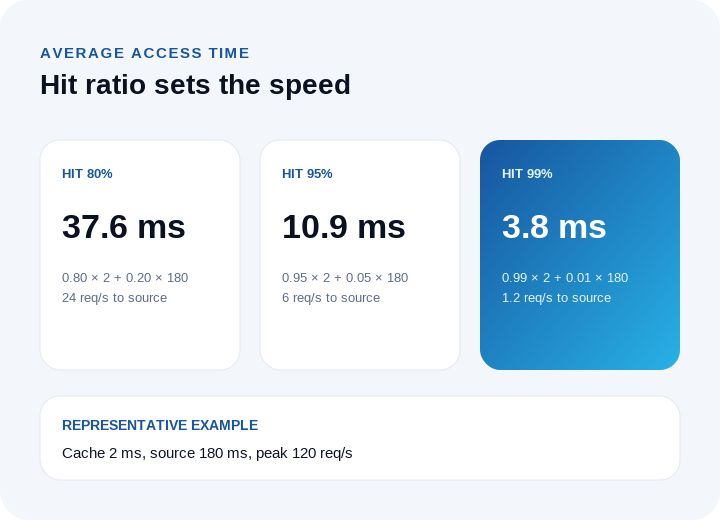
Two results stand out. At 95%, 9 ms of the 10.9 ms, that is 9 ÷ 10.9 ≈ 82.6%, comes from the 5% of misses alone; the tail drives the average. Raising the hit ratio from 95% to 99% cuts the average by (10.9 − 3.8) ÷ 10.9 ≈ 65%. The formula also ignores the cache lookup on a miss; add it and the 95% case becomes 0.95 × 2 + 0.05 × 182 = 11.0 ms. Beyond speed, source load is directly proportional to (1 − h): at a 95% hit ratio the source receives 6 requests instead of 120.
We recommend reading: How to do performance testing? Target, load and bottleneck guide
How Do You Prevent a Cache Stampede?
A cache stampede happens when a popular record expires and many requests miss at once and all go to the source. The source slows down, the record refills late, and the stampede grows.
Representative calculation: the most popular record is requested 30 times a second and takes 400 ms to rebuild. In those 0.4 seconds, 30 × 0.4 = 12 requests hit the source; 11 of them are wasted. A mass expiry is worse: if the hot 2,000 records were written together with the same TTL, a source that handles 28 requests per second stays fully busy for 2,000 ÷ 28 ≈ 71 seconds.
- Lock or single flight: Only one request refreshes a given key; the others wait or take the old answer. Twelve requests become one.
- Random TTL (jitter): Add ±20% to the TTL: 240–360 s instead of 300 s. The 2,000 records spread over 120 seconds; about 2,000 ÷ 120 ≈ 17 refreshes per second are needed, roughly 60% of the 28 capacity.
How Do You Manage Cold Start, Size and Eviction (LRU)?
After a restart or when the cache is emptied, the first requests miss; this is called a cold start. With an empty cache, 120 requests per second go to the source, about 4.3 times its 28 requests per second capacity. The fix is warming: fill the 2,000 most viewed records before opening traffic. To avoid swamping the source, using 4 parallel connections (≈ 22 requests per second) it takes 2,000 × 180 ms ÷ 4 = 90 seconds.
When the cache is full a record is evicted; the most common rule is LRU (evict the least recently used). Representative model: 10,000 products, 4 KB per record; 80% of traffic goes evenly to the 2,000 most viewed products and 20% to the other 8,000; the most used records are kept.
| Records in cache | Memory | Hit ratio | Calculation |
|---|---|---|---|
| 1,000 | 4 MB | 40% | 0.80 × 1,000 ÷ 2,000 |
| 2,000 | 8 MB | 80% | Hot set complete |
| 4,000 | 16 MB | 85% | 0.80 + 0.20 × 2,000 ÷ 8,000 |
| 10,000 | 40 MB | 100% | Everything fits |
The gain ends at the hot set: going from 1,000 to 2,000 records buys 40 points for 4 MB, from 2,000 to 4,000 buys only 5 points for 8 MB, and from 4,000 to 10,000 buys 15 points for 24 MB. Real LRU falls a little below this ideal; one-off large reads such as a bulk report can push the hot set out, so they are kept away from the cache.
How Do You Cache User-Specific Data Safely?
The key must include every input that changes the answer; otherwise one user's answer is shown to another. This is the most serious caching bug: dealer A's price list is stored by address alone, and when dealer B requests the same address, B sees A's prices.
- Put the inputs in the key: source, dealer group, language, currency.
- Do not put personal answers in a shared layer: send a "do not share" directive at the edge.
- Authorization runs before the cache: the existence of a cache must not bypass an access rule. For the permission model, see our role-based access control article.
- Manage the number of keys: 10,000 products × 5 price groups = 50,000 keys, and 50,000 × 4 KB ≈ 200 MB. If you store the shared product data once (10,000 × 4 KB = 40 MB) and the group prices as small separate records (10,000 × 100 B × 5 ≈ 5 MB), then combine them at computation time, the total is 45 MB.
For personal data held in a cache, assess your KVKK (Turkey's personal data protection law) obligations with your legal counsel.
How Do You Measure Whether a Cache Works?
Four measures: hit ratio = hits ÷ (hits + misses), so 94,800 hits in 100,000 reads is 94.8%, which is also the source load reduction; the number of stale reads; p95 and p99 latency, not the average; and the eviction count with memory fill. Do not use the hit ratio alone: it can be 99% on the hot set and 20% in the long tail. A sudden drop after a deployment often points to a changed key format or TTL; to tie these measures to alerts, see our monitoring guide.
When Does a Cache Investment Pay Back?
The gain comes from needing less capacity on the source side. In the representative example one source instance safely handles 28 requests per second and costs ₺9,000 per month. Without a cache, 120 ÷ 28 ≈ 4.3, so 5 instances are needed. At a 95% hit ratio the source load is 6 requests per second and 1 instance is enough; 4 instances × ₺9,000 = ₺36,000 monthly saving. With infrastructure at ₺6,000 and extra maintenance plus stale-fix cost at ₺4,000, the monthly net is ₺26,000. If the build is 18 person-days × ₺9,000 = ₺162,000, payback is 162,000 ÷ 26,000 ≈ 6.2 months.
| Hit ratio | Source load | Instances needed | Monthly net | Payback |
|---|---|---|---|---|
| 95% | 6 / s | 1 | ₺26,000 | ≈ 6.2 months |
| 80% | 24 / s | 1 | ₺26,000 | ≈ 6.2 months |
| 60% | 48 / s | 2 | ₺17,000 | ≈ 9.5 months |
| 40% | 72 / s | 3 | ₺8,000 | ≈ 20.3 months |
Savings rise in steps because instances are whole numbers; the response-time gain is not part of this calculation. If the hit ratio falls to 40%, first find out why the cache is not hitting.
What Steps Does Cache Design Follow?
Six steps keep decisions written down and measurable.
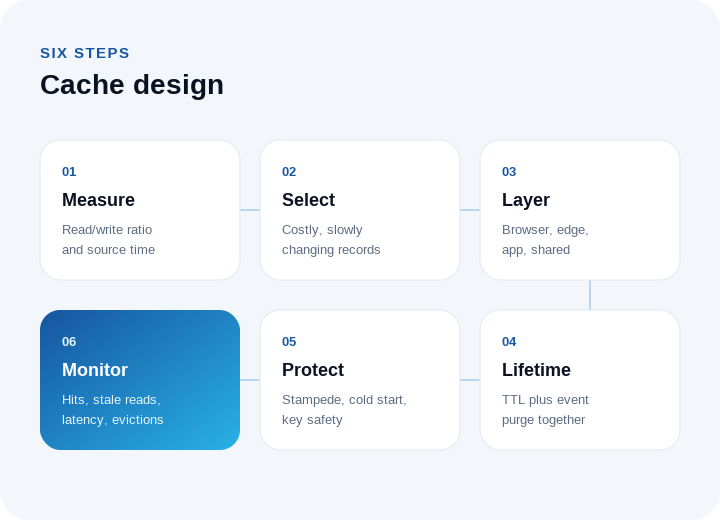
- Measure: Work out read and write ratios, the source response time and the slowest queries.
- Select: List expensive, slowly changing records and write the staleness tolerance for each.
- Choose the layer: Pick it by who owns the data and how many servers run.
- Design lifetime and purge: Choose the TTL by the cost of staleness and add event-based purge.
- Protect: Set up stampede protection, warming and key safety.
- Monitor: Put hits, stale reads, latency and evictions on a dashboard.
We recommend reading: What is a web application? Architecture, cost and decision guide
We recommend reading: How to Improve Website Speed: Page Weight Budget, Images, Scripts and Core Web Vitals Guide
We recommend reading: What Is Serverless Architecture? Cold Starts, Limits, Break-Even Cost and When It Fits
Custom Software and Performance-Minded Architecture with İnovabil
At İnovabil our focus is building custom software from scratch for your company: custom software, ERP, CRM, e-commerce, web, mobile and integration. We recommend writing down, during requirements analysis and architecture, which data is cached and with what staleness tolerance; we do not offer a separate caching service or give numerical performance commitments.
We built CRM, purchasing and mobile for Avcılar İnşaat; a purchasing system for İZBAN; logistics and shipment planning with wholesale order management for Karyak; and warehouse management with a complaint and support system for Sleepy. Briefly describe the screens that stay slow; let us measure the bottleneck together first, then decide whether a cache is needed.
We recommend reading: Our software development process: step by step from analysis to launch
Frequently Asked Questions
What is caching, and what is it for?
It is the technique of keeping a frequently requested, expensive answer in a fast place for a while and reusing it; it speeds up responses and reduces load on the source.
What is the hardest part of caching?
Deciding when data counts as invalid, that is, designing lifetime and purge. That is why event-based purge and a TTL as a safety net are used together.
Which data should not be cached?
Data that needs instant accuracy: payment amount, credit limit, balance and the final stock check. These are read from the source.
What should the hit ratio be?
There is no single right value; it depends on your source load and time goals. In the example, going from 80% to 95% cuts the average from 37.6 ms to 10.9 ms. Calculate the target with your own times and capacity, and look at p95 too.
Can a cache show one user's data to another?
Yes, if the key is built incompletely. Every input that changes the answer must be in the key, and the authorization check must run before the cache.