

When a dealer portal confirms an order, four things happen behind the scenes: the order is saved, an e-invoice (e-Fatura) is prepared, the record is written to the ERP and a confirmation email goes out. If you run all four in sequence while the user stares at the screen, one slow invoicing service slows down every order. A message queue separates these jobs: the front end answers "your order has been received" right away, the remaining work is dropped into a queue, and background workers called consumers pick it up one by one. Working this way is called asynchronous processing.
In this guide we explain synchronous versus asynchronous processing, queue types, delivery guarantees and duplicate protection, retries and the dead-letter queue, poison messages, ordering, and how to calculate the number of consumers with Little's law. All examples use a dealer portal; the numbers are illustrative, not measurements of a real system or the values of any specific product.
What Is a Message Queue and Asynchronous Processing?
A message queue is an intermediate store where one application leaves a "do this job" message for another application (or for its own background job), and where the receiver picks it up in order when it is ready. The side that leaves the message is the producer; the side that takes it is the consumer. The producer does not wait for the job to finish, only for confirmation that the message is safely queued.
This gives you a fast response, no lost work when a consumer is down, and load spread over time. The price: the result appears a little later and the system is briefly inconsistent (eventually consistent). External systems notifying you over HTTP is a different topic, which we covered in our webhook guide. Here the focus is the queue inside your own system.
We recommend reading: Our integration service
What Is the Difference Between Synchronous and Asynchronous Processing?
In synchronous processing the caller waits until the work is done and gets the result in the same response. In asynchronous processing the caller waits only for "I have accepted the job"; the result arrives later through another route, such as a status lookup or a notification.
| Topic | Synchronous | Asynchronous (with a queue) |
|---|---|---|
| Response to the user | After all steps finish | When the job is accepted |
| A slow service | Slows down the whole request | Delays only that job |
| A service is down | The request fails | The message waits and is processed when the service returns |
| Traffic peak | Timeouts and lost orders | The queue builds up, then drains |
| Data state | Consistent immediately | Eventually consistent; may be briefly out of date |
| Complexity | Low | Higher: queue, duplicate protection, monitoring |
In the example order confirmation the step durations are (illustrative): validation and save 0.3 s, e-invoice 1.2 s, ERP write 0.8 s, email 0.7 s. The synchronous response time is 0.3 + 1.2 + 0.8 + 0.7 = 3.0 s. In the asynchronous design the user waits only for the save and the queue write: 0.3 + 0.05 = 0.35 s. The gain is (3.0 - 0.35) / 3.0 = 88.3%.
Reliability changes too: if three external services are each 99% available and all are waited on inside the request, the chance the order succeeds is 0.99³ ≈ 97.0%. With a queue, accepting the order is independent of those services. For the wider picture, see our microservices architecture guide.
How Does a Message Queue Work?
It has four parts, and a message travels like this:
- The producer writes the message: After the order is saved to the database, an "order_confirmed" message (order number, line items, amount) is put in the queue.
- The queue stores it: The message is kept durably (written to disk) until a consumer takes it.
- A consumer takes and processes it: One consumer receives the message; meanwhile it becomes invisible to other consumers (it is locked).
- An acknowledgement is sent: When the work finishes successfully, the consumer sends an ack and the message is deleted from the queue. If no ack arrives, the message becomes visible again after a timeout.
The ack proves the work is done; if a consumer crashes, no ack arrives and the message goes to another consumer. That also means a message can be processed twice. If the record is saved but the message cannot be written, the job is left half done, so a common pattern is to write the message to an "outbox" table inside the record's transaction and move it to the queue with a separate process.
What Types of Queues Are There?
Not every job fits the same queue. The right type depends on how many receivers should see a message and how far back you need to read.
| Type | How it works | Typical use |
|---|---|---|
| Work queue (point to point) | Only one consumer takes each message | E-invoice generation, sending email |
| Publish-subscribe (topic) | Each subscriber gets its own copy of the message | Announcing "order confirmed" to stock, invoicing and reporting services |
| Priority queue | Important messages jump ahead | A payment confirmation overtakes a bulk report |
| Delay queue | The message becomes visible after a set time | Abandoned-cart reminders, retry intervals |
| Dead-letter queue | A parking place for messages that cannot be processed | Inspection and manual correction |
| Event stream (log based) | Messages are not deleted, are kept for a period and can be re-read | Replay, audit, many readers |
For small and mid-sized businesses the first three usually cover the need. An event stream makes sense when you must re-read history, and it asks for more operational effort.
What Are Delivery Guarantees and Duplicate Protection (Idempotency)?
A queue offers one of three delivery guarantees. Which one you choose answers the question "is it cheaper to lose a message or to process it twice?"
| Guarantee | Meaning | Risk |
|---|---|---|
| At most once | Delivery is tried, never repeated | A message can be lost |
| At least once | Redelivered until an ack arrives | The same message can arrive more than once |
| Exactly once | Neither loss nor duplication is wanted | Hard end to end; in practice achieved with duplicate protection |
Business systems mostly pick "at least once", because a lost order or invoice costs more than a double run. In that case duplicate protection is the consumer's job: every message has a unique ID, the consumer records the IDs it has processed, and if the same ID arrives again it does not repeat the work. Example: if 0.3% of 100,000 daily messages are redelivered, 100,000 × 0.003 = 300 messages arrive a second time. Without protection that means 300 duplicate emails or invoices; with it, none.
The same logic applies to webhook receivers; details are in our webhook guide.
What Are Retries, the Dead-Letter Queue and a Poison Message?
Processing sometimes fails for temporary reasons (a network cut, a locked record). The message is then retried at growing intervals. Example: retry 30 seconds after the first attempt, then after 2 minutes, then after 10 minutes. The attempts happen at minute 0, 0.5, 2.5 and 12.5: four attempts in total. If all fail, the message moves to the dead-letter queue and the team is alerted. A dead-letter queue is not a trash can but an inspection list.
A poison message is one that fails no matter how often it is tried, such as a malformed message or one pointing to a record that does not exist. With unlimited retries it keeps a consumer permanently busy. Example: there are 25 consumers, each handling one message in 0.5 s (2 messages/s), and the load is 40 messages/s. If five poison messages each return to the queue immediately with a 30 s timeout, five consumers stay busy all the time. The remaining capacity is (25 - 5) × 2 = 40 messages/s, equal to the incoming load; the queue never drains and grows without bound at the slightest fluctuation. The fix is to cap the number of attempts and move the message to the dead-letter queue once the cap is exceeded.
How Many Consumers Do You Need? A Little's Law Calculation
Little's law gives the average number of items in a system in steady state: L = λ × W. Here λ is the number of messages arriving per unit of time and W is the average time a message spends in the system (waiting plus processing). Our scalability guide used it for concurrent users; here we use it for consumers.
Example (illustrative): arrival rate λ = 40 messages/s, processing time S = 0.5 s per message. The number of messages processed at the same moment is 40 × 0.5 = 20; that is the minimum number of consumers and the limit where utilisation is 100%. As utilisation approaches 100% the queue lengthens quickly, so a target of 70-80% is chosen.
| Target utilisation | Consumers needed | Total capacity | Comment |
|---|---|---|---|
| 100% | 20 | 40 messages/s | No margin; the queue grows at the smallest fluctuation |
| 80% | 20 / 0.8 = 25 | 50 messages/s | A balanced starting value |
| 60% | 20 / 0.6 = 33.3 → 34 | 68 messages/s | Comfortable, but only 58.8% utilisation |
Take 25 consumers for 80%: capacity is 25 × 2 = 50 messages/s and utilisation is 40 / 50 = 80%. If the measured average time in the system is W = 0.9 s, the average number of messages in the system is L = 40 × 0.9 = 36. Of these, 20 are being processed and 36 - 20 = 16 wait in the queue; the waiting time is 16 / 40 = 0.4 s. If processing time grows, the picture changes: if the ERP slows down and processing rises to 0.8 s, the capacity of 25 consumers becomes 25 / 0.8 = 31.25 messages/s; against 40 arriving, 8.75 messages pile up every second and in one hour 8.75 × 3,600 = 31,500 messages collect in the queue. That is why you must watch processing time as closely as the consumer count.
How Much Does the Queue Build Up at a Peak, and When Does It Drain?
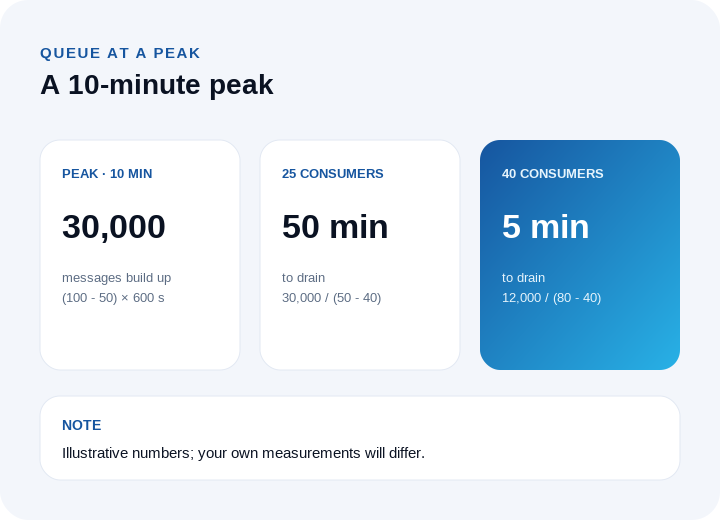
The biggest benefit of a queue is that it absorbs the peak. Example campaign: for 10 minutes (600 s) the load rises to 100 messages/s, then returns to 40 messages/s. With 25 consumers the capacity is 50 messages/s.
- Build-up: At the peak 100 - 50 = 50 messages pile up every second; after 600 s there are 50 × 600 = 30,000 messages in the queue.
- Draining: After the peak the drain rate is 50 - 40 = 10 messages/s; emptying 30,000 messages takes 30,000 / 10 = 3,000 s = 50 minutes.
- Wait of the last message: A message entering at the end of the peak waits for the 30,000 ahead of it: 30,000 / 50 = 600 s = 10 minutes.
If we raise the consumers to 40, capacity becomes 80 messages/s. The build-up is (100 - 80) × 600 = 12,000 messages, and since the drain rate is 80 - 40 = 40 messages/s, it clears in 12,000 / 40 = 300 s = 5 minutes. To have no build-up at all at the peak you would need 100 × 0.5 = 50 consumers (100% utilisation), or 62.5 → 63 consumers with an 80% target. An email can wait 10 minutes, a payment confirmation cannot; that is why you put the two in separate queues.
To verify these calculations in a real system you need to try the peak in advance; we described the method in our performance testing guide.
How Is Message Order Preserved?
With a single queue and a single consumer, order is preserved; with several consumers it is not. The "created", "paid" and "cancelled" messages of the same order can go to different consumers, and "cancelled" can be processed before "paid". The fix is to partition messages by a key (for example the order number): messages with the same key always go to the same consumer, while different orders run in parallel.
The price is balance. If the key is chosen badly (for example all orders carry one dealer code), one consumer receives everything; at 0.5 s per message the capacity drops to 2 messages/s, which is 5% of a 40 messages/s load. If order is not essential, put a version number in each message and do not let an old message overwrite a newer state.
Which Measures Show the Health of a Queue?
A queue works silently; the indicators below warn before a user complaint does. We described the general monitoring approach in our software monitoring guide.
| Indicator | What it tells you | Example threshold (illustrative) |
|---|---|---|
| Queue depth | Number of waiting messages | A lasting rise; a curve climbing for 5 minutes |
| Age of the oldest message | The real delay | Over 60 s; equals a depth of 60 × 50 = 3,000 messages |
| Produce and consume rate | Direction of build-up | If incoming > processed for 5 minutes |
| Processing time (p95) | Consumer slowdown | 1.5 times the planned 0.5 s |
| Retry rate | Frequency of temporary errors | 1.2% (1,200 / 100,000 per day) |
| Dead-letter count | Permanent errors | 12 messages a day (0.012%); each one inspected |
The age of the oldest message is more meaningful than depth, because it directly shows the delay users experience. The conversion is age = depth / consume rate; 3,000 / 50 = 60 s.
What Are the Cost and Return of a Message Queue?
The cost of a queue is the setup effort and the operation; the return is the orders you do not lose at a peak. Illustrative example: building the queue and consumer architecture takes 24 person-days × ₺9,000 = ₺216,000. Extra infrastructure and monitoring cost ₺12,000 a month.
Suppose that in the synchronous design there is one campaign a month and 2.5% of 12,000 order attempts are lost to timeouts: 12,000 × 0.025 = 300 orders. With a basket of ₺1,200, 300 × ₺1,200 = ₺360,000 of revenue, and with a 20% contribution margin that is ₺72,000 lost. Assuming the queue prevents that loss completely, the monthly net benefit is 72,000 - 12,000 = ₺60,000 and the payback is 216,000 / 60,000 = 3.6 months. If the loss were half as large (1.25%), the benefit would be 36,000 - 12,000 = ₺24,000 and the payback 216,000 / 24,000 = 9 months.
What Steps Set Up a Message Queue?
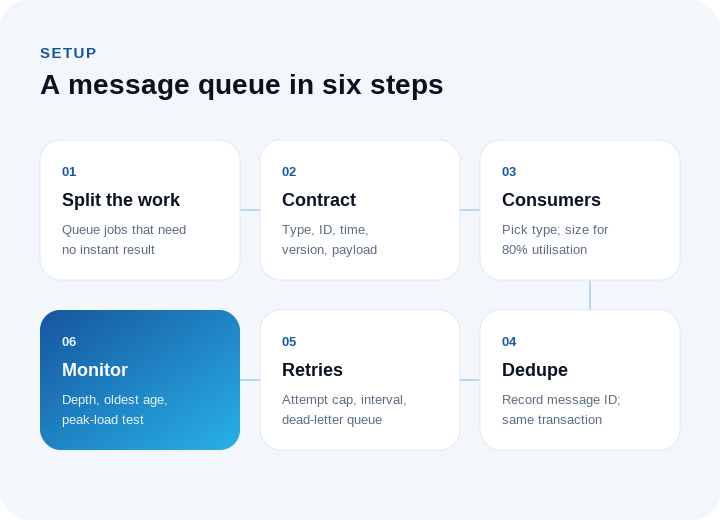
- Separate the work: Queue the jobs whose result the user does not need immediately (invoice, email, report, ERP write); keep steps that need an instant result, such as payment verification, synchronous.
- Write the message contract: Define each message's type, unique ID, time, version and payload so that changing the contract does not break consumers.
- Set up the queue and consumers: Choose the queue type and set the consumer count with Little's law for 70-80% utilisation.
- Add duplicate protection: Prevent double processing with the message ID; record the ID and do the work in the same transaction.
- Set up retries and the dead-letter queue: Cap the number and interval of attempts; send permanent errors to the dead-letter queue and attach an alert.
- Monitor and test: Watch queue depth and the age of the oldest message; try the peak load and a consumer crash beforehand.
We recommend reading: What is an order management system? Lifecycle, stock allocation and payback guide
What Mistakes Are Common with Message Queues?
- Skipping duplicate protection: "At least once" delivery means double processing; without protection you get duplicate invoices and emails.
- Sizing consumers for 100% utilisation: With no margin, even a small fluctuation causes a lasting build-up.
- Not capping retries: A poison message eats up consumer capacity.
- Not showing the user a status: In asynchronous work the user must see "received, processing"; otherwise they retry again and again.
We recommend reading: What is API integration? Core concepts and integration paths
We recommend reading: How to secure an API
We recommend reading: How to Improve Database Indexing and Query Performance: An Index, N+1 and Slow Query Guide
We recommend reading: What Is Batch Processing and Scheduled Jobs? Batch Windows, Restarts, Locks and the Critical Path
We recommend reading: How to Design Mobile Push Notifications: Types, Permission, Frequency Caps and Measurement Guide
We recommend reading: How to Ensure Transactional Email Deliverability: Authentication, Warm-Up, Bounces and Monitoring Guide
We recommend reading: What Is EDI? Electronic Data Interchange, Document Flow, Mapping and Payback Guide
We recommend reading: What Is Caching? Layers, TTL, Invalidation, Cache Stampede and Payback Guide
We recommend reading: How to Prevent Double Selling with Concurrency Control: Locking, Optimistic Versioning and Reservations
We recommend reading: How to Generate PDF Documents and Labels from Software: Templates, Page Breaks, Barcodes and Payback Guide
We recommend reading: What Is Event-Driven Architecture? Event Types, Outbox, Replay and Payback Guide
We recommend reading: How to Design an Offline-First App: Local Data, Sync, Conflict Resolution and Payback Guide
We recommend reading: How to Run Integration Operations: Error Queues, Reprocessing and Monitoring Dashboards
We recommend reading: What Is Serverless Architecture? Cold Starts, Limits, Break-Even Cost and When It Fits
We recommend reading: WebSockets vs SSE vs Polling: How to Choose Real-Time Updates for a Business App
We recommend reading: What Is the Saga Pattern and Distributed Transactions? Compensation, Step Order and Failure Math Guide
Integration and Background Processing with İnovabil
At İnovabil our focus is building custom software from scratch for your company: custom software, ERP, CRM, e-commerce, web, mobile and integration. In work that connects several systems such as orders, invoicing and stock, we decide with you during requirements analysis which step goes into a queue and which stays synchronous. A queue is a tool we recommend only where it is truly needed.
We built CRM, purchasing and mobile for Avcılar İnşaat; a purchasing system for İZBAN; logistics and shipment planning with wholesale order management for Karyak; and warehouse management plus a complaint and support management system for Sleepy. Send us a short summary of your systems and your daily load pattern, and we will produce a written assessment of which jobs can be asynchronous.
We recommend reading: Our software development process: from analysis to launch, step by step
Frequently Asked Questions
What is a message queue and what is it for?
It is an intermediate store where messages one application leaves for another are kept durably and in order until the receiver is ready. By spreading work over time it gives users a fast response and prevents work from being lost while a service is down.
What is the difference between synchronous and asynchronous processing?
In synchronous processing the caller waits for the work to finish and gets the result immediately; in asynchronous processing it learns only that the job was accepted and the result comes later. In the example the response time falls from 3.0 s to 0.35 s; in return, the result is eventually consistent.
How many consumers do you need?
Multiply the message arrival rate by the processing time and divide by the target utilisation. For 40 messages/s and 0.5 s, 40 × 0.5 = 20; with an 80% target, 20 / 0.8 = 25 consumers. For peak load, also calculate the build-up and the drain time.
What happens if the same message arrives twice?
With at-least-once delivery that is normal. If the consumer records the message ID and does not repeat the work when the same ID returns, the outcome does not change. Without protection you get a duplicate invoice, a duplicate email or a double stock deduction.
When is a dead-letter queue needed?
Every queue needs one, because some messages will not be processed even after retries. A malformed or invalid message goes there, the consumer is not blocked, and the team inspects, fixes and resends it; its count should be tied to an alert.