

Three programs, three price lists, and the same sentence in all of them: "e-invoice, customer accounts, cash, bank, everything included." Every demo looks good. The trouble shows up three months later, when bank transactions will not match or your financial advisor (certified accountant) refuses the journal entries. Choosing pre-accounting software is not about reading a feature list; it is about testing your own transactions in the program and calculating the real cost.
In this guide we explain how to list your needs, which criteria to look at, how to compare programs with a weighted score, how to work out the real three-year cost, which scenarios to run during a trial, and which signs are red flags. (Pre-accounting means day-to-day bookkeeping and invoicing.) All example figures are illustrative; replace them with your own.
What Should You Look At When Choosing Pre-Accounting Software?
Four things: does it cover your e-document and customer account transactions, does it work with the other systems you use, does it work smoothly with your financial advisor, and what does it really cost over three years. Price is only one of the four.
We covered what pre-accounting is and how it differs from general accounting in our pre-accounting guide; this article is for businesses that already know the topic and now have to pick a program.
We recommend reading: Accounting software: customer accounts, e-invoice, cash and bank in one system
How Do You Define Your Needs Before Choosing?
Look at your own business first, not at the program: how many invoices do you issue a month, who will log in, how many companies do you have, and do you know where your data will come from. These five numbers eliminate many programs at the first pass.
| Question | Why it matters |
|---|---|
| How many sales and purchase invoices are processed a month? | As volume grows, manual entry becomes unsustainable; bulk import and integration become mandatory |
| How many users, with which permissions? | If licensing is per user, cost depends directly on this; without permission separation, security becomes a problem |
| How many companies and currencies? | Multiple companies and foreign currency are not equally easy in every program |
| Where do orders come from? | If marketplace, website or ERP orders must be transferred by hand, the time saving disappears |
| Which format does your financial advisor accept? | If the export format does not match, entries are retyped |
Write the answers on one page and split your needs into three groups: must-have (you cannot work without it), important (the job gets easier with it) and nice to have. Through the whole selection, this list protects you from flashy but unnecessary features in demos.
What Are the Criteria for Choosing Pre-Accounting Software?
Eight criteria decide the outcome for most businesses. The table below collects the question to ask the vendor for each one.
| Criterion | Question to ask the program |
|---|---|
| E-invoice and e-archive | Which integrator does it work with, and can you choose your own? Are incoming invoices received automatically? |
| Customer accounts and terms | Are there payment terms, credit limits, statements and an aging report? Do collections match invoices automatically? |
| Cash and bank | Are bank transactions imported automatically? Do they match customer accounts on their own? |
| Stock and expenses | Does stock move with the invoice? Can expenses be entered with a photo? |
| Accountant export | Are journal entries exported in the format your financial advisor uses? Does the chart of accounts map? |
| Integration | Does it work with your marketplaces, shipping, ERP and website? Does it offer an API? |
| Permissions and audit trail | Is who-did-what visible in the records? Can role-based permissions be defined? |
| Data and support | Can you export your data at any time? Through which channel and during which hours is support available? |
Who is covered by the e-invoice and e-archive obligation, and where the thresholds lie, is set by regulation; get those figures from the Revenue Administration (GİB) and your financial advisor, not from a vendor.
How Do You Compare Programs with a Weighted Score?
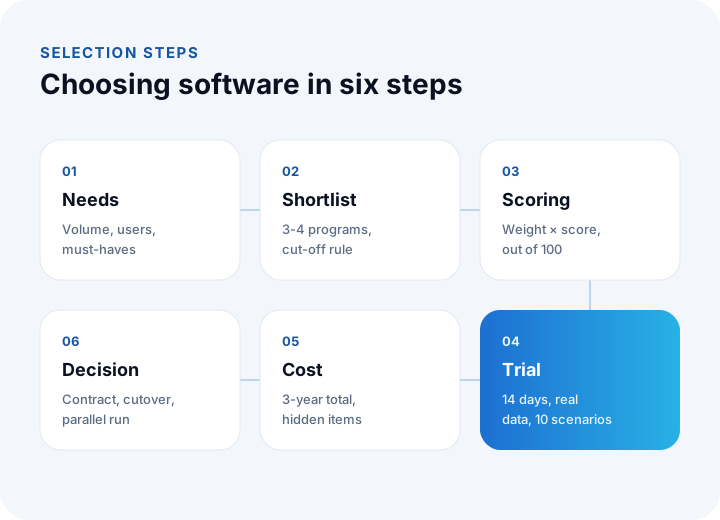
Give each criterion a weight by importance, give each program a score from 1 to 5, multiply the two and add them up. This turns "I think this one is better" into a number.
Example: for five criteria the weights are e-documents 25, customer accounts and collections 20, bank 15, integration 25 and accountant export 15. Suppose you score two programs like this:
| Criterion | Weight | Program A score | Program B score |
|---|---|---|---|
| E-invoice and e-archive | 25 | 4 | 3 |
| Customer accounts and collections | 20 | 5 | 4 |
| Bank | 15 | 3 | 4 |
| Integration | 25 | 2 | 5 |
| Accountant export | 15 | 4 | 3 |
| Total (out of 100) | 100 | 355 ÷ 5 = 71 | 385 ÷ 5 = 77 |
Program A: 25×4 + 20×5 + 15×3 + 25×2 + 15×4 = 355. Program B: 25×3 + 20×4 + 15×4 + 25×5 + 15×3 = 385. Although A is stronger on customer accounts, B pulls ahead because integration carries a high weight.
Add a cut-off rule as well: a candidate that scores below 3 on a must-have criterion is dropped, whatever its total. For a business that treats integration as must-have, A is eliminated here despite its 71 points.
How Do You Calculate the Real Three-Year Cost?
The monthly price is only one line of the cost. Compare programs on a three-year total.
Example (illustrative figures, five users): Program A's license is ₺400 per user per month, and Program B's is ₺550.
| Item | Program A | Program B |
|---|---|---|
| License (36 months, 5 users) | 400 × 5 × 36 = ₺72,000 | 550 × 5 × 36 = ₺99,000 |
| Setup and data migration | ₺15,000 | ₺5,000 |
| Extra integration | ₺24,000 | Included |
| Training | ₺6,000 | ₺3,000 |
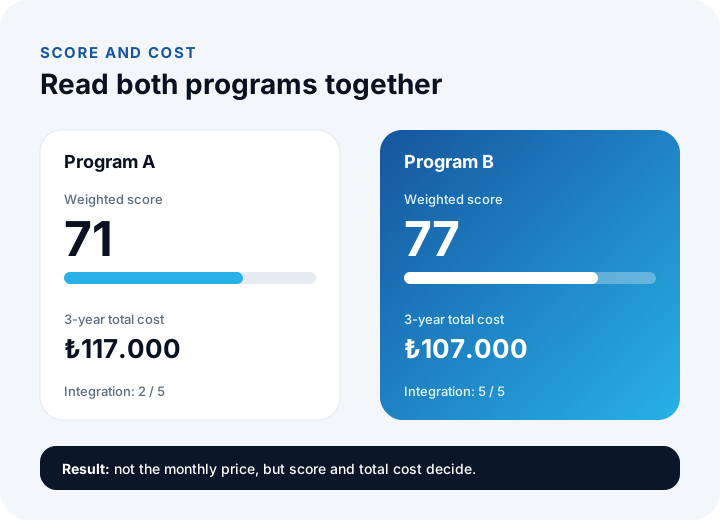
| Three-year total | ₺117,000 | ₺107,000 |
Program A, which looks cheaper per month, ends up ₺10,000 more expensive over three years. Also add how the license scales when your user count grows and what the price-increase terms are; an increase that is not written into the contract becomes next year's surprise.
Which Scenarios Should You Run During a Trial?
A demo shows the program at its best; a trial shows your business. Try it for at least 14 days, with your own real data, using the scenarios below:
- Issue a sales invoice and send it as an e-invoice or e-archive invoice; confirm that you can see the delivery result inside the record.
- Receive an incoming purchase invoice and post it to the supplier account.
- Import a bank statement and count how many transactions match a customer account on their own.
- Enter a partial collection: make two separate payments against one invoice and check the remaining balance.
- Issue a return invoice and see that the account and stock movements correct together.
- Export a journal entry and show the output to your financial advisor.
- Test permission separation: can a user who should only see collections delete an invoice?
- Run the aging and cash flow reports; do the figures match the table you keep by hand?
- Export your data (Excel or CSV) and verify that it arrives complete.
- Try the support line once: ask a question and see how fast and how well it is answered.
Cloud Software or Installed Software?
For most small and mid-sized businesses cloud software is more practical; the choice is revisited when needs such as data security, backup and special links to existing systems grow.
| Topic | Cloud (subscription) | Installed (on your server) |
|---|---|---|
| Setup | Fast; sign in from a browser | Needs a server and installation work |
| Updates | The vendor does it; e-document regulation changes arrive on their own | Your responsibility or the installer's |
| Access from anywhere | Direct | Needs extra connection setup |
| Backup | Depends on the vendor's service; ask where backups are kept | Your responsibility |
| Cost structure | Regular subscription | High at the start, then maintenance and server |
We recommend reading: How to back up business data: RPO, RTO and the 3-2-1 rule
Which Signs Are Red Flags When Choosing Software?
If you see even one of the signs below, pause the purchase and get clarity:
- You cannot export your data. Without a way out of the program, your data is held hostage.
- The e-document integrator is fixed. If switching to another integrator is impossible, you lose any say over cost and timing.
- No trial, or a very limited one. Do not buy a program you cannot test with your own data.
- Pricing is vague. If what you will pay as users, companies and invoice counts grow is not written down, the risk is large.
- Your financial advisor's format is not supported. Retyping entries every month wipes out the program's gain.
- Support only by form or email. On a day when you cannot issue an invoice, you have to wait for an answer.
- No audit trail or permissions. If you cannot see who changed what, errors and misuse go unnoticed.
How Do You Plan Data Migration and Cutover?
The cutover matters as much as the choice; even the best program causes trouble in the first month without a migration plan. Opening balances (customer accounts, cash, bank, stock) are taken at a set cutoff date, and for a month the old and new systems run in parallel so figures can be compared. The old system is not closed without your financial advisor's approval.
We recommend reading: What is pre-accounting? Cutover steps and common mistakes
When Is Off-the-Shelf Software Not Enough?
For a standard flow of customer accounts, invoices, cash and bank, off-the-shelf software is usually enough. The signs below show that your need has reached its limit:
| Sign | What to do |
|---|---|
| Several companies and a complex ownership structure | Look at a program that supports multi-company setups, or consider a custom system |
| Sales are managed together with ERP or production | Set up an ERP integrated with production, stock and costing |
| Custom approval flows and sector-specific documents | Build custom development around your business rules |
| Marketplace and shipping data is moved by hand every day | Build a custom integration |
We recommend reading: Off-the-shelf or custom software? A decision guide
We recommend reading: What Is E-Invoice Integration and How Is It Done? A Guide for Orders, ERP and Accounting
We recommend reading: How to choose a CRM: criteria, scoring, cost and demo guide
We recommend reading: What is procurement software? Process, approval matrix, quote scoring and three-way matching guide
Recommended reading: How to Track Customer Accounts
Pre-Accounting Software with İnovabil
At İnovabil we help in two ways. For standard pre-accounting needs we develop and run our own cloud pre-accounting product, NetKasam, which covers customer accounts, stock, cash, bank and e-invoice processes. When you need multi-company structures, custom approval flows, sector-specific documents or deep integration with ERP and production, we build custom accounting software for you.
We decide together at the analysis stage which path suits you: first we write out your needs list and system inventory, then we state clearly what an off-the-shelf solution can and cannot cover. You can fill in the scoring and cost tables in this guide with your own data and send them to us, and we can do the comparison together.
We recommend reading: Our integration and API development service
Frequently Asked Questions
What is the most important criterion when choosing pre-accounting software?
There is no single criterion, but smooth e-document handling, bank and account matching, an export your financial advisor can use, and integration decide the outcome for most businesses. A weighted score shows which of them matters most for you.
How long should I test during a trial?
At least 14 days, with your own real data. A small sample from one month's invoices, a bank statement and a test export to your financial advisor show whether the program fits your daily work.
Is the program with the lowest monthly price the most economical?
No. Setup, data migration, extra integrations, training and how the license scales as users grow decide the total cost. Compare on a three-year total.
How can I tell if a program works with my financial advisor?
During the trial, export a journal entry and show the output to your financial advisor. Do not decide before confirming that the chart of accounts maps and the entries load cleanly into their software.
What should I do if off-the-shelf software is not enough?
If you need a multi-company structure, custom approval flows, sector-specific documents, or deep links to ERP and marketplaces, consider custom development or a custom integration. Which one fits is decided after an analysis based on your needs list.