

The sales team writes customer notes in personal notebooks, quotes live in email and deals sit in a spreadsheet. When the manager asks at the end of the month, "how many deals do we have, and how many will close?", the answer passes through three people before it arrives. That is the moment businesses start looking for a CRM, but how to choose a CRM takes far more than reading a vendor's feature list.
In this guide we cover the decisions to make before choosing, an eight-criteria evaluation table, weighted scoring, a three-year total cost formula, the scenarios to test in a demo or trial, the difference between off-the-shelf, custom and hybrid options, red flags and data migration steps. The example figures are illustrative; they are not a real price or market-rate claim.
What Should You Decide Before Choosing a CRM?
Before you look at any product, answer three questions in writing: which steps make up your sales process, who will use the system, and what measurable result you expect from the CRM. Without these answers, every comparison ends up following the vendors' marketing language.
- Process: Where do leads come from, which stages do they go through, who approves a quote, and where does a won deal go next? Draw this flow on paper.
- Users: How many people, in which roles (sales, support, management, field) and on which devices? The number of users directly drives the license cost.
- Goal: Write measurable targets such as "quote preparation time drops from 2 hours to 20 minutes" or "the lost-deal reason is filled in on every record".
We explained what a CRM is and which modules it has in our what is CRM guide; here we focus on the selection process.
We recommend reading: Our CRM software service and its modules
Which Criteria Should You Use When Choosing a CRM?
Eight criteria are enough for most businesses: fit with the sales process, ease of use, integration, reporting, mobile use, permissions and security, scalability and total cost. Write each criterion together with how you will test it, not as a yes/no question.
| Criterion | What to look at | How to test it |
|---|---|---|
| Fit with the sales process | Do stages, fields and approval steps match your flow? | Build your own funnel and run three real deals end to end |
| Ease of use | In how many minutes can a new user create a record without training? | Give a salesperson the task "save a new lead" and time it |
| Integration | Does it connect to email, phone, ERP, accounting, web forms and calendar? | Check that a request from a web form turns into a record on its own |
| Reporting | Are funnel, forecast and per-person performance reports ready, and can they be customized? | List your manager's questions and produce a report for each |
| Mobile use | Can the field team enter call notes and deals from a phone? | Try notes, calls and visit records on a real phone |
| Permissions and security | Is there role-based access, an audit log and export control? | Log in as a salesperson and try to see someone else's deal |
| Scalability | How do performance and price change as users, records and fields grow? | Test with a sample twice the size of your target |
| Total cost | What do license, setup, integration, training and maintenance cost together? | Calculate the three-year cost with the formula below |
The eight criteria do not carry the same weight in every business. For a team that sells by phone, mobile and call integration are decisive; for a business that manages a dealer network, permissions and ERP integration come first.
How Does Weighted Scoring Work in CRM Selection?
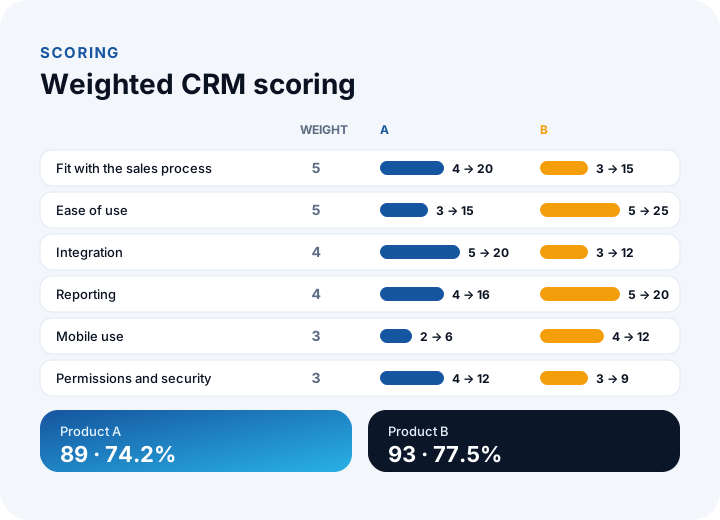
Each criterion gets an importance weight (1–5) and each product gets a score (1–5) on that criterion; weight times score is summed. That turns "I think B is better" into a number everyone can see.
Example (illustrative): six criteria and two candidate products. The weights add up to 5 + 5 + 4 + 4 + 3 + 3 = 24, so the highest possible score is 24 × 5 = 120.
| Criterion | Weight | Product A | Product B |
|---|---|---|---|
| Fit with the sales process | 5 | 4 (20) | 3 (15) |
| Ease of use | 5 | 3 (15) | 5 (25) |
| Integration | 4 | 5 (20) | 3 (12) |
| Reporting | 4 | 4 (16) | 5 (20) |
| Mobile use | 3 | 2 (6) | 4 (12) |
| Permissions and security | 3 | 4 (12) | 3 (9) |
| Total | 24 | 89 → 74.2% | 93 → 77.5% |
B's total is slightly higher; however, if fit with the sales process and integration are must-haves, B sits right at the limit with a 3 on both. When the gap is small (4 points in the example), the decision comes from the demo and the pilot. Scoring is not the judge; it is a tool that organizes the discussion.
How Is the Three-Year Total Cost of a CRM Calculated?
A license price alone is misleading: setup, integration and training land in the first year, while the per-user fee is added every month. Compare options on a three-year total.
Example (illustrative), 25 users: say the off-the-shelf CRM costs ₺900 per user per month. The license is 900 × 25 × 36 = ₺810,000; adding ₺60,000 setup, ₺90,000 integration and ₺30,000 training gives ₺990,000. For a custom CRM, 50 person-days with a 20% uncertainty buffer become 60 person-days; at ₺9,000 per day, development is ₺540,000. With annual maintenance at 15% (₺81,000) and annual infrastructure at ₺30,000, the three-year total is 540,000 + 243,000 + 90,000 = ₺873,000.
In a custom solution the cost does not depend on the number of users; in an off-the-shelf one the total grows with the per-user fee. Break-even: (873,000 − 180,000) ÷ (900 × 36) = 693,000 ÷ 32,400 ≈ 21.4, so in this example the custom solution becomes cheaper beyond about 22 users. To read the calculation correctly, remember that a custom CRM covers only your own needs, while an off-the-shelf product offers a wider set of features.
We recommend reading: Off-the-shelf or custom software? A decision guide
Which Scenarios Should You Test in a CRM Demo or Trial?
A demo prepared by the vendor always shows the best path. Give your own scenarios, and run the same scenarios with the same people in every candidate.
| # | Scenario | What to look at |
|---|---|---|
| 1 | Creating a new lead | How many clicks and seconds does it take; is there a duplicate warning? |
| 2 | Moving a deal through the funnel and quoting | Do tasks and the quote template appear on their own when the stage changes? |
| 3 | Importing a spreadsheet list | Field mapping, an error report for bad rows and the ability to undo |
| 4 | Call notes from a phone | Speed of the mobile screen and offline note entry |
| 5 | A request from a web form | Is it assigned to the right person, and is a notification sent? |
| 6 | Sales forecast report | Does it produce a forecast weighted by stage probability? |
| 7 | Permission check | Can a salesperson not see or export someone else's record? |
| 8 | Taking your data out | Can you export all records in an open format? |
The eighth scenario is often forgotten and it is critical: if you cannot get your data out as a clean file whenever you want, you are tied to the product. Run this test in every candidate before you sign a contract.
How Do You Decide Between Off-the-Shelf, Custom and Hybrid CRM?
All three paths can be right; which one depends on how standard your processes are and how much integration you need.
| Option | When it fits | Watch out for |
|---|---|---|
| Off-the-shelf CRM | The process is standard, you want to start fast and the user count is low | Grows with the per-user fee; custom fields and flows may be limited |
| Off-the-shelf + customization / integration | The core is standard, but ERP, accounting or custom calculation must be connected | Integration upkeep is ongoing work; watch version updates |
| Custom CRM | The sales process is different, with custom business logic such as dealers, field work or quoting rules | Requirements analysis and acceptance testing are essential; ownership and maintenance must be in writing |
If you are considering a custom CRM, the scope should be written down before the project starts. For that you can use our software requirements analysis guide and our guide on how to get custom software developed, which covers comparing quotes.
What Are the Red Flags When Choosing a CRM?
Some signs show in advance that the product or the vendor will cause problems later.
- Unclear data exit: Be careful if "you can export your data" is not shown in the demo.
- Integration "coming soon": If the connection you need is on the roadmap, treat it as missing for today's decision.
- Price given as license only: If setup, integration and training are not listed in writing, the total cost is unknown.
- No trial with real data: A demo with sample data does not reveal problems in your own data layout.
- User count tightly bound in the contract: If adding or removing users is hard and expensive, scaling gets stuck.
- No permissions or a single role: If everyone sees everything, personal data and competitive information are exposed.
How Is Old Customer Data Moved to a New CRM?
Migration is more than copying: data is cleaned first, then mapped, tested and verified. Data moved without cleaning brings the old mess into the new system.
- Take inventory: In which files and programs does customer data live, and how many records are there?
- Clean: Merge duplicate records, fill in empty required fields and fix phone and email formats.
- Map the fields: Write the equivalent of each old column in the new fields in a table.
- Run a test import: Try a sample of a hundred records first and fix the errors.
- Verify: Compare source and target record counts, totals and sample records.
- Run in parallel: Keep both systems for a short time with the old one read-only, then switch it off.
Example (illustrative): the old list has 12,400 records and 1,860 of them are duplicates. The duplicate rate is 1,860 ÷ 12,400 = 15%; after cleaning, 10,540 records are moved. Measure this number before the migration and reflect it in the schedule. For the data protection side of moving personal data, consult your legal advisor.
We recommend reading: What is API integration? A guide to connecting systems
How Do You Make Sure the CRM Is Adopted After Selection?
CRM projects most often stumble not on technical setup but on usage. If salespeople do not write records into the system, even the best product stays empty.
- Reduce the entry burden: Limit required fields to those that affect reporting.
- Manage from the system: Hold meetings and forecasts from the CRM screen, not from a spreadsheet.
- Name a champion: Have one person in each team who supports the system and helps others.
- Measure usage: Weekly active users ÷ licensed users. Example: 18 ÷ 25 = 72%; the target is 90% or more.
We covered process ownership and change management in detail in our digital transformation guide.
What Does a Six-Step CRM Decision Process Look Like?
Selection starts with writing down the need and ends with a short pilot. If you follow the six steps in order, you do not leave the decision to price negotiation or a single demo.
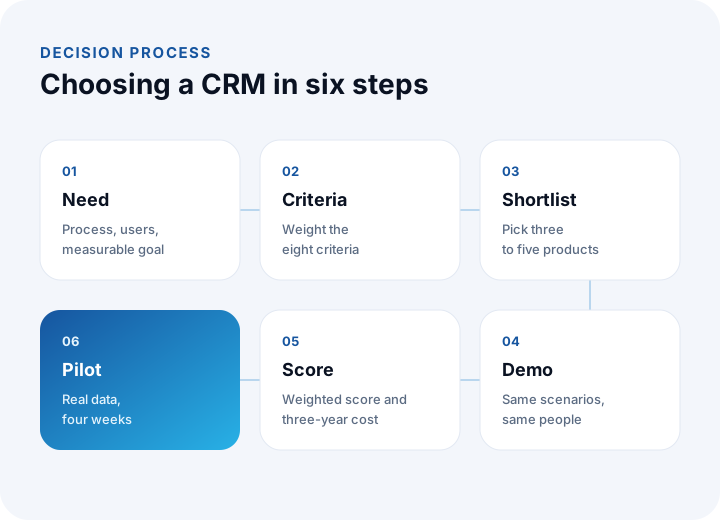
- Need: Write down the process, the users and the measurable goal.
- Criteria: Weight the eight criteria and mark the must-haves.
- Shortlist: Pick three to five products; more only delays the decision.
- Demo: Run the same scenarios with the same people in every candidate.
- Score: Evaluate the weighted score and the three-year cost together.
- Pilot: Try the best two candidates with real data in one team for four weeks.
We recommend reading: What is help desk software? Ticket life cycle, priority matrix, SLA compliance and team sizing guide
Recommended reading: What is a customer portal? Self-service scope, security and payback guide
Recommended reading: CRM vs ERP
CRM Solutions with İnovabil
At İnovabil we build custom CRM for sales processes that an off-the-shelf CRM cannot cover: customer and deal management, quotes, tasks and reminders, field and mobile use, role-based permissions, and integrations with ERP, accounting and web forms. We start a project with a process map and requirements analysis, and move forward with development in parts and acceptance testing.
We built CRM, purchasing and a mobile application together for Avcılar İnşaat, and moved shipment and warehouse processes into software for businesses such as Karyak and Sleepy. If you are not sure whether to go with an off-the-shelf product or a custom solution, describe your processes in a few sentences; we will first compare your criteria and the options in writing.
We recommend reading: Our software development process: step by step from analysis to release
Frequently Asked Questions
How to choose a CRM, in short: which steps should you follow?
First write down the sales process, the users and the goal; then weight eight criteria, have three to five candidates run the same scenarios in a demo, evaluate the weighted score and the three-year cost together, and pilot the best two candidates with real data.
Which is the most important criterion when choosing a CRM?
It varies from business to business, but fit with the sales process and ease of use for the team are usually decisive. If the team does not use the system, all other features are wasted.
How is the cost of a CRM calculated?
A license alone is not enough. For an off-the-shelf CRM, multiply the monthly user fee by the number of users and by 36 months, then add setup, integration and training. For a custom CRM, add development, maintenance and infrastructure. In the example calculation with 25 users, off-the-shelf comes to ₺990,000 and custom to ₺873,000.
Is an off-the-shelf or a custom CRM better for a small business?
If there are few users and the process is standard, an off-the-shelf CRM is usually fast and economical. If your process is different, if you need deep integration with an ERP or a dealer system, or if the user count will grow, a custom solution should be considered.
How is CRM data moved to a new system?
Data is first inventoried and cleaned, fields are mapped, a test import is run with a small sample, record counts are verified, and the old system is shut down after a short parallel period. For personal data, data protection obligations should be clarified with a legal advisor.