

HR takes leave requests by email, the purchasing form sits in a spreadsheet, and the field team reports faults through a messaging app. Starting a separate software project for each of them is heavy; leaving them all unsystematic means errors and delays. Low-code development is a way to turn this kind of work into applications quickly, with visual tools and very little hand-written code. It is not the right road for every job, though.
In this guide we explain what low-code is, how it differs from no-code and custom software, how platforms work, which jobs suit it, its limits and risks, a six-question decision test, a three-year cost comparison, and how to set up governance. The sample figures are illustrative; they are not any platform's price or an industry average.
What Is Low-Code?
Low-code is a development approach in which applications are assembled in a visual designer by drag and drop, ready-made components (forms, tables, approval flows, connectors) are used, and short code or expressions are written only where needed. The application runs on the platform's infrastructure; the platform takes over repetitive work such as authorization, data storage and the interface.
The gain sits in two places: the first release comes out fast, and changes can be made by someone close to the business unit. The price is staying inside the platform's limits. We explained what bespoke software is and which layers it consists of in our what is custom software guide.
We recommend reading: Our custom software service
What Is the Difference Between Low-Code, No-Code and Custom Software?
The three roads solve the same problem at different balance points. No-code needs no code at all and is fastest, but covers the narrowest ground. Custom software is the most flexible, but takes the longest. Low-code sits between the two.
| Topic | No-code | Low-code | Custom software |
|---|---|---|---|
| Who builds it? | A business-unit employee | A business user and a developer together | A software team |
| Flexibility | Low; ready-made patterns | Medium; rules and short code can be added | High; no ceiling |
| Speed of first release | Very fast | Fast | Longer |
| Integration | Limited to ready connectors | Medium depth via connectors and APIs | Designed for each system |
| Platform dependency | High | High | Low; you own the source code |
| Cost structure | Per-user licence | Licence and setup | Build and upkeep |
| Typical job | Forms, simple lists | Approval flows, internal tools, pilots | Core systems, distinctive business rules |
How Do Low-Code Platforms Work?
Platforms work on four layers. Knowing them shows what comes ready-made and what stays your responsibility.
- Visual modelling: Forms, tables, reports and workflows are drawn in the designer, and the data model (which field in which record) is defined.
- Ready components and connectors: Approval steps, email notifications, calendars and connections to common systems are provided as building blocks.
- Rules and short code: Calculations, validations and conditions are written as expressions or short code; whatever the platform does not cover is closed here.
- Hosting and access: The infrastructure the application runs on, user sign-in, roles and version management are supplied by the platform.
The fourth layer is both an advantage and a risk: your upkeep burden shrinks, but your data and application are bound to the platform's shape. If you will connect to outside systems, the basics in our API integration guide help.
Which Jobs Suit Low-Code?
What suitable jobs share is that the process is repeatable, the rules are clear and the number of people affected is limited.
- Internal approval flows: Leave, expense and purchase requests, with defined steps.
- Request and form applications: Equipment requests, fault reports, visitor registration.
- Simple tracking boards: Lists and status tracking as the first stop when moving from a spreadsheet to a system.
- Pilots and prototypes: Testing an idea without a big investment. If the pilot works, moving to custom software is also an option.
- Department tools: Small tools used by one team with no deep integration to anything else.
Much of this work may be running in a spreadsheet today. We walked through that move step by step in our guide to moving from Excel to software; low-code is one of the options on that road.
What Are the Limits and Risks of Low-Code?
Problems usually appear not in the first three months but when the application grows. Before choosing a platform, ask these six questions about risk.
- Platform dependency: The application is stored in the platform's format; leaving often means rewriting. Test the data export path beforehand.
- Licence growth: A per-user fee makes cost grow linearly with the user count.
- Complex business rules: Many-branch calculations, custom algorithms and heavy data processing hit the platform's ceiling.
- Performance: Speed can drop with large data volumes and heavy concurrent use.
- Integration depth: Without a ready connector, or when a needed field is not exposed, the solution gets hard.
- Uncontrolled sprawl: Where anyone can create an app, ownerless, unbacked-up applications pile up.
On security and personal data, where the platform stores data, whether its permission model is sufficient and data-protection obligations should be assessed separately; for legal detail, consult your legal counsel. Put your backup expectations in writing with the RPO and RTO concepts from our data backup guide.
Low-Code or Custom Software? A Six-Question Test
Answer the questions below for the candidate process. Each "yes" is a point in favour of low-code.
- Is the process repeatable, with rules clear enough to write down?
- Is the user count below the break-even point calculated below?
- Is there a ready connector or a simple API for the systems to be connected?
- Is there no need for a custom algorithm, heavy computation or high performance?
- Will changes be frequent, and is it valuable for the business unit to make them itself?
- Do you have an exit plan (data export, rewrite allowance), and is the dependency acceptable?
| Number of "yes" | Meaning | Suggested step |
|---|---|---|
| 5–6 | Strong low-code candidate | Run a 2–4 week pilot |
| 4 | Low-code fits, watch the risks | Run a pilot, write the exit plan |
| 2–3 | Mixed picture | Do a requirements analysis, cost both roads |
| 0–1 | Custom software candidate | Draw up the scope for custom software |
Before turning the score into a decision, the requirement has to be written down; we explained how in our requirements analysis guide. For the ready-made, adapted and custom distinction, see also our off-the-shelf or custom software post.
How Do You Compare the Three-Year Cost of Low-Code and Custom Software?
Low-code is cheap in year one, but its cost grows with users. Compare by user count and by three-year total. The assumptions below are illustrative.
- Low-code: ₺500 per user per month in licences; setup 20 person-days × ₺9,000 = ₺180,000.
- Custom software: 50 person-days × 1.2 buffer = 60 person-days × ₺9,000 = ₺540,000; upkeep 15% a year, so ₺243,000 over 3 years; infrastructure ₺20,000 a year, so ₺60,000 over 3 years.
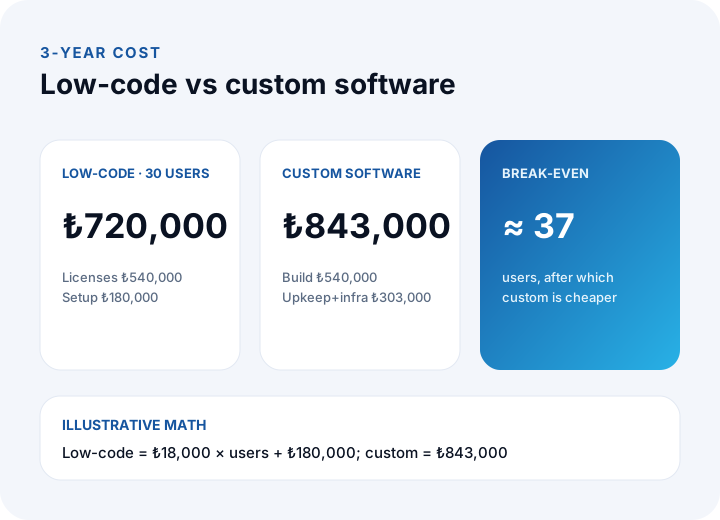
| Item | Low-code (30 users) | Custom software |
|---|---|---|
| Licences: ₺500 × 30 × 36 | ₺540,000 | — |
| Setup / build | ₺180,000 | ₺540,000 |
| Upkeep (3 years) | — | ₺243,000 |
| Infrastructure (3 years) | — | ₺60,000 |
| 3-year total | ₺720,000 | ₺843,000 |
Low-code cost for u users is ₺18,000 × u + ₺180,000 (₺500 × 36 months = ₺18,000). The break-even is (₺843,000 − ₺180,000) ÷ ₺18,000 ≈ 37 users. At 30 users low-code is ₺123,000 cheaper; above 37, custom software pulls ahead. For a real decision, plug in your own user count, the actual licence price and your growth expectation. You can find the cost items in detail in our software project cost guide.
How Is a Low-Code Project Run?
In low-code, speed looks like an easy shortcut; if the project is run without discipline, the time won in the first months comes back as upkeep and confusion. A six-step road helps.
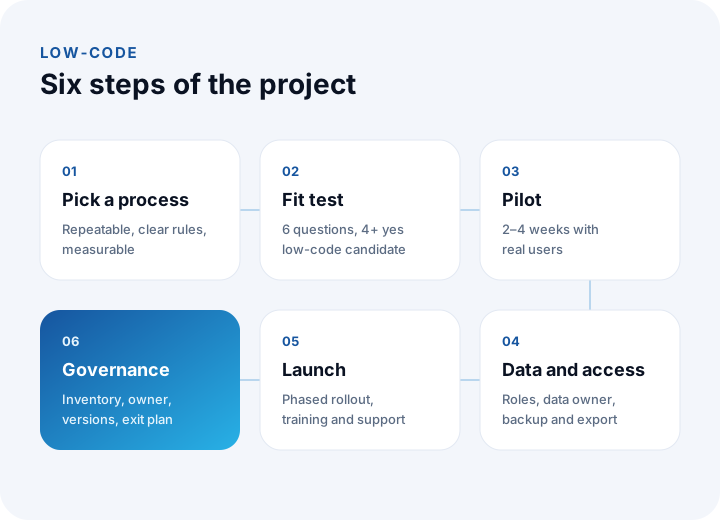
- Pick a process: Start with a repeatable process with clear rules and measurable impact.
- Fit test: Answer the six questions and move on if you score 4 or more.
- Pilot: Try the single process with real users over 2–4 weeks; measure time and defect count.
- Data and access: Roles, data owner, backup and the data export path should be written down.
- Launch: Open it in phases, train people and set the support channel.
- Governance: Put the app in the inventory and assign an owner and a version steward.
Measure the time gained in the pilot concretely. In the example, the first release of the leave-request app comes out in 12 working days instead of 30: (30 − 12) ÷ 30 = a 60% reduction. This is also an illustrative figure; your measurement will differ.
How Are Low-Code Applications Governed?
The least-discussed risk of low-code is that apps are so easy to create. Governance is the set of rules that keeps that ease from turning into chaos.
- Inventory: Each application's name, owner, users, linked data and last-update date should be in one list.
- Ownership: An app with no owner is shut down or handed over. Sample measure: if 18 of 24 apps have a known owner, the ownership rate is 18 ÷ 24 = 75%; the target is 100%.
- Access and data class: For apps holding personal data, access goes only to those who need it; the separation of test and live environments is kept.
- Versions and change: Changes to a live app are made first in a test environment and recorded.
- Exit plan: The data export of critical apps is tested regularly.
What Are Common Mistakes in Low-Code?
- Moving the core system to low-code: Distinctive business rules and high-volume core processes hit the platform ceiling soonest.
- Not scaling the licence with users: A solution that looks cheap in the pilot can be expensive at a hundred users.
- Never thinking about the exit: If data export is not tested on day one, it costs more later.
- Leaving integration to last: The hardest part is usually the connection to existing systems; test it in the pilot too.
- Piling up ownerless apps: Without an inventory, low-code turns into shadow IT.
- Trusting one side only: A project left only to the business unit, or only to IT, drifts from either the need or the standard.
Recommended reading: What is a customer portal? Self-service scope, security and payback guide
Recommended reading: What is microservices architecture? Monolith difference, cost and decision guide
Custom Software and Process Digitization with İnovabil
At İnovabil, our focus is building company-specific software from scratch: custom software, ERP, CRM, e-commerce, web, mobile and integration. If part of your process can be met with ready-made tools or a low-code solution, we suggest comparing it in writing, with cost and limits, during requirements analysis; if the core system carries distinctive business rules, custom software gives firmer ground.
We built CRM, purchasing and mobile for Avcılar İnşaat; a purchasing system for İZBAN; logistics and shipment planning plus wholesale order management for Karyak; and warehouse management plus a complaint and support management system for Sleepy. Send a short summary of your processes and user count; let us do the fit test together first and produce a written assessment.
We recommend reading: Our software development process: step by step from analysis to launch
Frequently Asked Questions
What is low-code, in short, and what is it for?
It is an approach to building applications in a visual designer with ready-made components and, when needed, short code, instead of writing code. It speeds up the first release for repeatable work such as forms, approval flows and internal tools.
What is the difference between low-code and no-code?
No-code needs no code and a business-unit employee can use it alone, but it is limited to ready patterns. Low-code allows adding rules and short code, so it is more flexible; it usually asks a business user and a developer to work together.
Does low-code replace custom software?
Generally no. It is an alternative for simple, repeatable processes; custom software suits core systems that need distinctive business rules, high volume and deep integration. Many businesses use both.
When does low-code get more expensive than custom software?
As the user count grows. In the example, with a ₺500 licence, ₺180,000 setup and ₺843,000 for custom software, the break-even is about 37 users; above that, custom software is cheaper over three years. Recalculate with your own figures.
What should be tested before starting with low-code?
The six-question fit test, the data export path, integration with the systems to be connected, and licence cost against the user count. Test them in a 2–4 week pilot with real users.