

A customer asks "where is my order?", emails to request a copy of an invoice, or wants last year's contract. Each request takes a team member half an hour, and the customer waits until someone replies. A customer portal moves the answers to those questions onto a secure screen the customer logs in to: orders, invoices, documents and support requests in one place, at any hour of the day.
In this guide we explain what a customer portal is, how it differs from a dealer portal, what it can cover, how data isolation and security work, how it connects to your existing systems, how to calculate the self-service rate and payback period, how off-the-shelf, low-code and custom options compare, and what a six-step project looks like. The example figures are illustrative; they are not an industry average or the result of any specific product.
What Is a Customer Portal?
A customer portal is a web (and, where needed, mobile) application where customers sign in with credentials and verification, reach the information that concerns them and carry out simple tasks themselves. Typical content includes order status and history, invoices and payments, contracts and documents, opening and tracking support requests, and updating profile details and addresses.
A portal is not a business system in its own right. It reads data from sources such as your ERP, CRM and accounting software, and writes some actions back to them. That is why its quality depends on how solidly it is connected to the systems behind it. We covered the basic concepts of those connections in our API integration guide.
We recommend reading: Our CRM development service
What Is the Difference Between a Customer Portal and a Dealer Portal?
They can share the same infrastructure, but their purpose and transaction intensity differ. A dealer portal is a wholesale sales channel; a customer portal delivers information and after-sales service.
| Topic | Customer portal | Dealer (B2B) portal |
|---|---|---|
| Main purpose | Offer information and service as self-service | Take wholesale orders online |
| Typical user | End customer, corporate account | Dealer, distributor |
| Core transaction | Status lookup, requests, documents | Orders, price lists, customer/supplier account (current account) balance |
| Pricing and discounts | Usually none | Dealer-specific prices and discounts |
| Success measure | Self-service rate, fewer requests | Share of online orders, order time |
You can also read our B2B e-commerce guide, which covers the dealer side in detail. Combining both portals on a single infrastructure is a common choice.
What Can a Customer Portal Cover?
A customer portal can cover the questions your customers ask most often, and the scope should be drawn from exactly those questions. The table below shows typical modules and where their data comes from.
| Module | What the customer does | Data source |
|---|---|---|
| Orders | Tracks status, sees history, reorders | ERP, order system |
| Invoices and payments | Downloads invoices, sees the balance | Accounting, e-invoice (e-Fatura) |
| Documents | Downloads contracts, quotes, delivery notes | Document store |
| Support requests | Opens a request, follows its status | Ticketing system |
| Profile | Updates address, contact person, notification preferences | CRM |
| Notifications | Receives status changes by email or message | Event stream |
The support request module produces the most value when you think of it together with a separate help desk system: the request is opened in the portal, the team manages it from a single queue, and the customer follows its status on the same screen.
Notice what the table leaves out. There is no pricing engine, no stock planning and no accounting logic inside the portal. Each of those stays in the system that already owns it. The portal only presents the result and accepts a small number of well-defined actions.
When Do You Need a Customer Portal?
You need one when customers repeatedly ask for information that already exists in your systems. The usual signs are these:
- The same questions keep coming back: Order status, invoice copies and document requests are filling your communication channels.
- The team has to grow as customers grow: Request volume rises in a straight line with the number of customers.
- Information is scattered: Answering one question means checking three different systems.
- Customers expect out-of-hours access: They want to reach information at night or on weekends too.
- Corporate customers ask for it: They need an account structure with several authorized users.
If you have few customers and requests are rare, a portal investment may not pay for itself. Test your own situation with the calculation below.
How Do You Ensure Data Isolation and Security in a Customer Portal?
You ensure it by checking on the server, for every request, that the record belongs to the signed-in customer. A portal is a door opened to the outside world, and the most critical rule is that a customer sees only their own records. That cannot be a field hidden on the screen; it has to be a condition verified on the server side in every query.
- Object-level authorization: If someone changes the order number in the address bar, another customer's record must not open. Every request needs the check "does this record belong to this customer?"
- Authentication: A strong password policy, account lockout and, where possible, a second verification step.
- Corporate account roles: Roles such as administrator and viewer for the users of the same company.
- Audit log: Who viewed or downloaded what, and when.
- Data minimization: Only the necessary fields are exposed to the portal; internal notes and cost information are never carried over.
For the details of authorization and authentication, see our API security guide. Processing personal data falls under KVKK (Turkey's personal data protection law); consult your legal advisor for the privacy notice and retention periods.
How Does a Customer Portal Connect to Existing Systems?
It connects by treating the source system as the single source of truth and reading from it, rather than keeping its own copy. If the portal duplicates data, you risk having different information in two places. There are four common patterns:
- Live read: Each time the portal opens, it pulls current data from the source system's interface.
- Cached read: Frequently read data is stored briefly; speed improves and the delay stays acceptable.
- Event-based update: When an order status changes, the source system notifies the portal.
- Write-back: Actions such as updating an address or opening a request are written to the source system, and duplicate records are prevented.
On the invoice side, we explained the e-document process in our e-invoice (e-Fatura) integration guide. The portal should only display an invoice that has been issued, never generate it again.
A practical rule helps here: for every field on a portal screen, you should be able to name the system it comes from and the owner who fixes it when it is wrong. If a field has no clear source, it should not be on the screen yet.
How Do You Calculate the Self-Service Rate and Payback Period?
You calculate them from the number of requests that close without human involvement. The portal's value is measured by that count. The assumptions below are illustrative.
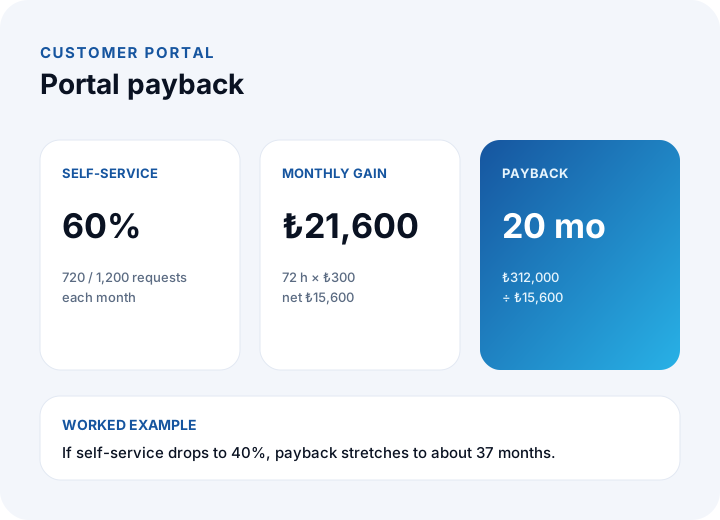
- 1,200 information and support requests arrive each month; the share a portal can answer is 60%.
- Each request takes an average of 6 minutes of staff time; the hourly cost is ₺300.
- The portal's monthly running cost is ₺6,000 and the initial investment is ₺312,000.
| Step | Calculation | Result |
|---|---|---|
| Self-service requests | 1,200 × 60% | 720 requests |
| Time saved | 720 × 6 min = 4,320 min | 72 hours |
| Gross gain | 72 h × ₺300 | ₺21,600 / month |
| Net gain | ₺21,600 − ₺6,000 | ₺15,600 / month |
| Payback | ₺312,000 ÷ ₺15,600 | 20 months |
If the self-service rate drops to 40%, the gross gain becomes ₺14,400 and the net ₺8,400, and the payback stretches to about 37 months. That is why the scope must be drawn from the real distribution of requests. Beyond the time saved, customer satisfaction and out-of-hours access are additional benefits, but they are not counted here. For the general investment logic, see our software project cost guide.
The same table works as a before-you-build check. Replace each assumption with your own figure: count last quarter's requests, time a few of them honestly, and use your real hourly cost. If the payback comes out far beyond three years even with generous assumptions, start with a smaller scope or a simpler tool rather than a full portal.
Should a Customer Portal Be Off-the-Shelf, Low-Code or Custom?
It depends on how deeply the portal must connect to your own systems and how many users it will have. Each option has a clear strength and a clear caution.
| Option | Strength | Point to watch |
|---|---|---|
| Off-the-shelf portal module | Fast setup | Does not connect deeply to your own systems; per-user fees |
| Low-code | Fast pilot, easy changes | Data isolation and licence growth must be tested |
| Custom software | Full fit with your systems and business rules | Higher initial investment and longer timeline |
On a screen opened to customers, licensing grows with the number of users. Work out the break-even point for a low-code solution using the method in our low-code guide. For the general decision framework, see our post on off-the-shelf vs custom software.
How Is a Customer Portal Project Run?
It runs in six steps, from analyzing real requests to measuring results after launch.
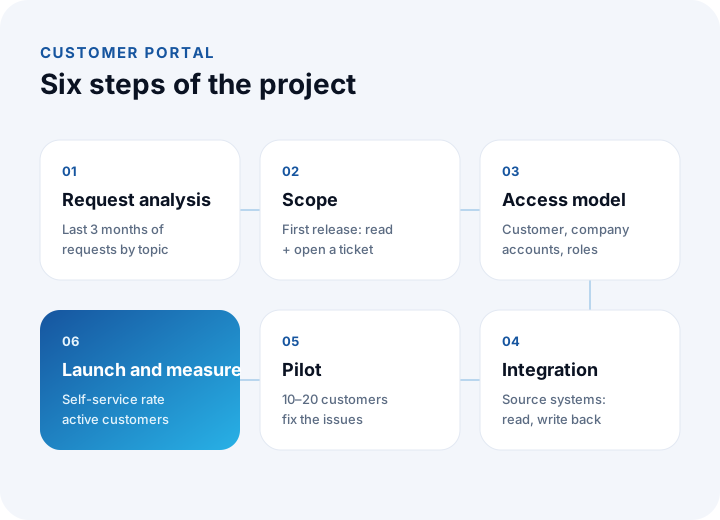
- Request analysis: Count the last three months of requests by topic; the five most frequent topics form the portal's first scope.
- Scope: In the first release, only read-only screens (orders, invoices, documents) and request creation; the remaining actions go to later releases.
- Permission model: The structure of customers, corporate accounts and roles is written down.
- Integration: Decide which data is read from which source system and how, then test it.
- Pilot: Open it to 10–20 customers; fix the problems they find.
- Launch and measurement: Announce it to all customers and track the self-service rate and the active customer rate.
To put the scope in writing, the acceptance criteria method in our requirements analysis guide is useful; for designing the screen flows, see our UX design guide.
Choosing a read-only first release is deliberate. Read-only screens carry far less risk than screens that change data, they deliver most of the self-service value, and they give you real usage numbers before you invest in the harder write-back features.
How Do You Increase Customer Portal Adoption?
You increase it by making the first login easy and pointing customers to the portal at every contact. If customers do not use a portal, no gain appears, however well it is built. In the example, if 252 of 420 customers sign in at least once a month, the active customer rate is 252 ÷ 420 = 60%. To raise that rate:
- Make the first login easy: an invitation email and one-click password setup.
- Guide the customer: when you answer by phone or email, include a link to the relevant portal screen.
- Connect status notifications to the portal: the link in the "your order has shipped" email should open in the portal.
- Collect feedback: a "Was this information useful?" question on the screen is the most valuable data in the first release.
Adoption is also a team habit. If staff keep answering by email what the portal could show, customers learn that the portal is optional. Agree internally that the first reply to a status question is the portal link.
Which Metrics Show Whether a Customer Portal Works?
After launch, a few indicators show whether the portal pays off. All can be derived from existing ticket and login records; the example values are illustrative.
| Metric | Calculation | Example |
|---|---|---|
| Self-service rate | Closed in the portal ÷ total requests | 720 ÷ 1,200 = 60% |
| Active customer rate | Customers logging in per month ÷ all customers | 252 ÷ 420 = 60% |
| Staff cost per request | 6 min ÷ 60 × ₺300 | ₺30 |
| Portal cost per request | Monthly running cost ÷ requests | ₺6,000 ÷ 1,200 = ₺5 |
| Repeat-request rate | Re-raised on the same topic ÷ self-service | Should be low; if high, the screen falls short |
To collect these on a monthly dashboard, use the approach in our business intelligence guide. The topics customers ask about most but cannot resolve in the portal are the first items of the next release, which is why feedback should be collected on every screen. Notifications (order shipped, invoice ready) raise both satisfaction and return visits; check messaging channel rules from official sources and respect each customer's notification preferences.
What Are Common Mistakes in Customer Portals?
- Inflating the scope: Trying to cover every transaction in the first release delays launch by months.
- Leaving authorization to the interface: Merely hiding another customer's data is not enough; it must be verified on the server.
- Copying data: If the portal becomes a separate data source, two different versions of the truth appear.
- Not measuring: If the self-service rate is not tracked, you cannot know whether the benefit exists.
- Forgetting mobile use: Customers mostly look from their phones; screens should be designed for the small screen.
- Not connecting the support flow: If a request opened in the portal does not land in your team's queue, the portal adds workload instead of removing it.
Recommended reading: What Is a Web Application?
Recommended reading: How to Track Customer Accounts
Customer and Dealer Portal Development with İnovabil
At İnovabil, our focus is building bespoke software from scratch for your company: custom software, CRM, ERP, e-commerce, web, mobile and integration. A customer portal is where these pieces meet; it can be designed as an application that reads your source systems, works with role-based permissions and plugs into your request flow.
We have built CRM, purchasing and mobile for Avcılar İnşaat; a purchasing system for İZBAN; logistics and shipment planning with wholesale order management for Karyak; and warehouse management plus a complaint and support management system for Sleepy. Write to us briefly about the five topics customers ask about most and the systems you already use, and we will work out the scope and permission model together.
We recommend reading: Our software development process: step by step from analysis to launch
Frequently Asked Questions
What is a customer portal and what is it for?
It is a secure web application where customers sign in to see and manage their orders, invoices, documents and support requests themselves. It frees up your team's time by answering repetitive information requests without human involvement.
Are a customer portal and a dealer portal the same thing?
No. A dealer portal focuses on taking wholesale orders online, while a customer portal focuses on offering information and after-sales service as self-service. The two can share the same infrastructure and are often built together.
How is data security ensured in a customer portal?
The most important piece is object-level authorization: on every request, the server verifies that the record belongs to that customer. Strong authentication, corporate account roles, an audit log and exposing only the necessary fields are added to that. For KVKK details, consult a legal advisor.
When does a customer portal pay for itself?
It depends on monthly request volume, the self-service rate and the running cost. In the example, with 1,200 requests, 60% self-service, a ₺312,000 investment and ₺6,000 running cost, payback is about 20 months; recalculate with your own figures.
Should I choose an off-the-shelf solution or custom software for the portal?
For simple, standard needs, an off-the-shelf module or a low-code solution is quick. If you need deep connection to your own systems, custom business rules and multi-user corporate accounts, custom software fits better. Cost out the number of users and the depth of integration before deciding.