

A shopper types "kosu ayakkabisi" into the search box and the page says "no results found". Yet the product is in the catalog; its title simply carries the Turkish letters, and the search engine treats them as different characters. Ecommerce site search is the clearest sentence a visitor ever says to your store, and misreading that sentence costs sales directly.
In this guide we explain how to measure your store's own search box, why zero-result searches happen, how to fix typos, synonyms and Turkish character problems, how to build field-weight scoring, how to handle stock and filters, how to design autocomplete, how to analyze the query log and how to calculate payback. All numbers are representative; they are not taken from a real store or an industry average. The share of visitors who use search is something you must measure from your own data.
Why Is Site Search a Topic of Its Own?
Because the search box solves a different problem from Google rankings or product data hygiene: turning the intent of a visitor who has already arrived into a product. For visibility on Google see our SEO guide, for completeness of product fields our product information management article, and for screen design our UX design guide. Here we cover only the logic behind the search box.
Visitors who search are often close to a decision, but that is not a causal claim. They may buy more simply because they already intended to buy. That is why we measure the effect of an improvement with a controlled test, not only by comparing before and after.
We recommend reading: Our ecommerce development service
How Do You Measure Search Users and Search Quality?
Four numbers are enough: zero-result rate, search exit rate, search-to-cart rate and search-to-order rate. All come from your own query log and event records; copying a "good rate" from elsewhere misleads.
Representative store: 60,000 sessions a month, 9,000 of them use the search box (15%), and 12,000 searches are made in total. 1,800 searches return nothing.
| Measure | Definition | Example calculation | Value |
|---|---|---|---|
| Zero-result rate | Searches with no results ÷ all searches | 1,800 ÷ 12,000 | 15% |
| Search exit | Sessions leaving after a search with no click ÷ search sessions | 2,700 ÷ 9,000 | 30% |
| Search to cart | Search sessions adding to cart ÷ search sessions | 1,350 ÷ 9,000 | 15% |
| Search to order | Search sessions placing an order ÷ search sessions | 540 ÷ 9,000 | 6% |
For comparison, look at sessions without search too: 51,000 sessions at a 2% order rate make 1,020 orders, for 1,560 orders in total. Search sessions are 15% of traffic and 540 ÷ 1,560 = 34.6% of orders. That gap shows how important search is; it does not show why.
What Is the Zero-Result Rate and Why Does It Happen?
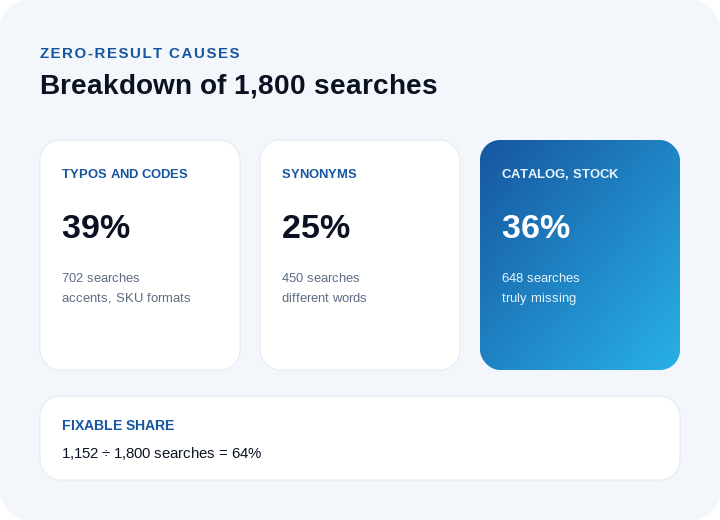
The zero-result rate is the share of searches that return no products. Not every zero result means "we do not have it"; often the product exists and the search simply failed to find it. Splitting the 1,800 zero-result searches by cause decides what to fix first.
| Cause | Example | Searches | Share | Fixable? |
|---|---|---|---|---|
| Typos and characters | "ayakabi", "kosu" | 540 | 30% | Yes |
| Synonyms and different words | "tee" ↔ "t-shirt" | 450 | 25% | Yes |
| Product code format | "AB-1024" ↔ "AB1024" | 162 | 9% | Yes |
| Not in the catalog | A product never sold | 396 | 22% | No, a demand signal |
| Unpublished or out of stock | A temporarily hidden product | 252 | 14% | Partly |
| Total | 1,800 | 100% |
The first three causes add up to 540 + 450 + 162 = 1,152 searches, 64% of 1,800. The "not in the catalog" group is not a loss but a demand signal: people are searching for this product and you do not sell it. Hand that list to your buying team.
How Do You Fix Typos, Synonyms and Turkish Character Problems?
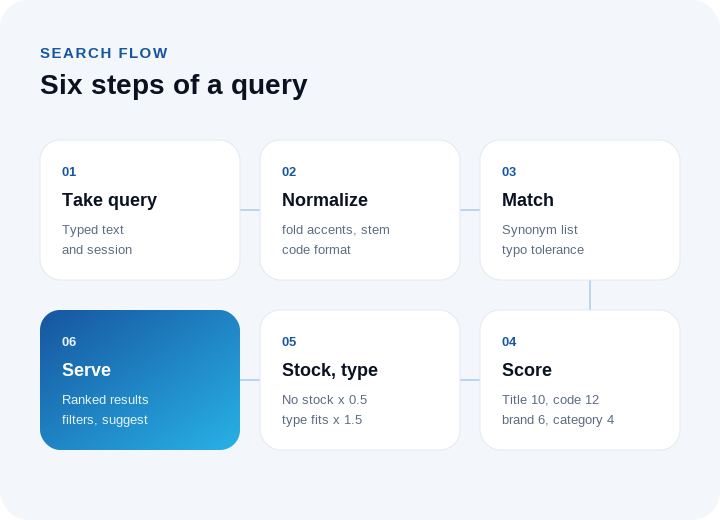
The common fix for all three is to bring both product data and the query to the same form: normalization. If the indexed text and the typed query pass through the same rules, matching improves on its own.
- Turkish character folding: Map the six Turkish letters with diacritics (c-cedilla, g-breve, dotless i, o-umlaut, s-cedilla, u-umlaut) to their plain ASCII forms, in both data and query. Then "kosu ayakkabisi" and the title with proper Turkish letters return the same result. When changing case, keep the dotted and dotless i pairs apart; a lowercase conversion that does not know the language rule misreads words that contain a capital I.
- Suffixes and plurals: The base word, its plural and its possessive forms should reduce to one stem. Do not stem aggressively on short words; if "kol" (arm) and "kolay" (easy) get mixed, irrelevant results appear.
- Typo tolerance: Accept a one- or two-letter mistake, but scaled to word length. Zero tolerance under four letters, 1 from four to seven letters, 2 from eight letters up is sensible. Otherwise short queries match unrelated products.
- Synonym list: Build pairs such as "tee", "t-shirt" and "tshirt" from real queries in your log. Separate two-way synonyms from one-way ones: a search for "sports shoe" may return "running shoe", but a search for "shoe" should not favor only running shoes.
- Product code formats: In code search, ignore hyphens, spaces and case: "AB-1024", "ab 1024" and "AB1024" should reach the same product.
If these rules solve 75% of the 1,152 searches in the example, 864 searches leave the zero-result group; zero results fall to 1,800 − 864 = 936 searches, or 936 ÷ 12,000 = 7.8%. The target is not zero; the share of products you truly do not carry remains.
The figure below summarizes the steps a query goes through behind the scenes.
How Do You Set Field Weights and Scoring?
Every product has many fields, and the fields are not equally valuable. In scoring, each query word earns points from the highest-weighted field it matches; the higher the weight, the more reliable the match.
Representative weights: title 10, exact product code match 12, brand 6, category 4, description 1. The query is "blue sports shoe" and there are four products.
| Product | Match | Raw score | Stock multiplier | Type multiplier | Result |
|---|---|---|---|---|---|
| A: Blue Running Sports Shoe | 3 words in title: 30 | 30 | 1 | 1.5 | 45 |
| B: Sports Shoe Black ("blue" in description) | 10 + 10 + 1 | 21 | 1 | 1.5 | 31.5 |
| D: Blue Running Sports Shoe (out of stock) | 3 words in title: 30 | 30 | 0.5 | 1.5 | 22.5 |
| E: Sports Shoe Care Spray, Blue Box | 3 words in title: 30 | 30 | 1 | 1 | 30 |
On raw score alone, A, D and E tie at 30; a care spray and an out-of-stock product compete with the real product. The stock multiplier (0.5 when out of stock) pulls D down to 15, and the type multiplier (1.5 when the product type in the query matches the category) lifts items of the right type: A 45, B 31.5, E 30, D 22.5. The ranking now fits the product.
How Should Stock, Filters and Sorting Be Handled?
Ranking in-stock items higher is usually better than hiding out-of-stock ones entirely: the product stays visible, carries an "out of stock" label and the visitor is guided to similar items. If you hide it completely, the person looking for it still sees zero results.
- Default sorting should be relevance. Sorting by price is a user choice; as a default it pushes irrelevant but cheap products to the top.
- Filters should reflect the result count. In a result of 240 products, a color filter that keeps 25% leaves 60, and a size filter that keeps 20% of those leaves 12. Show product counts next to options and disable filters that would return nothing.
- The zero-result page should never be empty. Re-searching with one word dropped, suggesting a close query and showing popular categories keeps the visitor in the store.
- Do not force promoted products to the top. Make price and campaign decisions within the framework of our price optimization article; turning search results into an ad board can erode trust.
How Do You Design Autocomplete?
Autocomplete leads the visitor to a valid query without typos and lowers the zero-result risk at the moment of typing. Use popular queries, category names and brand names as suggestion sources; show individual product names for only a few suggestions.
- Start threshold: Show suggestions after the first two or three characters; a suggestion after one letter is meaningless.
- Wait time: Do not send a request on every keystroke. For an eight-letter query, a request per key is 8 requests; if a short wait after the third character brings it to 3, 12,000 searches send 36,000 requests instead of 96,000 (a 62.5% reduction). We covered query speed in our database indexing article.
- Suggestions with results: Do not suggest a query that returns nothing. Build the suggestion list from the index and exclude zero-result queries.
How Do You Analyze the Query Log?
The query log is the most valuable and least read data in search. Half an hour a week and three lists are enough: the 20 most searched queries, queries with zero results, and queries that show results but get no click.
In the representative example, the 12,000 searches contain 4,200 distinct queries. The 20 most searched queries total 3,360 searches: 3,360 ÷ 12,000 = 28%. Among the 1,800 zero-result searches, the top 20 queries total 612: 612 ÷ 1,800 = 34%. Fixing just twenty queries removes nearly a third of all zero results.
- Zero-result queries: Tag each as typo, synonym or not in the catalog, and give every tag its own owner (search rules, catalog, buying).
- Results but no click: The top results are irrelevant; review scoring or product titles.
We recommend reading: How to do customer journey mapping and behavior analytics
How Do You Calculate the Payback of Search Improvement?
Payback is found by subtracting the monthly running cost from the gross profit of the extra orders and dividing the investment by that net profit. Combine the effect into a single assumption first, then verify it with a controlled test.
Representative assumption: after rules and scoring, search-to-cart rises from 15% to 17%. Sessions adding to cart become 9,000 × 17% = 1,530, which is 180 more than today's 1,350. If the cart-to-order rate is 40%, extra orders are 180 × 40% = 72.
| Item | Calculation | Value |
|---|---|---|
| Extra orders | 180 × 40% | 72 orders/month |
| Extra revenue | 72 × ₺900 basket | ₺64,800 |
| Gross profit (30%) | 64,800 × 0.30 | ₺19,440 |
| Monthly running cost | Search service and upkeep | ₺4,000 |
| Monthly net profit | 19,440 − 4,000 | ₺15,440 |
| Investment | Setup and tuning | ₺180,000 |
| Payback | 180,000 ÷ 15,440 | ≈ 11.7 months |
If the effect halves, extra orders are 36, gross profit ₺9,720, net ₺5,720 and payback stretches to 180,000 ÷ 5,720 ≈ 31.5 months. The same investment gives very different results depending on the effect, which is why the effect must be measured.
How Many Visitors Does an A/B Test Need?
Seeing a small difference takes many sessions. A practical rule is that detecting a difference in rates between two groups with about 80% power and 5% significance needs n ≈ 16 × p × (1 − p) ÷ d² sessions per group, where p is the average rate and d is the difference you want to detect.
In the example p is about 0.16 (between 15% and 17%) and d = 0.02: n = 16 × 0.16 × 0.84 ÷ 0.0004 = 5,376 sessions per group. For two groups that is 10,752 sessions; at 9,000 search sessions a month it takes about 1.2 months. If the difference were 1 point, d² would fall to a quarter and the required sessions would quadruple: 21,504 per group, 43,008 for two groups, about 4.8 months. Run the test in whole weeks and do not stop it after an early look at the result.
What Steps Improve Site Search?
- Measure and only observe for the first month.
- Tag zero results and assign owners.
- Normalize and build the synonym list.
- Score and tune against a small test set.
- Test and tie it to a weekly review.
For the general frame of building a store, see our guide to building an ecommerce website.
We recommend reading: How to Manage Ecommerce Product Reviews and Ratings: Collection, Moderation, Weighted Averages and Metrics
We recommend reading: How to Improve Ecommerce Checkout: Step Conversion, Form Fields, Payment Errors and Payback Guide
We recommend reading: How to Design a B2B Quick Order Screen and Reorder Flow: Line Entry, Case-Pack Rules and Payback Guide
We recommend reading: How to Build Enterprise Search and Document Q&A with RAG: Chunking, Access Filters, Threshold and Payback Guide
We recommend reading: How to Run an A/B Test: Hypothesis, Sample Size, Significance and Pitfalls Guide
We recommend reading: How to Build an Ecommerce Product Recommendation Engine: Bought Together, Similar Items, Lift, Filters and Measurement Guide
Ecommerce and Search Solutions with İnovabil
At İnovabil our focus is building software from scratch, tailored to your company: ecommerce, web, integration, ERP and CRM. We suggest covering your store's search behavior, product data and existing systems in writing during requirements analysis and choosing the right solution together; we do not promise a specific search success rate or figure.
We developed order intake and wholesale order management for Karyak, warehouse management and a support system for Sleepy, and CRM, purchasing and mobile for Avcılar İnşaat. Send us a summary of your store's search queries; let us look at the zero-result causes together and produce a written assessment.
We recommend reading: Our software development process: from analysis to release, step by step
Frequently Asked Questions
What is site search and why does it matter?
It is the store's own search box. Because visitors type what they want in their own words, it gives you both a signal close to purchase and valuable data about gaps in the catalog and the search rules.
What should the zero-result rate be?
There is no universal target; it depends on the store's catalog and demand. What matters is measuring the rate in your own data, splitting it by cause and reducing the fixable part systematically. Products you truly do not carry will always remain.
How do Turkish characters affect search?
Visitors may type s instead of s-cedilla or i instead of dotless i, and the product title may be written differently. Character folding that brings both data and query to the same form solves these matches; case conversion must follow Turkish rules.
Should out-of-stock products appear in search?
Usually yes, but ranked lower and carrying an "out of stock" label. If you hide them entirely, the visitor looking for that product sees zero results; if you leave them visible, you can guide the visitor to similar products.
Is an A/B test necessary for search improvement?
It is recommended for measuring the effect reliably. A before-and-after comparison gets mixed with seasonal and campaign effects. As the difference in rates shrinks, the required sessions grow quickly; in the example it quadruples when the difference falls from 2 points to 1.