

A dealer reorders mostly the same items every week. They know the product codes by heart, think in cases, and usually have a spreadsheet or last week's order at hand. If the portal still makes them search for every product and add it one by one, a 40-line order turns into half an hour of drudgery, and the dealer picks up the phone instead. A B2B quick order screen lets this buyer place an order in minutes by typing codes, pasting a list, uploading a file or repeating a past order.
In this guide we cover the line logic of a quick order screen, paste and file upload, how to show case-pack and stock rules, the reorder flow, error prevention, measurement and the payback calculation. All example figures are representative; they are not the average of any real business or sector.
What Is a B2B Quick Order Screen and Why Design It Separately?
A quick order screen is a line-based entry surface that runs alongside the product catalog: each line holds a code, a quantity and an instant result. The catalog is for discovery; the quick order screen is for placing an order for something already known.
We covered the general dealer portal setup in our what is B2B e-commerce guide. Here we focus only on the order entry screen. For a customer choosing from scratch, see the site search guide.
Four methods complete the same 40-line order in very different times. The times come from the representative scenario in this guide:
| Method | How it works | Time for 40 lines | Best fit |
|---|---|---|---|
| Picking from the catalog | Search, open, type quantity, add to cart | 11 min (16.5 s per line) | Discovering new products |
| Keyboard quick entry | Type code, Tab to quantity, Enter for a new line | 4 min (6 s per line) | Items with known codes |
| Paste or file | Give the whole code and quantity list at once | 3 min | A list already prepared elsewhere |
| Reorder from history | Open an old order, confirm the changed lines | 2 min 20 s | Regular, repeating purchases |
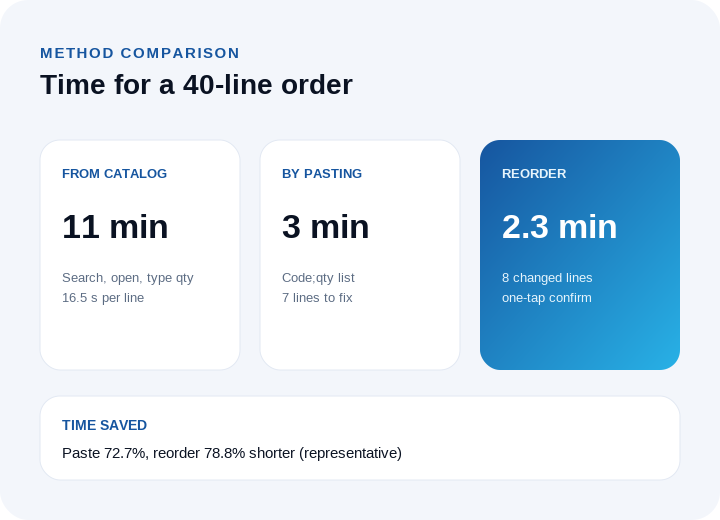
Eleven minutes is 660 seconds; spread over 40 lines that is 16.5 seconds per line. The paste path takes 180 seconds, which shortens the time by 72.7 percent (1 − 180 ÷ 660). Reorder leaves 140 seconds, a 78.8 percent reduction.
How Is the Quick Entry Line Designed?
Each line carries a product field, a quantity, an instant status and an amount. The product field suggests matches by code and name as you type; the list shows only a few results and Enter selects one. Tab moves to the quantity field, and Enter after the quantity opens the next empty line and moves focus there.
- Code first, name second: A dealer who knows the code types it in full; otherwise they type the first letters of the name. Both routes reach the same line.
- Per-line feedback: Price, stock and case status appear on the right of the line. If something is wrong, the dealer sees it as they type, before going to the cart.
How Do Multi-Line Paste and File Upload Work?
Dealers often already hold a list: a needs report from their own system, a table in an email or an old order. The screen reads multi-line text pasted from the clipboard, in "code;quantity" or tab-separated form, and turns each row into a quick entry line. File upload runs the same logic with a spreadsheet file; a template can be downloaded.
We covered file format, column mapping and general import validation in our bulk data import guide. The difference in an order context is that the result is not a data table but a cart, and the dealer fixes bad lines inside the cart. Faulty lines do not stop the upload; partial acceptance applies.
In a representative paste example, the result for 40 lines is:
| Result | Lines | What the dealer sees |
|---|---|---|
| Ready | 33 | Price, stock status and amount; no action needed |
| Case-pack correction | 3 | Two nearby valid quantities offered |
| Partial stock | 2 | Quantity on hand and expected date; split option |
| Out of stock | 1 | A substitute product suggestion |
| Unknown or inactive code | 1 | Line shown in red; fix or delete the code |
| Total | 40 | First-pass ready rate: 33 ÷ 40 = 82.5% |
The 7 lines needing review (3 + 2 + 1 + 1) are 17.5 percent of the total. The dealer's time reflects that: paste 20 s, scan the result 40 s, fix 7 lines at 7 × 15 = 105 s and submit 15 s; a total of 180 seconds, or 3 minutes.
How Are Case-Pack, Minimum Quantity and Stock Rules Shown?
In B2B, quantity is not free: products are sold in case or pallet multiples, and some items have a minimum order quantity. A rule violation is shown to offer a solution, not to block the dealer. Instead of "invalid quantity", the screen says what to do.
- Case multiple: With quantity 7 and a case multiple of 6, the screen suggests "6 (1 case) or 12 (2 cases)", chosen with one tap. 300 units is 50 cases; if a pallet is 48 cases, it can also be shown as one pallet plus 2 cases.
- Minimum order: It can apply per item or per cart; if the cart total is under a representative ₺5,000 threshold, the remaining amount is shown (₺380 for ₺4,620).
- Stock status: Three states are enough: in stock, partial and expected date. For a partial state, with 60 requested and 36 on hand, the option "36 now, 24 on the expected date" is offered.
- Substitute product: When stock is out, an alternative with the same function is suggested together with the price difference. The screen never swaps it on its own.
How stock is calculated and how much of it is promised to a dealer is a separate topic; for the order lifecycle and stock allocation, see the order management system guide.
How Are Price, Stock and Total Shown Instantly?
A dealer's price depends on the dealer group and the quantity tier. We explained the structure of the price list in the B2B price list management guide. The quick order screen only shows the result and marks on each line, with a short label, which rule applied.
A representative example: a three-line cart for a group A dealer.
| Line | Qty | List | Dealer price | Amount |
|---|---|---|---|---|
| K-2041 (12 cases, tier) | 72 | ₺100 | ₺85.36 (12% + 3% tier) | ₺6,145.92 |
| K-3310 (5 cases) | 30 | ₺140 | ₺123.20 (12%) | ₺3,696.00 |
| K-1175 (2 cases) | 12 | ₺60 | ₺52.80 (12%) | ₺633.60 |
| Subtotal | ₺10,475.52 |
The first line is 88 × 0.97 = 85.36; the tier threshold is taken as a representative 10 cases (60 units), and 12 cases exceeds it. Because the subtotal is above the representative shipping threshold (₺10,000), shipping shows ₺0; if it fell below, a ₺350 line would appear. If the tax rate in the example is taken as a representative 20 percent, tax is ₺2,095.10 and the grand total ₺12,570.62. For tax rules and invoice format, consult your accountant.
The total updates instantly on every line change, and the rounding order at line level must be chosen deliberately. For details see the money and rounding errors guide.
How Does a Reorder from a Past Order Work?
Most B2B orders are repeats. A reorder flow does not copy the old order verbatim; it rechecks every line against today's price, stock and product status. Only changed lines are highlighted, and unchanged ones are confirmed at a glance.
In the representative example, 8 lines of the old 40-line order have changed: 4 lines in price, 3 in stock and 1 in product status. The dealer's flow goes like this: open the order 10 s, review the 32 unchanged lines 30 s, accept the 8 changed lines with one tap or pick a substitute 8 × 10 = 80 s, submit 20 s; a total of 140 seconds.
- Templates and favorite lists: Frequent orders are saved as named lists ("Weekly core stock", "Site A"). Their lines are still validated against current price and stock.
- Recurring order draft: A "same every month" option prepares a draft 3 days before the chosen date and sends the dealer a confirmation notice. The draft does not enter processing until it is confirmed.
- Aging line warning: Items not ordered for six months are flagged.
We recommend reading: What is a customer portal? Self-service scope, security and payback guide
How Are Errors Prevented on a Quick Order Screen?
Speed must not invite mistakes. Two errors are common.
- Duplicate lines: If the same code appears on two lines, the screen warns and suggests merging. Example: 12 and 24 units of K-2041; the merged line is 36 units. Asking the dealer instead of merging automatically preserves deliberately separate lines.
- Double submit: If the dealer taps "Submit" twice, the same order must not be created twice. Each submission carries a unique order key; a second request with the same key does not open a new order but returns the result of the first.
Performance is also part of error prevention. Validating a 200-line order line by line means a separate request per line: 200 × 120 ms = 24,000 ms, or 24 seconds. A bulk endpoint that validates all lines in one request returns in about 900 ms; the difference is 24,000 ÷ 900 ≈ 26.7 times. Bulk validation returns a separate result per line, so line-level messages are kept.
How Are Mobile Use, Barcode and Accessibility Handled?
Dealers often order standing in front of a shelf. Scanning a barcode with the camera is faster than typing a code: if, representatively, typing a code takes 9 s per line and scanning 5.5 s, 40 lines take 220 s instead of 360 s, a 38.9 percent reduction. For the general structure of barcode systems, see the barcode system guide.
Accessibility is often overlooked. The keyboard flow must be complete, focus must stay visible and the paste result must be announced to screen readers: "40 lines added, 33 ready, 7 lines need review." Focus moves to the first problem line. For detailed principles, see our web accessibility guide.
How Are Buyer-Side Approval and Budget Limits Managed?
In corporate buyers, the person placing the order and the person approving it differ. The quick order screen puts an order into "awaiting approval" by amount threshold: representatively, anything under ₺25,000 goes straight through and anything above goes to the buyer company's manager. The ₺12,570.62 cart in the example goes through directly; a ₺31,000 cart needs approval. For the seller's internal approval chains, see the workflow and approval software guide.
Which Metrics Are Tracked for Quick Order and Reorder?
| Metric | Definition | Representative value |
|---|---|---|
| Order completion time | Time from start to submit, 40 lines | 11 min, target 3 min |
| Reorder share | Orders created by reorder ÷ all orders | 660 ÷ 1,200 = 55% |
| Wrong item rate | Lines corrected due to error or return ÷ all lines | 3.2%, target 1.1% |
| First-pass ready rate | Clean lines on paste ÷ all lines | 33 ÷ 40 = 82.5% |
| Order help calls | Monthly support requests about order entry | 150, target 90 |
If the wrong item rate falls from 3.2 percent to 1.1 percent, the expected number of faulty lines in a 40-line order drops from 1.28 to 0.44. For metric design, see the KPI guide.
How Is the Payback of a Quick Order Screen Calculated?
Representative business: 300 dealers, 1,200 orders per month, an average of 40 lines per order, a daily development rate of ₺9,000 and an hourly rate of ₺300.
- Entry labor: 720 orders are keyed in by the sales support team at 12 min each: 720 × 12 ÷ 60 = 144 h. If 70 percent of them move to the dealer, 100.8 h are saved; 100.8 × ₺300 = ₺30,240.
- Error cost: 3.2 percent of 1,200 × 40 = 48,000 lines is 1,536 lines and 1.1 percent is 528; the difference is 1,008 lines. At a representative ₺60 correction cost per line, that is ₺60,480.
- Support calls: 60 fewer calls (150 down to 90) × 15 min = 15 h; 15 × ₺300 = ₺4,500.
Gross gain is ₺30,240 + ₺60,480 + ₺4,500 = ₺95,220 per month; with a representative running cost of ₺12,000 per month, net is ₺83,220. Build is 55 person-days × ₺9,000 = ₺495,000; payback is 495,000 ÷ 83,220 ≈ 5.9 months. If only half of the dealers use it, gross gain is ₺47,610, net ₺35,610 and the period stretches to about 13.9 months. Adoption is the most sensitive input in this calculation; for ways to get dealers used to the screen, see the software adoption guide.
In Which Steps Is a Quick Order Screen Built?
Six steps, taking the riskiest decisions first.
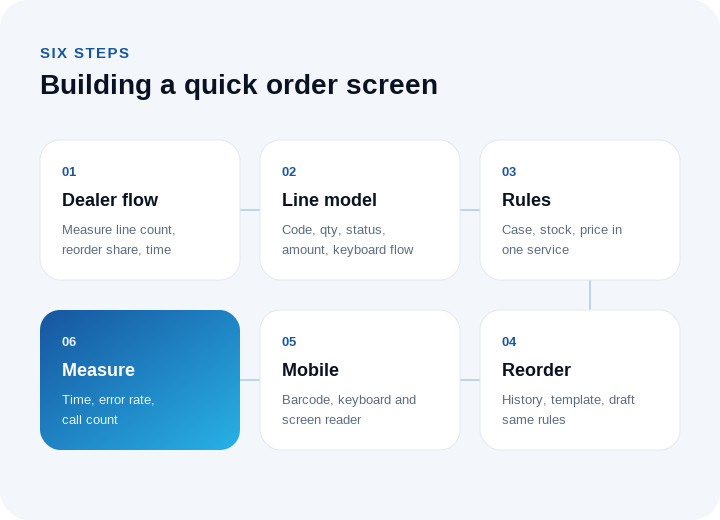
- Measure the dealer flow: Take line counts, reorder share and average time from real orders.
- Design the line model: Code, quantity, status, amount; keyboard flow and suggestion behavior.
- Collect the rules in one place: Case-pack, minimum quantity, stock and price rules live in a single server-side service; the screen only displays.
- Add reorder: Past order, template and recurring draft are validated by the same rule service.
- Complete mobile and accessibility: Barcode, keyboard, screen reader announcements.
- Measure and iterate: Track time, error rate and call count monthly; fix the most problematic items in product data.
For general usability measurement of the screen, see our UX design guide; the example of reducing the number of steps in an order flow is worked out there.
We recommend reading: How to Design B2B Company Accounts, Sub-Users and Purchasing Permissions: Roles, Limits and Approvals
We recommend reading: How to Design and Validate Forms in Business Applications: Fields, Error Messages, Drafts and Payback Guide
Dealer and Order Screens with İnovabil
At İnovabil our focus is custom software built from scratch for your company. For Karyak we built wholesale order intake and management together with logistics and shipment planning; for Sleepy, warehouse management and a complaint and support management system; for Avcılar İnşaat, CRM, purchasing and mobile; for İZBAN, a purchasing system. If you want a dealer-facing or buyer-facing screen such as a quick order screen, we recommend writing the need down in requirements analysis together with the dealer flow, case-pack and price rules. Send us a short summary of your dealer count, average line count and current order channels, and let us evaluate it together.
We recommend reading: Our software development process: step by step from analysis to launch
Frequently Asked Questions
What is a B2B quick order screen?
A line-based screen where a dealer or corporate buyer enters a multi-item order by product code and quantity, by pasting, by uploading a file or by repeating a past order. Price, stock and case-pack rules are validated instantly on each line.
Does a quick order screen replace the catalog?
No. The catalog is for discovering new products; the quick order screen is for items whose code is known and that repeat. They share the same cart and the dealer can switch between them freely.
What happens if a quantity does not fit the case multiple?
The screen does not reject the order; it suggests two nearby valid quantities. With quantity 7 and a case multiple of 6, it suggests 6 or 12, and the dealer picks with one tap.
Does a reorder copy the old order as it is?
No. Every line is rechecked against today's price, stock and product status. Changed lines are highlighted and unchanged ones are confirmed at a glance.
How long does a quick order screen take to pay back?
In the representative example, 55 person-days of build (₺495,000) and a net monthly gain of ₺83,220 give about 5.9 months. If half the dealers use it, it stretches to about 13.9 months. Recalculate with your own order volume and error cost.