

The same duvet cover set appears on your website as "Cotton Sateen Duvet Cover Set, 200x220", on a marketplace as "Bedding Set Double" and in the dealer catalog as "NVR-0412". The weight is in grams in one place and kilograms in another; one image is current, another is out of date. As you add sales channels, product information multiplies, and as it multiplies it drifts apart. Product information management (PIM) is the approach of collecting product data in one place, enriching and checking it, and publishing it to every channel in the format that channel expects.
In this guide we cover how PIM differs from ERP and an e-commerce platform, the product data model, the completeness score, channel mapping, workflow, the payback calculation and a six-step setup. All example figures are representative; they are not measurements of any specific software or industry.
What Is Product Information Management (PIM)?
PIM is a system in which everything that describes a product (name, description, attributes, category, barcode, dimensions, images, documents, translations) lives in one central record, the quality of that record is checked, and it is distributed to channels. The central record is the master copy; the name, description or image shown on a channel is derived from it.
PIM focuses on how a product is described; transactional data such as price, stock and orders is owned by other systems.
We recommend reading: What is marketplace integration? Product matching, stock and price sync guide
How Do PIM, ERP and an E-Commerce Platform Differ?
All three keep product records, for different purposes. ERP keeps them to run the product, an e-commerce platform to sell it, and PIM to describe and distribute it.
| Topic | ERP | E-commerce platform | PIM |
|---|---|---|---|
| Main purpose | Stock, production, purchasing, finance | Taking orders in a single store | Enriching and distributing product information |
| Product record emphasis | Item code, unit, cost, warehouse | Title, price, image, cart rules | Attributes, variants, media, translations, channel values |
| Number of channels | Channel-agnostic | Usually one (your own site) | Many; a separate format for each |
| Data quality control | Limited | Limited | Required fields, completeness score, approval workflow |
| Owner of price and stock | Yes (stock, cost) | Displays the selling price | No; reads or links them |
The rule is simple: item code and cost are born in ERP, the product story is written in PIM, and the e-commerce platform shows it on the sales page. We explained the scope of ERP in our what is ERP guide. With one channel and a small catalog, the e-commerce platform may be enough; PIM starts to make sense as channels and products multiply.
Why Does Product Data Drift Apart in Multichannel Selling?
The root cause is not carelessness; it is that every channel has its own rules and its own entry screen.
- Multiple entry points: The same description is typed into four places by hand; one gets updated and three stay stale.
- Channel rules: Title length, attributes and the category tree change from channel to channel.
- File sprawl: Images live in email and shared folders, and nobody knows which one is current.
The result is rejected listings and wrong information reaching customers. Example: in a sample of 200 products, 34 show a different name or weight on at least one channel; the rate is 34 ÷ 200 = 17.0%. If 6 products remain after PIM, it becomes 6 ÷ 200 = 3.0% (representative).
How Do You Build a Product Data Model in PIM?
A data model is the plan for which information is stored at which level. If it is built wrongly, every new product breaks the rules; if it is built well, a piece of information is written once.
| Element | What it holds | Example |
|---|---|---|
| Parent product (model) | Information shared by variants: name, description, brand, care note | Cotton sateen duvet cover set |
| Variant (SKU) | The single sellable unit: size, color, barcode, weight | 200x220 cm, navy |
| Attribute | A field that describes the product; its type and unit are defined | Fabric type (list), weight (number, grams) |
| Category | Internal classification; each category has a required-attribute template | Home textiles › Bedding |
| Media | Images, documents, video; each has a role and an order | Main image, detail image, care label |
| Relationship | Links between products | Set, complementary, alternative |
| Channel value | A channel-specific counterpart of a field | Marketplace title, dealer catalog code |
If "weight" is free text, one row says "450 g" and another says "0.45 kilo". If you define it as a number with a unit, PIM converts grams to kilograms itself wherever a channel needs it. The main types are text, number, number with unit, selection list and yes/no; a list type also removes spelling differences.
The variant logic saves effort. Example: a duvet cover set is offered in 3 sizes and 4 colors; 3 × 4 = 12 variants. If the shared description is written once on the parent product, 1 text is needed instead of 12, so the writing drops by 91.7% (11 ÷ 12). Each variant's own barcode and weight stay at variant level. For the structure and check digit of barcodes, see our barcode system guide; in PIM the barcode (GTIN) is simply an identifier that matches the product across channels.
How Do You Calculate Product Data Quality and a Completeness Score?
Data quality is measured by how many of the required fields are filled. But a single percentage misleads; three measures should be read together: field completeness, weighted score and the share of products ready to publish.
Example catalog: 1,200 products, 8 required fields per product. Total field cells are 1,200 × 8 = 9,600. The fill levels are:
| Required field | Products filled | Completeness | Weight | Contribution (weight × completeness) |
|---|---|---|---|---|
| Product name | 1,200 | 100.0% | 15 | 15.00 |
| Category | 1,140 | 95.0% | 15 | 14.25 |
| Barcode (GTIN) | 1,080 | 90.0% | 20 | 18.00 |
| Description | 900 | 75.0% | 15 | 11.25 |
| Main image | 1,020 | 85.0% | 15 | 12.75 |
| Weight and dimensions | 840 | 70.0% | 10 | 7.00 |
| Product attributes | 600 | 50.0% | 5 | 2.50 |
| English name and description | 360 | 30.0% | 5 | 1.50 |
| Total | 7,140 / 9,600 | 74.4% | 100 | 82.25 |
- Field completeness: filled cells ÷ total cells = 7,140 ÷ 9,600 = 74.4%.
- Weighted score: Σ weight × completeness = 82.25 (out of 100). The barcode carries a high weight because it decides matching across channels; you set the weights for your own business.
- Ready-to-publish products: the share of products with every required field filled. In the example 312 products are complete: 312 ÷ 1,200 = 26.0%. Although 74.4% of fields are filled, only about a quarter of products are ready, because the gaps are spread across different products.
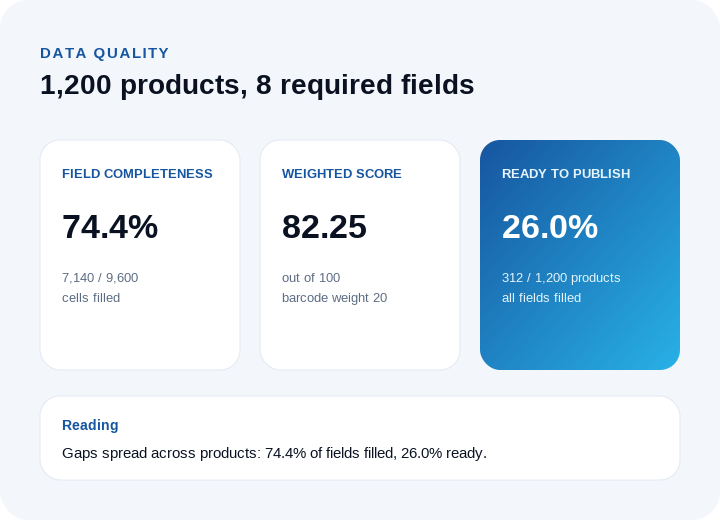
Looking at the score loss shows priorities. Loss = weight × (1 − completeness): description 3.75, English content 3.50, weight and dimensions 3.00, image 2.25 and barcode 2.00. The total loss is 100 − 82.25 = 17.75; the top three fields account for 10.25 points, or 57.7% of the loss.
The size of the missing work can be calculated too. Missing cells are 9,600 − 7,140 = 2,460; at an average of 3 minutes that is 7,380 minutes = 123 hours. At ₺300 per hour, a one-off completion effort costs ₺36,900 (123 × 300). Target thresholds (for example score ≥ 95, ready share ≥ 90%) are set per business.
How Do You Do Channel Mapping and Enrichment?
The central record does not go to a channel as is; every channel has different field names, length limits and category trees. Mapping is the set of rules that connects an internal field to a channel field. You define it once and it runs on every publish.
| Internal field | Own website | Marketplace | Dealer catalog |
|---|---|---|---|
| Product name | Longer, search-friendly title | Fits the channel's title rule, shortened if needed | Item code + short name |
| Category | The site's own menu | Mapped to the channel's category ID | Ordered list by dealer group |
| Description | Rich text, internal links | Plain text in the format the channel allows | Technical summary |
| Image | Wide, rich gallery | Size derived to the channel's image requirements | Single main image |
Enrichment means taking a raw record from a supplier and adding description, attributes, images and translations to make it ready to sell.
The day-to-day running of a channel, such as price, stock and match rate, belongs to marketplace integration rather than PIM; we worked through barcode matching, sellable stock and channel price calculations in our marketplace integration guide. PIM sits at the start of that chain: the success of matching depends largely on the quality of the data here. For moving data between systems, see our API integration guide.
How Do Workflow and Approval Work in PIM?
A workflow defines which steps a product passes from draft to publication and who approves it. The aim is to stop incomplete or unapproved data from reaching a channel.
- Draft: The product arrives from a supplier file or from ERP; only the basic fields are filled.
- Enrichment: The content team completes description, attributes and images; the completeness score is visible live.
- Check: The required-field rule runs; a product with gaps cannot pass this step.
- Approval: The catalog manager (and a second person where needed) approves the content.
- Publish: The approved product goes to the selected channels; each channel's rules are checked separately.
Roles should be separate: the person who enters content, the one who approves it and the one who configures the channel should not all be the same. If changes are logged as who, when, from which value to which, the source of wrong information is found quickly. Status transitions need clear entry and exit conditions; we described the same logic for the order life cycle in our order management system guide.
How Are Images and Multilingual Content Managed in PIM?
Images and translations are the two kinds of content that drift apart most easily in a catalog; both become manageable once they are tied to the central record.
- Images: A high-resolution file is uploaded once; the size a channel needs is derived automatically. A naming and role rule (main, detail, in use) is set from the start.
- Multilingual content: The language versions of every text field are held in the same record. The status of each language is tracked (empty, translated, approved); when the source text changes, its translations are flagged "needs update".
In the example, English content stayed at 30%; that is the biggest gap for a cross-border channel (see our e-export guide).
We recommend reading: How to build an e-commerce website: platform, payment, shipping and cost guide
How Does PIM Affect Publishing Time and Cost?
The effect is measured in two places: the time for a new product to reach channels and the time to update an existing product. The example business sells on four channels (own website, two marketplaces, dealer catalog), adds 150 new products a month and updates the information of 300 products.
| Task | Before (manual, per channel) | After (PIM) | Monthly volume | Monthly time (before → after) |
|---|---|---|---|---|
| New product publishing | 20 + 25 + 25 + 15 = 85 min | 30 min enrichment + 4 × 2 min check = 38 min | 150 products | 212.5 h → 95.0 h |
| Product information update | 4 × 6 = 24 min | 8 min (in one place) | 300 products | 120 h → 40 h |
| Total | 332.5 h → 135 h |
New product publishing time falls from 85 to 38 minutes (−55.3%); updating falls from 24 to 8 minutes (−66.7%). The time saved each month is 332.5 − 135 = 197.5 hours, worth ₺59,250 at ₺300 per hour. The figures are representative; recalculate with your own channels and volumes.
Payback: if the monthly PIM running cost (hosting, license, maintenance) is ₺15,000, the monthly net benefit is 59,250 − 15,000 = ₺44,250. The investment has two parts: 45 person-days × ₺9,000 = ₺405,000 for modeling, data cleanup, integration and training, plus ₺36,900 to complete the missing content; total ₺441,900. Payback is 441,900 ÷ 44,250 ≈ 10.0 months. Over three years the net gain is 44,250 × 36 − 441,900 = ₺1,151,100.
Bad case: if only 50% of the benefit materializes, the monthly net becomes 29,625 − 15,000 = ₺14,625 and payback stretches to 441,900 ÷ 14,625 ≈ 30.2 months. As channels and products shrink, the gain falls quickly; with two channels and 200 products, PIM often does not pay for itself.
How Do You Set Up PIM?
Success depends less on the tool than on the data model and cleanup; leaving the data for later is the most common mistake. A six-step path works.
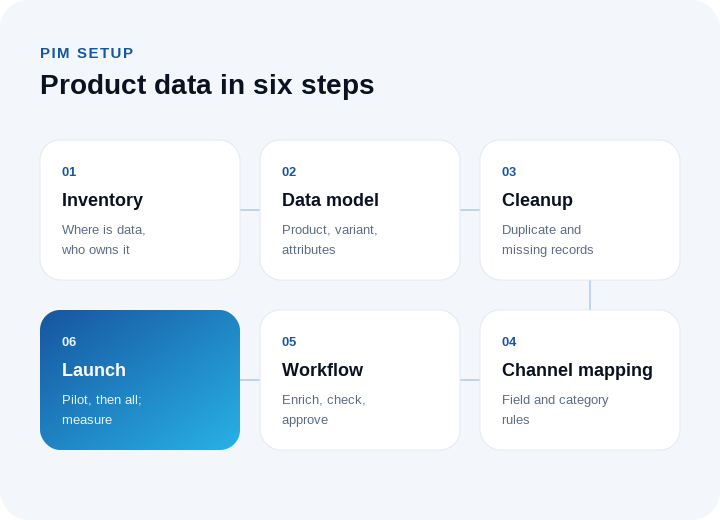
- Inventory: List where product data lives today (ERP, spreadsheets, websites, supplier files) and who owns each field.
- Data model: Define parent products, variants, attribute types and category templates; write down required fields and weights.
- Cleanup and migration: Remove duplicate and conflicting records, fill the gaps and reconcile the counts after migration. For the method, see our data migration guide.
- Channel mapping: Turn each channel's field, category and image rules into a mapping table; start with one pilot channel.
- Workflow and roles: Define the steps from draft to publication, the approvers and the required-field rules.
- Launch and measurement: Publish one product group first, then everything; track the score, the ready share and publishing time monthly.
What Are Common PIM Mistakes?
- Migrating without cleaning the data: Moving dirty data into a new system only changes where the problem lives.
- Looking at a single percentage: 74% completeness looks fine; if the ready share is 26%, you cannot open a channel.
- Loading price and stock into PIM: A second source means new inconsistency.
- Leaving translation for last: If you do not put multilingual fields in the model from the start, adding them later is expensive.
We recommend reading: What Is a Product Configurator (CPQ)? Option Rules, Pricing and Bill of Materials Guide
We recommend reading: What Is Master Data Management (MDM)? Duplicate Records, Golden Record and Data Quality Guide
We recommend reading: How to Improve Ecommerce Site Search: Zero Results, Turkish Characters, Scoring and Payback Guide
We recommend reading: How to Build an Ecommerce Product Recommendation Engine: Bought Together, Similar Items, Lift, Filters and Measurement Guide
We recommend reading: How to Add Structured Data (Schema Markup, JSON-LD): Types, Validation and Payback Guide
We recommend reading: Bundle Inventory Management: How to Handle Kits, Virtual Bundles, Price Allocation and Partial Returns
Product Data and Multichannel Selling with İnovabil
At İnovabil our focus is building company-specific software from scratch: custom software, e-commerce, ERP, CRM, web, mobile and integration. Whether your product data needs a separate PIM depends on your channels, product volume and your existing ERP or e-commerce platform; we suggest settling it in the requirements analysis, in writing and with its cost.
We built CRM, purchasing and mobile for Avcılar İnşaat; a purchasing system for İZBAN; logistics and shipment planning with wholesale order management for Karyak; and warehouse management plus a complaint and support management system for Sleepy. Send us a short summary of your channels and product count, and we will assess the fit together and produce a written plan.
We recommend reading: Our software development process: from analysis to launch, step by step
Frequently Asked Questions
What is PIM (product information management) and what is it for?
It is a system where everything that describes a product is gathered in one central record, its quality is checked, and it is distributed to each channel in that channel's format. It reduces manual duplicate entry and inconsistency between channels.
What is the difference between PIM and ERP?
ERP keeps stock, cost and warehouse data to run the product; PIM keeps attributes, images, translations and channel values to describe it. Item code and cost are born in ERP, while enriched content lives in PIM.
When do you need PIM?
When channels and products multiply, when the same information starts being held in several places, when multilingual content is needed and when listing rejections or inconsistencies are frequent. For a single channel and a small catalog, the e-commerce platform is usually enough.
How is product data quality measured?
Field completeness (filled cells ÷ total cells), the weighted score and the ready-to-publish share are tracked together. In the example they came out at 74.4%, 82.25 and 26.0%; looking only at the first would have made the situation look better.
How long does a PIM investment take to pay back?
It depends on channel and product volume. In the example the investment is ₺441,900, the monthly net benefit ₺44,250 and payback about 10 months; if the benefit halves, about 30 months. Calculate it with your own figures.