

Part of your site's traffic is not human. Search engine crawlers, price-monitoring programs, scrapers that copy your content, automated buyers that sweep up campaign stock in seconds, and fake clients that open accounts and place orders all come through the same front door. Bot traffic management means measuring that automated traffic, separating the good from the bad, and limiting the harmful part without bothering real customers. The goal is not to drive bots to zero; it is to bring the damage down to an acceptable level.
This guide covers the defensive side only; it does not describe attack or evasion techniques. All figures are representative examples, not measurements of a real site or an industry average.
What Is Bot Traffic and What Types Exist?
A bot is a client that acts automatically in place of a person. Not every bot is bad; without search engine crawlers nobody would find your site.
| Type | What it does | Assessment | Typical response |
|---|---|---|---|
| Search engine crawler | Visits pages to index them | Good | Verify, allow, watch its speed |
| Monitoring bot | Checks that the site is up | Good | Allowlist |
| Scraping bot | Copies content or prices | Uncertain or bad | Rate limit, slow down |
| Stock and campaign bot | Bulk-buys limited stock or coupons | Bad | Quantity caps, queue, verification step |
| Account abuse bot | Fake accounts, fake orders, login attempts | Bad | Protect sign-up and login |
| Load-generating client | Overloads the server with a faulty loop or excessive polling | Often unintentional | Rate limit, contact the owner |
The last row is often overlooked: some heavy load comes not from a malicious party but from a badly written integration. In that case you need a conversation, not a block.
This article focuses on the network and traffic layer. Authentication inside the application, password policy and multi-factor verification are covered in our MFA and SSO guide, and API key and token design in our API security article; we do not repeat them here.
How Do You Make Automated Traffic Visible?
First make sure every request record carries the fields below. None proves a bot on its own, but together they form a pattern.
- Request rate: requests per minute from the same client. A person spends seconds on each page; automation is often faster.
- Pages per session and browsing pattern: walking through sequential page numbers or product IDs with no pause.
- User agent mismatch: the declared browser does not match the rest of the headers.
- Missing browser behavior signals: clients that run no scripts, store no cookies, or produce no pointer or focus events.
- Network origin: the type of network the client comes from. Alone it is not enough for a decision, because thousands of real users share one address on corporate and mobile carrier networks.
Central log collection is the precondition for querying these fields in one place; see our centralized log management guide for setup.
How does bot traffic distort analytics?
If automated sessions also reach your measurement tools, the conversion rate is misread. In a representative example, 100,000 real sessions produce 2,000 orders: a 2.0% conversion rate. If automated sessions make up 30% of all sessions, the total is 100,000 ÷ 0.70 ≈ 142,857 sessions and the measured conversion falls to 2,000 ÷ 142,857 ≈ 1.4%. A team may then hunt for a problem in the checkout that does not exist. Report automated sessions separately; for the checkout itself, see our checkout guide.
How Do You Build a Simple Signal Score?
A single signal leads to wrongful blocking; weighting several weak signals and adding them up is more reliable. The representative model has five signals totaling 100.
| Signal | Weight | Trigger condition (example) |
|---|---|---|
| Request rate | 30 | More than 100 requests per minute in one session |
| Sequential browsing | 25 | Sequential product or page IDs with no pause |
| No cookie or session | 15 | A client that never returns the session cookie |
| Header mismatch | 15 | Declared browser inconsistent with headers |
| Known bad network | 15 | Source on a list with past abuse |
The score is the sum of the weights of the signals that fire. Four clients:
| Client | Signals fired | Calculation | Score |
|---|---|---|---|
| A | Rate, browsing, cookie, headers | 30 + 25 + 15 + 15 | 85 |
| B (corporate network, 200 staff) | Rate only | 30 | 30 |
| C | Browsing, cookie, headers | 25 + 15 + 15 | 55 |
| D | Rate, browsing, bad network | 30 + 25 + 15 | 70 |
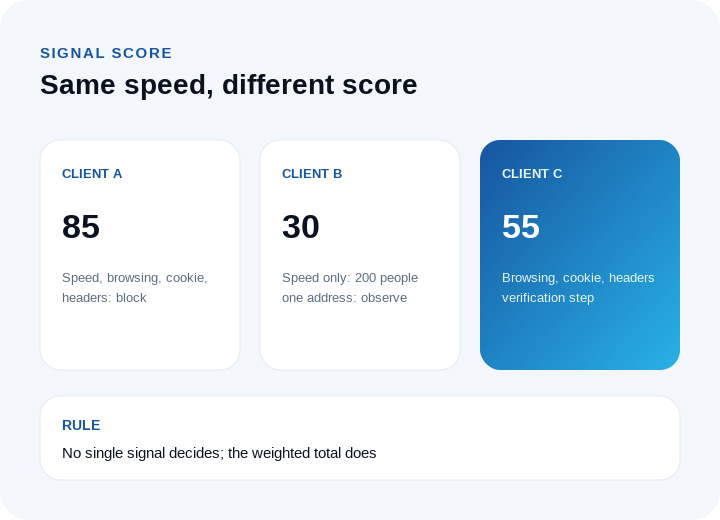
Client B's case is an important lesson: a rule that looks only at speed would punish a whole company because 200 employees leave through one address. The score model keeps it in the "observe" band.
Which Response Does Each Score Get?
Choose a proportionate response for each score band. Blocking is the harshest response; in many cases lighter steps are enough first.
| Score | Response | Meaning | Cost if wrong |
|---|---|---|---|
| 0–29 | Allow | Normal flow | A bot gets through |
| 30–49 | Observe | Record, do not decide | None |
| 50–69 | Verification step | Ask for a small human check | Brief friction |
| 70–84 | Slow down | Reduce request speed | Slow pages |
| 85–100 | Block | Reject the request | Lost customer |
Thresholds are tuned with examples recorded in your own traffic. Entering the block tier only when several strong signals combine reduces false positives, and showing a support link on the block page lets a customer who was caught by mistake reach you.
Why Does Rate Limiting Fail on Shared Networks?
Tying a rate limit to the address alone is the most common design mistake. Corporate, hotel and mobile carrier networks put hundreds of users behind a single address.
A representative calculation: 200 employees of one company use your dealer portal, each generating about 6 requests per minute; the total is 200 × 6 = 1,200 requests per minute. If you set a limit of 300 per minute per address, only 300 ÷ 1,200 = 25% of the requests are served and 75% are rejected, all from real users. With a per-session limit of 30 per minute, every employee (6 requests) would pass comfortably, while a single automated session producing 120 requests per minute would have (120 − 30) ÷ 120 = 75% of its requests rejected.
- Multiply the key: consider address, session and account together.
- Give known shared networks headroom: raise the limit for recognized corporate and carrier ranges, or apply it per session only.
Rate limit math at the API level, such as guessing codes or attempts on one endpoint, is in our API security article; the issue here is that sharing an address punishes legitimate users. For behavior under load, see the performance testing guide.
Which Endpoints Should Be Protected First?
Protecting every page equally is expensive and tiring for customers; rank endpoints by the cost of abuse.
| Endpoint | Form of abuse | Criticality | Priority |
|---|---|---|---|
| Login | Many account attempts | High | 1 |
| Sign-up | Fake account creation | High | 2 |
| Cart and stock | Holding stock, bulk buying | High | 3 |
| Campaign and coupon | Mass redemption | Medium-high | 4 |
| Search and listing | Scraping, load | Medium | 5 |
| Public content | Copying | Low-medium | 6 |
Design mistakes in campaign and coupon logic are in our coupon engine guide, and abuse of verification code messages in our transactional SMS article; we do not go into their details here.
What Do You Do During a Limited-Stock Campaign?
Limited stock is the moment automation gains the most. In a representative example, 500 units go on sale at 10:00. With no per-account quantity cap, 40 fake accounts each putting 12 units in the cart take 40 × 12 = 480 units, 96% of the stock, within seconds. With a cap of 2 per account, the same 40 accounts can take at most 40 × 2 = 80 units, or 16%.
- Quantity cap: per account, payment method and delivery address.
- Queue or waiting room: if demand arrives in one instant, admitting requests in a fair order removes the speed race.
- Cart hold time: stock is held briefly and released when the time runs out.
What Can Be Done Against Content and Price Scraping?
Completely stopping an automation that can see a public page is often impossible; the aim is to make scraping slow and expensive. A robots file is not a security measure: it is a voluntary rule for clients that choose to follow it and does not stop those that do not.
In a representative example your catalog has 20,000 product pages. An unlimited client pulling 20 pages per second takes the whole catalog in 20,000 ÷ 20 = 1,000 seconds, about 16.7 minutes. With a limit of 30 product pages per minute per session, the same job takes 20,000 ÷ 30 ≈ 667 minutes, about 11.1 hours.
- Rate limiting and slowing down: as above, by page type.
- Data behind authentication: show dealer-specific prices only to signed-in, authorized users.
- Legal route: consult your legal counsel on terms of use and copyright.
A page served from cache does not strain the server; see the website speed guide for details.
How Do You Let Good Bots Through?
Blocking a good bot reduces your visibility. Do not recognize search engine crawlers by the user agent text alone; anyone can imitate it. Search engines publish their own verification methods: looking up the domain from the client address by reverse lookup and confirming that the domain resolves back to the same address, or checking published address ranges. For the current and correct method, consult the search engine's official documentation. Verified bots go on an allowlist, but their speed is still monitored.
How Much Friction Can You Put on Real Users?
A verification step is friction and needs a budget; the representative target is at most 2% of sessions. With 400,000 sessions a month, that is 8,000 impressions.
Assume 30% of those impressions are real people: 2,400 sessions. If 15% give up before completing the step, 360 sessions are lost. If 2% of those sessions would have ordered, that is 360 × 0.02 = 7.2 orders; at an average order of ₺1,000, the friction costs ₺7,200 a month. If the impression rate rises to 4%, the cost doubles.
How do you monitor false positives?
Regularly review a small sample of blocked or challenged sessions by eye. Of 120,000 blocked sessions a month, take a sample of 200; if 1 turns out to be a real user, the false positive rate is 1 ÷ 200 = 0.5%: 120,000 × 0.005 = 600 real sessions. At 2% conversion and a ₺1,000 order, that is 600 × 0.02 × ₺1,000 = ₺12,000. At a 2% rate it would be 2,400 sessions and ₺48,000 in losses.
What Does Bot Management Cost and Return?
Representative example: 100 million requests a month, 30% of them automated, so 30 million. Of these, 8 million are verified search engine and monitoring bots; the remaining 22 million are bad or uncertain. If infrastructure cost is ₺0.40 per thousand requests, those 22 million requests cost 22,000 × 0.40 = ₺8,800 a month. If 75% are rejected at the edge and a rejected request costs 10% of a normal one, the saving is 8,800 × 0.75 × 0.90 = ₺5,940 a month.
The main gain is in fake orders: 900 fake orders a month at ₺45 each for cancellation and review is ₺40,500; an 80% reduction saves ₺32,400.
| Item | Monthly effect |
|---|---|
| Infrastructure saving | +₺5,940 |
| Fake order handling saving | +₺32,400 |
| Verification step friction | −₺7,200 |
| False positive loss (0.5%) | −₺12,000 |
| Operation and monitoring effort | −₺8,000 |
| Net | +₺11,140 |
With an initial setup of ₺150,000, payback is 150,000 ÷ 11,140 ≈ 13.5 months. Sensitivity matters: if the fake-order reduction is only 40%, that saving falls to ₺16,200 and the net becomes ₺5,940 + ₺16,200 − ₺7,200 − ₺12,000 − ₺8,000 = −₺5,060; if the false positive rate reaches 2%, the net drops to −₺24,860. Success is therefore measured not by the number of blocked requests alone but together with the false positive rate.
In What Order Do You Act During a Sudden Bot Wave?
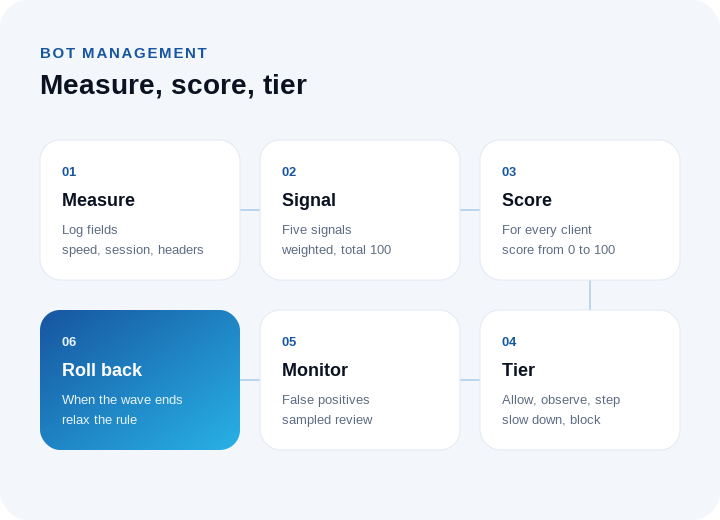
When the request rate jumps from 2,000 to 9,000 per minute (4.5 times), go step by step.
- Measure: on which endpoint, which client group and with which signals did the rise happen?
- Limit: the first step is a rate limit or slowdown on the affected endpoint, not a block.
- Block: only the group carrying several strong signals, with a narrow scope.
- Roll back: when the wave ends, relax the rule and review false positives.
For the monitoring and alerting side, see the software monitoring guide; to tell whether a rise came from real load or bots, see our scalability article.
Which Metrics Should You Track?
| Metric | Representative target | What it shows |
|---|---|---|
| Automated traffic share | Under 20% excluding verified bots | Overall pressure |
| Verification step impression rate | Under 2% | Friction budget |
| Blocked sessions | Trend is tracked | Intervention volume |
| False positive rate | Under 0.5% | Real customer loss |
| Abuse events per endpoint | Monthly decline | Effect of protection |
What About Personal Data and the Law?
Addresses, device fingerprints and behavioral signals can count as personal data. Retention period, purpose of use, and whether consent is needed for cookies or similar tracking depend on KVKK (Turkey's personal data protection law) and related legislation; consult your legal counsel. As a technical principle, collect only the signals you need and limit how long you keep them.
We recommend reading: What is data encryption and key management? A guide to transit, storage and key rotation
We recommend reading: How to Prepare an E-Commerce Store for Peak Campaign Season: Demand, Stock, Capacity and Live Control Guide
We recommend reading: How to Set Up Cookie Consent Management: Cookie Policy, Banner, Tag Loading and Measurement Impact Guide
We recommend reading: How to Prevent E-Commerce Order Fraud: Risk Scoring, Threshold Selection and Manual Review
Secure Web and Application Development with İnovabil
At İnovabil our focus is building bespoke software from scratch: custom software, ERP, CRM, e-commerce, web, mobile and integration. We have no ready-made product or certified service for bot protection, and we say so openly. During analysis we write down, together with you, the critical endpoints and requirements such as rate limiting, role-based access and audit logs, and build them into the design of the custom software.
We have built CRM, purchasing and mobile for Avcılar İnşaat; a purchasing system for İZBAN; logistics and shipment planning with wholesale order management for Karyak; and warehouse management plus a complaint and support management system for Sleepy. If you have a public-facing portal or a campaign flow, send us a short summary and we will work out your critical endpoints and requirements together.
We recommend reading: Our software development process: step by step from analysis to launch
Frequently Asked Questions
What is bot traffic, and is every bot bad?
A bot is a client that acts automatically in place of a person. Search engine and monitoring bots are useful; scraping, stock-hoarding and fake account bots are harmful.
Does a robots file block bots?
No. It is a voluntary rule and malicious clients ignore it. Real protection relies on rate limits, data behind authentication and behavior signals.
Why should a rate limit not be tied to the address alone?
Hundreds of users share one address on corporate and carrier networks. In the example, 200 users produce 1,200 requests per minute; a limit of 300 per address wrongly rejects 75% of requests. Session and account based keys are fairer.
Can a verification step drive real customers away?
Yes, to a degree. That is why the impression rate gets a budget; in the example it is 2%, and 8,000 impressions cost ₺7,200 a month.
How do you calculate the return on bot management?
Add infrastructure and fake-order handling savings, then subtract friction, false positive loss and operating effort. In the representative example the net is ₺11,140 a month and payback is about 13.5 months on a ₺150,000 investment; if false positives rise, the gain can turn negative.