

Is the person signing in to your dealer portal really the dealer's employee, or someone whose password has been circulating in a leak? Is the person approving a discount in your ERP really who they claim to be? Authentication answers these questions, and it is the door of business applications that is targeted most often. In this guide we explain how to design multi-factor authentication (MFA), single sign-on (SSO) and a password policy, why passwords should be long, and what the investment pays back, from the point of view of a business that commissions or selects software.
The article is defence-focused. All example figures are illustrative: they are not a product price, an attack statistic or an industry average. Recalculate them with your own user count and incident cost.
What Is the Difference Between Authentication and Authorization?
Authentication answers "who are you?", authorization answers "what may you do?". Identity is proven first, then the permissions assigned to it are applied.
Strong MFA does not make an over-privileged account safe. We covered role and permission design in our role-based access control (RBAC) guide; this article stays with the door itself, the proof of identity. Token and request verification on the API side is the subject of our API security guide and is not repeated here.
What Are the Authentication Factors?
There are three types of factor: something you know, something you have and something you are. MFA means requiring at least two of them together; two passwords, or a password plus a security question, do not count as MFA.
| Factor | Example | Strength | Weakness |
|---|---|---|---|
| Something you know | Password, PIN | Cheap, works everywhere | Leaks, is guessed, phished and reused |
| Something you have | Phone app, hardware key | Hard to steal remotely | Gets lost or broken; recovery needed |
| Something you are | Fingerprint, face recognition | Nothing to remember | Cannot be changed; biometric data is special-category personal data |
Clarify the personal-data side of biometrics with your legal counsel under KVKK (Turkey's personal data protection law).
How Do MFA Methods Compare?
Security and convenience are usually inversely related, so choose the method according to risk.
| Method | Security | Convenience | Cost | Watch out for |
|---|---|---|---|---|
| SMS code | Low–medium | Very high | Per-message fee | Number porting and forwarding; tricking users into typing the code on a fake site |
| App code | Medium–high | High | Low | Enrolment must move when the phone changes; the code can still be phished |
| Push approval | Medium–high | Very high | Usually included in the licence | Approval fatigue from repeated prompts; number matching reduces it |
| Hardware key | Very high | Medium | One-off per device | A spare key is essential; the most phishing-resistant option |
The practical rule: use a phishing-resistant method such as a hardware key for administrators and accounts that move money, an app code or number-matching push for general staff, and SMS only as a fallback. SMS is still better than no MFA, but it should not be the first choice.
What Should a Password Policy Look Like?
The general direction of current guidance is long passwords instead of complex short ones, event-based change instead of forced periodic change, and checks against known leaks. Build your policy on these principles.
- Length beats complexity: Encourage longer passwords instead of demanding "at least one symbol". We suggest 12 characters or more as a starting value; risk sets the real threshold.
- Leaked-password check: Check a new or changed password against known leak lists and common-password lists; reject matches.
- No forced periodic change: Frequent change pushes users toward predictable patterns such as "Password1!", "Password2!". Change a password only after a leak or suspicious activity.
- Allow paste and password managers: Blocking paste hurts users who generate long random passwords.
- One password, one place: Reuse spreads one leak to every account; this is another reason SSO is valuable.
How Should Passwords Be Stored in the Database?
A password is stored neither in plain text nor as an ordinary fast hash; it is stored as a salted, deliberately slow password hash. This is a development decision and should be written into the requirements.
The salt makes two users with the same password look different and defeats precomputed tables. The slowness cuts the number of guesses per second if the database is stolen. Choose the algorithm and its parameters with a security specialist; below we only calculate the effect.
How Long Does It Take to Guess a Password?
The search space of a random password is the size of the character set raised to the length: setlength. With 26 lowercase letters, 26 uppercase, 10 digits and about 33 symbols, the set is 95.
- 8 lowercase letters: 268 = 208,827,064,576 ≈ 2.09 × 10¹¹
- 8 random characters: 958 = 6,634,204,312,890,625 ≈ 6.63 × 10¹⁵
- 12 random characters: 9512 ≈ 5.40 × 10²³
- 4 random words from a 7,776-word list: 7,7764 = 3,656,158,440,062,976 ≈ 3.66 × 10¹⁵
Time = search space ÷ attack speed. For an attacker holding a copy of the database, the illustrative speeds are 1010 guesses per second against a fast hash and 104 against a slow salted hash. The table shows the time to scan the whole space; the average is about half.
| Password | Search space | Fast hash (1010/s) | Slow salted hash (104/s) |
|---|---|---|---|
| 8 lowercase letters | 2.09 × 10¹¹ | ≈ 21 seconds | ≈ 242 days |
| 8 random characters | 6.63 × 10¹⁵ | ≈ 7.7 days | ≈ 21,000 years |
| 4 random words | 3.66 × 10¹⁵ | ≈ 4.2 days | ≈ 11,600 years |
| 12 random characters | 5.40 × 10²³ | ≈ 1.7 million years | ≈ 1.7 trillion years |
A slow hash stretches the time by 106 (8 lowercase letters: 21 seconds → 242 days). Four random words are memorable and of the same magnitude as 8 random characters. Every figure assumes the password was truly chosen at random; human-chosen passwords cluster in a small part of the space and fall to common-password lists far sooner.
How Much Does Rate Limiting Slow an Online Attack?
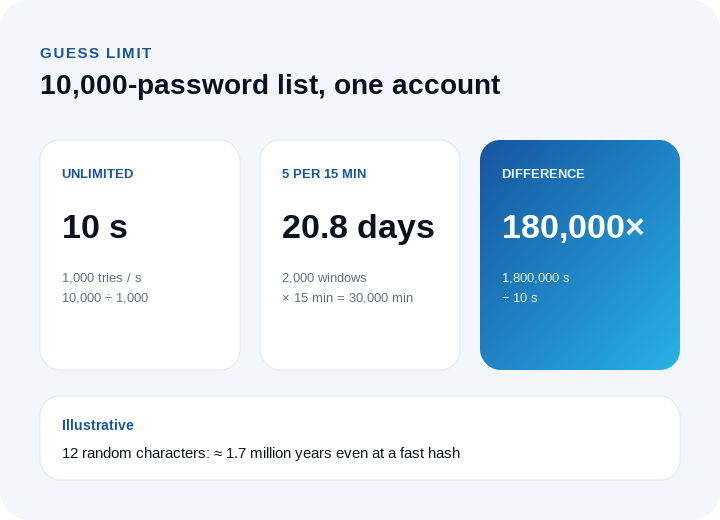
In an online attack, the decisive factor is the guess limit you set. For an attacker trying a common 10,000-password list against one account:
- Unlimited at 1,000 tries per second: 10,000 ÷ 1,000 = 10 seconds.
- 5 tries per 15 minutes per account: 10,000 ÷ 5 = 2,000 windows; 2,000 × 15 min = 30,000 min = 20.8 days.
- Difference: 20.8 days = 1,800,000 s; 1,800,000 ÷ 10 = 180,000 times.
When one password is tried across dozens of accounts, a per-account limit is not enough; you also need monitoring by IP, device and behaviour. Testing these controls during a penetration test makes sense.
Can Account Lockout Cause a Denial of Service?
Yes; badly designed, lockout becomes the attacker's tool. In the same example, with 150 accounts, a threshold of 5 failed attempts and a 15-minute lock, keeping every account locked takes 150 × 5 = 750 requests, which is 750 ÷ 900 s ≈ 0.83 requests per second.
The fix is progressive back-off instead of permanent lockout, and treating known devices separately: a correct password from a familiar device is not blocked, repeated failures from an unknown source are slowed down and MFA is demanded. A sudden rise in locked accounts is a sign of an attack or a misconfiguration.
What Is Single Sign-On (SSO)?
SSO means the user signs in once to an identity provider and reaches all connected applications without typing a password again. Applications never see the password; they trust a signed verification result from the identity provider.
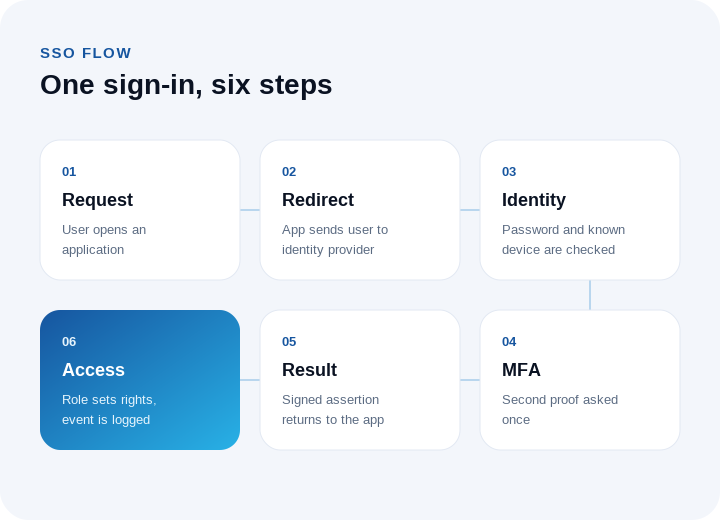
If the session is already open, MFA is asked once and a signed result returns to the application. The connection uses standard protocols; this is an integration job.
What Does SSO Bring, and What Risk Does It Add?
SSO has three gains: one password and one MFA, central access removal and central logging. The most concrete benefit shows when an employee leaves.
For example, closing accounts by hand in all 12 applications takes 12 × 5 min = 60 minutes per person and finishes on average within 3 working days. After SSO, one removal takes 5 minutes and completes within 1 hour. For 18 leavers a year the effort falls from 18 hours to 1.5 hours, and the time accounts stay open drops from 18 × 3 = 54 working days to 18 × 1/8 = 2.25 working days (−95.8%). Other steps of the leaver process are in our leave and employee management guide.
The risk must be stated plainly: SSO is a single door. If the identity provider is compromised, every application opens; if it goes down, nobody gets in. Countermeasures: the strongest MFA on administrator accounts, an outage plan, and separately stored, monitored emergency accounts. Legacy applications that cannot join SSO go on a separate risk list.
How Should Session Management Be Set Up?
The longer a session stays open, the more a stolen session is worth.
- Idle timeout: An inactive session closes (for example 15 minutes on administration screens; values are illustrative).
- Absolute lifetime: Even in active use, the session ends after a fixed time and asks for re-authentication.
- Step-up: Sensitive actions such as discount approval or changing payment details ask for re-verification.
- Sign-out and revocation: Sign-out, a role change or a password change also ends open sessions on the server.
What Happens If the MFA Device Is Lost?
Recovery is the weakest link of MFA: an attacker may simply phone the help desk saying "I lost my phone". Design the process in writing beforehand.
- Backup method: A second method (a backup code or second device) is registered at enrolment and stored safely.
- Help desk verification: A phone request alone is never enough; require manager approval, a pre-registered channel or video verification.
- Notification and logging: The old enrolment is revoked, the user and their manager are notified, and every recovery is written to the audit log.
How Do You Apply MFA to Dealers and External Users?
Dealer, customer and supplier users are not in your corporate directory, so you cannot impose a device. The aim is to lower risk without adding friction.
The approach: offer external users an app code or push option, make it mandatory for sensitive actions, remember a familiar device for a period, and consider federation with the dealer's own identity provider. We cover access and data isolation in our customer portal and supplier portal guides.
How Fast Does an MFA and SSO Investment Pay Back?
Illustrative example: 150 employees, 12 applications. The gain comes from labour savings and a lower expected loss; the second is an assumption, so we also show the sensitivity.
| Item | Calculation | Result |
|---|---|---|
| Password resets (before) | 150 × 12 × 0.5 = 900 requests × 20 min = 300 h × ₺300 | ₺90,000/year |
| Password resets (after SSO) | 150 requests × 20 min = 50 h × ₺300 | ₺15,000/year |
| Labour saving | ₺90,000 − ₺15,000 | ₺75,000/year |
| Leaver handling | (18 h − 1.5 h) × ₺300 | ₺4,950/year |
| Expected-loss reduction | (10% − 2%) × ₺2,000,000 | ₺160,000/year |
| Gross benefit | 75,000 + 4,950 + 160,000 | ₺239,950/year |
| Licence (₺60 × 150 × 12) | — | ₺108,000/year |
| Net benefit | 239,950 − 108,000 | ₺131,950/year |
Monthly net benefit is 131,950 ÷ 12 ≈ ₺10,996. If the set-up investment (connecting 12 applications, training, a recovery process) is ₺240,000, payback is 240,000 ÷ 10,996 ≈ 21.8 months. If MFA lowers the takeover probability only from 10% to 5% (instead of 2%), the risk gain is ₺100,000, net benefit ₺71,950 a year and payback ≈ 40.0 months. Count no risk gain at all and net benefit is 79,950 − 108,000 = −₺28,050: the value of the investment comes mostly from the lower takeover probability, not from user convenience.
Probability, incident cost and licence change with your data; record real incidents with the method in our incident management guide and update the table.
How Do You Set Up Authentication in Six Steps?
- Take an inventory: Which applications do which users (staff, dealers, external) sign in to, and how? Separate those suited to SSO.
- Rank by risk: Administrators, accounts that can move money or export data, and external access go onto MFA first.
- Choose the identity provider and pilot SSO: Start with two or three applications and a small group, and test the outage and recovery plan.
- Write down the password policy and storage: Length, leak check, event-based change, salted slow hashing and rate limiting go into the requirements document.
- Define recovery and the leaver process: MFA device loss, help desk verification and one-step removal of a leaver must be written and tested.
- Measure and review: MFA coverage (example: 138 ÷ 150 = 92%), SSO coverage (10 ÷ 12 = 83.3%), account removal time, password reset count and locked-account count are reviewed every three months.
For security across the whole lifecycle, see our secure software development guide.
We recommend reading: What Is Role-Based Access Control (RBAC)? Role Design, Least Privilege and Audit Guide
We recommend reading: How to Secure an API: Authentication, Authorization, Token Lifetime, Rate Limiting and Monitoring Guide
We recommend reading: What Is Penetration Testing? Types, Scope, Reports, Cost and How a Business Should Commission One
We recommend reading: Disaster Recovery and Business Continuity Planning: BIA, RTO, Tiers and Drills Explained
We recommend reading: What Is Data Encryption and Key Management? Encryption in Transit and at Rest, Envelope Encryption and Rotation Guide
We recommend reading: How to Manage Software Inventory and Shadow IT: Discovery, Risk Score and Approval Rule Guide
We recommend reading: User Account Lifecycle Management: How to Handle Joiners, Movers and Leavers
We recommend reading: How to Design Transactional SMS and OTP Messages: Segments, Pumping Defense and Cost Guide
We recommend reading: How to Manage Bot Traffic and Automated Abuse: Signal Scoring, Rate Limits and Payback Guide
We recommend reading: How to Integrate Electronic Signatures: E-Signature Flow, Identity Verification, Evidence and Payback Guide
Secure Sign-In Design with İnovabil
At İnovabil our focus is bespoke software built from scratch for your company: custom software, ERP, CRM, e-commerce, web, mobile and integration. We do not sell an identity product; in the systems we build we use role-based access, audit logs and secure hosting, and we recommend writing the authentication expectations (MFA scope, SSO, recovery, password storage) down during requirements.
We built CRM, purchasing and mobile for Avcılar İnşaat; a purchasing system for İZBAN; logistics and shipment planning with wholesale order management for Karyak; and warehouse management plus a complaint and support management system for Sleepy. Send us a short note on your user types and applications and we will pin down the sign-in requirements together.
We recommend reading: Our software development process: from analysis to release, step by step
Frequently Asked Questions
What are MFA and SSO, and are they the same thing?
No. MFA asks for two different kinds of proof at sign-in (for example a password and a code on a phone). SSO means signing in once to reach many applications. They can be combined: with SSO, MFA is asked once, centrally.
Is an account safe if MFA is on and the password leaks?
Largely yes, but not completely. If the attacker cannot reach the second factor, the password alone is not enough; however, phishing can steal a code or an approval. That is why high-risk accounts should use a phishing-resistant method.
Do passwords need to be changed regularly?
The general direction of current guidance is long passwords, leak checks and event-based change instead of forced periodic change. If there is a leak or suspicious activity, change the password immediately.
Does SSO not create a single point of failure?
It does; that is why an outage plan, separately stored emergency administrator accounts and strong MFA on administrator accounts are part of the design. Assess the outage impact in writing alongside the benefit calculation.
What should be checked before using biometric authentication?
Biometric data is special-category personal data. Consult your legal counsel on processing and explicit-consent conditions.