

An analytics tag goes onto the website, then an advertising tag, then a live chat widget. Three months later nobody can say which cookie came from where. If those tags run the moment a visitor opens a page, you have a cookie consent management problem. And the cookie policy text, written once at launch, is rarely opened again.
This guide treats cookie consent not as a legal document but as a software and measurement discipline: cookie categories, what must not load before consent, equal-weight buttons, how the choice is stored, when tags load, how the consent rate distorts your numbers, the cookie inventory and a test list. For legal obligations, retention periods and penalties, consult your legal counsel; every figure in this article is representative.
What Is Cookie Consent Management?
Cookie consent management is the setup that decides which cookies and similar storage your site writes to a visitor's browser, when it asks for a choice, and how it applies and proves that choice. It has three parts: the banner shown to visitors, the tag-loading logic that applies the choice, and the cookie policy that tells visitors what you do.
This article covers site cookies and measurement tags only. Permission for channels such as email and SMS is a separate subject, covered in our customer consent management guide. Handling requests to access or delete personal data is in our article on data subject requests.
What Types of Cookies Are There?
Cookies fall into four groups by purpose: strictly necessary, preference, statistics and marketing. Which group needs a choice, and under what conditions, is a legal assessment to settle with your counsel; the safe technical default is to put everything non-essential behind consent.
The inventory below shows the 18 cookies of a representative online store.
| Type | Cookie count | Typical purpose | Loading rule (our recommendation) |
|---|---|---|---|
| Strictly necessary | 6 | Session, cart, security, load balancing | Written immediately; keeps the site working |
| Preference | 4 | Language, currency, appearance | Depends on the visitor's choice |
| Statistics | 5 | Visit counts, page views | After consent |
| Marketing | 3 | Ad conversion, retargeting | After consent |
| Total | 18 | 6 + 4 + 5 + 3 = 18 | 12 cookies besides the necessary ones depend on choice |
As the table shows, only 6 of the 18 cookies are written without consent; the other 12 (66.7%) depend on the visitor's choice. You do not set the number of cookies, the tags on your site do; every new tag means a new row in the inventory.
Which Tags Must Not Load Before Consent?
None of the statistics or marketing tags should load before consent, and a tag that is loaded but "paused" is not enough, because the network request may already have left. The right approach is that the tag script is never downloaded at all.
- Make the tag conditional: The script is added to the page only when the preference cookie says "accept".
- Treat third-party widgets as tags: An embedded map, video or live chat widget can write cookies too and follows the same rule.
- Do not leave the tag manager unbounded: Every tag the marketing team adds through its management tool must pass through the same consent gate.
- Do not load on development and staging addresses: If measurement runs only on the real domain, test traffic cannot pollute your data.
To verify, use the browser's network tab: if a new session with no consent shows no third-party requests, the gate works. We covered how automated traffic skews measurement in our bot traffic management guide.
How Should a Cookie Consent Banner Be Designed?
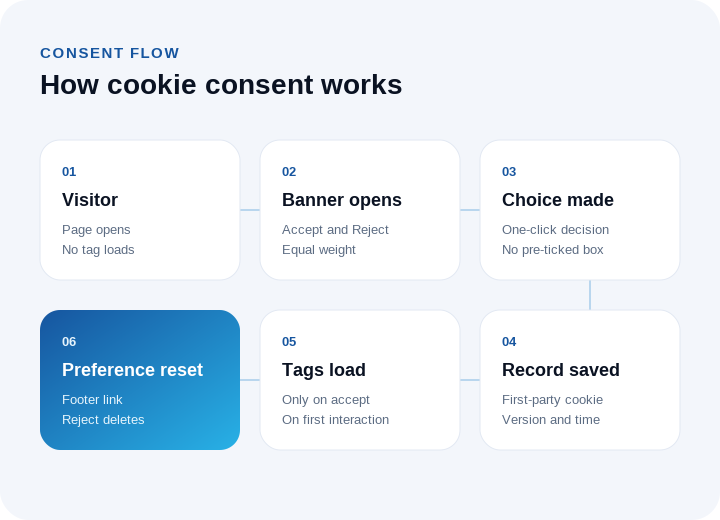
A consent banner should be short, clear and present the two options with equal weight. If "Accept" is large and colored while "Reject" is a hidden or faded link, the visitor has not made a real choice.
- Equal buttons: "Accept" and "Reject" have the same size, the same visibility and sit on the same step.
- Short, plain text: What will be done and for what purpose is said in two or three sentences; the policy link carries the detail.
- No pre-ticked boxes: No non-essential category is on by default.
- Accessibility: Reachable by keyboard, with visible focus, announced to screen readers, and the banner does not cover the content.
- Frictionless close: Once a choice is made the banner closes and the visitor is not asked again in the same session.
How Is the Choice Stored and Reopened?
The choice is stored in a first-party cookie on your own domain, so you do not depend on a third-party service that browser settings or blockers can cut off. The cookie lifetime is a decision to settle with your counsel; 12 months is one example. When it expires, the banner asks again.
Four rules keep the choice manageable:
- A reopen link: A "Cookie preferences" link in the footer of every page lets visitors change their mind at any time.
- Rejecting means deleting: When a visitor who accepted earlier later rejects, their existing statistics and marketing cookies are removed from the browser; stopping new writes is not enough.
- A version number: The record carries the version of the banner text and categories. When a new tag is added the version increases and the banner asks again.
- A record: At decision time the timestamp, version, chosen categories and an anonymous identifier are stored; no identity data is needed.
The consent record is small. If you write a record for every one of 60,000 monthly sessions, it comes to 60,000 × 12 × 150 bytes = 108,000,000 bytes ≈ 108 MB a year. If you write only at decision time (40% of sessions, i.e. 24,000 decisions a month) it is 24,000 × 12 × 150 = 43,200,000 bytes ≈ 43.2 MB, a 60% cut. The retention period is a policy decision; ask your counsel.
When Should Tags Load, and How Does It Affect Page Speed?
Even after consent, tags do not have to load while the page opens; they can wait for the first interaction or a short delay. That cuts the page's starting weight substantially.
| Loading time | Starting weight | Transfer time* | LCP |
|---|---|---|---|
| Tags load with the page | 420 KB | 2.10 s | 2.4 s |
| Tags load on first interaction or after a delay | 90 KB | 0.45 s | 1.7 s |
| Difference | −330 KB (−78.6%) | −1.65 s | −0.7 s (−29.2%) |
* Assuming a representative 1.6 Mbit/s connection = 200 KB/s: 420 ÷ 200 = 2.10 s; 90 ÷ 200 = 0.45 s. The LCP values are representative measurements; measure your own site.
The one caution with deferral is very short sessions: if a visitor leaves within seconds without interacting, the tag may never load and that session goes unmeasured. If the "Accept" click and the conversion page load the tag instantly without waiting, the loss is limited to that window. We covered the overall page-weight budget in our website speed guide.
How Does the Consent Rate Affect Measurement?
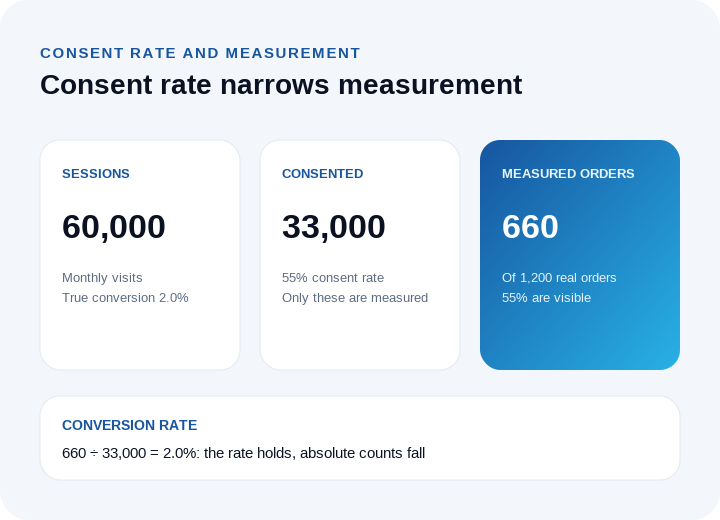
Your measurement sees only those who consent. At a 55% consent rate your analytics report reflects 55% of visitors; the rest are invisible. That is not a bug, it is the price of the setup, and you must account for it when reading reports.
Example site: 60,000 sessions a month and a true conversion rate of 2.0%, which means 60,000 × 0.02 = 1,200 orders in the server records.
| Consent rate | Measured sessions | Measured orders | Unseen orders | Measured conversion |
|---|---|---|---|---|
| 45% | 27,000 | 540 | 660 | 2.0% |
| 55% | 33,000 | 660 | 540 | 2.0% |
| 65% | 39,000 | 780 | 420 | 2.0% |
| 75% | 45,000 | 900 | 300 | 2.0% |
Two results stand out. First, the conversion rate stays constant (660 ÷ 33,000 = 2.0%), because consenting and non-consenting visitors are assumed to behave alike. Second, absolute numbers fall: at 55% consent only 660 of 1,200 orders appear in analytics and 540 (45%) are invisible. If real behavior differs, that assumption breaks; so read exact figures such as orders and revenue from server records, and read behavior analysis from the consenting sample.
How does ad efficiency get misread?
Say ad spend is ₺90,000 and the average basket is ₺1,000. Suppose the campaign really brought 300 orders: 300 × ₺1,000 ÷ ₺90,000 = 3.33 return. Because measurement sees only consenters, 300 × 0.55 = 165 orders are reported: 165 × ₺1,000 ÷ ₺90,000 = 1.83. Someone reading the report might think the campaign is losing money and switch it off.
A simple correction is to divide the measured count by the consent rate: 165 ÷ 0.55 = 300. This is an estimate, not a substitute for the exact value; where possible, cross-check against server-side order records. No accuracy commitment can be made for modeling approaches that fill measurement gaps with estimates; validate any model against your own data. We explained how to set up behavior analytics in our article on customer journey mapping and behavior analytics.
If you raise the consent rate from 55% to 65%, measured orders go from 660 to 780, an increase of 120 (+18.2%); that improvement alone cuts the measurement loss from 45% to 35%. When you change the button design or text, test the result with the method in our A/B testing guide, and look not only at the consent rate but also at complaints and abandonment.
How Do the Cookie Inventory and the Policy Text Stay in Sync?
A cookie policy must describe the cookies the site actually writes. If the policy text is written by hand once a year, it drifts away from the site with every new tag.
The fix is to make the inventory the single source of truth: for each cookie you record the name, type, whether it is first or third party, lifetime, purpose and the tag that writes it. The list on the policy page is generated from this inventory and compared against a real scan once a quarter.
- Scan: List the browser's cookies in two separate sessions, one with consent and one without.
- Compare: A cookie found in the scan but missing from the policy is a policy error; a cookie in the policy but absent from the scan pads the list.
- Rule: Before a new tag is added, the policy text and the inventory are updated.
Example: the scan found 18 cookies and the policy lists only 15. The match is 15 ÷ 18 = 83.3%; of the 3 missing cookies one is in the preference group and two are marketing. The target is 100%, and every gap opens a fix ticket. For other technical markup work, see our structured data guide.
How Do You Test Cookie Consent?
Run eight scenarios before every release. The most common break is an old tag that keeps loading outside the gate.
| # | Scenario | Expected result |
|---|---|---|
| 1 | New visitor, clean browser | Banner appears; no third-party request in the network tab |
| 2 | Click "Accept" | Preference cookie is written; tags load |
| 3 | Click "Reject" | Preference cookie says "reject"; no tags; old analytics cookies are deleted |
| 4 | Page refresh | No banner; the preference applies |
| 5 | Reopen preferences from the footer, switch from accept to reject | Existing cookies are deleted |
| 6 | Staging and development addresses | Banner appears; the measurement tag does not load |
| 7 | Browser that blocks cookies | Site works; no errors and no repeating banner |
| 8 | Thank-you or conversion page | No consent means no conversion is counted; with consent it is sent once |
You can add the test to your continuous integration pipeline as an automated smoke test; a simple scenario that checks network requests catches a tag leaking past the gate before release.
What Does Cookie Consent Management Cost, and What Is the Payback?
Setup is a one-time job; the gains show up in three places: speed, measurement confidence and order. A representative calculation:
- Investment: 8 person-days × ₺9,000 = ₺72,000 (banner, preference storage, tag-loading logic, inventory and tests).
- Speed gain: Conversion 2.0% → 2.05% (relative +2.5%, assumed to follow from the roughly 0.7 s LCP gain): 60,000 × 0.0005 = 30 extra orders × ₺1,000 × 20% contribution = ₺6,000 a month.
- Better campaign decisions: Reading the measurement gap knowingly prevents wrongly paused campaigns; a representative ₺9,000 a month.
- Running cost: Quarterly scans and policy updates cost ₺1,500 a month.
Monthly net gain is ₺6,000 + ₺9,000 − ₺1,500 = ₺13,500. Payback: ₺72,000 ÷ ₺13,500 = 5.33 ≈ 5.3 months. If the net gain halves (₺6,750), it stretches to ₺72,000 ÷ ₺6,750 = 10.67 ≈ 10.7 months. We left the monetary value of reduced legal risk out of this calculation; that assessment belongs to your legal counsel.
How Do You Set Up Cookie Consent in Six Steps?
- Build the cookie and tag inventory: Scan to list all cookies and the tags that write them; group them by type.
- Write the rule: Decide with legal counsel which type depends on what before loading.
- Build the banner and preference storage: Equal buttons, a first-party cookie, a version number and a reopen link.
- Tie tags to the gate: With no consent no tag is downloaded; set loading to the first interaction or a delay.
- Generate the policy from the inventory: The text and list match the real cookies; the policy is updated before a new tag arrives.
- Test and measure: Run the eight scenarios; track the consent rate and measurement loss monthly.
What Are the Common Mistakes?
- Loading a tag and "pausing" it: The request has already gone out; never download the script.
- Hiding the reject button: It offers no real choice and weakens the validity of the preference.
- Not deleting on reject: Cookies already written stay in the browser.
- Not updating the policy: A new tag is added and the text stays the same.
- Reading the report blindly: Without knowing the consent rate, measured numbers do not reflect reality.
- Forgetting test addresses: Staging traffic leaks into live reports.
We recommend reading: How to build a corporate website: planning, design, speed and SEO guide
We recommend reading: How to improve the e-commerce checkout
We recommend reading: How to Build a Landing Page: One Goal, Message Match, Form and Measurement Guide
Cookie Consent in Web and E-Commerce Projects with İnovabil
At İnovabil our focus is building bespoke software from scratch: custom software, e-commerce, CRM, ERP, web, mobile and integration. In web and e-commerce projects we suggest settling, during requirements analysis, which measurement tags will be used, the consent setup and the policy text, so that measurement is part of the design rather than a patch added later.
We apply the same setup on our own site: measurement code runs only when the visitor clicks "Accept" and only on the real domain, "Reject" carries equal weight, the preference is stored in a first-party cookie for 12 months, the "Cookie preferences" link in the footer reopens the banner, and rejecting deletes the analytics cookies. Tags arrive on first interaction or 6 seconds after load; our site's Lighthouse speed score sits in the 97–100 range. This is not a cookie management product or service; it describes the setup we run on our own site. In projects such as Avcılar İnşaat, İZBAN, Karyak and Sleepy we also put measurement and consent requirements in writing at the start of the process.
Send us a short summary of your site's or store's measurement and consent requirements and we will build the inventory together.
We recommend reading: Our web development service
Frequently Asked Questions
What is cookie consent management and what is it for?
It is the setup that decides which cookies a site writes and when, how the visitor's choice is collected, and how that choice is applied and recorded. For the details of legal obligations, consult your legal counsel.
Which tags must not load before consent?
Our recommendation is to put every non-essential tag behind consent: statistics and marketing tags and embedded third-party widgets. The preference cookie is checked before the script is downloaded; which types require consent is settled with legal counsel.
How much does a low consent rate distort my measurement?
In the example, with 55% consent 660 of 1,200 orders appear in analytics; the conversion rate stays the same but absolute numbers come out 45% lower. Read orders and revenue from server records and behavior from the consenting sample.
Where and for how long should the preference be stored?
In a first-party cookie on the site's own domain; the lifetime is a policy decision settled with legal counsel. 12 months is one example; when it expires or the consent version changes, the banner asks again.
How do I keep the cookie policy text up to date?
Make the cookie inventory the single source, generate the policy list from it and compare it against a real scan once a quarter. Update the inventory and policy before a new tag is added; in the example, a 15 ÷ 18 = 83.3% match opens a fix ticket.