

Your website, email addresses and integrations rest on three invisible things: a domain name, DNS records and SSL/TLS certificates. When one of them quietly expires, the site opens with a "not secure" warning, email stops arriving and integrations fail with connection errors. SSL certificate management, together with domain and DNS management, is the working routine that decides who a domain is registered to, when each item renews, who may change it, and how a bad change gets rolled back.
We cover password and key storage in our secrets management guide and the general approval process for changes in our change management guide; this article is only about the lifecycle of domains, DNS and certificates. The example figures are illustrative: they are not a specific provider, a price list or an industry average.
Who Should a Domain Be Registered To, and How Do You Secure Its Renewal?
The registrant should be the company itself, the account should sit behind a role mailbox, and renewal should be automatic and monitored. The most common problem is a domain registered years ago in the name of an employee or an agency.
The example business has 14 domains and 22 subdomains beneath them. Registrant ownership breaks down like this:
| Registrant | Domains | Risk |
|---|---|---|
| Company (managed through a role mailbox) | 9 | Low |
| An employee's personal name and email | 3 | Access and renewal notices disappear when the person leaves |
| Former agency account | 2 | Transfer gets hard if the account closes or the relationship ends |
| Total | 14 |
In the example, 5 of 14 domains (35.7%) are not under the company's direct control; moving them to the company is the first priority. The size of the renewal fee is misleading: at an illustrative ₺500 per domain per year, 14 domains cost ₺7,000, while the main domain being unreachable for 12 hours costs 12 × ₺35,000 = ₺420,000. A single incident is 420,000 ÷ 7,000 = 60 times the annual fee.
- Registrant and contact email: Renewal and transfer notices go to a role mailbox read by several people, not a personal inbox.
- Registrar lock and two-step sign-in: The transfer lock stays on by default and is lifted only briefly for a planned transfer; account sign-in uses two steps and recovery methods are kept somewhere safe.
- Two-person rule: Cutting the number of people with write access at the registrar from 5 to 2 reduces it by 3 ÷ 5 = 60%; two people still cover holidays and departures.
- Renewal tracking: Automatic renewal can still fail because the card has expired; expiry dates live in the inventory and the first alarm rings 60 days ahead.
For closing a leaver's access to the registrar account, see our account lifecycle guide.
What Do DNS Records Do, and What Can Go Wrong?
DNS is the address book that translates a domain into a server, a service or a mail system. Each record type does a different job, and one wrong line can stop a website or email.
| Record | What it does | When it goes wrong |
|---|---|---|
| A / AAAA | Points a name to a server address (IPv4 / IPv6) | The site goes to a wrong or old server |
| CNAME | Makes one name an alias of another | If the target is shut down the name dangles |
| MX | Says which server receives the domain's email | Incoming email is lost or bounces |
| TXT | Free text; ownership checks and email policies (SPF, DKIM, DMARC) live here | Mail cannot be sent or lands in spam |
| CAA | Restricts which authorities may issue certificates for the name | Renewal fails, or an unexpected authority issues a certificate |
The detail of the email-related TXT records (SPF, DKIM, DMARC) is in our transactional email deliverability guide, so we do not repeat it. The principle here is: keep email records separate from website records, and whoever moves the website does not touch them. Deleting a TXT or MX record that "looks unused" can stop email.
Each record's owner and purpose are kept in the inventory; a record with no known owner is not deleted, it is exported first and then watched.
What Is TTL, and How Do You Change DNS Safely?
TTL (time to live) is how many seconds a DNS answer may be cached. A change does not "propagate"; resolvers around the world keep the old answer until its TTL runs out. So the safe plan is to lower the TTL before the change and wait for the lower value to take effect.
| Step | Time | Action |
|---|---|---|
| 1 | T − 2 h | Lower the record's TTL from 3,600 s to 300 s; wait for the old TTL (1 h) |
| 2 | T | Change the record to the new value; keep an export of the old one |
| 3 | T + 5 min | Query the new record from several resolvers and from an outside network |
| 4 | T + 1 h | If all is well, raise the TTL back to 3,600 s; do not shut the old server at once |
A failure scenario shows why this matters. If the change is wrong, the outage lasts the rollback work (10 minutes in the example) plus the TTL.
- TTL 3,600 s: 10 min + 60 min = 70 min; 70 × ₺35,000 ÷ 60 ≈ ₺40,833 lost.
- TTL 300 s: 10 min + 5 min = 15 min; 15 × ₺35,000 ÷ 60 = ₺8,750 lost.
- Difference: 55 min ≈ ₺32,083. The price is that resolver queries rise 3,600 ÷ 300 = 12 times during the window, a small load that ends when the TTL goes back up.
If a TTL was never lowered and sits at 86,400 s (24 h), the wait is 24 h too. The extra rule for DNS is two-person approval on critical records and an export before every change.
What Happens When an SSL/TLS Certificate Expires?
Browsers and clients refuse the connection or show a "not secure" warning, and the website, APIs and integrations effectively stop. The outage comes not from application code but from a missed date.
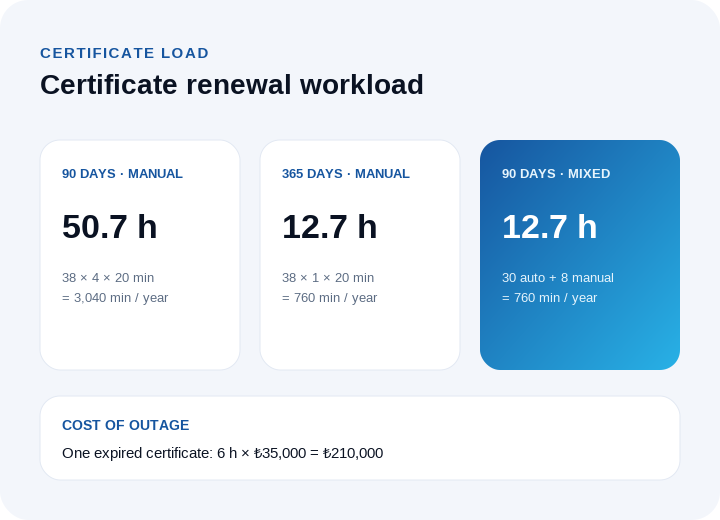
The shorter certificate lifetimes get, the more renewals there are. The example inventory has 38 certificates and a manual renewal takes 20 minutes on average:
| Scenario | Renewals a year | Effort |
|---|---|---|
| 90-day lifetime, all manual | 38 × 4 = 152 | 152 × 20 min = 3,040 min = 50.7 h |
| 365-day lifetime, all manual | 38 × 1 = 38 | 38 × 20 min = 760 min = 12.7 h |
| 90-day lifetime, 30 automatic + 8 manual | 152 | 8 × 4 × 20 + 30 × 4 × 1 = 640 + 120 = 760 min = 12.7 h |
In the mixed scenario the 30 automatic certificates need one minute of oversight per renewal, while the 8 that cannot be automated are renewed by hand. The saving is 50.7 − 12.7 = 38 h; at ₺300 an hour that is ₺11,400 a year. The real gain is lower risk of a missed renewal.
Take an illustrative assumption: a manual renewal is missed 1% of the time, an automatic one with alarms 0.2% of the time. Expected misses a year are 152 × 0.01 = 1.52 when everything is manual and 32 × 0.01 + 120 × 0.002 = 0.56 in the mixed setup. If one expired certificate costs 6 h × ₺35,000 = ₺210,000, expected annual loss falls from ₺319,200 to ₺117,600, a difference of ₺201,600.
How Do You Set Up a Certificate Inventory and Automatic Renewal?
First you must know which certificates exist and where they live. They are not only on the web server: they may sit on a load balancer, an API gateway, a mail server, an old appliance or a shared service's admin panel.
- Outside discovery: For every domain and subdomain, connect from outside and read the certificate presented. In the example the recorded inventory shows 31 certificates while discovery finds 38; 7 certificates, or 18.4%, were unrecorded.
- Ownership: Each certificate has a responsible person and a renewal method (automatic or manual).
- Automatic renewal: Set it up wherever possible; in the example 30 of 38 (78.9%) are automatic. Manual ones get a calendar entry and a second person.
- Wildcard certificates: One certificate covers many names, but the private key then lives in many places, so a leak has a wider effect (for storing the key, see the secrets management guide). The authority that renews must also be allowed in the CAA record.
Alarm thresholds follow the certificate lifetime. For a 90-day certificate, automatic renewal is usually tried about 30 days before expiry; that window is the margin for fixing a failed renewal.
| Time left | Status | Who is told |
|---|---|---|
| 30 days | Not renewed: first warning | Certificate owner |
| 14 days | Still not renewed | Owner and team lead |
| 7 days | Incident opened | On-call and manager |
| 1 day | Emergency | Everyone involved |
These thresholds are an example for a 90-day certificate; the person the alarm reaches is tested as well.
Why Are Dangling Subdomain Records a Risk?
If an unused subdomain record still points at a closed external service or an old server, anyone who takes over that target could serve content under your domain. This is not an attack recipe but an inventory problem: every record is tied to an owner and a purpose.
In the example inventory 3 of 22 subdomains are no longer used: 3 ÷ 22 = 13.6%. Deleting those three cuts the surface from 22 to 19. A monthly check confirms for each subdomain that it answers, that its target is still yours, and that the record has an owner.
- Decommission order: When retiring a service, remove the DNS record first and then shut the service down.
- Project handover and temporary addresses: Subdomains and certificates belong on the handover list (see the project closure guide); temporary addresses get an end date.
How Should You Separate the Root Domain, www and the Test Environment?
Every address should have one short path: either the root domain or www is the main address and the other redirects to it permanently (301), while the test address is a separate subdomain with its own certificate.
Chained redirects between the root domain and www add delay. In the example each redirect takes 80 ms and the chain has three hops: 3 × 80 = 240 ms. If the root address goes to www in a single hop it is 80 ms, a 66.7% reduction from 240 to 80. A single main address also avoids splitting search signals (see the SEO guide).
On our own site the root domain redirects permanently to the www address in one step, http requests redirect permanently to https, the test address sits under a separate name and is closed to search engines, and email records are kept apart from website records and left alone during web work.
- Test and live separation: The test address has its own certificate, secrets and database; the live certificate's private key is never copied to the test server (see the software environments guide).
- Search engines: A response header keeps the test address out of the index; the live address does not carry that header.
When Does This Management Pay for Itself?
In the example the one-off setup effort is ₺180,000 (inventory, automatic renewal, alarm setup, moving ownership) and the yearly running cost is ₺24,000. Three benefits count: lower risk of missed certificate renewals at ₺201,600, manual effort saved at ₺11,400, and lower risk of domain expiry. A single domain incident costs 12 h × ₺35,000 = ₺420,000; if the yearly probability falls from 5% uncontrolled to 0.5% controlled, that is worth 420,000 × 0.045 = ₺18,900.
- Gross yearly benefit: 201,600 + 11,400 + 18,900 = ₺231,900.
- Net yearly benefit: 231,900 − 24,000 = ₺207,900.
- Payback: 180,000 ÷ 207,900 × 12 ≈ 10.4 months.
- If the benefit halves: 231,900 ÷ 2 = 115,950; net 91,950; 180,000 ÷ 91,950 × 12 ≈ 23.5 months.
The probabilities are assumptions; redo the calculation with your own outage history.
How Do You Set Up Domain, DNS and Certificate Management in Six Steps?
You need not do everything in one week: inventory and ownership first, automation next.
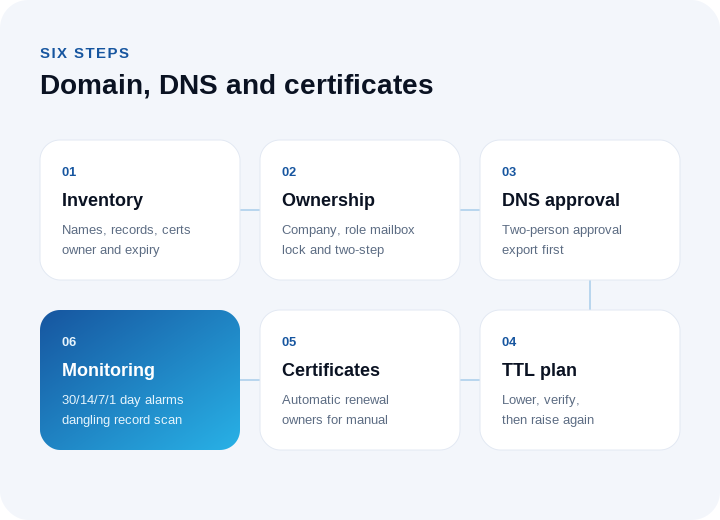
- Inventory: List every domain, subdomain, DNS record and certificate with its owner, expiry date and renewal method; use outside discovery to find the gaps.
- Ownership: Move registrations to the company, use a role mailbox, turn on the registrar lock and two-step sign-in, and cut the number of people with access to two.
- DNS approval: Require two-person approval on critical records and export the zone before every change.
- TTL plan: Lower the TTL ahead of a migration, verify, then raise it back; write the rollback step in advance.
- Certificate automation: Automate renewal wherever possible, give manual ones an owner and a calendar entry, and add the CAA record.
- Monitoring: Set up expiry alarms (30/14/7/1 days), outside checks of certificates and redirects, and a monthly scan for dangling records.
What Mistakes Are Common in This Area?
- Keeping a domain in a personal account: An employee who leaves takes the notices and the access along.
- Sending renewal email to a mailbox on the same domain: If the domain lapses, the notice never arrives.
- Deleting a record that looks unused: Export and watch it first; it may be a mail or verification record.
- Tying an alarm to one person: If it goes to someone on holiday or gone, it never rang.
We recommend reading: How to manage software environments: development, test, staging and production
We recommend reading: How to Migrate a Website Without Losing SEO: 301 Redirects, URL Mapping, Launch Day and Monitoring Guide
Reliable Web and Integration Infrastructure with İnovabil
At İnovabil our focus is building bespoke software from scratch for your company: custom software, ERP, CRM, e-commerce, web, mobile and integration. Our recorded capabilities include role-based access control, audit logs and secure hosting; we suggest writing down in the requirements analysis at the start of a project who the domain will be registered to, which environment runs on which address, and who renews what. We do not claim to offer a separate domain or DNS management service.
We have built CRM, purchasing and mobile for Avcılar İnşaat; a purchasing system for İZBAN; logistics and shipment planning with wholesale order management for Karyak; and warehouse management plus a complaints and support management system for Sleepy. Send us a short list of your domains and we will turn it into a written inventory together.
We recommend reading: Our software development process: from analysis to launch, step by step
Frequently Asked Questions
What is the difference between a domain, DNS and an SSL certificate?
A domain is the name you rent for your site; DNS connects that name to servers and mail systems; a certificate proves the connection is encrypted and reaches the right server. Each has its own expiry and its own owner.
What happens when an SSL certificate expires?
Browsers show a warning or refuse the connection, and API clients fail. In the example a 6-hour outage costs ₺210,000 when an hour of downtime costs ₺35,000. The defence is automatic renewal plus alarms at 30, 14, 7 and 1 day.
How long does a DNS change take to take effect?
It depends on the record's TTL: an old cached answer may be used until the TTL runs out. At 3,600 s you wait up to an hour, at 300 s up to five minutes. That is why you lower the TTL before a migration and wait as long as the old value.
Why should a domain be registered to the company?
A domain registered to a person or held in an agency's account creates renewal, transfer and access problems when that person leaves or the relationship ends. A company registration behind a role mailbox, with two authorised people and a registrar lock, is much safer. For contract and ownership questions consult a legal adviser.
When does this management pay for itself?
In the example, with a ₺180,000 setup and a net yearly benefit of ₺207,900, payback is about 10.4 months; if the benefit halves, about 23.5 months. The probabilities are assumptions, so recalculate with your own outage history.