

The database password, the API key for a payment or shipping service, the signing key and the certificates a software team uses often sit somewhere in plain text: in a configuration file, in a chat message, in an old repository history. Secrets management is the working discipline that keeps these values outside the code, stored with access control and a log, renewed on a schedule and revoked quickly when they leak. The goal is not to assume a secret will never leak; it is to make sure that when it does, the damage is small and short.
This guide covers the lifecycle of an application's own secrets: inventory, where to store them, environment separation, least privilege, short-lived credentials, rotation, leak scanning, the order of response and cost. We covered the client keys you hand out through a public API in our API key and quota management guide and encrypting data in our data encryption guide; we do not repeat them here. The example figures are representative; they are not the price of a specific tool or an industry average.
Which Data Counts as a Secret and Where Should It Not Live?
A secret is any value that gives whoever holds it access to a system or an identity. You must know which ones you have first; without an inventory there is nothing to manage.
| Secret type | Example | Representative count | Common wrong place |
|---|---|---|---|
| Shared password | Admin panel, shared account | 24 | Chat message, shared sheet |
| API key | External service, marketplace, carrier connection | 18 | Source code, configuration file |
| Database connection | User name, password, connection string | 14 | Environment file in the repository |
| Signing key and certificate | Document signature, webhook signature, TLS | 12 | Developer laptop |
| Other | Notification service, storage access | 12 | Email attachments |
| Total | 80 |
For each secret in the inventory keep these fields: name, type, owner, system that uses it, environment, creation date, last rotation date and permission scope. In the example, 22 of the 80 secrets are over a year old and have never been rotated: 22 ÷ 80 = 27.5%. That ratio is the top of the first improvement list.
Where Should Secrets Be Stored?
In short: not inside code or any file that leaves the repository, but in a central vault with access that is logged. The options behave differently for security and operations.
| Storage place | Advantage | Risk | Decision |
|---|---|---|---|
| Source code | Convenience | Stays in every copy and in history | Never |
| Configuration file in the repository | Ships with the version | Same spread as code | No |
| Environment variable (set by hand) | Separate from code | No record of who reads it or when it changed | Stopgap |
| Chat, email, shared sheet | Fast sharing | Searchable, never deleted | No |
| Central vault | Access control, log, rotation, versions | The vault itself must be protected and backed up | Target |
A vault does more than store: it records who read a secret and when, keeps versions, defines access per secret and automates rotation. The application fetches the secret from the vault at startup or when needed; the secret itself never enters the image, the code package or the logs. Because the vault can become a single point of failure, you design in advance how to back it up and how the application behaves when it is unreachable, for example running on the last valid cached value.
How Do You Apply Separate Secrets per Environment and Least Privilege?
Each environment gets its own secrets, and each secret carries only enough permission to do its job. We described how environments are separated in our software environments guide; here we cover only the secrets side.
- No sharing across environments: 80 secrets with separate values for development, staging and production makes 80 × 3 = 240 secret values. A leak in a test environment does not open production.
- Narrow permissions: The reporting service's database user gets read-only access to the 4 tables it needs; it does not carry write access to 40 tables.
- One purpose per secret: A key serves a single service, so the log shows which service leaked and revoking it does not stop another service.
- Narrower human access: If the number of people who can reach production secrets drops from 25 to 6, the access surface shrinks by 19 ÷ 25 = 76%. A person reading a secret should be the exception; the main reader is the application identity.
For the logic of role-based permissions see our role-based access control guide; the same least-privilege principle applies here to machine identities.
How Do Short-Lived Credentials Narrow the Leak Window?
Using a credential that the vault issues to the application for a short time, instead of a long-lived key, cuts the leak window to hours. We can express the window as: impact = validity period × permission scope.
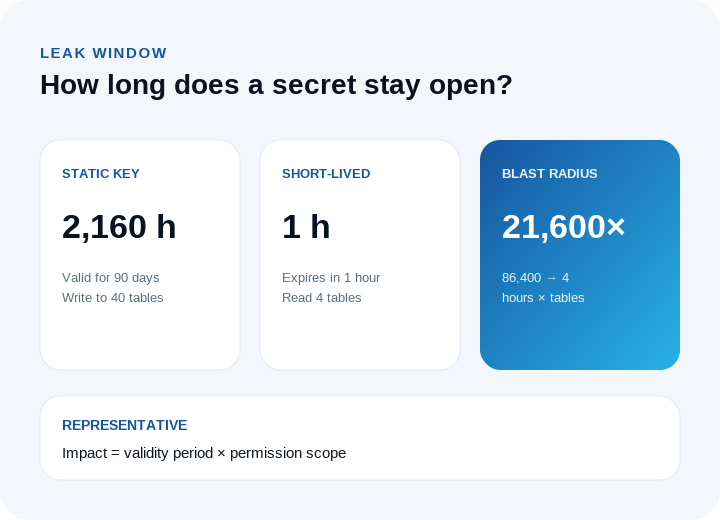
| Item | Static key | Short-lived, narrow |
|---|---|---|
| Validity period | 90 days = 2,160 h | 1 h |
| Permission scope | Write to 40 tables | Read 4 tables |
| Impact (h × tables) | 2,160 × 40 = 86,400 | 1 × 4 = 4 |
| Reduction | Duration 2,160 times, impact 86,400 ÷ 4 = 21,600 times | |
This calculation is for the worst case: the secret is assumed to stay valid from the moment of exposure until the next rotation. In reality a leak is revoked once noticed, but noticing can take days, while a short lifetime does not wait for anyone to notice. The cost of the short-lived approach is renewal traffic: if 30 services renew hourly, that is 30 × 24 = 720 renewals a day. The volume is small for a vault, but the vault's availability becomes more critical.
How and How Often Should Secrets Be Rotated?
Rotation means replacing a secret with a new value. Done by hand it gets forgotten, so whatever can be automated is left to the vault. For a safe switch, the old and new values stay valid together briefly; once consumers move to the new value, the old one is closed.
Example effort calculation: rotating each of the 80 secrets by hand takes 25 minutes and the team does four rounds a year.
- By hand: 80 × 25 min = 2,000 min (33.3 h) per round; 4 × 2,000 = 8,000 min = 133.3 h a year.
- Mixed: 60 secrets automatic (1 min of supervision per round = 60 min) and 20 by hand (20 × 25 = 500 min): 560 min per round; 2,240 min = 37.3 h a year.
- Difference: 133.3 − 37.3 = 96 h a year; at ₺300 an hour that is ₺28,800.
Frequency depends on each secret's value and convenience: automatic ones rotate at short intervals, manual ones less often but on a calendar. When someone leaves the team or a device is lost, you rotate the secrets that person could reach without waiting for the calendar. For account lifecycle see our account lifecycle guide.
How Do You Find Secrets That Have Leaked?
Leaks are mostly accidental: a test key is pushed along with the code. So scanning is set up at two points: before a developer sends a change and across the whole repository history.
- Pre-push scanning: Catches secret-looking text before the change enters the repository.
- Repository and history scanning: Finds values left in old records; remember that deleted files remain in history.
- Handling false positives: In the example, scanning 14 repositories returns 17 findings; 6 are samples or fake values (6 ÷ 17 = 35.3%) and 11 are real. Of the 11 real findings, 7 are still valid; they go straight onto the revocation list.
- Outside the repository: Chat, support tickets and shared documents are scanned too; secrets leak in more places than code.
Scanning is part of a secure development process; for the broader frame see our secure software development guide and for its place in the release pipeline our CI/CD guide.
What Do You Do in the First Hour After a Secret Leaks?
Revoke first, clean up second. Most teams do the opposite: they try to delete the value from repository history while the secret stays valid. But once a value has been shared, copies may remain in caches and clones; cleanup alone is not enough.
| Order | Step | Why in this order? |
|---|---|---|
| 1 | Revoke or rotate the secret | Closes the open window |
| 2 | Pull the usage scope from the access log | Shows what was affected |
| 3 | Distribute the new value and verify the applications | Restores service |
| 4 | Review the logs for suspicious use | Determines whether it was abused |
| 5 | Clean history and copies | Lowers the chance of leaking again; it is not security |
| 6 | Run a blameless review and fix the rule | Prevents the same mistake |
The time difference is large. If cleanup comes first, 120 min of cleanup + 15 min of revocation = 135 min open; if revocation comes first, 15 min: 135 ÷ 15 = 9 times. If there are signs the revoked secret was used, the situation is an incident; for the process see our incident management guide. If personal data is affected, notification duties under KVKK (Turkey's personal data protection law) should be assessed with your legal counsel; this article is not legal advice.
How Do You Set Up Access Logging and the Four-Eyes Principle?
Who read a secret, when and for what purpose is recorded. The record does two jobs: it defines the scope in a leak and turns unusual reads into alerts. For log design see our audit log guide.
- Volume: 30 services restart 4 times a day and read 8 secrets at each start: 30 × 4 × 8 = 960 reads. Human access is 20 a day: 980 reads a day in total. At 300 bytes per record that is 294,000 bytes a day (about 287 KB) and 294,000 × 365 = 107,310,000 bytes a year (about 107 MB); manageable.
- Alert threshold: If normal human access is 20 a day, more than 90 reads in a day, or a production secret read outside working hours, is an alert.
- Four eyes: For 12 critical secrets, such as the signing key and the production database admin password, reading requires a second person's approval. At 10 requests a month × 10 min of extra approval = 100 min a month, one person's mistake or bad intent is blocked.
What Does Secrets Management Cost and When Does It Pay Back?
The benefit comes from two items: rotation effort saved and expected loss reduced. The assumptions below are representative: a secret-related incident costs ₺1,200,000, the yearly probability is 10% before the program and 2% after; setup is ₺180,000; running cost (vault, scanning, monitoring) is ₺36,000 a year.
| Item | Calculation | Amount |
|---|---|---|
| Expected loss (before) | ₺1,200,000 × 10% | ₺120,000 |
| Expected loss (after) | ₺1,200,000 × 2% | ₺24,000 |
| Loss reduction | ₺120,000 − ₺24,000 | ₺96,000 |
| Rotation effort saved | 96 h × ₺300 | ₺28,800 |
| Running cost | −₺36,000 | |
| Net per year | ₺96,000 + ₺28,800 − ₺36,000 | ₺88,800 |
Net per month is ₺88,800 ÷ 12 = ₺7,400; payback is ₺180,000 ÷ ₺7,400 ≈ 24.3 months. If the probability only falls from 10% to 6%, the loss reduction is ₺1,200,000 × 4% = ₺48,000; net per year is ₺48,000 + ₺28,800 − ₺36,000 = ₺40,800 and payback is ₺180,000 ÷ ₺40,800 ≈ 4.4 years (about 52.9 months). If no risk benefit is counted at all, net per year is ₺28,800 − ₺36,000 = −₺7,200 and the program does not pay for itself on effort savings alone. So decide with your own incident cost and a realistic probability.
How Do You Set Up Secrets Management in Six Steps?
You do not need to build everything at once; start with the inventory, then the riskiest secrets.
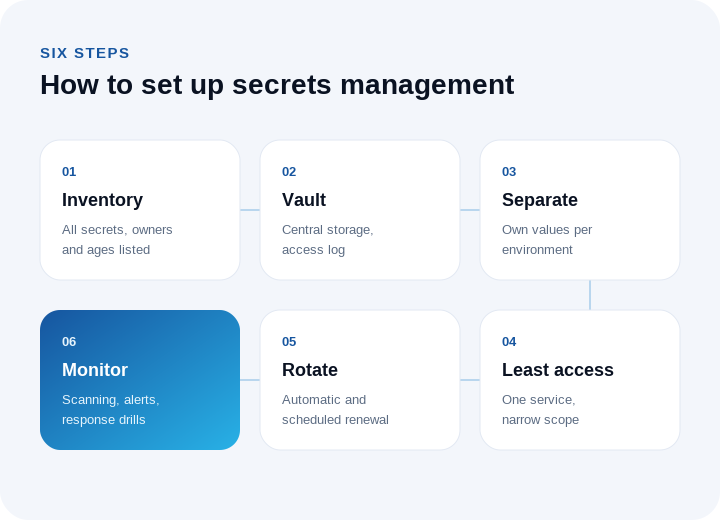
- Inventory: List all secrets, their owners and ages; find the gaps with repository and chat scanning.
- Vault: Choose a central vault and move the riskiest secrets first; make applications fetch secrets from it.
- Environment separation: Give each environment its own values; narrow access to production secrets.
- Least privilege: Tie each secret to one service and narrow permissions; move to short-lived credentials where possible.
- Rotation: Automate what can be automated, put a calendar on manual ones, and rotate immediately on departures and losses.
- Monitoring: Set up the access log, pre-push scanning and alert thresholds; write down the response order and rehearse it.
What Are the Common Mistakes in Secrets Management?
- Deleting the secret from the repository and calling it done: It stays in history and clones; revoke first.
- Using the same secret across environments: A leak in the test environment opens production.
- One "admin" key: A secret that can do everything is the largest blast radius.
- Never trying rotation: Not knowing how to rotate when it is needed means late revocation.
- Not protecting the vault: The vault's backup, access log and number of administrators need managing too.
- Writing secrets to logs: Debug output must never show connection strings or header values.
We recommend reading: How to secure an API: authentication, authorization, token lifetime and monitoring
We recommend reading: How to set up a software bill of materials and dependency update management
We recommend reading: SSL Certificate Management: How to Manage Domains, DNS and Certificates (Ownership, TTL, Renewal and Inventory Guide)
We recommend reading: Payment Gateway Integration: State Machine, 3D Verification, Duplicate Charges and Payback Guide
Secure Custom Software with İnovabil
At İnovabil our focus is building bespoke software from scratch: custom software, ERP, CRM, e-commerce, web, mobile and integrations. Our recorded capabilities include role-based access control, audit logs and secure hosting; we recommend writing expectations such as where secrets will live and how they will be managed into the requirements analysis at the start of a project. We do not claim to offer a separate secrets management service.
We built CRM, purchasing and mobile for Avcılar İnşaat; a purchasing system for İZBAN; logistics and shipment planning with wholesale order management for Karyak; and warehouse management plus a complaint and support management system for Sleepy. Send us a short summary of your integrations and environments, and we will turn it with you into a written list of what should move into a vault.
We recommend reading: Our software development process: from analysis to release, step by step
Frequently Asked Questions
What is secrets management?
It is keeping secrets such as passwords, API keys, connection strings, signing keys and certificates outside the code in a central vault, with access control and logging, rotating them regularly and revoking them quickly when they leak.
Is keeping secrets in environment variables enough?
It is better than keeping them in code because it separates them from the code, but it does not track who reads them or when they change, and it offers no rotation or versions. The target is a central vault with logged access; environment variables are a stopgap.
What should you do first if a secret is accidentally pushed to the repository?
Revoke or rotate the secret first, then review its usage and clean the history. In the example, a team that cleans first stays exposed for 135 minutes, a team that revokes first for 15 minutes; cleanup alone does not provide security.
How often should secrets be rotated?
There is no single right frequency. Secrets that can be rotated automatically rotate at short intervals, manual ones on a calendar; when a person leaves or a device is lost, the related secrets rotate immediately. Short-lived credentials largely remove the problem.
When does secrets management pay for itself?
In the example, when the yearly incident probability falls from 10% to 2%, payback is about 24.3 months; if it only falls to 6%, it stretches to about 52.9 months. Recalculate with your own incident cost and probability.