

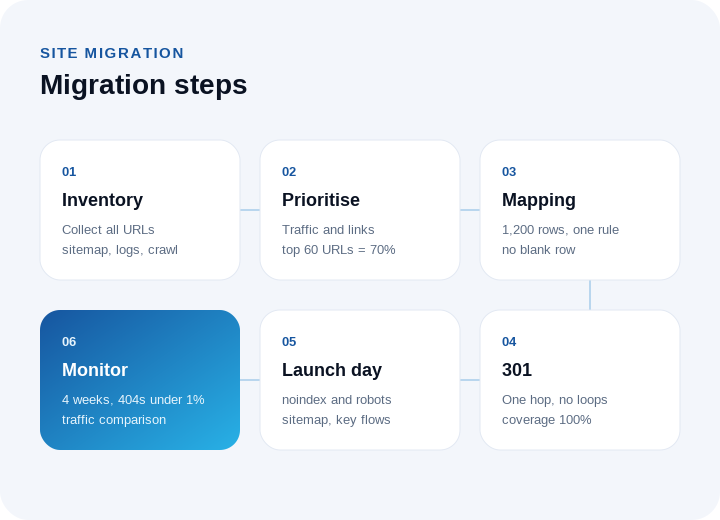
Moving to a new design, a new platform or a new domain is a planned project; a sudden drop in search traffic usually comes from details nobody planned for. Website migration SEO comes down to four habits: know every old URL, write down the new home of each one, apply that mapping with single-hop permanent redirects, and measure after launch. The hard part is doing all of that completely on a site with 1,200 URLs.
This guide covers migration types, how to inventory and prioritise existing URLs, the mapping table, 301 redirect rules, what must be preserved, the staging-noindex trap, a launch-day checklist, four weeks of monitoring, a rollback plan and whether the preparation pays for itself. Example figures are representative; they are not measurements from a real site or industry averages, and no ranking or traffic outcome is promised.
What Is a Website Migration and Why Does It Cause SEO Loss?
A website migration is any move that substantially changes a site's URLs, infrastructure or appearance. Loss comes from two directions: old URLs fail to answer or point to the wrong place (the search engine loses the page), and new pages do not carry the title, content and internal link structure of the old ones (the page is no longer valued the same).
The loss often starts from the assumption that a better-looking new site cannot hurt. For a search engine, what matters is continuity of the address and consistency of the content. For the fundamentals, see our guide on how to do SEO; this article focuses only on the moment of the move.
We recommend reading: Our web development service
What Are the Migration Types and Which Is Riskiest?
The migration type determines how many URLs change, and risk scales with that number.
| Migration type | What changes | URLs | Risk |
|---|---|---|---|
| New design | Look and templates | Stay the same | Low; keep titles and content |
| New platform | Infrastructure, content management | Often change | Medium; mapping table required |
| https and structure change | Protocol, www, trailing slash, folder layout | All change technically | Medium; rule-based redirects |
| Domain change | Brand or domain name | All change | High; full mapping and monitoring |
| Combined migration | Design, platform and domain together | All change | Highest; split into phases if possible |
Doing several types on the same day makes it hard to isolate the cause of a problem; schedule the domain change on a separate date. For the domain and DNS side, the checkpoints in our guide to managing domains, DNS and SSL certificates apply.
How Do You Inventory and Prioritise Existing URLs Before Migrating?
First collect every URL of the old site in one list, then add traffic and link value to each and sort from most to least valuable. A small group of URLs usually brings most of the traffic, and that is where you spend the most care.
Example site (representative): 1,200 URLs and 18,000 search sessions per month. Sorted by sessions, the top 60 URLs bring 70% of traffic:
- Top 60 URLs: 18,000 × 70% = 12,600 sessions; an average of 12,600 ÷ 60 = 210 sessions per URL.
- Remaining 1,140 URLs: 18,000 − 12,600 = 5,400 sessions; an average of 5,400 ÷ 1,140 ≈ 4.7 sessions per URL.
The top 60 are reviewed one by one: title, main heading (h1), content, internal links and canonical tag are compared between old and new page. At 20 minutes per URL, 60 × 20 = 1,200 minutes = 20 hours. For the remaining 1,140 URLs the method is pattern rules: product pages handled by one rule, blog posts by another (12 rule groups in the example).
Combine the old sitemap, server logs, the URLs shown in the search engine's site-owner tool and a crawl of the site; if you rely on the sitemap alone, you will miss old URLs that are not listed but receive external links.
How Do You Build the Old URL → New URL Mapping Table?
Every old URL gets one written decision: it has a new equivalent, it was merged into another page, or it was removed. No row stays empty, because an empty row means a 404 on launch day.
| Decision | URLs | Action | Example |
|---|---|---|---|
| Has a new equivalent | 1,040 | 301 to the new URL, one to one | /product/item-a → /products/item-a |
| Merged into another page | 110 | 301 to the merged page | Three old posts → one guide page |
| Removed | 50 | 301 to the nearest category, or 410 | Expired campaign page |
| Total | 1,200 | 1,040 + 110 + 50 = 1,200 | One decision per row |
The split is roughly 87% one to one, 9% merged and 4% removed. Redirecting every removed page to the home page is a common mistake: an irrelevant target reads as a "soft 404" to both users and search engines. Send it to a close category if one exists; otherwise a 410 (permanently gone) is more honest.
The table has columns for old URL, new URL, decision, owner and test result; pattern rules are written separately and exceptions row by row. If you are structuring content from scratch, the URL and content-type plan in our CMS guide makes this table easier.
How Do You Set Up 301 Redirects, and Why Are Chains and Loops a Problem?
A 301 says "this address has moved permanently". Every old URL should reach its final new URL in a single hop; intermediate stops cost both speed and value transfer.
A typical chain: the old URL opens over http, redirects to https, then to www, then to the new folder structure. If each hop takes 80 ms in the example:
- Three-hop chain: 3 × 80 = 240 ms before the page even starts loading.
- Single hop: 80 ms. The difference is 240 − 80 = 160 ms, or 66.7% shorter.
Write the rule so that it also corrects protocol and host name in the same step. Principles:
- Single hop, no loops: from the old URL straight to the final URL; A → B → A is blocked.
- Permanent code: 301, not a temporary 302; keep the query string where it matters.
- Keep them for long: redirects stay even after traffic stops (12 months in the example, a representative lower bound).
How do you check redirect coverage?
Request all 1,200 old URLs from the mapping table and compare the response with the expected one. On the first run, 1,158 URLs respond correctly: 1,158 ÷ 1,200 = 96.5%. The remaining 42 failures break down as 18 chains, 14 dead ends (404), 6 loops and 4 wrong targets; 18 + 14 + 6 + 4 = 42. Do not launch until the re-run gives 1,200 ÷ 1,200 = 100%; the threshold is 100% because those 42 URLs may include valuable pages.
What Must Be Preserved in a Migration?
Redirects move the page; content and signals are preserved on the new page by hand. Treat anything you want to improve as a separate job after the migration.
| Element | Preserve | Common mistake |
|---|---|---|
| Title and description | Same or better on traffic-bearing pages | The template default title lands on every page |
| Main heading (h1) and body | Topic and main phrases | Text is shortened and phrases disappear |
| Internal links | Links to important pages | Menu is simplified and deep pages become orphans |
| Canonical | Self-referencing canonical on the new URL | Canonical points to the old URL |
| Structured data | Product, FAQ and breadcrumb markup | Markup disappears with the template |
| Language alternates (hreflang) | Two-way and pointing to new URLs | Old URLs stay in the pairs |
If you built structured data at template level as in our structured data guide, you check it in one place during migration. On multilingual sites, our localization guide helps keep language pairs intact.
What Are the Sitemap, robots and noindex Traps?
The most expensive mistakes often come from the smallest lines. A staging environment is closed to search engines; if that closure travels to production, the site drops out of the index.
- Staging noindex reaches production: a noindex left in a meta tag or response header removes the new site from the index. Tying the closing rule to the host name prevents this leak.
- A blanket block in robots: a "block the whole site" line left from staging stops crawling.
- The old sitemap: a map listing old URLs makes the crawler keep following redirects. The new map contains only new URLs.
Repeat these checks on staging, on launch day in production and afterwards. To keep the new site from regressing on speed, apply the budget approach from our website speed guide to the new template as well.
What Is the Launch-Day Checklist?
- Timing: pick a day outside peak season when the team is reachable; freeze content changes.
- DNS preparation: shorten the DNS time to live before the change (3,600 s → 300 s in the example) so you can switch back fast if needed.
- Backup: a full backup of the old site and a read-only copy of the old server at a separate address.
- Redirects: publish the mapping rules and re-run the 1,200-URL verification crawl; target 100%.
- Index blockers: check noindex, robots and password protection on the live address.
- Sitemap: publish the new map and submit it in the search engine's site-owner tool.
- Critical flows: try forms, checkout, login and search by hand.
- Monitoring start: note the launch time and save the traffic and ranking summary of the four weeks before the move.
We recommend reading: How to build a landing page: message match, form and measurement guide
How Do You Monitor After the Migration?
Look daily for the first four weeks, then weekly. Watch four things: indexing, crawl errors, the 404 rate and the traffic comparison, measured against the average of the four weeks before the move.
Example site (representative): 18,000 sessions a month, or 4,500 a week; the new site has 1,040 URLs and the sitemap lists them. A prepared migration might look like this:
| Week | Sessions | Loss | Indexed URLs | Ratio |
|---|---|---|---|---|
| 1 | 4,140 | 8% | 418 | 40.2% |
| 2 | 4,185 | 7% | 780 | 75.0% |
| 3 | 4,230 | 6% | 936 | 90.0% |
| 4 | 4,275 | 5% | 1,019 | 98.0% |
The math: 4,500 × 0.92 = 4,140; 4,500 × 0.93 = 4,185; 4,500 × 0.94 = 4,230; 4,500 × 0.95 = 4,275. Index ratios: 418 ÷ 1,040 = 40.2%; 780 ÷ 1,040 = 75.0%; 936 ÷ 1,040 = 90.0%; 1,019 ÷ 1,040 ≈ 98.0%. This is an illustration; real recovery time depends on site size, crawl frequency and what changed, and no duration can be promised.
Alert thresholds
- 404 rate: on a site with 9,000 page requests a day, 140 404s → 1.6% (threshold 1%). After fixing the most common missing patterns, 36 → 0.4% and the alert clears.
- Traffic: a drop of more than 15% from the four-week average (below 3,825 on a weekly 4,500) triggers a review. This is a representative threshold; tune it to your own variation.
- Index coverage: if it is still under 90% in week 4, recheck the sitemap, blockers and canonicals.
How Long Does the Temporary Dip Last and What Does It Cost?
A short dip is normal even in a prepared migration while the search engine re-evaluates the new URLs. To price it, put two scenarios side by side on the same example (representative; value per session ₺12):
- Unprepared: a 35% loss = 18,000 × 0.35 = 6,300 sessions a month; 6,300 × ₺12 = ₺75,600 a month. If it lasts 3 months, 6,300 × 3 = 18,900 sessions, 18,900 × ₺12 = ₺226,800.
- Prepared: an 8% loss in week one and linear recovery over 8 weeks gives weekly losses of 8, 7, 6, 5, 4, 3, 2 and 1%, a total of 36%. On 4,500 weekly sessions, 4,500 × 0.36 = 1,620 sessions; 1,620 × ₺12 = ₺19,440.
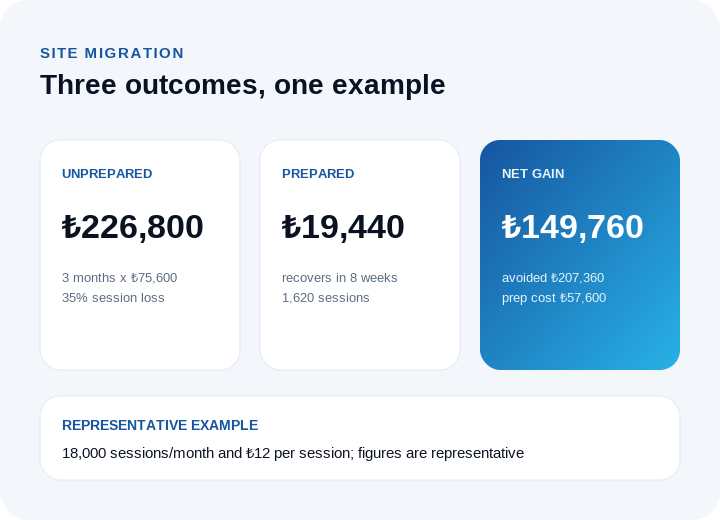
Avoided loss: ₺226,800 − ₺19,440 = ₺207,360. Replace the assumptions with your own numbers.
Does the Preparation Pay for Itself?
Preparation effort in the example is 96 hours: inventory and prioritisation 12, mapping table 24, redirect rules and testing 20, content and title comparison 20, staging audit 8, launch day and monitoring setup 12; 12 + 24 + 20 + 20 + 8 + 12 = 96 hours. At ₺600 per hour, 96 × ₺600 = ₺57,600.
- Net gain: ₺207,360 − ₺57,600 = ₺149,760; a return of 149,760 ÷ 57,600 ≈ 2.6 times.
- Half scenario: even if the avoided loss is only ₺103,680, the net is ₺103,680 − ₺57,600 = ₺46,080.
- Break-even: the preparation pays for itself if at least 57,600 ÷ 207,360 ≈ 27.8% of the avoided loss materialises.
This counts only the direct value of search sessions, and the three-month loss is an example assumption. Read the result as an order of magnitude, not a promise.
How Do You Prepare a Rollback Plan?
Write the decision rule before launch day:
- Trigger: for example, if the 404 rate passes 5% in the first 24 hours or the payment or form flow fails, a rollback is discussed.
- Means: the shortened DNS time to live and the read-only copy of the old site make going back possible within minutes.
- Limit: decide within the first 48 hours; after that, rolling back may create new problems, so fix forward instead.
What Are the Common Migration Mistakes?
- Redirecting everything to the home page without a mapping: the signals of valuable pages are lost.
- Rewriting content at the same time as the move: the cause of any loss cannot be isolated.
- Skipping monitoring: a problem is noticed weeks later.
We recommend reading: How to build a corporate website: planning, content and launch guide
Related service pages: e-commerce development and custom software.
Web Development and Launch Discipline with İnovabil
At İnovabil our focus is building firm-specific software from scratch; web development, e-commerce, custom software, mobile and integration are parts of that. We do not offer a separate site migration or search engine optimisation service, but we run pre-launch checks in web projects as part of the analysis and testing steps.
Our own site shows the discipline in practice: it is generated statically and every URL is a single file; the root domain redirects to www with a single 301 and http redirects to https with a 301; the sitemap and language alternates are generated automatically from the content; the staging address is closed with a noindex header that is not sent in production. We bring the delivery experience from projects such as Avcılar İnşaat, İZBAN, Karyak, Sleepy and Kredili Kargo to web work too. Send a short summary of your current site and migration plan, and we can produce an inventory and risk assessment together.
We recommend reading: Our software development process: from analysis to launch, step by step
Frequently Asked Questions
Is SEO loss unavoidable during a website migration?
A short dip is normal, but lasting loss is usually avoidable. A mapping table, single-hop 301 redirects, preserved titles and content and four weeks of monitoring keep the loss small. No exact duration for the dip can be promised.
What is the difference between a 301 and a 302 redirect?
A 301 signals a permanent move and a 302 a temporary one. In a migration the old URLs have moved permanently, so use 301; a temporary redirect can slow the transfer of signals to the new URL.
How long should I keep the redirects in place?
As long as you can. Old URLs live on in other sites, bookmarks and emails. The example uses 12 months as a lower bound; do not remove them while traffic still arrives.
What should I watch when changing the domain name?
Because every URL changes, you need a full mapping table, single-hop redirects, updated canonicals and language alternates, a fresh sitemap and monitoring. If possible, do not combine it with a design or platform change on the same day.
What should I do if traffic drops after the migration?
Check noindex and robots blockers first, then redirect errors and the 404 rate; then compare canonicals, the sitemap and content differences. If there is a serious outage in the first 48 hours, apply the rollback plan.