

Your product page says ₺1.299,90 and "In stock", but a search engine or an AI assistant still has to read the page and work out what those words mean. Structured data labels the content of a page (a product, an article, an organization) and the meaning of its values in a form a machine can read directly. The most common way to add it is a JSON-LD block in the page, which is often simply called schema markup.
In this guide we explain what structured data is, how JSON-LD differs from microdata, which types belong on which page of a corporate site or online store, why the markup must match the visible page exactly, how to write a Product example, how to generate markup from templates, how to validate it, how to keep price and stock in sync, how to calculate payback and what the six steps of a rollout look like. All example figures are representative; they are not measurements of a real site or industry averages.
What Is Structured Data?
Structured data is an additional layer that labels the information on a page with a shared vocabulary (schema.org types and properties). A visitor sees the page as it is; search engines and other machine readers use this layer to learn "this is a product, its name is this, its price is this, the currency is TRY, it is in stock" without guessing from running text.
The layer does not make the page faster and does not lift rankings by itself; its job is to reduce ambiguity. We covered the wider picture of search visibility in our guide on how to do SEO and the role of AI answers in our post on what GEO is. Here we focus only on the markup itself.
We recommend reading: Our web development service
Should You Use JSON-LD or Microdata?
For most projects JSON-LD is the better fit, because the markup sits in one block, separate from the visible HTML. Microdata and RDFa instead embed the markup inside the visible tags.
| Topic | JSON-LD | Microdata / RDFa |
|---|---|---|
| Placement | A separate script block | Inside the properties of visible tags |
| Maintenance | Changed in one place in the template | Mixed with interface tags; can break when the design changes |
| Error risk | Can drift from visible values; reduced with templates | Sits on the same tag as the visible value, but is hard to manage on complex pages |
| Testing | Easy to read and validate the block on its own | The HTML tree must be parsed first |
| Typical choice | New projects, online store templates | Existing, already-marked templates |
Supported formats and conditions can change, so check the search engine's current official documentation before you decide.
Which Types Go on Which Page?
Do not put every type on every page; add only the type that describes what the page really is. The core set for a corporate site and an online store is below.
| Type | Which page | What it describes | Data source |
|---|---|---|---|
| Organization | Home, about | Company name, address, logo, contact, official profile links | Company settings |
| WebSite | Home | Site name and address | Site configuration |
| BreadcrumbList | All inner pages | The breadcrumb path | Page tree |
| Product + Offer | Product page | Name, image, code, brand, price, currency, stock | Product database |
| FAQPage | A visible FAQ section | Question and answer pairs | FAQ content |
| Article | Blog post | Headline, author, publish and update dates, image | Post record |
The conditions for rich-result display of FAQPage have changed and narrowed over time, so use the markup to present the questions and answers on the page in a machine-readable way, not in the hope of a special display. For required and recommended properties, rely on the official documentation.
Why Must the Markup Match the Visible Page Exactly?
Every value you mark up must equal the value the visitor sees on the page. Marking up information that is not visible, or leaving an outdated price in place, is a trust problem that conflicts with search engine guidelines; verify the current conditions in the official documentation.
The only robust way to achieve this is a single source of truth: the data object that draws the price on the page is the same object that produces the JSON-LD. Two separate sources (one for the visible page and one for a hand-maintained file or plugin setting) will drift apart sooner or later. In the example below, 12 of 400 products show a JSON-LD price that differs from the page after a campaign, because it came from a cache refreshed overnight: 12 ÷ 400 = 3.0% mismatch. When both are generated from the same data object, this rate is structurally zero.
How Do You Write Product and Offer?
In a Product example, each field has a visible form on the page and a different form in JSON-LD. The values below are representative.
| Field | Visible on the page | JSON-LD value |
|---|---|---|
name | Steel Thermos 500 ml | "Steel Thermos 500 ml" |
sku | Product code TRM-500-CLK | "TRM-500-CLK" |
offers.price | ₺1.299,90 | "1299.90" (decimal point, no thousands separator) |
offers.priceCurrency | The ₺ symbol | "TRY" (three-letter currency code) |
offers.availability | "In stock" | "https://schema.org/InStock"; OutOfStock when unavailable, PreOrder for pre-orders |
image | Main product image | Full (absolute) image address |
The most common numeric mistake is formatting. The page shows "1.299,90"; if the template carries that text into JSON-LD unchanged, a reader sees a value like 1.299, roughly one-thousandth of the real price (1299.90 ÷ 1.299 ≈ 1,000). The fix is to generate the price from the numeric field it is stored in, not from the formatted text, and always write it with a decimal point and no separators.
For variant products (for example three sizes at three prices), do not write a single price; use the offer type that expresses a price range, and if each variant has its own page, let each page carry its own price. For price rules and campaign layers, see our post on price optimization and dynamic pricing.
How Do You Generate Markup from Templates and Keep It Under Version Control?
Do not write the markup page by page; write one template per page type and fill it from the same data object that produces the visible page. Writing it by hand for 400 pages takes 400 × 6 min = 2,400 min = 40 hours, and it must be redone every time a price changes.
- Generate on the server: The JSON-LD block should arrive with the page HTML. Markup added later by a script in the browser depends on the reader running that script, which is one more dependency.
- One template per type: Four templates (product, category, blog and home) are enough; shared fields such as company details come from one place.
- Skip empty fields: Do not write a field with an empty string; omit it entirely. An empty price is markup that looks valid but means nothing.
- Put it under version control: Templates live with the code and changes go through review. For the idea behind version control see our post on what version control is, and for the release pipeline see what CI/CD is.
- One source, many outputs: If product data feeds several channels, keep it in one place; see product information management.
How Do You Validate and Test Structured Data?
Validation works on two levels: automated tests before release and a regular scan after release. The official validation tools that search engines provide, and generic schema validators, are enough to check syntax and required fields; you do not need to depend on a particular tool.
- Template tests: Four states for the product (in stock, out of stock, discounted, with variants) and one example for each of the other five types: 4 + 5 = 9 scenarios. Run them automatically on every release.
- Value comparison: In the test, read the JSON-LD price and the visible price from the same data and compare them; format errors are caught here.
- Live sampling: After release, pull samples from each page type and run them through the official validator; for the whole site, a crawler script can be written.
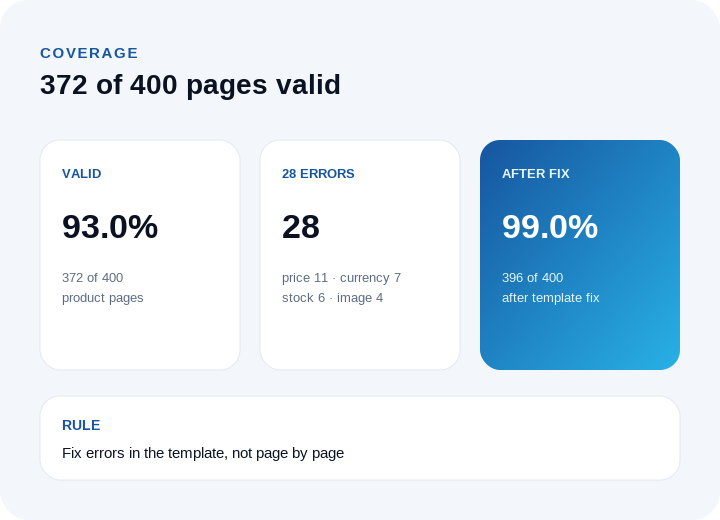
In a representative store, the first scan gives this result: 372 of 400 product pages are valid, that is 372 ÷ 400 = 93.0%. The remaining 28 errors fall into four causes: empty price (11 pages, 39.3%), missing currency (7, 25.0%), invalid stock value (6, 21.4%) and broken image address (4, 14.3%); 11 + 7 + 6 + 4 = 28.
| Page type | Pages | Valid | Rate |
|---|---|---|---|
| Product | 400 | 372 | 93.0% |
| Category | 30 | 30 | 100.0% |
| Blog | 60 | 57 | 95.0% |
| Home | 1 | 1 | 100.0% |
| Total | 491 | 460 | 93.7% |
Of the errors, 24 (price, currency and stock) close with a template fix; four are data problems (broken image addresses) and go to the content team. After the fix, valid product pages are 372 + 24 = 396, so 396 ÷ 400 = 99.0%. What matters is not fixing 28 pages one by one but fixing three template bugs once.
How Do You Keep Price and Stock in Sync?
Price and stock go stale fastest, so how often the markup is refreshed determines its accuracy. In the example, 40 of the 400 products (10%) change stock status each day, spread evenly through the day. Total daily observation is 400 × 24 = 9,600 product-hours.
| Refresh method | Average staleness | Stale product-hours (per day) | Rate |
|---|---|---|---|
| Overnight batch (24 h) | 12 h | 40 × 12 = 480 | 5.0% |
| Hourly cache | 0.5 h | 40 × 0.5 = 20 | 0.21% |
| Real-time from the same data as the page | 0 | 0 | 0% |
In the table, 5.0% = 480 ÷ 9,600 and 0.21% = 20 ÷ 9,600. If the page is already rendered in real time, generating the JSON-LD in the same request from the same object is both the simplest and the most accurate option. If the page is served from a cache, the markup should sit in the same cache entry; otherwise the page and the markup are refreshed at different times. The stock flow itself is covered in our guide to building an e-commerce website and our integration posts.
How Do Rich Results and GEO Relate to Structured Data?
Structured data is one of the conditions for rich results (a display with extras such as stars or price), but meeting the condition does not guarantee the display. The search engine decides by its own criteria, and those criteria can change. We do not give a figure such as "this many more clicks" in this post, because we have no source for one. Measure your own effect in the search engine's publisher dashboard by comparing the period before and after the markup.
On the GEO side, markup helps AI systems read company and product information from precise fields, but again we cannot promise that any system will use it or cite it in an answer. A more reliable foundation is clear, correct and current text on the page together with the markup. For the other parts of the whole, see our posts on website speed and web accessibility.
How Do You Calculate the Payback of a Structured Data Project?
It is more honest to calculate payback from maintenance effort alone, without tying it to a visibility gain. The assumptions are representative.
- Investment: Four templates, tests and scanning: 6 person-days × ₺9,000 = ₺54,000.
- Monthly effort today: 60 new or changed product pages × 6 min = 360 min = 6 h; manual checking 10 h; total 16 h × ₺300 = ₺4,800.
- Monthly effort afterwards: With templates and automated checks, a monthly review of 2 h × ₺300 = ₺600.
Monthly net saving is ₺4,800 − ₺600 = ₺4,200; payback is ₺54,000 ÷ ₺4,200 ≈ 12.9 months. If the saving halves (₺2,100), the period stretches to ≈ 25.7 months. The one-time manual writing effort (400 × 6 min = 40 h = ₺12,000) and any visibility gain are not included; the calculation is deliberately cautious. On a small site (under a few hundred pages) a handful of hand-managed markup blocks may be enough, and the investment pays back slowly.
How Do You Add Structured Data in Six Steps?
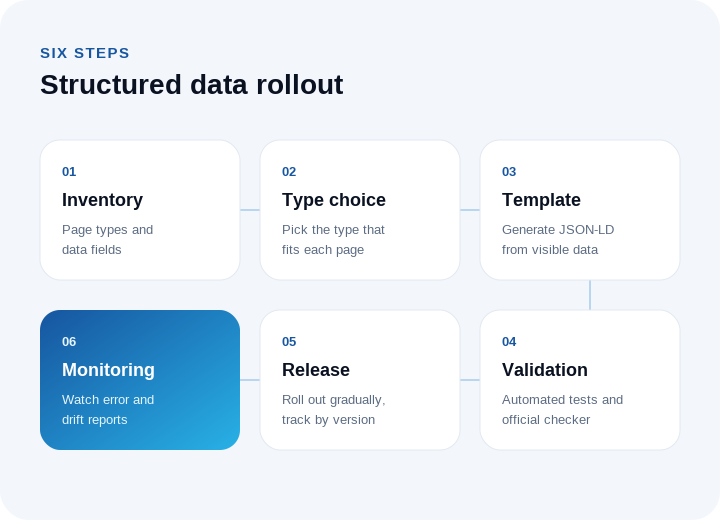
- Inventory: List the page types and the data fields of each; write down which data comes from which source.
- Type selection: For each page type, choose the type from the table that describes the content visible on the page.
- Template: Generate the JSON-LD from the data object that produces the page; write the price from the numeric field and the currency as a code.
- Validation: Set up the nine-scenario automated test and the value comparison; run the first coverage scan.
- Release: Open it on one page type first, watch the results, then roll out to the others.
- Monitoring: Track the weekly error count, the coverage rate and price-stock mismatch; rerun the tests whenever a template changes.
What Are the Common Mistakes with Structured Data?
- Marking up invisible content: Marking up reviews, ratings or an FAQ that is not on the page damages trust.
- Copying the price from text: Carrying "1.299,90" over as it is corrupts the value.
- Keeping two sources: If the visible price comes from one place and the markup from another, drift is inevitable.
- Putting every type on every page: Unneeded types raise the error count and the maintenance load.
- Testing only on launch day: A template change can silently break the markup; tests must run on every release.
We recommend reading: How to build a corporate website
We recommend reading: What Is a Headless CMS? CMS vs Headless, Content Model, Workflow and Cost Guide
We recommend reading: How to Set Up Cookie Consent Management: Cookie Policy, Banner, Tag Loading and Measurement Impact Guide
We recommend reading: How to Migrate a Website Without Losing SEO: 301 Redirects, URL Mapping, Launch Day and Monitoring Guide
Web Development and Structured Data with İnovabil
At İnovabil our focus is building software from scratch for your company: custom software, e-commerce, web, mobile, ERP, CRM and integrations. On our own site we use 12 different JSON-LD types generated by page type, and our Lighthouse performance score was measured at 97–100 on mobile; this is our own measurement showing that structured data can be added without giving up speed, not a client result or a display guarantee.
In web and e-commerce projects we suggest writing down, during requirements analysis, which page types receive markup, from which data source and with which validation routine. We built CRM, purchasing and mobile for Avcılar İnşaat; a purchasing system for İZBAN; logistics and shipment planning with wholesale order management for Karyak; and warehouse management plus a complaint and support management system for Sleepy. Send us a short note on your page types and product data source and we will draft a markup plan together.
We recommend reading: Our software development process: step by step from analysis to launch
Frequently Asked Questions
What is structured data and what is it for?
It is an extra data layer that labels what the content on a page is (a product, an article, an organization) and what its values mean, in a form machines read directly. It helps search engines and AI systems understand a page without guessing.
Should I choose JSON-LD or microdata?
For new projects JSON-LD is usually the better choice: it sits in a separate block, is managed in one place in the template and can be tested on its own. Microdata embeds the markup in visible tags; it is workable if you are keeping an existing template that already works. Verify current support conditions in the search engine's official documentation.
Does structured data guarantee rich results?
No. The markup is one of the conditions for display but not enough on its own; the search engine decides whether to show it, and its criteria can change. Measure the effect in your own search dashboard by comparing the period before and after the markup.
How do I keep price and stock information current?
Generate the JSON-LD in the same request from the same data object that draws the price on the page. In the example, an overnight batch leaves 5.0% stale and an hourly cache 0.21%, while real-time generation from the same data leaves zero. Take the price from the numeric field, not from formatted text.
How long does a structured data project take to pay back?
In the example, a 6 person-day investment (₺54,000) and ₺4,200 of monthly maintenance saving give about 12.9 months; if the saving halves it is about 25.7 months. The calculation excludes any visibility gain. Recalculate it with your own page count and labor cost.