

When you want to take orders from abroad or serve users in other countries, the first job that comes to mind is translating the screens. But software localization is more than translation: date and number formats, text that fits on screen, plural and grammar rules, address and currency formats, and appearing in the right language in search results are all part of it. If the texts were never separated from the code, every new language means hunting for strings inside the code one by one.
In this guide we cover internationalization (i18n) versus localization (l10n), translation keys, traps in Turkish and other languages, format and layout issues, URL structure and language switching, the translation workflow, testing, and a representative cost and payback calculation for three languages. All figures are representative; they are not any translation vendor's price or any market's conversion rate.
What Are i18n and l10n, and What Is the Difference?
i18n (internationalization) makes software adaptable to many languages and regions without changing the code; l10n (localization) actually adapts the content and formats for one specific language and region. The numbers in the abbreviations count the letters between the first and last letter: 18 for internationalization, 10 for localization.
| Concept | What it does | Who does it | When |
|---|---|---|---|
| i18n | Separates text from code, binds formats to the locale, builds a flexible layout | Software team | Once, at the start |
| l10n | Translates text, adapts dates, currency and visuals to that market | Translator, reviewer, product owner | For every new language |
| Translation | Converts text into another language; a part of l10n | Human or machine + review | For every new text |
| Locale | A language and region pair that determines formats (e.g. tr-TR, en-GB) | Software library | On every request |
A language is not the same as a locale. "Let's add English" is an incomplete sentence; say which market it is for. We covered how to choose the market in our e-export guide.
We recommend reading: Our web development service
How Do You Separate Text From Code? Translation Keys
No visible text is hard-coded; each is referred to by a key and the language dictionary supplies the text. The code only says cart.checkout; the locale decides whether the screen shows "Passer à la caisse" or "Proceed to checkout".
- Keys carry meaning:
cart.checkoutis good;button7is not. A translator understands the position from the key. - Sentences are never split: Instead of concatenating "Hello, " + name + "!", write one message:
Hello, {name}!. Word order changes by language; pieces cannot be reordered. - Use named variables: Named placeholders such as
{count}and{city}let a translator move words around. - A note and screenshot for every key: Is "Book" a reservation or a publication? Without context, translation errors are unavoidable.
Doing this afterwards means pulling 1,200 lines of text out of the code one by one; doing it at the start means writing the key while designing the screen. The same dictionary can be shared by a web application and a mobile app.
What Are the Translation Traps in Turkish and Other Languages?
The biggest trap is baking another language's rules into the text. Turkish suffixes change with vowel harmony, plurals have more than two forms in some languages, and nouns and adjectives change with gender in some others.
| Trap | Example | Fix |
|---|---|---|
| Suffix harmony | "{city}'de": Kayseri'de but Ankara'da | Don't glue the suffix on the name; use a full-sentence key or a grammar-aware library |
| Plural forms | English has 1 item / 2 items; Turkish keeps "5 kitap" singular; Arabic has six categories | Use a message format that picks the plural category from the number |
| Gender and case | In some languages "you were assigned" changes with gender | Write a neutral sentence or define a separate translation form per gender |
| Upper/lower case | Turkish dotted and dotless i have separate capitals; applying English rules turns the Turkish word "bilgi" into "BILGI" by mistake | Make case conversion locale-aware |
| Sorting | The Turkish alphabet orders its extra letters (dotless i, c with cedilla, g with breve, o and u with umlaut, s with cedilla) separately | Sort lists by locale |
| Concatenated sentence | Pieces such as "{n} items " + "in your cart" | One message with named variables |
How Do You Handle Date, Number and Currency Formats?
No format is written by hand; the setting is left to the locale. The same data is written differently in different regions, and a wrong format causes a misunderstanding.
- Date: 03.04.2026 is 3 April in Turkey; in a region that reverses day and month, the same display reads as 4 March. Store dates in a standard format in the database and convert to the locale when displaying.
- Time zone: Store timestamps with one standard time zone and show them in the user's own zone. This matters for operations that cross a date line, such as delivery dates and campaign end times.
- Number: 1.234,56 uses a decimal comma and a thousands dot in Turkish; many other regions write the same number as 1,234.56.
- Currency: The symbol position (before or after the amount), the number of decimals and the thousands separator vary. Store the amount and the currency separately. Exchange-rate and exchange-difference records are a separate subject; we covered them in our multi-currency guide.
How Do Text Expansion and Right-to-Left Languages Affect Design?
Translated text is often longer than the source, and buttons, menus and table headers are the first places to overflow. Leaving room for text in the design is cheaper than fixing it afterwards.
A representative rule: leave a 30% expansion allowance in the design. For example, if a button label fits 24 characters, limit the source text to 24 ÷ 1.3 ≈ 18 characters; a 20-character label that grows 30% becomes 26 characters and overflows. Real expansion varies by language and text; use the pseudo-locale test below to measure it.
Right-to-left (RTL) languages (for example Arabic and Hebrew) are a separate dimension of this topic: the page layout and navigation direction are mirrored, icon directions (like a back arrow) flip, but numbers and some symbols keep their direction. Adding an RTL language needs extra design and testing effort; it is not included in this article's cost calculation.
How Should You Set Up URL Structure and Language Selection?
Each language version lives at its own address and the user can switch language with a link. There are three common structures, each with different maintenance and search engine pros and cons.
| Structure | Example | Pro | Con |
|---|---|---|---|
| Subdirectory | site.com/en/products | One site to manage, easy setup | Weaker country signal |
| Subdomain | en.site.com | Separate server and team possible | Managed like a separate site |
| Country domain | site.de | Strong local trust | Each domain adds cost and upkeep |
For most businesses the subdirectory structure is the simplest start; our own site publishes Turkish at the root and English under /en. If the address table is kept in one place, adding a language is just a dictionary and a column in the table; a missing translation fails the build.
- Keep the language switch visible: Users should be able to change language on every page and their choice should be remembered.
- Link the language counterparts of a page: Each version marks its own language and its counterparts (hreflang); for details see our SEO guide.
Site-wide topics such as speed, accessibility and structured data are in our corporate website guide, and the commercial side is in our e-commerce website guide.
How Is Translation Done? Human, Machine and Review
There are three methods, mixed according to the risk of the content: human translation, machine translation with review, and a combination. Risky content such as a brand slogan, a contract or payment text calls for human translation; high-volume, low-risk content such as help text suits machine translation with review.
| Method | Speed | Cost (representative) | Suitable content |
|---|---|---|---|
| Human translation + review | Slow | ₺2.50 / word | Marketing, legal and payment text, slogans |
| Machine translation + human review | Fast | ₺1.00 / word | Interface text, help, high-volume content |
| Machine translation only | Very fast | Almost nothing | Internal use; not recommended for customer-facing text |
Two structures keep the work consistent. A glossary holds the approved equivalents of terms such as "cart", "order" and "dealer" and is used in every translation. A translation memory stores sentences and fragments that were approved before and suggests them when the same or similar text comes again. In the representative example, if 20% of 9,600 words are repeats or near repeats, 1,920 words × ₺2 = ₺3,840 of translation fees are not paid again per language; across three languages that is ₺11,520.
Review should be done by someone other than the translator, ideally a native speaker who knows the market. For the legal text requirements a language or country makes mandatory, consult your legal counsel.
How Do You Calculate the Cost and Payback of Multilingual Software?
Initial setup has three items: infrastructure (i18n), testing and translation. The whole calculation is representative; redo it with your own screen and text counts.
- Scope: 100 screens × 12 keys per screen = 1,200 keys; an average of 8 words per key, so 1,200 × 8 = 9,600 words per language; 3 target languages.
- Translation and review: ₺2 per word for translation + ₺0.50 for review = ₺2.50; per language 9,600 × ₺2.50 = ₺24,000, ₺72,000 for three languages.
- Infrastructure: separating keys, a format library, a language switch and the address structure: 15 person-days × ₺9,000 = ₺135,000.
- Testing: pseudo-locale, long text and visual checks: 5 person-days × ₺9,000 = ₺45,000.
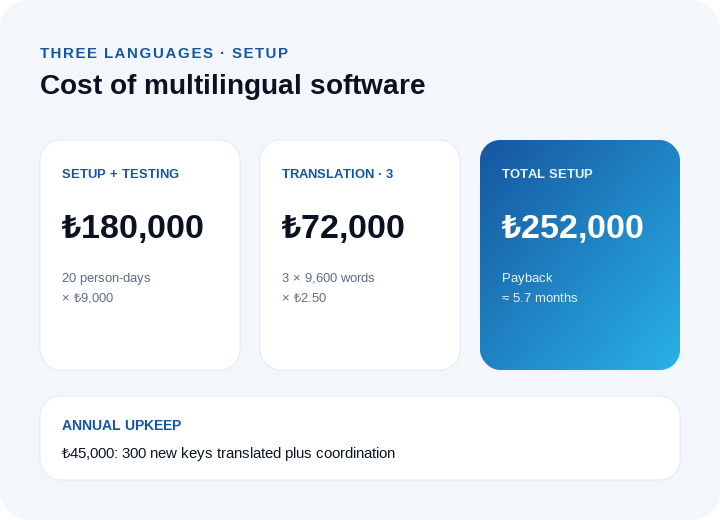
| Item | Calculation | Amount |
|---|---|---|
| Infrastructure (i18n) | 15 person-days × ₺9,000 | ₺135,000 |
| Testing | 5 person-days × ₺9,000 | ₺45,000 |
| Translation and review | 3 languages × 9,600 words × ₺2.50 | ₺72,000 |
| Initial setup | ₺252,000 | |
| Annual upkeep | 3 languages × 2,400 words × ₺2.50 = ₺18,000; coordination 3 person-days = ₺27,000 | ₺45,000 |
The upkeep calculation: 5 releases a year, 60 new or changed keys per release, so 300 keys × 8 words = 2,400 words per language. Translation goes stale when the source text changes, so upkeep is not a one-time item; it is a part of every release.
The revenue side is an assumption. Suppose each new language brings 40 extra orders a month, with an average basket of ₺1,000 and a 40% gross margin: 40 × ₺1,000 × 40% = ₺16,000 profit per language per month; ₺48,000 for three. Annual upkeep is ₺45,000 ÷ 12 = ₺3,750 a month; monthly net ₺48,000 − ₺3,750 = ₺44,250. Payback: ₺252,000 ÷ ₺44,250 ≈ 5.7 months.
Sensitivity: if extra orders fall to 20 per language, profit is ₺24,000, net ₺20,250 and payback ₺252,000 ÷ ₺20,250 ≈ 12.4 months. To pay back in 12 months the required monthly net is ₺21,000 + ₺3,750 = ₺24,750 of profit; that is ₺8,250 per language ÷ ₺400 (profit per order) ≈ 21 orders a month. The three-year total cost is ₺252,000 + 3 × ₺45,000 = ₺387,000. These figures only show the structure of the calculation.
What Happens When a Translation Is Missing? Fallback and Staleness
If a key has no translation, the user must not see the raw key name; the system follows a fallback chain: first the regional language (e.g. tr-TR), then the language (tr), and finally the source language. The screen does not break, but the missing text appears in the source language.
- Coverage rate: If 1,164 of 1,200 keys are translated, coverage is 1,164 ÷ 1,200 = 97.0%; the remaining 36 keys appear in the fallback language. Track this rate at every release.
- Staleness: When the source text changes, the old translation may no longer be right. 90 changed keys, 90 ÷ 1,200 = 7.5%, are flagged as "outdated" and re-reviewed.
When writing requirements for a new software feature, "which languages will it ship in" should also be written down; our requirements analysis guide makes it part of the scope decision.
How Do You Test Multilingual Software?
Three tests catch the first mistakes. Pseudo-locale test: all texts are automatically shown with accented characters and stretched by 30–40% (like "[!!! Order summary !!!]"); text left hard-coded, overflowing buttons and broken characters show up immediately. Long-language test: walk through all screens with the language that produces the longest text. RTL test: if planned, mirror the layout and check it.
How Do You Run a Multilingual Project? Six Steps
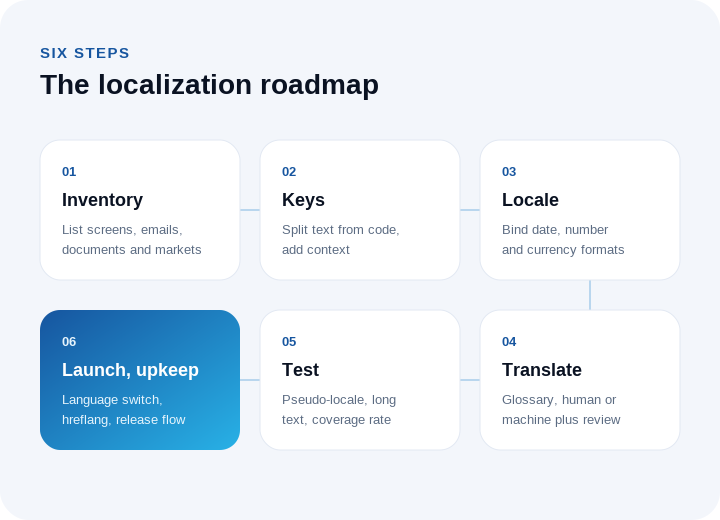
- Inventory: Which screens, emails, documents and texts will be translated; which markets and languages are targeted?
- Keys: Separate texts from code, set up named variables, add a note to every key.
- Locale: Bind date, number, currency and sorting to the locale; standardize the time zone.
- Translation: Prepare the glossary, choose the method by content risk, have a native speaker review.
- Testing: Run the pseudo-locale and long-text tests, measure the coverage rate.
- Launch and upkeep: Publish with a language switch, address structure and language links; run the translation flow with every release.
We recommend reading: What is custom software? Types, examples and who it is right for
We recommend reading: What Is a Design System and How Do You Build One? Tokens, Components, Versioning and Payback
We recommend reading: How to Set Up Transactional Message Template Management: Email, SMS and Push Templates, Variable Contracts, Versions and Payback Guide
We recommend reading: What Is a Headless CMS? CMS vs Headless, Content Model, Workflow and Cost Guide
Multilingual Software Development with İnovabil
At İnovabil our focus is building bespoke software from scratch for your company: custom software, ERP, CRM, e-commerce, web, mobile and integration. We do not claim a ready-made product or a separate service for multilingual software; we treat it as a target market and language decision in the project's requirements analysis, and we place the separation of texts from code in the design stage. Our own site is also published in Turkish and English; the addresses are kept in one table and a missing translation fails the build.
We built CRM, purchasing and mobile for Avcılar İnşaat; a purchasing system for İZBAN; logistics and shipment planning with wholesale order management for Karyak; and warehouse management plus a complaint and support management system for Sleepy. Send us a short summary of your target markets, languages and screen count; let's put the scope and translation cost in writing together.
We recommend reading: Our software development process: step by step from analysis to launch
Frequently Asked Questions
What is the difference between i18n and l10n?
i18n makes software ready for many languages without changing the code; it is done once. l10n adapts the text, formats and content for a specific language and region; it is done for every new language.
Where are texts kept in a multilingual system?
In a separate dictionary file per language. The code only uses the translation key; adding a language means adding a new dictionary.
Is machine translation enough for translation?
For low-risk, high-volume text it can be used together with human review. For risky content such as brand voice, contracts and payment text, human translation and native-speaker review are recommended.
What does the cost of multilingual software depend on?
On the number of screens and texts, the number of languages, the translation method and how much of the infrastructure is already in place. In the representative example, initial setup for 1,200 keys and three languages is ₺252,000 and annual upkeep is ₺45,000; recalculate with your own figures.
Does each language need its own page and address?
Yes, each language version should be published at its own address and in its own language, with the versions marked to each other through language links. For legal text requirements, consult your legal counsel.