

Your corporate site, your dealer portal and your mobile app all show the same product descriptions, yet each one has its own copy of the text. One gets updated and the others stay stale. An author emails a draft, an editor corrects it in another file, and on launch day nobody is sure who approved it. This tangle has one common cause: a content management system (CMS) that was never set up, or was set up wrongly.
In this guide we explain what a CMS is, how a traditional CMS differs from a headless CMS, how to design the content model, how roles and approval work, preview and scheduling, multilingual content and media, how content reaches the page, SEO fields, and the three-year cost and payback. The example numbers are illustrative; they are not the price of any particular product or an industry average.
What Is a Content Management System (CMS)?
A content management system is software in which text, images and product information are created, approved and published without programming knowledge. It has three parts: a store where content lives, an admin interface that editors use, and a delivery layer that brings the content to the visitor.
A CMS manages publishing content (pages, descriptions, announcements, guides); transaction data such as orders, stock and invoices lives in an ERP or custom software. We covered how to plan the website itself in our corporate website guide and browser-based business tools in our web application article; this one focuses on the layer that manages their content.
We recommend reading: Our web development service
What Is the Difference Between a Traditional CMS and a Headless CMS?
A traditional (coupled) CMS keeps content and page appearance in one system; a headless CMS stores only the content and serves it through an API. The name comes from removing the "head", the layer that renders the page, from the system. A third path is to keep content as files and generate pages ahead of time; the blog of this site works that way.
| Topic | Traditional (coupled) | Headless | File-based + static |
|---|---|---|---|
| Where does content live? | In the system's database, tied to templates | In a content store, independent of presentation | In version-controlled files |
| Who draws the page? | The system's template | A separate front-end application | Static pages generated at build time |
| Multiple channels | Needs plugins or copies | Natural; each channel reads from the API | Content files can be read anywhere |
| Editor experience | Ready-made, visual | Interface is built or bought | Needs technical skill; no interface |
| Build cost | Low | High; the front end is built too | Medium |
| Fits when | One site, standard structure | Many channels, many content types | Small team, technical editors |
How Do You Design a Content Model?
A content model defines which content types exist and which fields each one has. Using rule-based fields instead of a free-form page editor is the precondition for showing the same content consistently in different places.
The example corporate and dealer portal content falls into six types. There are 400 entries in the Turkish version; across two languages that makes 800 entries.
| Content type | Fields | Entries (one language) | Field values |
|---|---|---|---|
| Page | 7 | 60 | 420 |
| Service | 9 | 40 | 360 |
| Product | 12 | 160 | 1,920 |
| Blog post | 8 | 90 | 720 |
| FAQ | 4 | 30 | 120 |
| Reference | 8 | 20 | 160 |
| Total | 48 (average 8) | 400 | 3,700 |
The arithmetic: 60 + 40 + 160 + 90 + 30 + 20 = 400 entries; 420 + 360 + 1,920 + 720 + 120 + 160 = 3,700 field values; 7,400 across two languages. With 7,400 values whose format is not governed by rules, inconsistency is unavoidable.
- Field types: short text, long text, number, date, option list, image and a reference to another entry. Making price a number field instead of free text prevents format errors from the start.
- References: a product entry refers to a category entry; the category name is written once.
- Required fields and rules: title length, unique address and required image are checked at save time.
How Do You Set Up Roles, Drafts and Approval?
A publishing workflow defines which steps a piece of content passes from draft to live and what each person can do at each step. For a team of five editors, three roles are enough: three authors, one editor and one publisher. For the general framework of roles see our role-based access control guide.
| Action | Author | Editor | Publisher |
|---|---|---|---|
| Create a draft, edit own draft | Yes | Yes | Yes |
| Edit someone else's draft | No | Yes | Yes |
| Submit for approval / send back | Can submit | Yes | Yes |
| Publish, schedule | No | No | Yes |
| Unpublish, restore a previous version | No | No | Yes |
| Change the content model | No | No | No; administrator only |
The time saving comes from the flow itself. In the old setup a piece of content takes 1.0 day for the draft, 1.5 days waiting for approval by email and 0.5 day for corrections: 3.0 days in total. In the system, the draft takes 0.5, review 0.25 and approval 0.25 day: 1.0 day in total. The reduction is (3 − 1) ÷ 3 = 66.7%. On the effort side, for 40 pieces a month, moving text from Word and the email round trip costs 45 minutes per piece: 40 × 45 = 1,800 min = 30 h. In the system it is 20 minutes: 800 min ≈ 13.3 h. The difference is ≈ 16.7 h × ₺300 = ₺5,000 saved per month.
How Do Preview, Scheduling and Version History Work?
Preview shows a draft as the real page before publishing; scheduling ties publication to a future time; version history makes mistakes reversible.
- Preview: in a headless setup, the front-end application must be able to read draft content. The preview link should be signed and time-limited.
- Scheduling: publish time is stored in one standard time zone and shown in local time on screen.
- Version history: each record keeps who changed what and when. Restoring a previous version should be a single step.
How Are Multiple Languages and Media Managed?
In multilingual content, each entry's language version is stored as a separate record or as a separate field in the same record; what matters is that a missing translation is visible. For the translation architecture on the software side see our localization guide; on the content side three rules help.
- Translation status: every entry carries a "not translated, draft, approved" status. In the example 352 of 400 entries are translated and approved: 352 ÷ 400 = 88.0%; 48 entries are missing.
- Publishing rule: an entry without an approved translation is not published in that language; it also stays out of lists and the sitemap.
- Media: one image is one record; size and format variants are generated automatically. Alt text is written separately for each language.
How Does Content Reach the Page? Dynamic, Cached and Static
Content reaches the visitor in three ways: it is generated on the server for every request, generated and kept in a cache, or generated ahead of time at publish. Illustrative values: dynamic generation takes 600 ms per page; delivery from a cache or a static file takes 60 ms.
| Method | Page time | Concurrent jobs at a 20 requests/s peak | Visible after publishing |
|---|---|---|---|
| Dynamic (every request) | 600 ms | 20 × 0.6 = 12 | Immediately |
| Cache with 95% hit rate | 0.95 × 60 + 0.05 × 600 = 87 ms | 20 × 0.087 ≈ 1.7 | When it expires or is purged |
| Static (pre-generated) | 60 ms | 20 × 0.06 = 1.2 | After the regeneration time |
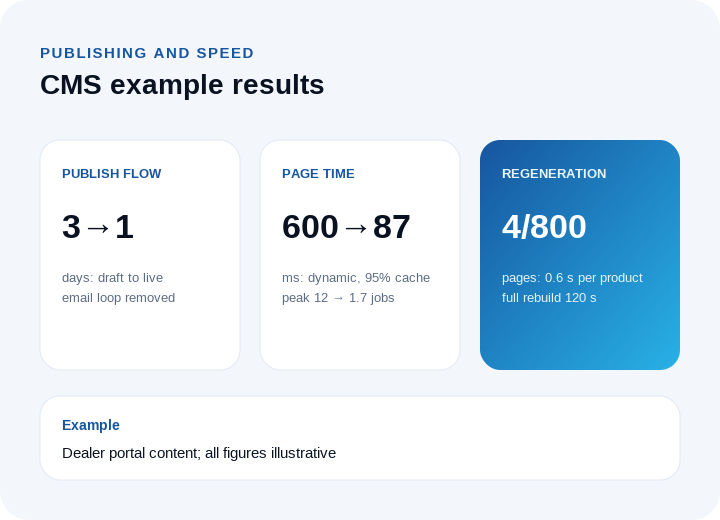
With static generation, the key question is what gets regenerated when one piece of content changes. Regenerating all 800 pages at 0.15 s per page takes 800 × 0.15 = 120 s. But when one product changes, only the affected pages are needed: the product page 1, category listings 2, the home page showcase 1 = 4 pages; 4 × 0.15 = 0.6 s. Incremental generation is 120 ÷ 0.6 = 200 times shorter. For the detail of cache logic see our caching guide.
How Are SEO Fields Managed in a CMS?
Making SEO fields part of the content model is how you keep quality without opening pages one by one. Each page entry has four fields: title, description, canonical address and share image.
- Save-time checks: the title is at most 60 and the description 110–160 characters; a live counter shows the editor. A record that breaks the rules cannot be submitted for approval.
- Measurement: in one language, 400 pages × 4 fields = 1,600 fields. Without checks, if 12% are faulty, that is 192 fields; with required fields and counters it falls to 2%, or 32 fields. These rates are illustrative; measure your own site with a crawl.
- Structured data: markup should be generated from content fields; hand-written markup drifts away from the content. We described the method in our structured data guide.
- Addresses and redirects: when an address changes, the old one redirects to the new. For the overall frame see our SEO guide.
How Does One Piece of Content Reach Several Channels?
One content, many channels means writing a product description once and showing it on the web, in the mobile app and in the dealer portal. It is the strongest argument for headless.
In the example there are 160 products and three channels show them. If each channel keeps its own entry, that is 160 × 3 = 480 records; from a single source 160 are enough. The reuse rate is (480 − 160) ÷ 480 = 66.7%. With 120 product updates a month at 5 minutes each: in three places 120 × 3 × 5 = 1,800 min = 30 h; in one place 120 × 5 = 600 min = 10 h. The difference is 20 h × ₺300 = ₺6,000 a month. The saving grows linearly with channels: every extra channel means 10 h, or ₺3,000, saved a month.
What Is the Three-Year Cost and Payback of a CMS?
At first glance a headless CMS looks modern, but on the cost table it starts behind the traditional route. Compare on a three-year total. Assumptions are illustrative: ₺9,000 per person-day and maintenance of 15% a year.
| Item (3 years) | Ready-made traditional | Headless | File-based + static |
|---|---|---|---|
| Build | 25 person-days = ₺225,000 | 70 person-days = ₺630,000 | 40 person-days = ₺360,000 |
| Hosting, platform, plugins | (₺24,000 + ₺18,000) × 3 = ₺126,000 | ₺36,000 × 3 = ₺108,000 | ₺6,000 × 3 = ₺18,000 |
| Maintenance (15% × build × 3) | ₺101,250 | ₺283,500 | ₺162,000 |
| Editor support share | — | — | ₺36,000 × 3 = ₺108,000 |
| 3-year total | ₺452,250 | ₺1,021,500 | ₺648,000 |
Anyone looking only at this table would rule headless out. But content effort is a cost too. In the example with three channels, 40 pieces of content a month and 120 product updates:
| Item (3 years) | Ready-made traditional | Headless |
|---|---|---|
| 3-year total | ₺452,250 | ₺1,021,500 |
| Product update effort (30 h ↔ 10 h a month, × ₺300 × 36) | ₺324,000 | ₺108,000 |
| Publishing flow effort (30 h ↔ 13.3 h, × ₺300 × 36) | ₺324,000 | ₺144,000 |
| Effective total | ₺1,100,250 | ₺1,273,500 |
With three channels headless is still ₺173,250 more expensive. The break-even channel count: the traditional effective cost rises ₺108,000 with each extra channel (10 h a month × ₺300 × 36); ₺173,250 ÷ ₺108,000 ≈ 1.6 extra channels, so about 4.6 channels. At five channels the traditional route costs ₺1,316,250 and headless ₺1,273,500, so headless comes out ₺42,750 ahead. The front end of extra channels is separate work on both routes; the tables count only the content side.
Payback: the build difference between headless and traditional is ₺630,000 − ₺225,000 = ₺405,000. The yearly running difference is (₺36,000 + ₺94,500) − (₺42,000 + ₺33,750) = ₺54,750, or ₺4,562.50 a month. With three channels the monthly net gain is ₺5,000 + ₺6,000 − ₺4,562.50 = ₺6,437.50; payback is ₺405,000 ÷ ₺6,437.50 ≈ 62.9 months. With five channels the gain is ₺5,000 + ₺12,000 − ₺4,562.50 = ₺12,437.50 and payback ≈ 32.6 months. With one channel the gain is only ₺437.50, so headless practically never pays for itself.
How Is a CMS Project Run?
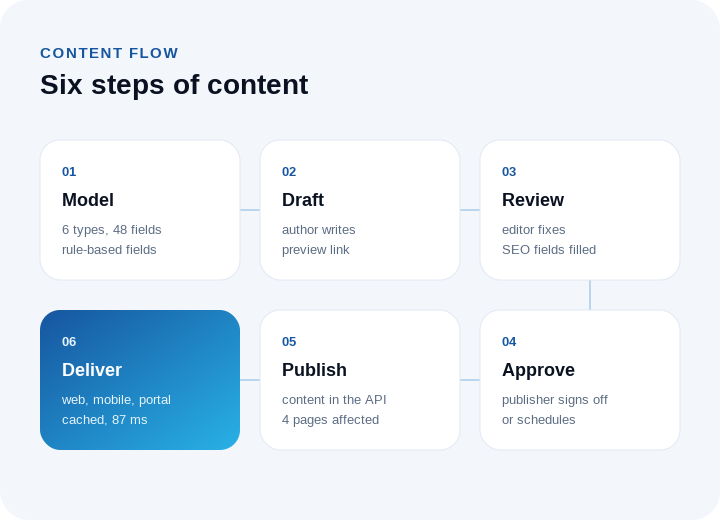
A six-step path keeps both the build and the team's adjustment manageable.
- Content inventory and model: split existing content into types and define fields and references. Write down how many channels each piece goes to.
- Roles and flow: set author, editor and publisher permissions and the approval rule.
- Admin interface and preview: build the screen editors will use and the preview link; start with one content type.
- Migration: move old content into the new model through the rules; clean duplicate and incomplete records at this stage.
- Delivery and cache: define how pages get the content and which change refreshes which page.
- Training and measurement: train editors; track flow time and SEO field errors monthly.
What Mistakes Are Common When Choosing a CMS?
- Choosing headless for a single channel: in the calculation above, payback with one channel runs to hundreds of months.
- Building the interface before thinking about the model: if fields change later, migration effort grows.
- Putting everything in free-text fields: price, date and address break in free text; use typed fields.
- Publishing missing translations: a half-finished page misleads both the user and search.
For personal data that enters content (application forms, comments), retention periods and consent texts should be settled with your legal counsel under KVKK (Turkey's personal data protection law).
We recommend reading: How to Migrate a Website Without Losing SEO: 301 Redirects, URL Mapping, Launch Day and Monitoring Guide
Web Development and Content Management with İnovabil
At İnovabil, our focus is building company-specific software from scratch: custom software, ERP, CRM, e-commerce, web, mobile and integration. We do not offer a separate CMS service or product; in website and portal projects we recommend handling content management in requirements analysis and comparing the routes with their costs, based on channel count, editor count and multilingual needs.
The blog of this site is an example of the third route we described: content sits in version-controlled files and pages are generated ahead of time at publish. Measured results: Lighthouse speed score 97–100, 12 JSON-LD types. This approach suits technical editors; larger editorial teams need a model with an interface. We built CRM, purchasing and mobile for Avcılar İnşaat; a purchasing system for İZBAN; logistics and shipment planning plus wholesale order management for Karyak; and warehouse management plus a complaint and support management system for Sleepy. Tell us about your content and channels; let's write down the right route together.
We recommend reading: Our software development process: step by step from analysis to launch
Frequently Asked Questions
What is a content management system (CMS), in short?
It is a system in which content is created, approved and published without programming knowledge. It consists of a content store, an editor interface and a delivery layer, and gives consistent, traceable and fast publishing.
What is the difference between a headless CMS and a traditional CMS?
A traditional CMS keeps content and page appearance in the same system. A headless CMS stores only the content and serves it through an API; the web, mobile and portal each draw their own screen. This flexibility comes with higher build and maintenance cost.
When do you need a headless CMS?
When content goes to several channels and there are many content types. In the example break-even is about 4.6 channels; for a simple single-channel site a traditional or file-based route is usually more economical.
Why does the content model matter so much?
The example has 7,400 field values. If field types and rules are not defined up front, data such as price, date and address breaks in free text, and showing the same content consistently across channels becomes impossible.
What should be prepared before starting a CMS project?
A content inventory, the number of channels, field lists per content type, roles and the approval rule, multilingual expectations and the old content to migrate. With these in writing, the cost comparison can be done with real numbers.