

When a customer writes "show me what data you hold about me" or "delete my record", the real work is not the reply; it is the search. The person has to be found in the CRM, the order system, support records, marketing lists and file attachments, one by one. Teams that do this through email threads and manual lookups spend hours on every request and risk missing a system. Handling data subject requests in software means tying the intake, identity check, search, execution and proof of each request into one workflow.
This guide covers software and process design only. The scope of rights, statutory deadlines, exceptions and obligations are legal matters to be settled with your legal counsel; this article is not legal advice. The durations in the examples are not legal deadlines but "internal target times", and all figures are illustrative.
What Types of Data Subject Requests Exist?
Six request types are distinguished by internal terminology. Each maps to different software behavior, which is why the type is a mandatory field on the request record. Which type is granted under which conditions is left to legal counsel.
| Request type | What the person wants | What the software needs |
|---|---|---|
| Access / copy | To see the data held about them | Cross-system search and a compiled response file |
| Correction | To fix wrong or incomplete data | A change in the source system, propagated to copies |
| Deletion | For the data to be erased | A delete, anonymize or restrict decision |
| Restriction of processing | To stop the data being used | A restriction flag; stored but not used |
| Objection | To object to a specific use | Removal from that processing (marketing, for example) |
| Portability | To receive the data in machine-readable form | A structured export (CSV or JSON) |
Our sample company receives 24 requests a month (illustrative): 10 access, 6 correction, 5 deletion and 3 objection. Most of the effort goes into the system search behind the access and deletion requests.
How Do You Collect Requests at a Single Point?
A request can arrive through a form, email, the call center or a branch. Whatever the channel, it must enter one intake point; otherwise it sits in a personal mailbox and nobody tracks the clock. The call center agent and the person reading email open the same record. Each request carries these fields.
| Field | Example | Why it is needed |
|---|---|---|
| Request ID | DSR-2026-0142 | Every message and proof attaches to this number |
| Type and channel | Deletion, email | Determines the flow |
| Received date | 08.12.2026 | Start of the internal target time |
| Verification status | Pending / verified | No data is shared before verification |
| Scope | All systems / marketing only | Which systems are processed |
| Decision and reason | Partly fulfilled | A trail for refusals and partial fulfillment |
| Closing proof | Action log for 14 systems | Evidence that the request was truly carried out |
We recommend reading: How to Design an Audit Log
How Is the Requester's Identity Verified?
Giving data to the wrong person is a bigger breach than the request itself. So before anything is shared, the requester is verified as the record owner. The method depends on the channel the request came through and on what you already hold.
- A logged-in user: The request is opened inside the account and the user re-authenticates for sensitive actions (password or a second step). This is the most reliable path.
- A request from the registered email: A one-time link is sent to the address on file; whoever opens it is treated as confirming the request.
- Phone or postal requests: You go back to the contact details on record, and the requester confirms some of the details held.
The principle is not to ask for more data than verification needs. Making an ID copy the default path means collecting new personal data; try the records you already have first. When extra documents may be requested is settled with legal counsel. For login design, see our guide to multi-factor authentication.
In Which Systems Does a Person's Data Live?
This is the hardest part. In the sample company, personal data sits in 14 systems: CRM, orders, ERP, invoicing, dealer portal, mobile app, support, marketing list, call records, file storage, reporting warehouse, logs, backups and the email archive. This list is called the data map, and it must exist before a request arrives. Data ownership and the data dictionary are covered in our data governance guide; the map reuses that output.
In every system the data sits in two forms. Structured fields (name, email, phone, address) can be searched and compiled. Unstructured places get forgotten: free text in support threads, attachments, logs and backups. The map should note, for each system, whether it is structured or free text.
Finding the person requires a common search key. In the example, 6 of the 14 systems store the customer ID (exact match), 5 store only the email, and 3 store only a phone number or name. Confidence varies accordingly.
| Search key | Systems | Confidence | Handling |
|---|---|---|---|
| Customer ID | 6 | Exact | Found and compiled automatically |
| 5 | High; shared addresses are a risk | Found automatically, flagged | |
| Phone or full name | 3 | Uncertain; many people share a name | Candidate list, a human confirms |
With an uncertain match, putting the wrong person's data in a response or deleting the wrong person's record is a serious mistake, so candidate lists pass through human review. Identity matching builds on the golden-record work in our master data management article, and keeping the customer ID in one place makes search far easier, as we discuss in the customer 360 guide.
How Is an Access Response Compiled?
The goal of an access request is to give the person a clear and complete copy. Decide in advance which data groups go into the response; legal counsel confirms the scope.
| Data group | Source | Before it enters the response |
|---|---|---|
| Identity and contact | CRM, account | Listed directly |
| Order history | Orders, ERP | Other people's data is masked |
| Support records | Support system | Staff names and internal notes are stripped |
| Marketing preferences | Consent records | Given with channel and date |
The response is prepared as a readable summary and as a machine-readable file (CSV or JSON). Third-party data most often appears in internal notes; apply the methods in our data masking guide. In the sample company, compiling an access response by hand took about 6 hours; after search and compilation were automated it fell to 40 minutes, or 1 hour with human review.
Because the export contains personal data, it is itself a risk. The file is produced encrypted, shared through an expiring link (sample setting: 72 hours) with a limited download count, and every download is written to the access log.
How Are Correction and Deletion Requests Executed?
For a correction, the source system is identified: an address is changed in the CRM, for example, and propagated to the other systems (invoice profile, shipping address, marketing list). A copy that does not receive the change is a system that looks corrected but still works on old data. The propagation result is written to the request record.
Deletion is more complicated, because not every piece of data can be erased. Some may have to be kept for legal or accounting reasons; legal counsel and your accountant decide which. On the software side, each data group is tied to one of four actions.
| Data group (conceptual) | Possible action | What it means in the software |
|---|---|---|
| Profile and contact details | Delete | The record and derived copies are removed |
| Personal fields on orders | Anonymize | Name and address become a placeholder; the amount stays |
| Invoice record | Restrict (retention may apply) | An "undeletable but restricted" flag |
| Marketing lists | Delete and add to suppression list | Prevents re-adding |
| Support records | Anonymize or delete | Personal details in free text are scrubbed |
Dependent records are the real trap in deletion. The sample customer has 18 orders and 18 invoices. Personal fields on the orders are anonymized; the order record and amount remain for stock and revenue reports. Invoices, if treated as records that must be kept, are not deleted but receive the restricted flag. So of 36 records, 18 are anonymized and 18 restricted. Referential integrity is preserved: a placeholder such as "deleted-48213" replaces the customer ID, and links do not break.
Data in backups is a separate matter: pulling one person out of a backup is often impossible, and when a restore happens the deletion record is reapplied. The retention schedule, legal hold and the difference between deletion and anonymization are covered in our archiving and retention policy guide; for the backup side see our data backup guide.
When deletion finishes, a proof record is kept: in which system, when, which action (delete, anonymize, restrict) and by whom. The record holds no data of the deleted person, only the request ID and an action summary.
How Are Restriction and Objection Managed?
A restriction flag marks data that is still stored but must not be used. The flag is a central field read by all systems: a restricted person is excluded from reports, campaign targeting and automated processes.
An objection is often about marketing: the person wants off the list. The consent record is updated and the person is removed from all channel lists. The data model for consent records is described in our consent management guide; all you do here is link the request to that record.
How Are the Workflow and Internal Target Time Set Up?
A request moves through six states: received, verified, scope defined, executed, answered, closed. Each state has an owner and a target time. Do not mistake the time for a legal deadline: the values below are internal company targets; legal counsel sets the statutory deadline and decides when the clock pauses.
| State | Internal target (business days, example) | Owner |
|---|---|---|
| Received | Logged the same day | Whoever receives the request |
| Verified | At most 2 | Data protection officer |
| Scope defined | At most 3 (cumulative) | Data protection officer, system owners |
| Executed | At most 8 (cumulative) | System owners |
| Answered | At most 10 (cumulative) | Data protection officer |
A reminder goes out on business day 6 and an escalation on day 8. You can build these rules with the delegation and escalation design in our workflow and approval software guide. The request owner is the data protection officer or the person concerned, system owners answer for execution in their own systems, and legal counsel answers for refusals and partial fulfillment. Separate permissions with role-based access control so that only authorized people see requests.
When a request is refused or partly fulfilled, the decision and reason are written to the request. Legal counsel writes the reason template; the software selects the template and stores the decision immutably.
How Are Requests Forwarded to Suppliers and Processors?
Personal data sometimes also sits outside your own systems, with an email delivery service, a carrier, support or analytics providers. A deletion request must be forwarded to these parties and the forwarding recorded. The example has 5 providers, so 5 deletion requests a month mean 25 forwards. In the first month, 21 of 25 forwards were confirmed within the internal target (5 business days): 84%. The 4 unconfirmed forwards go to reminder and escalation.
How Is the Process Tested?
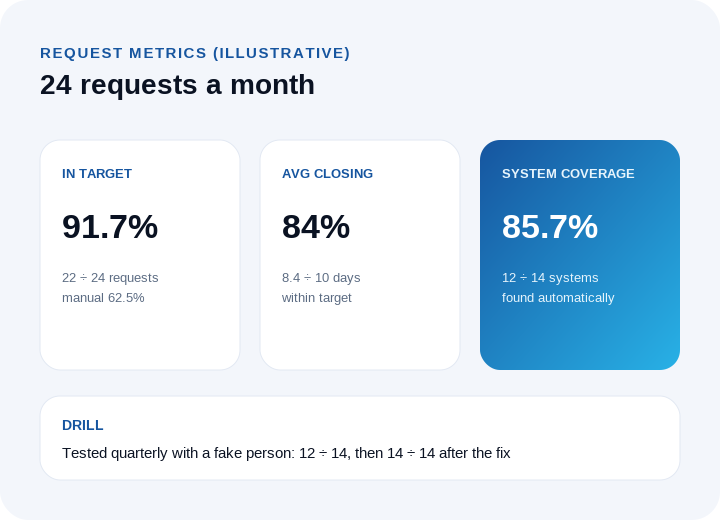
A deletion flow that does not work is discovered at the first real request. Instead, run an end-to-end drill every quarter: add a fake person to the 14 systems (carrying a unique marker in each), open an access and a deletion request for them, and check the results. In the first drill, 12 of 14 systems were cleaned (85.7%); two systems, the search index and the log, were missed. After the fix, the second drill reached 14/14. The drill also measures how current the data map is: if a new system was added and is missing from the map, this test exposes it.
Which Metrics Track the Process?
| Metric | Calculation (illustrative) | Result |
|---|---|---|
| Monthly requests | 10 + 6 + 5 + 3 | 24 |
| Closed within internal target | 22 ÷ 24 (manual: 15 ÷ 24 = 62.5%) | 91.7% |
| Average closing time | 8.4 ÷ 10 business-day target | 84% |
| Systems covered automatically | 12 ÷ 14 | 85.7% |
| Reopened requests | 1 ÷ 24 (manual: 3 ÷ 24 = 12.5%) | 4.2% |
When Does Automation Pay for Itself?
In the manual process, an average request takes 5.5 hours: 7.5 for access, 3.5 for correction, 6.0 for deletion and 2.0 for objection. Per month that is 10 × 7.5 + 6 × 3.5 + 5 × 6.0 + 3 × 2.0 = 132 hours. In the automated flow, access takes 1.0, correction 1.2, deletion 1.6 and objection 1.2 hours: 10 × 1.0 + 6 × 1.2 + 5 × 1.6 + 3 × 1.2 = 28.8 hours (an average of 1.2 hours). The difference is 103.2 hours.
On the error side, reopened requests fall from 3 to 1; at about 3 hours each, that saves another 6 hours. The total is 109.2 hours × ₺300 = ₺32,760. After subtracting a monthly running cost of ₺7,000, the net is ₺25,760. With a build investment of ₺420,000, payback is 420,000 ÷ 25,760 ≈ 16.3 months.
| Scenario | Monthly net gain | Payback |
|---|---|---|
| 24 requests a month | ₺25,760 | ≈ 16.3 months |
| 12 requests a month (half the volume) | ₺9,380 | ≈ 44.8 months |
At low volume, full automation is expensive; starting with a data map, a single intake point and a checklist, then automating the access export, is a sensible first step. The legal and reputational risk of missing a system is not in this calculation; that risk is assessed separately.
What Steps Set Up Request Handling?
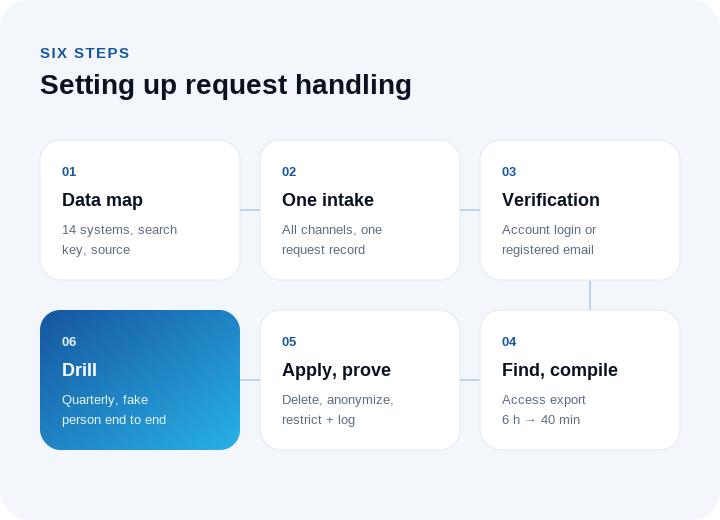
- Build the data map: List the systems that hold personal data, the fields, the search key and the source or copy status.
- Open a single intake point: Bind every channel to the same request record; type, date and owner are mandatory.
- Design verification: Set up the account login and registered-email paths, and do not ask for extra data.
- Automate find and compile: The access request first, then the delete and anonymize actions.
- Record decisions and proof: Fix the per-data-group action table with legal approval; keep an action log.
- Run a quarterly drill: Test end to end with a fake person; update the scope and the map.
We recommend reading: How to Set Up Cookie Consent Management: Cookie Policy, Banner, Tag Loading and Measurement Impact Guide
Custom Software and Process Design with İnovabil
At İnovabil our focus is building firm-specific software from scratch: custom software, ERP, CRM, e-commerce, web, mobile and integration. For a cross-system flow such as request handling, our recorded capabilities (role-based access, audit logs and secure hosting) are useful; the legal content is settled with your own legal counsel. We make no commitment to a ready-made request-handling product; we clarify the need in requirements analysis.
We have built CRM, purchasing and mobile for Avcılar İnşaat; a purchasing system for İZBAN; logistics and shipment planning with wholesale order management for Karyak; and warehouse management plus a complaint and support management system for Sleepy. Send us a short list of the systems that hold personal data, and we will draft the first version of the data map together.
We recommend reading: Our software development process: step by step from analysis to launch
We recommend reading: What Is Custom Software?
Frequently Asked Questions
How are data subject requests handled in software?
Requests are taken from a single intake point, the requester's identity is verified, the person's data is searched across the systems on the data map, the request is executed according to its type and the result is recorded with proof. The scope of rights and the deadlines are set with legal counsel.
How do we find a person's data across 14 systems?
First build the data map, then use a common search key (customer ID, email). Exact matches are found automatically; uncertain matches such as phone or full name go to human review as a candidate list.
Is every piece of data deleted on a deletion request?
No. Some data may be kept for legal or accounting reasons; legal counsel and your accountant decide which. In the software, each data group is assigned one of the delete, anonymize or restrict actions and the choice is recorded.
How is data in backups handled?
Pulling one person out of a backup is often impossible. Backups drop out of use when their retention period ends, and if a restore happens the deletion record is reapplied; the details are set in the archiving and retention policy.
When does automation pay for itself here?
In the example, about 16 months with 24 requests a month and a ₺420,000 investment, and about 45 months if volume halves. The figures are illustrative; calculate with your own data.