

The sales team builds quotes in one system, the warehouse sees orders in another, and accounting issues invoices from a third. The same customer is spelled three different ways in three places. At this point most businesses ask the same thing: what is the difference between CRM and ERP, and which one do we actually need? The short answer: CRM manages the relationship with customers, ERP manages the company's internal resources and operations. Most growing businesses end up needing both, and the real work is making them share the same data.
In this guide we put the two side by side on purpose, users, data and metrics, then cover who needs which, how data flows from quote to invoice, which system should own which record, the integration options, a payback calculation and the common mistakes. All example figures are illustrative; they are not a product's price or an industry average.
What Is the Difference Between CRM and ERP?
CRM (customer relationship management) holds everything about the customer from the first lead to the closed deal and the after-sales relationship. ERP (enterprise resource planning) takes over once there is an order: stock, purchasing, production, dispatch and finance. For the definitions in depth see what is CRM and what is ERP; here we compare them directly.
| Topic | CRM | ERP |
|---|---|---|
| Purpose | Win customers and keep the relationship going | Run resources and operations efficiently |
| Main users | Sales, marketing, customer service | Warehouse, production, purchasing, finance |
| Core records | Lead, customer, activity, opportunity, quote | Product, stock, bill of materials, order, invoice, customer/supplier account (current account) |
| Process | Lead → opportunity → quote → close | Order → procurement → production → dispatch → invoice |
| Metrics | Conversion rate, pipeline, sales forecast | Stock accuracy, unit cost, lead time |
| Time view | Future: forecast and relationship | Present and past: transactions that happened |
| Cost of an error | Lost opportunity, missed follow-up | Wrong stock, cost or financial record |
It comes down to this: in CRM a sale "might happen"; in ERP a sale "happened and must be fulfilled". The two worlds meet at the moment of the order.
Which Business Needs Which System?
It depends on how you sell and how complicated your operations are. The table below is a sensible starting point.
| Business situation | Priority | Reason |
|---|---|---|
| Has a sales team, opportunity and quote tracking is scattered | CRM | Lost deals and weak follow-up are the main problem |
| Stock, production or dispatch is complex, sales is simple | ERP | Operations and cost control are the main problem |
| Has both a sales team and stock or production | Both, integrated | Quote and dispatch must see the same data |
| Dealer and wholesale order network | Both, or a dealer portal | Order entry must be tied to stock and the customer account |
| Small business, few users, few processes | One lightweight tool | Running two separate systems costs more than it helps |
| Very specific processes, off-the-shelf products fall short | Custom, single system | One data model and one set of rules in one place |
A business in the first row starts with CRM and adds ERP when stock and cost problems appear. The opposite also happens. We covered the selection process in how to choose a CRM and how to choose an ERP.
How Does Data Flow From Quote to Invoice?
Data born on the sales side passes to operations the moment an order is confirmed, and from there reaches finance. The flow has four links.
- Quote (CRM): Customer, line items, price and validity period. When the opportunity is marked "won", the quote becomes an order.
- Order (ERP): The won quote lands in ERP as a sales order. Stock is reserved, and a purchase or production order is opened for any shortage.
- Dispatch (ERP): The warehouse prepares and ships; the status flows back to CRM so the sales rep can tell the customer "it's on the way".
- Invoice and collection (ERP, accounting): The invoice is issued and posted to the customer account. Payment status shows in CRM, which matters when quoting a customer who pays late.
Data moves both ways at every link: the quote downward, the status upward. When the flow breaks, a person types the same information twice. For the accounting side see what is pre-accounting (day-to-day bookkeeping and invoicing), and for the e-document side what is e-invoice (e-Fatura) integration.
We recommend reading: Our ERP software service
Which System Should Own Which Record?
The decision most often skipped in integration is "if this record lives in both systems, which one is right?". Choose one system of record (a single source of truth) for each record type; the other keeps a copy only and cannot change it.
| Record | System of record | Other system |
|---|---|---|
| Lead, opportunity, contact history | CRM | ERP does not see it, or reads only |
| Quote (until won) | CRM | Not in ERP |
| Customer contact details | CRM | ERP receives a copy |
| Tax details, account code, credit limit | ERP (finance) | CRM reads only |
| Product, bill of materials, price list | ERP | CRM uses them in quotes |
| Stock quantity | ERP | CRM only sees "in stock / out of stock" |
| Order (after confirmation) | ERP | CRM tracks the status |
| Invoice, collection | ERP (accounting) | CRM sees the balance |
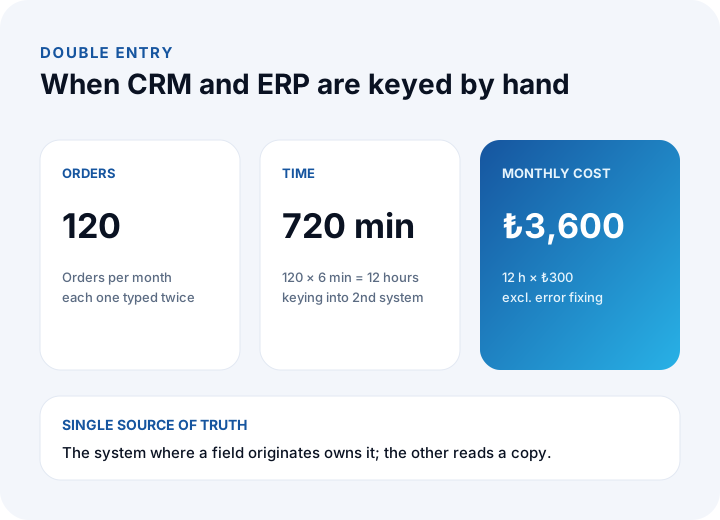
The rule is simple: the system where a field originates owns it. If the sales rep updates the phone number, CRM is the record; if finance enters the tax number, ERP is. Allowing the same field to be edited in two places is the source of conflicts. Put export and backup expectations in writing, as in our business data backup guide.
How Much Does Double Entry Cost?
If the two systems are not connected, a person becomes the integration. The cost follows a simple formula: orders × minutes per record ÷ 60 × hourly cost.
- 120 orders a month, 6 minutes each to key into the second system.
- 120 × 6 = 720 minutes; 720 ÷ 60 = 12 hours.
- At ₺300 an hour, 12 × ₺300 = ₺3,600 a month.
The time is small next to the errors. Say 4 wrong records a month, each taking 1.5 hours to fix: 4 × 1.5 = 6 hours, and 6 × ₺300 = ₺1,800 more. The hidden cost of a mistake (a wrong shipment, a wrong invoice) comes on top and is not counted here.
There is also a delay cost that no formula captures well. When the order reaches the second system a day late, the warehouse picks from stale information, the sales rep cannot promise a delivery date with confidence, and finance invoices later than it could. Measure the lag between "quote won" and "order visible in ERP" for a few weeks; if it is measured in hours rather than minutes, that alone is a strong argument for integration, even before you count the typing time.
A practical way to start is to count, not guess. Ask the person who does the re-keying to log how many orders they copy, how long each takes and how many corrections they make in a typical week. Multiply by four and compare it with the formula above. Your own figures will differ from this example, and that is exactly why the calculation is worth repeating with real data before you commit to an integration budget.
How Are CRM and ERP Integrated?
Integration means the two systems automatically share the records you choose. There are four routes.
| Route | How it works | Fits when |
|---|---|---|
| Ready-made connector | A prebuilt mapping between two products | Standard flow, little customization |
| Custom API integration | Two-way transfer written over the interfaces | Specific fields and rules |
| Middleware (integration hub) | A central service talks to every system | Three or more systems |
| Single custom system | CRM and ERP functions in one data model | Specific processes, undivided data |
We explained the basics of APIs in what is API integration and their security in how to secure an API. Whichever route you choose, the process has six steps.
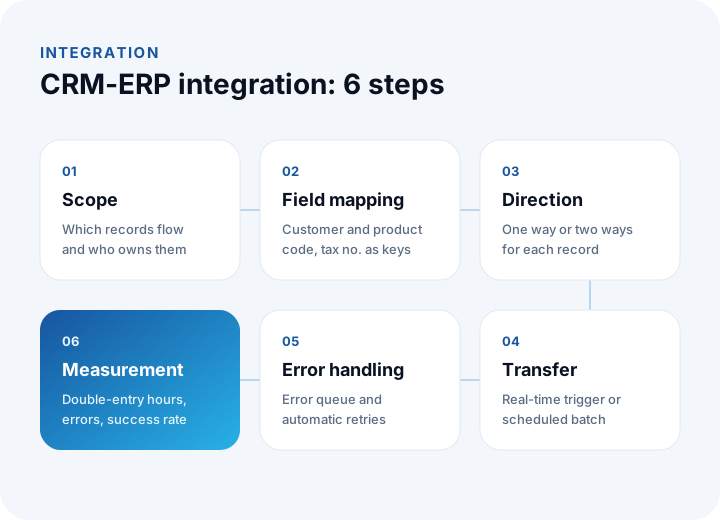
- Scope: Which records will flow (customer, product, order, status) and who owns each.
- Field mapping: Match the fields that mean the same thing in both systems; set customer code, product code and tax number as shared keys.
- Direction: Write down for each record whether it flows one way or both.
- Transfer: Real-time trigger or scheduled batch? Real time for orders, a daily run may do for the price list.
- Error handling: A failed transfer must not vanish silently; use an error queue, retries and notifications.
- Measurement: Track double-entry hours, wrong-record counts and transfer success.
When Does an Integration Pay for Itself?
Payback is the investment divided by the monthly net benefit. The example below uses the double-entry figures above and is illustrative.
- Investment: 10 person-days × ₺9,000 = ₺90,000.
- Monthly gross benefit: double entry ₺3,600 + error correction ₺1,800 = ₺5,400.
- Monthly running cost: monitoring and maintenance ₺900.
- Monthly net benefit: ₺5,400 − ₺900 = ₺4,500.
- Payback: ₺90,000 ÷ ₺4,500 = 20 months.
| Orders a month | Double entry (6 min, ₺300/h) | Payback (errors held constant) |
|---|---|---|
| 60 | ₺1,800 | ₺90,000 ÷ (₺1,800 + ₺1,800 − ₺900) ≈ 33 months |
| 120 | ₺3,600 | ₺90,000 ÷ ₺4,500 = 20 months |
| 240 | ₺7,200 | ₺90,000 ÷ (₺7,200 + ₺1,800 − ₺900) ≈ 11 months |
As order volume grows, the integration pays back faster; at low volume a ready-made connector or a controlled manual process may make more sense. Once you can put a number on the cost of errors, the decision gets clear. For the general cost approach see our software project cost guide.
Can One Custom System Cover Both CRM and ERP?
Yes. If your processes are specific and the gap between two off-the-shelf products is wide, a single custom system can hold customer and operations data in one model. Quote, order, dispatch and invoice become parts of one chain of records, so there are no transfer errors and no double entry.
The price is the initial development investment and the maintenance responsibility. Ready-made products usually start fast and are enough for standard processes; custom software makes the difference in areas like specific business rules, dealer and order flows or shipment planning. We compared the options in off-the-shelf vs custom software and what is custom software. Often a middle path works: a ready-made core with a custom module for the specific part.
What Are the Common CRM and ERP Mistakes?
- Treating them as the same thing: CRM does not hold stock or cost, and ERP does not manage opportunities or the sales funnel. Separate the expectations from the start.
- Not naming a system of record: If one field is edited in two places, data conflicts and nobody knows which to trust.
- Leaving integration to the end: Systems picked separately and joined months later hit field mismatches. Test connection capability during selection.
- Not sharing a customer code: Without a common key records do not match and duplicate customers multiply.
- No error queue: A failed transfer quietly disappears and half the orders never show up on the other side.
- Not training users: If sales will not use CRM and the warehouse will not use ERP, even the best integration carries empty data.
- Trying to build everything at once: Phase it: order flow first, then stock status, then collection information.
We recommend reading: What is procurement software? A step-by-step guide from request to payment
We recommend reading: What is digital transformation? Roadmap and payback guide
Recommended reading: How to Track Customer Accounts
CRM, ERP and Integration with İnovabil
At İnovabil our focus is building software from scratch, tailored to each company: custom software, ERP, CRM, e-commerce, web, mobile and integration. We suggest settling in the requirements analysis, in writing, whether CRM and ERP should be separate, connected or one system; the answer mostly depends on how specific your processes are.
We built CRM, purchasing and mobile for Avcılar İnşaat; a purchasing system for İZBAN; logistics and shipment planning with wholesale order management for Karyak; and warehouse management with a complaint and support management system for Sleepy. Send us a short description of your current systems and order flow, and we will work out together which record should be the system of record where.
We recommend reading: Our software development process: from analysis to launch
Frequently Asked Questions
What is the main difference between CRM and ERP?
CRM manages the customer relationship, sales opportunities and quotes. ERP manages the stock, purchasing, production, dispatch and finance that follow an order. One tracks how a sale is won, the other how it is fulfilled.
Do I need both CRM and ERP?
If you have a sales team and complex operations, yes, and they should share the same data. If only sales tracking is scattered, start with CRM; if only stock and cost are the problem, start with ERP. A small business may do fine with a single lightweight tool.
How are CRM and ERP connected?
Through a ready-made connector, a custom API integration or middleware. Whichever you choose, first decide which system owns each record, which fields match, and how a failed transfer will be caught.
How many months does an integration take to pay back?
In the example, a 10 person-day investment (₺90,000) with a monthly net benefit of ₺4,500 pays back in about 20 months. The period shortens as order volume grows; recalculate with your own order counts and times.
Can a single custom software cover both CRM and ERP?
Yes. When processes are specific, customer and operations data can live in one model and double entry disappears. The cost is the development investment and maintenance responsibility. For standard processes a ready-made product plus integration can start faster.