

A forklift operator whose certificate expired last month is still on shift in the warehouse. On the production line, only one person knows how to set up the press, and when that person goes on leave the line stops. Training is logged in a spreadsheet, but only one colleague remembers who should attend what and when. Employee training and competency management software solves these three problems in one system: it shows who can do which job at what level, which training and certificates expire when, and where the gaps are.
In this guide we cover the skills matrix, mandatory training rules, gap analysis, certificate alerts, single-person dependency risk, measuring training effectiveness, cost and payback, and a six-step setup. All figures are illustrative; they are not industry averages or the output of any specific software.
What Is Employee Training and Competency Management Software?
It is an application that keeps each employee's skill levels, completed training and certificates in a single record; determines the required training by role and job; raises alerts for expiring certificates; and reports the gap between required and current levels. Its core parts are a skills catalog, role requirements, a training catalog and plan, attendance and exam records, certificate records, alerts and reports.
This article is about an employee's ability to do the job. Teaching people to use a new software system is a separate problem, covered in our guide to software adoption and user training. Using skill data for shift assignment is touched on briefly in the shift and workforce scheduling article; here we go deeper into the training plan, certificate validity and gap analysis.
We recommend reading: What is leave and employee management software?
How Do You Build a Skills Matrix?
A skills matrix is a table with employees in rows and skills (job steps, machines, processes) in columns, with a level at each intersection. To be useful it needs a shared level scale first; a 0–4 scale is detailed enough for most businesses.
| Level | Meaning | What the person can do |
|---|---|---|
| 0 | No knowledge | Untrained; cannot be assigned |
| 1 | Trained | Works only under supervision |
| 2 | Independent, standard work | Does routine work alone |
| 3 | Independent, handles exceptions | Manages problem cases too; counts as qualified |
| 4 | Can teach | Trains and assesses others |
Read the matrix in two directions. By row, what can this employee do; by column, how many qualified people does each job have. Each role also gets a required level: forklift 3 and stock count 2 for a warehouse operator, for example. A level should rest on evidence such as an exam, a floor observation or a certificate, not on a manager's impression; otherwise the matrix turns into a table where everyone is a "2".
Our example business is illustrative: 120 employees and 20 skills. The full matrix has 120 × 20 = 2,400 cells, but not every employee needs every skill. Based on role requirements, an average of 6 skills per employee are mandatory: 120 × 6 = 720 required pairs.
How Are Mandatory Trainings Defined by Role and Job?
The rule is to attach training to the role and the job, not to the person; when someone is assigned to that role or job, the required list is generated automatically. New hires, people changing departments and promoted employees never need a hand-built list.
| Job / role | Mandatory training type | When assigned | Renewal |
|---|---|---|---|
| All new employees | Orientation and basic workplace safety | First week (illustrative) | Per policy |
| Forklift operator | Operator certificate and safe operation | Before being assigned to the job | Period set by the safety specialist |
| Quality control | Measuring instrument and procedure training | On assignment | When the procedure is revised |
| New manager | Team management basics | On the promotion date | As needed |
Which trainings are legally mandatory, who must hold which certificate and how often it is renewed depend on occupational health and safety regulations; these figures do not come ready-made as software defaults. Set the periods with your safety specialist and legal counsel and enter them as rules. Procedure changes on the quality side can also trigger training needs through the corrective action flow described in our quality control and nonconformance management article.
How Is a Skills Gap Calculated?
A gap is the positive difference between the required and the current level: gap = max(0; required − current). Being over-qualified is not a gap, though it is valuable for cross-training.
Below is an illustrative case for one employee in the warehouse operator role.
| Skill | Required | Current | Gap | Criticality (1–3) | Priority |
|---|---|---|---|---|---|
| Forklift operation | 3 | 2 | 1 | 3 | 3 |
| Picking | 3 | 3 | 0 | 2 | 0 |
| Stock counting | 2 | 2 | 0 | 1 | 0 |
| Barcode scanning | 2 | 1 | 1 | 1 | 1 |
| Goods receipt inspection | 2 | 0 | 2 | 2 | 4 |
| Safe stacking | 3 | 3 | 0 | 3 | 0 |
Priority = gap × criticality. Level coverage is the share of required levels that are met: the sum of min(current; required) is 2 + 3 + 2 + 1 + 0 + 3 = 11, the required total is 15, so 11 ÷ 15 = 73.3%. Goods receipt inspection comes first with 4 points, forklift second with 3. For safety and regulation-related mandatory training no score is needed: by rule, a person without the certificate is not assigned to that job.
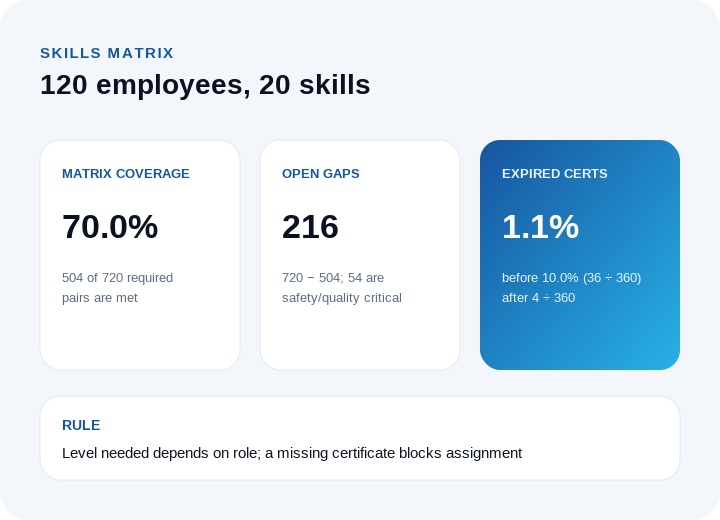
Summed across 120 employees, the illustrative result is: 504 of the 720 required pairs are met, so matrix coverage is 504 ÷ 720 = 70.0%, with 216 pairs open. Of those, 54 are critical for safety or quality.
The cost of closing the 54 critical gaps: say each takes 8 hours of training or shadowing; 54 × 8 = 432 person-hours. With the person-hour cost of ₺393.75 from the section below, 432 × ₺393.75 = ₺170,100.
How Do You Track Certificate and Document Validity?
Every certificate has a recorded expiry date, and the system raises alerts counting back from it. In the illustrative example employees hold 360 certificates with an average validity of 3 years; that means 360 ÷ 3 = 120 renewals a year, or 10 a month on average. With alerts starting 60 days ahead, about 20 certificates are in their renewal window at any time.
| Time to expiry | Who is alerted? | What happens? |
|---|---|---|
| 60 days | Employee and manager | Renewal training is planned and a suitable session is suggested |
| 30 days | Manager and training coordinator | A seat is reserved if none is booked yet |
| 7 days | Senior manager and safety specialist | Exception decision or backup assignment |
| Expiry day | System | Assignment to the certificate-dependent job is blocked |
The 60, 30 and 7-day thresholds are illustrative; adjust them to your training lead time. For the legal validity periods of certificates and the conditions that apply after expiry, consult your safety specialist and legal counsel. An alert is not enough; the rule must also block the assignment (the link is made on the scheduling side).
As a measure, look at the share of expired certificates at audit time. In the spreadsheet-driven example, 36 of 360 certificates are expired or missing: 36 ÷ 360 = 10.0%. After alerts and the assignment block, if that falls to 4, it is 4 ÷ 360 = 1.1%.
How Do You Measure Single-Person Dependency and Plan Cross-Training?
The number of qualified people (level 3 and above) for a job shows the dependency. If a person is unavailable for a share p of the year, the probability that none of n qualified people is available is about pⁿ (assuming independence). Illustrative values: p = 12%, 250 working days a year.
| Qualified people | Number of skills (out of 20) | Days a year with no qualified person | Status |
|---|---|---|---|
| 0 | 1 | Work cannot be done | Urgent |
| 1 | 4 | 250 × 0.12 = 30.0 | Red |
| 2 | 4 | 250 × 0.0144 = 3.6 | Amber |
| 3 or more | 11 | 250 × 0.001728 = 0.43 | Target |
Five of the skills (4 + 1) depend on at most one person: 5 ÷ 20 = 25%. With a target of at least three qualified people, 9 skills fall below target. The cross-training plan: 2 more people for each of the 4 single-person skills and 3 for the one skill nobody holds, so 4 × 2 + 3 = 11 people. Assuming 24 hours per person to move from level 2 to level 3, that is 11 × 24 = 264 person-hours, or 264 × ₺393.75 = ₺103,950.
The independence assumption has limits: if people on the same team plan leave for the same period or fall ill in the same season, the real risk is higher than calculated. To read this together with leave planning, see the leave and employee management article. The same logic applies to machine-specific maintenance skills; see maintenance management software.
How Do You Measure Training Effectiveness?
Having run a training does not mean it worked. The four-level Kirkpatrick model is enough as a concept: reaction, learning, behavior, results. Attach a measurable indicator to each level.
| Level | Indicator | Illustrative example |
|---|---|---|
| Attendance | Attended ÷ planned seats | 432 ÷ 480 = 90.0% |
| Learning | First-attempt exam pass rate | 378 ÷ 432 = 87.5% |
| Behavior | Correct application on the floor (observation) | 45 ÷ 60 = 75.0% |
| Results | Nonconformances in the related job, per quarter | 40 → 28 (−30.0%) |
Cumulative success against the plan is 378 ÷ 480 = 78.8%: about four in five planned seats ended in a passed exam. The 12.5-point gap between exam pass (87.5%) and floor application (75.0%) shows that what was learned does not fully carry over to the job; in that case strengthen on-the-job support and observation rather than the course itself. To keep these indicators on one dashboard, use the leading and lagging indicator distinction from our KPI guide.
How Are Training Cost and Payback Calculated?
Most of the cost of training is not the course fee but the time people spend away from work. Illustrative annual plan: 120 employees × 16 hours = 1,920 person-hours; employee hourly cost ₺300; external training and certificate fees ₺180,000.
- Lost working time: 1,920 × ₺300 = ₺576,000
- Total: ₺576,000 + ₺180,000 = ₺756,000
- Per person: ₺756,000 ÷ 120 = ₺6,300; per person-hour: ₺756,000 ÷ 1,920 = ₺393.75
The software's gain comes from planning effort, no-show seats and audit risk. First, monthly administration effort (illustrative):
| Task | With spreadsheets | With the system |
|---|---|---|
| Attendance lists (24 sessions) | 24 × 30 min = 720 min | 24 × 10 min = 240 min |
| Certificate expiry scan | 360 × 2 min = 720 min | Automatic; exceptions 60 min |
| Reminders and follow-up | 48 × 10 min = 480 min | Automatic; 12 exceptions × 10 min = 120 min |
| Matrix updates | 120 × 3 min = 360 min | 120 × 1 min = 120 min |
| Reporting | 240 min | 60 min |
| Total | 2,520 min = 42 h | 600 min = 10 h |
Monthly gain: 42 − 10 = 32 hours × ₺300 = ₺9,600. If attendance rises from 90% to 95%, 480 × 5% = 24 more seats are filled; assuming each missed seat costs ₺2,500 in rescheduling and empty session capacity, 24 × ₺2,500 = ₺60,000 a year = ₺5,000 a month. If the annual probability of an audit finding a missing certificate falls from 20% to 5% and one finding costs ₺150,000, the expected loss drops from ₺30,000 to ₺7,500: ₺22,500 a year = ₺1,875 a month. Regulatory penalties are not included in this calculation.
Total monthly benefit: ₺9,600 + ₺5,000 + ₺1,875 = ₺16,475. If the software's running cost is ₺2,500 a month, the net is ₺13,975. With an initial investment of ₺300,000, payback is ₺300,000 ÷ ₺13,975 ≈ 21.5 months. If the audit risk gain is not counted at all (₺9,600 + ₺5,000 − ₺2,500 = ₺12,100), the period stretches to about 24.8 months. Plug in your own figures.
How Do You Set Up Training and Competency Management Software?
Work in six steps; the output of each is the input of the next.
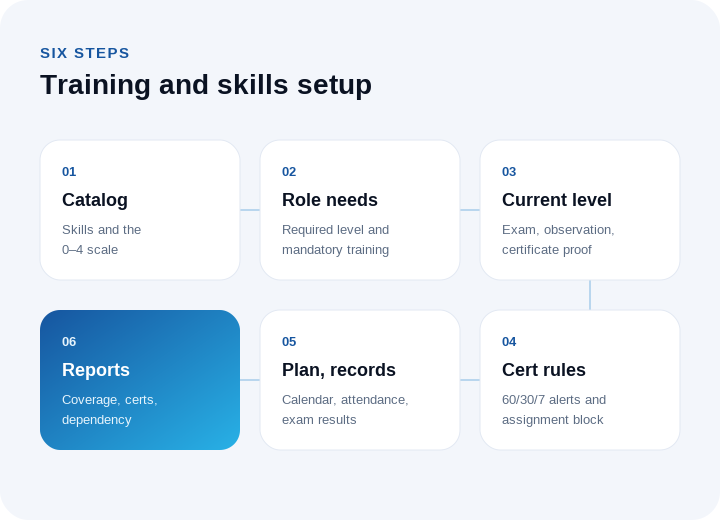
- Catalog and scale: Write down the skills and the 0–4 scale; define what counts as evidence for a level.
- Role requirements: Set the required levels and mandatory training for each role.
- Current level: Collect first data from manager assessments, exams and certificates; verify with a sample.
- Certificate rules: Set up expiry dates, 60/30/7 alerts and the assignment block.
- Plan and records: Move the training calendar, attendance and exam results into the system; settle KVKK (Turkey's personal data protection law) questions about employee data with your legal counsel.
- Reports and review: Review matrix coverage, certificate status and dependency reports with management every quarter.
If the rules need to be tied to an approval chain, for example for exception decisions, the threshold and delegation logic in our workflow and approval software article applies.
What Are the Common Mistakes in Training Management?
- Treating records as competency: Attending a training is not the same as doing the job; set the level with evidence.
- Assigning the same training to everyone: Without role and job rules, unnecessary training grows and the necessary ones get skipped.
- Not tying alerts to assignment: If someone with an expired certificate can still be assigned despite the alert, there is no control.
- Not seeing single-person dependency: If you never look at the column totals of the matrix, the risk stays invisible until the leave season.
- Measuring training by attendance only: Without exams and floor behavior, the effect is unknown.
- Filling the matrix once and leaving it: Levels change; review it every quarter.
Employee Training Software with İnovabil
At İnovabil our focus is building custom software from scratch for your company: custom software, ERP, CRM, e-commerce, web, mobile and integration. We do not offer a ready-made product for training and competency tracking; a need like this becomes a custom-solution question when it must connect to your roles, certificates and your scheduling or maintenance system. We suggest comparing it with off-the-shelf options on cost and limits during requirements analysis.
We built CRM, purchasing and mobile for Avcılar İnşaat; a purchasing system for İZBAN; logistics and shipment planning with wholesale order management for Karyak; and warehouse management plus a complaint and support management system for Sleepy. Send us a short summary of your role and certificate structure and we will draw up a written scope together.
We recommend reading: Our software development process: from analysis to launch, step by step
Frequently Asked Questions
What is employee training and competency management software?
It is an application that keeps employees' skill levels, training and certificates in one place, determines the required training by role, warns about expiring certificates and reports the gap between required and current levels.
What is a skills matrix used for?
It shows who can do which job at what level and how many qualified people each job has. With it you see training priorities, cross-training needs and single-person dependency risk.
How do you get alerts before a certificate expires?
Each certificate's expiry date is recorded, and the system counts back from it, for example at 60, 30 and 7 days, to alert the employee, the manager and the people responsible. Your training lead time sets the thresholds; for legal periods consult a safety specialist and legal counsel.
How do you measure whether training worked?
Attendance alone is not enough. Track exam pass rate, correct application on the floor (observation) and result indicators such as nonconformances in the related job together; the four-level Kirkpatrick model is a common reference point for this framework.
How long does it take for training software to pay back?
In the illustrative example the investment is ₺300,000, the monthly net benefit is ₺13,975 and payback is about 21.5 months; about 24.8 months if the audit risk gain is not counted. The real period depends on your certificate count, training volume and current administration effort.