

The software went live, there was a launch event, the project closed; three months later the sales team is still typing into a spreadsheet, the warehouse still works from paper, and managers still ask for the report by phone. This picture is not rare. Money, time and effort were spent, yet the system is not really used. Driving software adoption means making sure the ERP, CRM or portal you put into service is actually used by employees, every day and correctly; training is only one part of it.
In this guide we cover how to define the adoption rate, the causes of resistance, stakeholder analysis, building a champion network, a role-based training plan, pilot and wave rollout, retiring legacy tools, intensive early support (hypercare), metrics and the payback calculation. The examples follow a business with 120 users; all figures are illustrative, and your own result will differ.
What Is Software Adoption and Why Is It a Separate Job?
Software adoption is the communication, training, support and measurement work that gets the target users to actually use the new system in place of old methods. It closes the gap between technical delivery and business value.
It is a separate job because the "training" line in a project plan is usually a handful of sessions, while behavior change takes weeks: people must learn a new interface while still getting their daily work done. We covered the full go-live plan in our ERP implementation guide; here we deepen the short "training and user habits" part of that plan.
We recommend reading: How to run an ERP implementation
How Is the Adoption Rate Measured?
The adoption rate is weekly active users divided by licensed users, but "active" must be defined carefully. Logging in alone does not count, because a user can open the screen, close it and do the actual work in a spreadsheet.
Look at three dimensions. Reach: the share of users who perform at least one critical transaction (order, quote, stock movement) per week. Depth: how much of the critical work is done in the system. Quality: the share of records with all mandatory fields filled. An illustrative example:
- Reach: 48 of 120 licensed users perform at least one critical transaction weekly; 48 ÷ 120 = 40%. A 90% target needs 0.90 × 120 = 108 users.
- Depth: 520 of 1,000 monthly orders are opened in the system; 520 ÷ 1,000 = 52%. The rest runs through email and spreadsheets.
- Quality: 640 of 800 records have the mandatory fields filled; 640 ÷ 800 = 80%.
If a single number is wanted, a simple effective-use index can be built: reach × quality = 0.40 × 0.80 = 32%. At target, 0.90 × 0.95 = 85.5%. The index is a comparison tool; the decision comes from the three separate measures, because 90% reach with 50% depth means "it is used, but the real work is still outside."
Why Do Employees Resist New Software?
Resistance is usually not stubbornness but a reasonable reaction. The remedy changes with the cause, and training aimed at the wrong cause is wasted.
| Cause of resistance | How it looks | Effective response |
|---|---|---|
| Does not know how | "I couldn't find how to do it" | Role-specific hands-on training, short guide, close support |
| Sees no benefit | "The old way was faster" | Show the concrete gain in the person's own work |
| Distrusts the data | "The numbers don't match" | Migration validation, an open list of known errors |
| Workload grows | "Now I enter everything twice" | Remove unnecessary fields, retire the old tool |
| Wary of transparency | Enters records late or incompletely | Explain the purpose; say who sees the data and why |
| Old tool still open | The system stays "extra work" | A cutoff date and a ban on edits in the old tool |
The sixth cause is the most common and the cheapest to fix. In a business that allows both the new system and the old spreadsheet, the easiest path for an employee is to keep the spreadsheet. Data-accuracy worry also has a real basis; we covered migration validation in our data migration guide.
How Are Stakeholders Analyzed?
Not every stakeholder deserves the same attention. Score impact (1–3) and resistance (1–3) and multiply; a high product tells you whom to talk to first. An illustrative example:
- Sales manager: impact 3, resistance 2, score 6. The main consumer of reports; build targets and report screens together.
- Warehouse lead: impact 3, resistance 3, score 9. Used to a manual routine; set up the pilot with this person first.
- Accounting specialist: impact 2, resistance 2, score 4. Wants reconciliation assurance.
- Field sales rep: impact 1, resistance 3, score 3. A mobile screen and a short entry form help.
Meet one-to-one with those scoring 6 or more before the project starts; their question is often everyone's question. To clarify process outputs beforehand, our process mapping guide helps.
How Is a Champion (Super User) Network Built?
A champion is the employee who knows the system best in their own unit and gives colleagues first-line help. In the early weeks, when the support team cannot reach every request, champions solve requests on the floor.
- Ratio: About one champion per 15 users. With 120 users, 8 champions; 120 ÷ 8 = 15.
- Selection: Someone respected in the unit and open to learning, rather than whoever is assigned by a manager. At least one from every unit.
- Time: About 4 hours a week, 10% of working time, formally set aside. Example: 8 × 4 × 8 weeks = 256 hours × ₺300 = ₺76,800.
- Recognition: A written assignment and visible credit to their manager; not added on top as extra work.
Champions do not only help; they are a feedback channel. They carry the screens where users get stuck and the missing fields back to the project team.
How Is a Role-Based Training Plan Prepared?
The same training for everyone suits no one. Set duration and format by what the role actually does; the hands-on part should be longer than the lecture part.
| Role | People | Hours per person | Format | Total |
|---|---|---|---|---|
| Manager | 12 | 2 h | Report and approval screens, live demo | 24 h |
| Daily user | 84 | 6 h (2 h lecture + 4 h hands-on) | Workshop with real scenarios, test environment | 504 h |
| Champion | 8 | 16 h | Deep training, support and troubleshooting | 128 h |
| Viewer | 16 | 1.5 h | Short introduction and guide | 24 h |
| Total | 120 | average 5.7 h | 680 h |
The math: 24 + 504 + 128 + 24 = 680 person-hours; 680 ÷ 120 ≈ 5.7 hours. Participants' time costs 680 × ₺300 = ₺204,000; trainer, materials and test-data preparation is 12 person-days × ₺9,000 = ₺108,000. The total is ₺312,000, or ₺2,600 per person. Train in a test environment that resembles real data, using the users' own scenarios; a user who learns by doing their own work is working in the system the next day. Training should start after acceptance testing; we described that process in our user acceptance testing guide. For guides and short videos, see our software documentation guide.
Clarify labor-law questions, such as whether training must happen during working hours or whether off-hours training is compensated, with your legal counsel.
How Are the Pilot and Wave Rollout Planned?
Moving everyone on the same day means everyone has problems on the same day. A pilot and waves let what you learn carry over to the next group.
| Stage | Users | Week | Purpose |
|---|---|---|---|
| Pilot | 12 | 1–2 | Test in real work, fix guide and training |
| Wave 1 | 36 | 5 | First large group; champion network active |
| Wave 2 | 40 | 7 | Heavy-use group |
| Wave 3 | 32 | 9 | Remaining units; legacy tool cutoff |
| Total | 120 | 12 + 36 + 40 + 32 = 120 |
Mix demanding and willing users in the pilot group. A pilot run with volunteers only hides problems. Before each wave, review the previous wave's support requests and the gaps that were fixed.
When and How Are Legacy Tools Retired?
Parallel running is a safety net, not a permanent arrangement. Set a cutoff date for each wave, announce it several weeks ahead, and after that date close editing in the old tool, leaving the data read-only.
The cost of parallel running can be calculated: if 40 users in wave 2 double-enter for 25 minutes a day, a 10-working-day parallel costs 40 × 25 × 10 = 10,000 minutes = 166.7 hours; × ₺300 ≈ ₺50,000. Each extra week adds 40 × 25 × 5 = 5,000 minutes = 83.3 hours ≈ ₺25,000. As important as the cost, if the period stretches indefinitely, is the message users receive: "the cutoff isn't real." Management should announce the cutoff date, and the support team should confirm before the date that records in the old tool have been migrated.
How Is Early Support (Hypercare) Provided?
Hypercare is intensified support that answers questions within minutes in the first days after the move. Its length is set not by the calendar but by the ticket curve.
- Staffing: 2 support specialists plus the champions on the floor.
- Channel: One request channel, with every request recorded. For logging requests, see our help desk software guide. In the cost calculation only the first 10 working days count as intensive staffing; the existing support team covers the weeks after.
- Exit rule: Hypercare ends when weekly tickets drop below 0.25 per user, that is 120 × 0.25 = 30, and stay there for two consecutive weeks.
An illustrative curve: 150 tickets in week 1, 90 in week 2, 50 in week 3, 30 in week 4, 20 in week 5. Week 1 is 150 ÷ 120 = 1.25 tickets per user; by week 4 it falls to 30 ÷ 150 = 20%, an 80% reduction. Load check: in week 1, 150 ÷ 5 = 30 tickets a day × 20 minutes = 600 minutes = 10 hours; the 16-hour daily capacity of 2 specialists covers it. If the curve does not fall, the problem is design, not training; if the same screen keeps being asked about, that screen needs fixing.
Which Metrics Track Adoption?
| Metric | Calculation (illustrative) | Starting | Target |
|---|---|---|---|
| Weekly active users | 48 ÷ 120 | 40% | 90% |
| Critical work done in the system | 520 ÷ 1,000 | 52% | 95% |
| Record completeness | 640 ÷ 800 | 80% | 95% |
| Tickets per user per week | 150 ÷ 120 | 1.25 | ≤ 0.25 |
| Edits made in the old tool | weekly count | 120 | 0 |
Show the metrics on a weekly dashboard by unit so you can see which group is behind. Tracking individual usage can fall into employee monitoring: prefer aggregate, role-based reporting, and assess personal-data and employee-monitoring obligations with your legal counsel. Turning a measure into a target is also risky: if "number of logins" is the target, logins rise and the work does not change.
What Does Low Adoption Cost and What Is the Payback?
Low adoption loses money in two places: unused licenses and double entry. In the example, ₺600 per user per month is paid for licenses (illustrative).
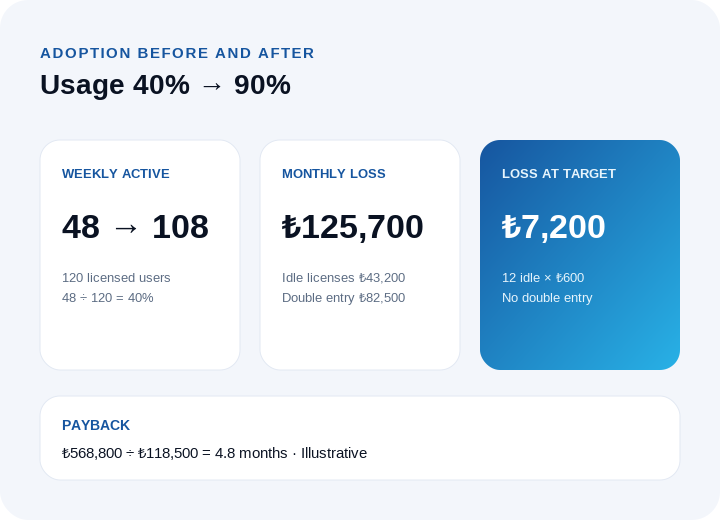
- Idle licenses (now): 120 − 48 = 72 unused licenses × ₺600 = ₺43,200 a month.
- Double entry (now): 30 users × 25 min × 22 days = 16,500 min = 275 h × ₺300 = ₺82,500 a month.
- Total loss (now): ₺43,200 + ₺82,500 = ₺125,700 a month.
- At target: 120 − 108 = 12 idle licenses × ₺600 = ₺7,200 a month; no double entry.
- Monthly gain: ₺125,700 − ₺7,200 = ₺118,500.
| Investment item | Calculation | Amount |
|---|---|---|
| Training | ₺204,000 + ₺108,000 | ₺312,000 |
| Champion time | 8 × 4 h × 8 weeks × ₺300 | ₺76,800 |
| Hypercare | 2 specialists × 10 working days × ₺9,000 | ₺180,000 |
| Total | ₺568,800 |
Payback: ₺568,800 ÷ ₺118,500 = 4.8 months. If the gain halves (₺59,250), it is 568,800 ÷ 59,250 = 9.6 months. Even if the target is missed, the investment still pays back within a year; remember that the money spent on the system itself never pays back as long as it is not adopted. For licensing models and managing idle licenses, see our software license guide. To test adoption up front when choosing a packaged system, use the demo scenarios in our CRM selection guide. The numbers are illustrative; recalculate with your real license fee, user count and hourly cost.
How Is Software Adoption Run in Six Steps?
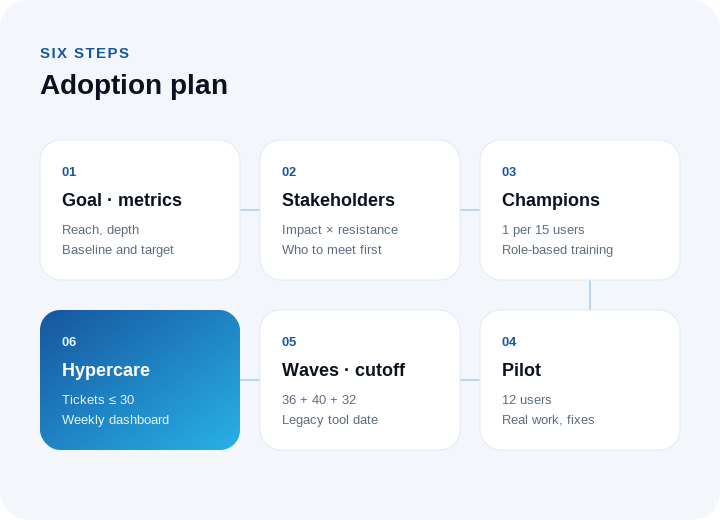
- Goal and metrics: Write down the adoption definition (reach, depth, quality); measure today's value and set the target.
- Stakeholder and resistance map: Talk before the project to people with a high impact × resistance score; match each cause of resistance to the table.
- Champions and training: Choose one champion per 15 users; write the role-based training plan and set aside the time.
- Pilot: Do real work with 12 users; fix the guide and training.
- Waves and cutoff: Announce a legacy-tool cutoff date for every wave and close editing after it.
- Hypercare and measurement: Give intensive support until the ticket curve reaches the threshold; keep the weekly dashboard for three months.
What Are Common Mistakes in Software Adoption?
- One-off training: A single day of training in go-live week is forgotten by the end of the first week; training should come with each wave and be repeated afterward.
- Generic training: The same lecture for every role fits nobody's job exactly.
- Leaving the old tool open: A parallel run with no cutoff date turns into permanent double entry.
- Watching only logins: A login does not show that the work was done in the system.
- Management not using it: A manager who asks for the report by email sends the message that the system is unnecessary.
- Ignoring feedback: If the area where users get stuck is not fixed, training only hides the problem.
We recommend reading: What is a software license?
We recommend reading: What Is Leave and Employee Management Software? Self-Service Portal, Leave Balance and Payback Guide
We recommend reading: What Is Shift and Workforce Scheduling Software? Hours Needed, Rules Engine, Skills and Payback Guide
We recommend reading: What Is OKR? Objectives and Key Results, the KPI Difference, Scoring and Setup Guide
We recommend reading: What Is Employee Training and Competency Management Software? Skills Matrix, Certificate Tracking, Gap Analysis and Payback Guide
We recommend reading: How to Close a Software Project and Hand It Over: Criteria, Checklist, Access Handover and Lessons Learned
We recommend reading: How to Build a Product Roadmap and Prioritize Features with RICE: From Requests to a Plan
We recommend reading: How to Do Stakeholder Management and Communication Planning for Software Projects? Influence–Interest Matrix, RACI and Report Guide
We recommend reading: How to Collect and Analyze User Feedback in a Software Product: Channels, Scoring and Closing the Loop
We recommend reading: How to Hire Software Developers: Technical Interviews, Scoring Rubric and the First 90 Days
We recommend reading: How to Design User Onboarding and the First-Run Experience: Activation, Product Tours, Empty States and Measurement
Software Rollout and User Transition with İnovabil
At İnovabil our focus is building software from scratch, specific to your company. As recorded on our process page, every project follows analysis, design, development, testing, release, and maintenance and support. Actual use of the software is the real goal of the release and the maintenance and support steps; that is why we suggest clarifying in the requirements phase who will use it, which legacy tools will be retired and what training is expected, in writing.
We built CRM, purchasing and mobile for Avcılar İnşaat; a purchasing system for İZBAN; logistics and shipment planning plus wholesale order management for Karyak; and warehouse management plus a complaint and support management system for Sleepy. We do not have a separate training product; our approach is to involve users from the start of the project. Briefly write down your user count and legacy tools, and we will add the transition plan to the analysis output together.
We recommend reading: Our software development process: step by step from analysis to release
Frequently Asked Questions
What is software adoption and how is it done in short?
It is the work that gets employees to actually use new software in place of old methods. It runs through goal and metric setting, resistance and stakeholder analysis, a champion network, role-based training, a pilot and waves, retiring the old tool and intensive support.
How is the adoption rate calculated?
Divide weekly active users by licensed users; active means performing at least one critical transaction a week. In the example, 48 ÷ 120 = 40%. Add the share of critical work done in the system and record completeness.
How many users per champion?
As a general rule, about one champion per 15 users is a reasonable start; 8 people for 120 users. Every unit should have at least one champion, with about 4 hours a week formally set aside.
When should the old tool be retired?
On a date announced in advance for each wave, after a parallel run of a few weeks at most. After the date the old tool is left read-only, and the migration of its records is confirmed beforehand. An open-ended parallel turns into double entry.
How is the payback of an adoption program calculated?
Divide the investment (training, champion time, hypercare) by the monthly gain (the reduction in idle-license and double-entry loss). In the example ₺568,800 ÷ ₺118,500 = 4.8 months; if the gain halves, 9.6 months. Recalculate with your own figures.