

A leave request sits in a manager's inbox, an expense form moves through a spreadsheet, and a discount approval turns into a "can you take a look?" message in a chat app. Nobody knows whose desk a request is on or how long it has waited. Workflow and approval software runs these requests through defined steps, with who holds each one and how long it has waited always visible: a request is opened, routed to the right people by rules, the decision is recorded, and the next action is triggered.
The figures below are all illustrative and are not measurements from any specific business or product.
What Is Workflow and Approval Software?
Workflow software defines which steps a piece of work passes through, in what order and by which person or role, and tracks the status of every request along that path. Approval software is the version built around an approval decision: leave, expenses, purchase requests, discounts, contracts and access requests, where authorized people answer the question "may this go ahead?".
The system knows four things: the content of the request, the rules (who approves under which condition), the status (where the request is now) and the record (who decided what, and when). Email and spreadsheets cannot hold all four together.
We recommend reading: What is business process automation? Priority score, steps and payback guide
What Is the Difference Between Workflow, Automation and a Process Map?
The three are close but answer different questions: a process map asks "how does it run today?", a workflow asks "by which rules and through whom will it run from now on?", and automation asks "which step will a machine do instead of a person?"
| Concept | Question it answers | Output | Example |
|---|---|---|---|
| Process mapping | How does it run today, and where does it wait? | As-is and to-be diagram, measurements | The 27.6-hour average of an expense request |
| Workflow (approval) | Who decides, when and under what condition? | Rules, states, tasks | Manager approval above ₺5,000 |
| Automation | Which step happens by itself? | A step done by the machine | An order being created after approval |
| Authorization | Who sees and changes which record? | Role and permission table | Only finance approves payment |
Order matters: first map the process and measure the waits, then turn the rules into a workflow, and only then choose the steps to automate. Build roles and permissions with the model in our role-based access control guide; approval authority is just another role.
How Does Approval Software Work? The State Machine
Every request sits in one of a set of predefined states and can only make the transitions that are allowed. This is called a state machine, and a basic seven-state model is enough for most approval processes.
| State | Meaning | Can move to |
|---|---|---|
| Draft | The requester is preparing it | In approval, Cancelled |
| In approval | Waiting with the current approver | Approved, Rejected, Awaiting correction, Cancelled |
| Awaiting correction | Returned to the requester for missing information | In approval, Cancelled |
| Approved | Every step in the chain is complete | Completed |
| Rejected | Closed with a reason | Closed; a new request is opened |
| Cancelled | The requester withdrew | Closed |
| Completed | The follow-up action was done (order, leave record) | Closed |
The real value is in the forbidden transitions: a rejected request cannot be quietly approved, and the amount of an approved request cannot be edited. Also write a rule for corrections: if a critical field such as the amount or type changes, the chain restarts from the beginning; if only a description was fixed, it continues where it stopped.
What Types of Approval Are There?
There are five basic approval types, and most processes combine them. The choice depends on whether the steps depend on each other.
| Type | How it works | When it fits |
|---|---|---|
| Sequential | Steps one after another; the second follows the first | One decision is an input to the next |
| Parallel, all | Sent at the same time; everyone must approve | Independent checks: need and budget |
| Parallel, any | The first decision is enough | An equivalent pool of approvers: shift supervisors |
| Conditional threshold | The path changes by amount, type or department | Short route for small requests, long for large |
| Automatic | The system approves if the rules are met | Small, low-risk requests |
The time difference is easy to compute. On a large request, the manager decides in 8 hours on average and finance in 12. In a sequential chain the total is 8 + 12 = 20 hours; if the two checks are independent, a parallel chain is governed by the slowest step: max(8, 12) = 12 hours. The gain is 8 hours, or 40% on a large request. If one approver rejects, the other approver's pending task should close automatically. We covered how discount approval and margin protection are set up in our quote management software article.
How Does an Amount Threshold Affect the Auto-Approval Rate?
As the threshold rises, the auto-approval rate climbs, but so does the amount the system passes without a human looking. In the illustrative example there are 800 expense requests a month; the distribution and average amounts are below.
| Auto-approval threshold | Auto-approved requests | Rate | Total amount passed automatically |
|---|---|---|---|
| Up to ₺2,000 | 280 | 280 ÷ 800 = 35% | 280 × ₺900 = ₺252,000 |
| Up to ₺5,000 | 480 | 480 ÷ 800 = 60% | ₺252,000 + 200 × ₺3,200 = ₺892,000 |
| Up to ₺10,000 | 624 | 624 ÷ 800 = 78% | ₺892,000 + 144 × ₺7,000 = ₺1,900,000 |
Raising the threshold from ₺5,000 to ₺10,000 lifts the rate by 18 points (624 requests instead of 480), but the amount passed automatically grows from ₺892,000 to ₺1,900,000, a factor of 2.13. The decision balances the time saved on the extra 144 requests against the ₺1,008,000 difference left without a check.
Auto-approval is not tied to the amount alone. Conditions are checked together: the budget line is valid and has enough balance, the supplier is on the approved list, and the requester has not exceeded the monthly limit. If any one fails, the request leaves auto-approval and goes to the manager. For approval matrices, three-way matching and quote scoring on the purchasing side, see our procurement software guide.
How Do You Ensure Separation of Duties and an Audit Trail?
Separation of duties means that a risky transaction is never in one person's hands from start to finish; an audit trail means every decision can be proven afterwards. Together they decide how trustworthy the approval system is.
- No approving your own request: Whatever role the requester holds in the chain, they do not count as an approver on their own request; the system skips that step to a higher authority.
- The same person never fills two steps: If one person is both manager and finance in the chain, the second step asks someone else.
- Split-request detection: Requests from the same requester to the same supplier within seven days are added together. Example: three ₺4,800 requests are each under the ₺5,000 threshold, but 3 × ₺4,800 = ₺14,400 puts them in the medium tier; the system merges the three and sends them to the manager.
- Tamper-evident record: Every event (opened, assigned, approved, rejected, passed to a delegate) is written with who, when, what amount and which rule version; records are never deleted, only appended.
The audit trail is small: with an average of five events per request, 800 × 5 = 4,000 records a month, or 48,000 a year. For retention periods and personal data, consult your legal counsel and financial advisor (certified accountant).
How Do You Set Up Delegation, Timeouts and Escalation?
The most common point where an approval chain breaks is an approver who is unreachable that day. Three rules fix it: delegation, reminders and escalation.
- Delegation: Before leave, the approver hands authority to a delegate for a date range; the system routes tasks to the delegate in that window and notes "on behalf of" in the record. A delegate cannot be the requester.
- Reminder: If a task goes unanswered for 8 hours, the approver gets a reminder.
- Escalation: With no answer in 24 hours, the task moves to a backup approver or a higher manager. The durations are illustrative; each process sets its own targets.
Let us compute the effect. The medium and large tiers hold 240 + 80 = 320 requests, and on average 10% of managers are unreachable because of leave or travel. That is 320 × 10% = 32 requests, or 4% of the monthly volume (32 ÷ 800). Without delegation each waits about 3 working days, or 24 extra hours: 32 × 24 = 768 request-hours. With delegation and escalation, rerouting takes 2 hours: 32 × 2 = 64 request-hours. The gain is 768 − 64 = 704 request-hours. This effect distorts the average a little and the long tail a lot.
How Do You Find the Bottleneck and Shorten the Average Cycle Time?
To find the bottleneck, split cycle time into two parts: the work itself (preparation, processing) and approval waiting. The illustrative measurement examines today's email-driven process in three tiers.
| Tier (800 requests) | Share | By email: waiting + processing | With a system |
|---|---|---|---|
| Up to ₺5,000 (480 requests) | 60% | 16 + 4 = 20 h | 0.5 h (automatic) |
| ₺5,001–₺50,000 (240 requests) | 30% | 26 + 6 = 32 h | 8 h (manager) |
| Above ₺50,000 (80 requests) | 10% | 48 + 12 = 60 h | 20 h (manager 8 + finance 12, sequential) |
| Weighted average | 100% | 27.6 h | 4.7 h |
The arithmetic: by email, 0.6 × 20 + 0.3 × 32 + 0.1 × 60 = 12 + 9.6 + 6 = 27.6 hours. With a system, 0.6 × 0.5 + 0.3 × 8 + 0.1 × 20 = 0.3 + 2.4 + 2 = 4.7 hours. The difference is 22.9 hours, an 83.0% reduction (22.9 ÷ 27.6).
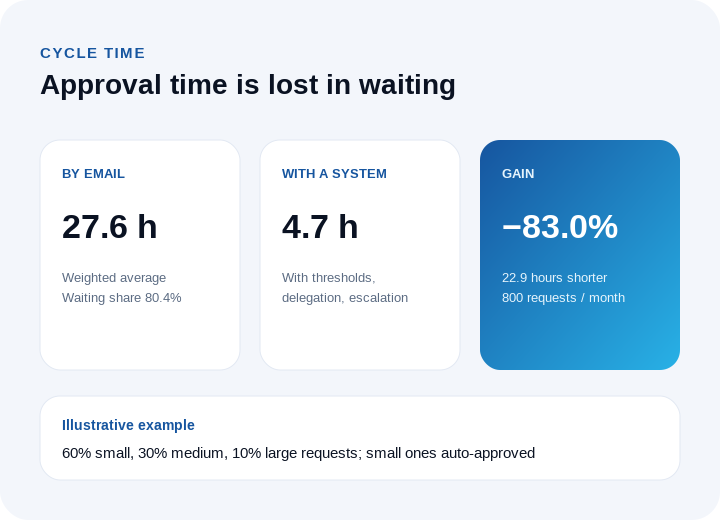
The bottleneck analysis looks at the waiting share. Average waiting: 0.6 × 16 + 0.3 × 26 + 0.1 × 48 = 9.6 + 7.8 + 4.8 = 22.2 hours, which is 22.2 ÷ 27.6 = 80.4%. The work itself is only 5.4 hours. Moreover, the smallest, lowest-risk requests (the first tier, 60% of volume) account for 9.6 hours, or 43.2% of all waiting (9.6 ÷ 22.2). A threshold with automatic approval is therefore the first win. If finance proves to be an independent check on large requests, moving to parallel approval saves another 8 hours: the large tier drops to 12 hours and the average to 0.3 + 2.4 + 1.2 = 3.9 hours.
How Is the Payback of an Approval System Calculated?
Let us say up front that the gain is capacity, not cash: we count only the working hours saved; the value of faster procurement, missed discounts or prevented errors is left out. Illustrative assumptions:
- Chasing and record-keeping effort (searching email, updating the sheet, asking "did you approve?"): 12 minutes per request, 3 minutes with the system. Saving 9 min × 800 = 7,200 min = 120 hours.
- On the 480 auto-approved requests the manager no longer spends about 4 minutes: 480 × 4 = 1,920 min = 32 hours.
- Hourly cost ₺300; savings (120 + 32) × ₺300 = 152 × ₺300 = ₺45,600 a month.
- Running cost (infrastructure and maintenance) ₺7,600 a month; monthly net ₺38,000.
- Investment: 30 person-days × ₺9,000 = ₺270,000.
Payback is ₺270,000 ÷ ₺38,000 ≈ 7.1 months. If the savings halve, net is ₺22,800 − ₺7,600 = ₺15,200 and payback is about 17.8 months (₺270,000 ÷ ₺15,200). If volume falls to a quarter, 200 requests, savings are 38 hours (₺11,400), net is ₺3,800 and payback is about 71 months. High-volume flows pay back fast; for a process with a few requests a month, a simple form may be enough. Calculate the whole cost with the method in our software project cost guide.
How Do You Set Up a Workflow and Approval System in Six Steps?
Write the rules before choosing technology; a tool enforces a rule, it does not replace one.
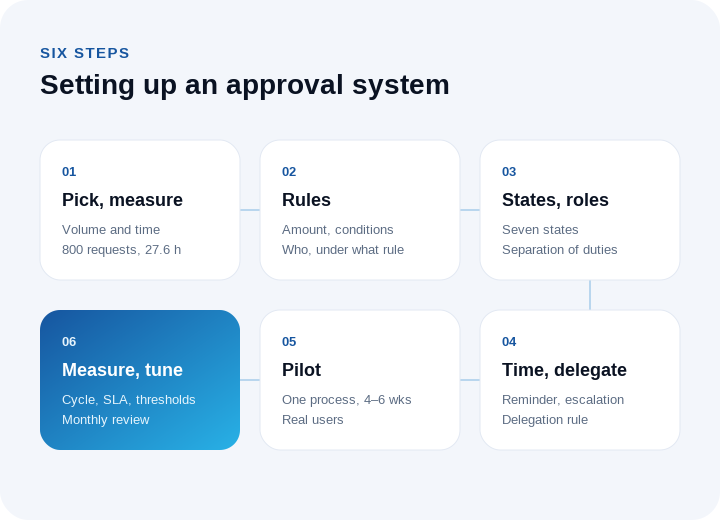
- Pick a process and measure it: Start with a high-volume process whose steps are clear, such as expense requests. How many requests a month, what is the average cycle time, what is the waiting share?
- Write the rules: Who approves at which amount, type and department? Under what conditions is automatic approval given? Have the business owner and finance sign the rule table together.
- Build the state and role model: Fix the seven states, the transitions, the separation-of-duties rules and the approver roles.
- Add time and delegation rules: Design reminders, escalation, delegation and split-request detection from the start; adding them later is hard.
- Run a pilot: One process, one department, 4–6 weeks, real users and real requests. For how notifications reach other systems, the event logic in our webhook guide helps.
- Measure and tune: Watch cycle time, the auto-approval rate (480 ÷ 800 = 60%), requests finished within target (744 ÷ 800 = 93.0%), escalated requests (48 ÷ 800 = 6.0%) and those sent back for correction (64 ÷ 800 = 8.0%) monthly; update thresholds and durations from the data.
How to turn the rules into requirements tied to acceptance criteria is in our requirements analysis guide. For a small, one-off process a ready-made tool or a low-code solution may also be enough; we compared its limits in our low-code guide.
What Mistakes Are Common in Workflow Projects?
- Starting software before writing the rule: "The manager usually looks" is not a rule; without an amount and condition table the system cannot be built.
- Putting every request through the same chain: Two approvals on a small request lengthen the queue; there is no threshold or auto-approval.
- Leaving delegation to the end: The chain stops when the leave season arrives.
- Skipping separation of duties: A user who can approve their own request makes the audit meaningless.
We recommend reading: What is custom software?
We recommend reading: What Is Quality Management Software? Inspection Plans, Nonconformance, CAPA, Traceability and Payback Guide
We recommend reading: What Is Leave and Employee Management Software? Self-Service Portal, Leave Balance and Payback Guide
We recommend reading: What Is Appointment Booking Software? Calendar Model, Double-Booking Prevention, No-Show Rate and Payback Guide
We recommend reading: How to Do Budgeting and Variance Analysis: Flexible Budgets, Price-Volume Breakdown and Rolling Forecast Guide
We recommend reading: How to Build a Customer and Dealer Onboarding Process: Document Tracking, Time to First Order, First 90 Days and Payback Guide
We recommend reading: What Is BOM Revision and Engineering Change Management? ECR, ECO, Cut-In and Cost Guide
We recommend reading: What Is Shift and Workforce Scheduling Software? Hours Needed, Rules Engine, Skills and Payback Guide
We recommend reading: What Is a Document Management System (DMS)? Versioning, Access, Search, Retention and Payback Guide
We recommend reading: How to Manage B2B Collections and Receivables: Aging, DSO, CEI and Collection Priority Guide
We recommend reading: What Is Employee Training and Competency Management Software? Skills Matrix, Certificate Tracking, Gap Analysis and Payback Guide
We recommend reading: How to Manage Software Inventory and Shadow IT: Discovery, Risk Score and Approval Rule Guide
We recommend reading: What Is a Business Rules Engine and Decision Table? Rule Management, Conflict Checks and Payback Guide
We recommend reading: How to Set Up IT Change Management and Maintenance Windows: Risk Scoring, Approval and Rollback Guide
We recommend reading: How to Design B2B Company Accounts, Sub-Users and Purchasing Permissions: Roles, Limits and Approvals
We recommend reading: How to Automate Accounts Payable and Incoming Invoice Processing: Capture, Matching, Approval and Payment Guide
We recommend reading: What Is Expense Management Software? Receipts, Policy, Advances, Approval and Accounting Export
We recommend reading: How to Integrate Electronic Signatures: E-Signature Flow, Identity Verification, Evidence and Payback Guide
Custom Software That Needs Approvals and Workflow, with İnovabil
At İnovabil our focus is bespoke software built from scratch for your company. We do not have a ready-made workflow product or approval engine; we design the approval steps around each project's own need. In the process we write business rules, roles, permissions and audit records down during requirements, and we launch on secure hosting.
We built the procurement system for İZBAN and the CRM, purchasing and mobile solution for Avcılar İnşaat. In work like this, where request and approval steps naturally appear, we produce the rule table together with the business and build the system to match. Send us a short summary of your process and request volume; let us first produce the measurements and the rule table together.
We recommend reading: Our software development process: step by step from analysis to launch
Frequently Asked Questions
What is workflow and approval software?
It is a system that defines which steps a request passes through, by which rules and with whose approval, tracks the status of each request and records decisions. It is used for work that needs approval, such as leave, expenses, purchasing and discounts.
What is the difference between workflow and automation?
A workflow defines the order of work, who is responsible and the rules; automation is a step being done by a machine instead of a person. An order being created by itself after approval is automation; who the approval must pass through is workflow.
Which requests should be auto-approved?
Small, low-risk requests whose amount is under the threshold, whose budget is valid, whose supplier is approved and whose requester has not exceeded their limit. The threshold depends on the business's risk appetite and authority table; in the example, a ₺5,000 threshold passes 60% of requests automatically.
What happens if the approver is unavailable?
A delegation rule routes the task to a delegate for the date range; if there is no answer within the reminder and timeout periods, the request escalates to a backup approver or a higher manager. Without these rules, requests hang for days during leave periods.
When does an approval system pay for itself?
It depends on volume. In the illustrative example, with 800 requests a month and a ₺270,000 investment, payback is about 7.1 months; if volume falls to 200 requests, about 71 months. Put in your own request volume, hourly cost and running cost.