

A leave request arrives by email, the manager answers in a different message, HR copies the entry into a spreadsheet, and at month end payroll types the same information again. Employees write to HR just to ask how many days they have left. Leave and employee management software pulls this flow into one system: the employee files the request, the manager approves it, the balance updates itself, the personnel record stays current, and payroll receives correct data. The face of the system where employees do their own tasks is called an employee self-service portal.
In this guide we explain what the software does, which modules it contains, how a leave balance is calculated, how a manager sees clashes in the team calendar, who should see sensitive employee data, how data flows between HR and payroll, a worked payback calculation and a six-step rollout. Example figures and leave days are representative; they are not a legal entitlement or an industry average.
What Is Leave and Employee Management Software?
Leave and employee management software is a business application that keeps an employee's leave requests, leave balance, personnel details, organization structure and absence summary in one record, and runs the process through an approval chain. It does not calculate payroll; it produces the leave and absence data that payroll needs, in an orderly and verified form.
It helps to see the two ends of the range. At one end is a simple approval flow that only digitizes the leave form; at the other is a broad human resources system that also covers payroll, performance and hiring. In a mid-sized company the need usually sits in the middle: leave, personnel records, organization and self-service. We covered the general approval logic (thresholds, delegation, escalation) in our workflow approval software guide; here we focus on what is specific to leave and employee data.
We recommend reading: Our custom software service
Which Modules Does the Software Include?
Six modules cover most companies' needs. Each has a "critical rule" that must be written down before the system is built.
| Module | What it does | Critical rule |
|---|---|---|
| Leave request and approval | The employee files a request, the manager approves or rejects | Who approves, and after how many days does a senior manager step in? |
| Leave balance | Calculates entitlement, carry-over, used and planned days | Entitlement, carry-over cap and rounding rule |
| Personnel record | Employee details, contract and document file | Who sees each field, and who can change it? |
| Organization chart | Holds department, manager and deputy relationships | How does the approval chain update when a manager changes? |
| Shift and absence summary | Combines leave, sick leave and absence in one calendar | Which days count and which do not? |
| Self-service portal | Employees see their balance, request documents, update details | Which changes need HR approval? |
The portal idea is not new: the same logic is built for customers and suppliers. We described the portal for outside users in our customer portal and supplier portal articles. An employee portal is the internal-user version of the same structure, and its data is more sensitive.
How Is a Leave Balance Calculated?
The available balance is the carried-over days plus this year's entitlement, minus the days already used and the approved future days: available = carry-over + entitlement − used − approved planned.
In the calculation below, an annual entitlement of 14 days is used as a company policy example. It is not legal information. The length of annual leave, how it changes with seniority, and the rules on carry-over and mandatory use depend on legislation and the employment contract; consult your legal counsel and HR specialist for these. The software only applies the rule they define.
| Item | Employee A | Employee B |
|---|---|---|
| Carry-over | 3 | 0 |
| This year's entitlement | 14 | 14 |
| Used | 9 | 12 |
| Approved, future-dated | 2 | 1 |
| Available | 3 + 14 − 9 − 2 = 6 | 0 + 14 − 12 − 1 = 1 |
| New request | 5 days → accepted, 1 left | 3 days → insufficient balance (1 < 3) |
Three rules must be written down when the system is built. Carry-over cap: if the policy allows at most 5 days to carry over, an employee with 8 days left carries over 5. Mid-year start: an employee who starts in early July earns 14 × 7 ÷ 12 ≈ 8.17 days; the rounding (down, up, half day) must be a written rule. Half days: state whether an afternoon off counts as 0.5 day. If the rule engine does not know these three, employees do not trust the figure and keep asking HR.
Balance visibility is also management information: if 150 employees have an average of 3 unused days, the company holds 150 × 3 = 450 days of accumulated leave. Ask your financial advisor (certified accountant) how this affects the books.
How Do the Manager Screen, Team Calendar and Clash Warning Work?
A manager should see who will be in the team that day before approving leave. The system warns about clashes at approval time using a "minimum people on duty" rule.
Example: in a team of 8, at least 5 people must be on duty, so at most 3 can be off at the same time (5 ÷ 8 = 62.5% minimum staffing).
| Day | Off | On duty | New request (Tuesday–Wednesday, 1 person) |
|---|---|---|---|
| Monday | 2 | 6 | Not affected |
| Tuesday | 3 | 5 | 4 off, 4 on duty: warning |
| Wednesday | 3 | 5 | 4 off, 4 on duty: warning |
| Thursday | 1 | 7 | Not affected |
| Friday | 1 | 7 | Not affected |
If the same person had asked for Thursday–Friday, 2 would be off and 6 on duty, so the rule would hold. A warning does not have to be a block: the manager can approve with a written reason, or the system can flag single-person roles (for example the dispatch lead) and block approval unless a deputy is assigned. To put the rule in writing, our business process mapping guide helps.
What Should an Employee Self-Service Portal Cover?
The portal's purpose is to let employees resolve repetitive questions to HR on their own. A narrow, clear scope gets high usage.
- Balance and history: Remaining leave, past requests and their status on one screen.
- Leave request: Pick dates, pick type, and the approval chain builds itself.
- Document request: Request and track commonly needed documents such as an employment letter.
- Detail updates: Employees update fields like phone and address; risky fields such as bank details go through HR approval.
The basic indicator to measure is the self-service share: if 42 of 60 monthly document and detail requests come through the portal, the share is 42 ÷ 60 = 70%. If the portal goes unused, the problem is usually adoption, not technology; apply the methods in our software adoption guide.
Who Should See Employee Data?
Employee data is among a company's most sensitive: salary, identity, bank and sick-note information. The principle is "least privilege": everyone sees only the fields their job requires. We explained this principle as a role model in our role-based access control guide.
| Data | Employee | Manager | HR | Payroll / accounting |
|---|---|---|---|---|
| Own leave balance | Sees | Sees team balances | Sees all | Sees day counts |
| Leave reason (sick note, excuse) | Sees | Sees only "on leave" | Sees the type | Sees the type for pay impact |
| Salary and pay data | Sees own | Does not see | Depends on the authorized person | Sees |
| Identity and bank details | Sees own | Does not see | Sees | Sees only what is needed |
| Medical report document | Uploads | Does not see | Few people see | Does not see |
Two operating rules are added: every access to a sensitive field is written to an audit log, and when an employee leaves or changes role, access is closed the same day. That employee data counts as personal data, that health data is special-category data, and the rules on retention and notice fall under KVKK (Turkey's personal data protection law); consult your legal counsel on these. This article is not legal advice.
How Is the Data Flow Between HR and Payroll Set Up?
Leave software does not calculate payroll, but it hands over the data payroll needs correctly at month end. The flow has three principles: a single source, a cut-off date and reconciliation.
- Single source: Leave and absence data is entered only in the leave system; the payroll side receives it and does not retype it.
- Cut-off date: It must be clear up to which day of the month approved leave enters that month's payroll. Leave approved after the cut-off moves to the next month and is visibly flagged.
- Reconciliation: Each month the day count in the HR system is compared with the day count sent to payroll.
A shared file or interface is defined for the transfer: employee ID, leave type, start, end and number of days. For the technical forms of the transfer, see our API integration guide. A measurement example: if 6 of 150 employees' records do not match, the mismatch rate is 6 ÷ 150 = 4.0%; with automatic transfer, falling to 1 record gives 1 ÷ 150 ≈ 0.7%. Pay calculation itself, tax and social security matters belong to your financial advisor (certified accountant) and HR specialist.
How Is the Payback of Leave Software Calculated?
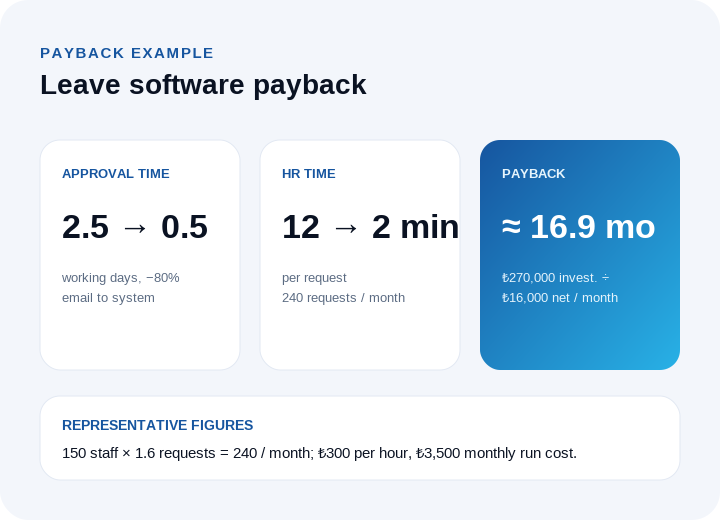
Payback is found by dividing the monetary value of time saved and errors avoided by the investment. The assumptions below are representative: 150 employees, an average of 1.6 leave requests per month (150 × 1.6 = 240 requests), an hourly cost of ₺300.
| Measure | Before (email, paper, spreadsheet) | After (software) |
|---|---|---|
| Approval cycle time (median) | 2.5 working days | 0.5 working days (−80%) |
| HR time per request | 12 min | 2 min |
| Employee and manager time per request | 8 min | 3 min |
| Balance errors (monthly) | 12 ÷ 240 = 5.0% | 2 ÷ 240 ≈ 0.8% |
| Error correction time | 12 × 30 min = 6 h | 2 × 30 min = 1 h |
The monthly gain is calculated as follows:
- HR time: 240 × (12 − 2) = 2,400 min = 40 h × ₺300 = ₺12,000.
- Employee and manager time: 240 × (8 − 3) = 1,200 min = 20 h × ₺300 = ₺6,000.
- Error correction: (6 − 1) h = 5 h × ₺300 = ₺1,500.
- Gross gain: ₺12,000 + ₺6,000 + ₺1,500 = ₺19,500; subtract ₺3,500 monthly hosting and maintenance for a net ₺16,000.
If the investment is 30 person-days × ₺9,000 = ₺270,000, the payback period is 270,000 ÷ 16,000 ≈ 16.9 months, and the net gain over 24 months is 24 × 16,000 − 270,000 = ₺114,000. If gains halve (₺9,750 − ₺3,500 = ₺6,250), the period stretches to 270,000 ÷ 6,250 = 43.2 months, so recalculate with your own request volume and real hourly cost. We detail the cost items in our software project cost guide.
How Is Leave and Employee Management Software Rolled Out?
A six-step path moves forward without carrying policy ambiguity into the system.
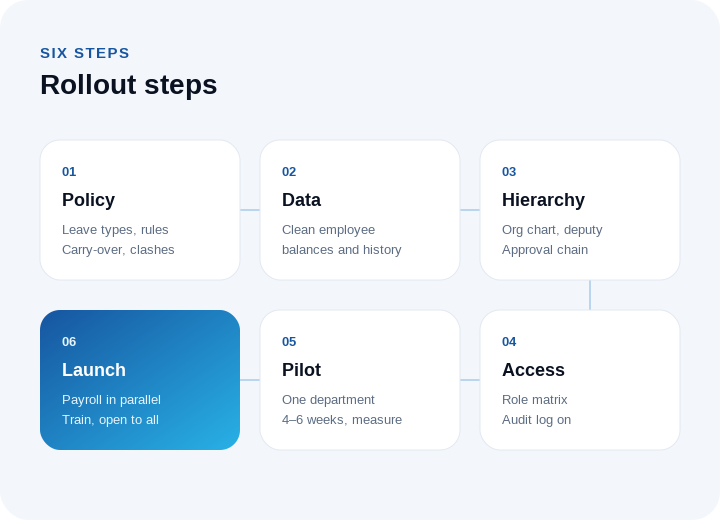
- Policy: Write the leave types, entitlement, carry-over and rounding rules and the clash threshold; verify the legally bound parts with legal counsel and an HR specialist.
- Data: Clean and migrate the employee, balance and history records from the current spreadsheet; we covered how to leave the spreadsheets behind in our spreadsheet-to-software guide.
- Hierarchy: Build the organization chart and the manager and deputy relationships; generate the approval chain from it.
- Access: Define the role matrix, restrict sensitive fields and turn on the audit log.
- Pilot: Run with one department for 4–6 weeks; measure approval time, error count and self-service share.
- Launch: Run the payroll transfer and reconciliation in parallel for the first month, train people, then open to the whole company.
To write the requirement down and limit the scope, our requirements analysis guide is useful.
Off-the-Shelf Solution or Custom Software?
For a standard leave flow, an off-the-shelf solution is often enough. Custom software makes sense when the rules are specific to your company and need deep ties to existing systems.
- When there is a non-standard working pattern such as shifts, field teams or project-based work.
- When the approval chain will merge with an order, purchasing or project system.
- When you want to keep the data in your own infrastructure and your own access model.
For the distinction between ready-made, adapted and custom solutions, see our off-the-shelf vs custom software article and our what is custom software guide. Leave approval is also a workflow; you can rank it against other candidates with the priority score in our business process automation article.
What Are the Common Mistakes?
- Moving to a system without writing the policy: If carry-over and rounding rules are vague, the balance dispute moves into the system.
- Opening sensitive data to everyone: A manager does not need to see the reason for leave or the salary.
- Leaving organization data stale: A request routed to a manager who has left just waits.
- Leaving the clash check to the manager's eye alone: Without a team calendar warning, the rule is not applied.
- Not planning backups and an exit path: Employee data needs a written backup expectation; our data backup guide shows the way.
We recommend reading: What Is Workflow Approval Software? Approval Chain, Thresholds, Delegation and Payback Guide
We recommend reading: What Is Shift and Workforce Scheduling Software? Hours Needed, Rules Engine, Skills and Payback Guide
We recommend reading: What Is Employee Training and Competency Management Software? Skills Matrix, Certificate Tracking, Gap Analysis and Payback Guide
We recommend reading: What Is MFA and SSO? Multi-Factor Authentication, Single Sign-On and Password Policy Guide
We recommend reading: How to Set Up Time Tracking and Timesheet Software: Time Entry, Utilization and Payback Guide
We recommend reading: User Account Lifecycle Management: How to Handle Joiners, Movers and Leavers
We recommend reading: How to Design Business Day Calendars and SLA Time Calculation in Software: Holiday Data, Pausing and Due-Date Guide
Custom Software and Process Digitization with İnovabil
At İnovabil our focus is custom software built from scratch for your company: custom software, ERP, CRM, e-commerce, web, mobile and integration. We do not claim to offer a ready-made product or HR software for leave and employee processes; if your business rules are specific and you need ties to existing systems, we work with you in requirements analysis to produce, in writing, the scope, the access model and a comparison with an off-the-shelf option.
We built CRM, purchasing and mobile for Avcılar İnşaat; a purchasing system for İZBAN; logistics and shipment planning plus wholesale order management for Karyak; and warehouse management plus a complaint and support management system for Sleepy. Send us a short summary of your processes and headcount, and let's clarify the scope and access model together.
We recommend reading: Our software development process: step by step from analysis to launch
Frequently Asked Questions
What is leave and employee management software?
A business application that keeps an employee's leave requests, balance, personnel details and organization structure in one record, runs approval through a chain and prepares correct data for payroll. Payroll calculation is usually outside its scope.
What is an employee self-service portal for?
Employees see their balance, file leave and document requests themselves and update their contact details. This reduces repetitive questions to HR. Risky fields such as bank details still go through HR approval.
How is a leave balance calculated?
Carry-over plus this year's entitlement, minus used and approved future-dated days. In the example, 3 + 14 − 9 − 2 leaves 6 days. Entitlement, the carry-over cap and rounding depend on legislation and company policy; verify them with legal counsel.
How is employee data protected under KVKK?
Least privilege, field-level access, an audit log and closing a leaver's access immediately are the basic measures. For processing special-category data such as health information and for retention periods, consult legal counsel.
How long does leave software take to pay for itself?
In the example, about 16.9 months with a net monthly gain of ₺16,000 and an investment of ₺270,000; 43.2 months if the gain halves. The figures are representative; recalculate with your own request volume and hourly cost.