

A salesperson returns from a client visit with a taxi receipt, a hotel invoice and a restaurant slip in a pocket. They type the amounts into a spreadsheet and email it. Finance reads each receipt, hunts for limit breaches by hand and tries to remember whether the same receipt arrived twice. At month-end, accounting keys the same amounts into the system once more. Expense management software ties this chain into one flow: the employee submits a photo of the receipt, policy checks run instantly, approval follows the amount, and payment and the accounting entry come from the same data.
This guide explains what expense management software is, the steps of the expense flow, policy rules, duplicate receipt detection, advances and settlement, corporate card matching, the logic of travel per diems, approval time, accounting export and cost-centre allocation, the payback calculation and a six-step rollout. Every example figure is representative; none is a measurement of a specific product or industry. Tax, VAT deduction and document validity belong to your financial advisor (certified accountant) and the Revenue Administration (GİB); this article contains no statutory amounts or rates.
What Is Expense Management Software?
Expense management software is an application where employees submit work-related spending, the submission is checked against policy, approved, reimbursed and exported to accounting. The receipt image, line items, project and cost centre, advances and corporate card transactions live in one record.
It differs from three neighbouring concepts. Accounts payable automation processes invoices a supplier issues to the company; expense management handles the small purchases employees make out of pocket or with a card. An approval workflow tool is a general mechanism; expense software combines that mechanism with receipts, limits and the accounting entry. Pre-accounting (day-to-day bookkeeping and invoicing) is where the record is kept; expense software delivers correct, balanced and documented data to it.
We recommend reading: Our accounting software service
What Steps Make Up the Expense Process?
Six steps are enough: spend, submit, check, approve, pay and post. Each step needs an owner and an output; otherwise the report sits idle between steps.
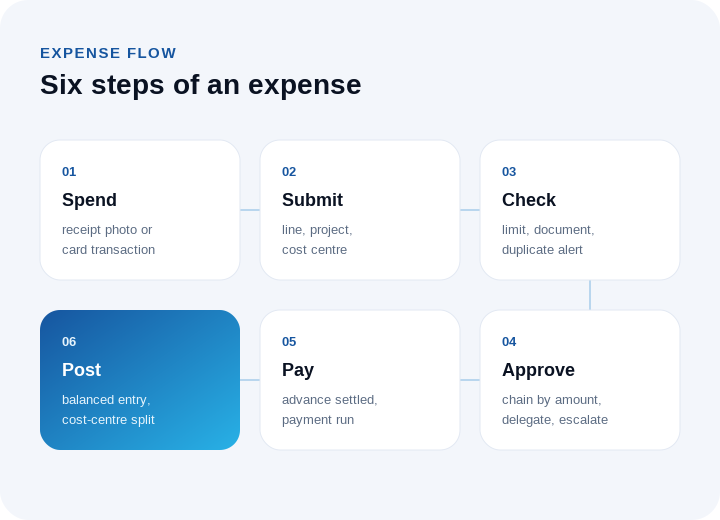
- Spend: The employee photographs the receipt with a phone, or the corporate card transaction drops in automatically.
- Submit: Lines are tied to a category, a project and a cost centre; one report holds several lines.
- Check: Limit, document and duplicate checks run at submission; if something is missing, the employee sees it at once.
- Approve: The chain is built by amount and category; a delegate steps in when the manager is away.
- Pay: The advance is settled and the remainder goes to the employee in the next payment run.
- Post: A balanced accounting entry is generated and cost-centre allocation is applied.
How Is an Expense Policy Set Up in Software?
A policy consists of a limit, a required document and an approval rule per category, and the software enforces it on the employee's screen. The amounts below are a company-policy example and are representative; they are not legal limits.
| Category | Example limit (representative) | Required document | What happens on breach? |
|---|---|---|---|
| Meals | ₺600 per person | Receipt and attendee count | Warning and justification, goes to approval |
| Lodging | ₺3,500 per night | Invoice | Manager and department head approval |
| Taxi | ₺1,500 per line | Receipt, route note | Justification required |
| Gifts and hospitality | ₺2,000 per record | Invoice, recipient details | Finance approval |
| Software subscription | Not accepted as an expense | — | Redirected to procurement |
There are two kinds of rule. A soft rule warns and asks for a justification; a hard rule blocks the submission. Example: a dinner for four costing ₺3,000 is ₺750 per person and exceeds the ₺600 limit; under a soft rule the employee writes a justification and the approver decides with that context. Reserve hard rules for clearly prohibited items; if you block every breach, employees start splitting lines.
Whether a document is legally valid, whether VAT can be deducted and which documents must be kept are matters for your financial advisor and GİB rules, not for software. The software collects the document, warns when it is missing and stores it; the validity decision stays with a person.
How Are Duplicate and Faulty Receipts Caught?
A duplicate is the same spending submitted twice; it can be deliberate, but more often it comes from a card statement and a receipt being entered separately. Software catches it in two layers.
- Exact match: If vendor, date, amount and document number are identical, the record is stopped before it is sent.
- Fuzzy match: If vendor and amount match but the date differs by a day, or the receipt image fingerprint is the same, a warning is raised and a review is requested.
- Overlap with a card transaction: If a card-paid purchase is also claimed out of pocket, the system points at the card transaction.
Representative example: 400 reports a month and 2,000 lines in total; 1% of the lines, or 20, are duplicates at an average of ₺500. With a manual catch rate of 25%, 5 lines are caught and 15 slip through: 15 × ₺500 = ₺7,500. With an automatic check at submission catching 90%, 18 lines are caught and 2 slip through: 2 × ₺500 = ₺1,000. The difference is ₺6,500 a month.
The same logic applies to out-of-policy spending. Say 5% of the 2,000 lines, or 100, are out of policy at an average of ₺400. With a manual catch rate of 50%, 50 lines slip through (₺20,000); a submission-time check catching 90% leaves 10 lines (₺4,000). The difference is ₺16,000, but not every caught line is recoverable, so we count half of it, ₺8,000, as a benefit.
How Do Advances and Settlement Work?
An advance is a payment made to the employee before the spending; settlement compares documented spending with the advance and either pays the difference or collects a refund. The formula is simple: payable to employee = documented spending + policy allowance − advance. If the result is negative, the employee returns the difference.
Representative trip: a three-day client visit with a ₺12,000 advance. Documented spending is transport ₺4,200 and lodging ₺6,300, total ₺10,500. Company policy sets a ₺900 daily allowance (a company example, not a legal amount): 3 × ₺900 = ₺2,700. Total expense is ₺10,500 + ₺2,700 = ₺13,200; with a ₺12,000 advance, the company pays the employee ₺1,200.
| Item | Amount | Note |
|---|---|---|
| Transport (documented) | ₺4,200 | Receipt attached |
| Lodging (documented) | ₺6,300 | Invoice attached |
| Daily allowance: 3 × ₺900 | ₺2,700 | Company policy |
| Total expense | ₺13,200 | |
| Advance given | −₺12,000 | Settled |
| Payable to employee | ₺1,200 | Next payment run |
The real risk with advances is that they stay open. In the example there are 24 open advances averaging ₺9,000, a total of 24 × ₺9,000 = ₺216,000. If policy requires settlement within 10 working days and 6 advances have exceeded that, the overdue rate is 6 ÷ 24 = 25% and the overdue amount is 6 × ₺9,000 = ₺54,000. The software reminds before the deadline and blocks new advances once it passes. Whether an unsettled advance may be deducted from payroll is an employment-law and payroll question; refer it to your legal counsel and financial advisor.
How Are Corporate Card Transactions Matched to Claims?
A corporate card purchase is already recorded on the bank side; what is missing is the document and the reason. Matching joins the card transaction with the receipt the employee submits and makes undocumented spending visible.
Example rule: equal amounts, or a receipt amount within 10% of the card amount (to allow for a tip), a date difference of at most 3 days and a similar vendor name. If the receipt is ₺420 and the card shows ₺462, the difference is ₺42; because 420 × 1.10 = ₺462, it matches within the tip tolerance.
Representative month: of 1,500 card transactions, 1,350 match a claim; the match rate is 1,350 ÷ 1,500 = 90.0%. The remaining 150 are undocumented; at an average of ₺650, that is 150 × ₺650 = ₺97,500 of spending without a reason. The software reminds the employee and, when the deadline passes, escalates to the manager and finance. How payment-provider and bank data reconcile should be considered together with the payment calendar in our cash flow guide.
How Are Travel Expenses and Daily Per Diems Managed?
A trip is handled as a package, not a single purchase: the request, advance, expenses and settlement hang on one trip record. That shows the total cost per trip, its purpose and its project.
- Trip request: Purpose, dates and estimated budget are approved in advance; no advance is given for an unapproved trip.
- Daily allowance: Calculated from the number of days and the city class in company policy; whether it is an allowance or actual cost is a policy decision.
- Allowance without receipts: The tax and payroll effect of a daily allowance that needs no receipt is a matter for your financial advisor; the software only applies company policy.
- Budget variance: If the actual trip cost exceeds the estimate by more than 10%, the approver gets an extra alert.
If you want to follow trip cost by project, the budget-versus-actual approach in our project cost and profitability guide applies as it stands.
How Are the Approval Chain and Cycle Time Measured?
The approval chain is built by amount; a small report needs one approval, a large one a few. Representative thresholds: up to ₺2,000 the manager; ₺2,000–₺10,000 the manager and the department head; above ₺10,000 those two plus the finance director.
Suppose 400 reports a month split 280, 90 and 30 across the three tiers, with average waits of 10, 22 and 40 hours. The weighted average is (280 × 10 + 90 × 22 + 30 × 40) ÷ 400 = (2,800 + 1,980 + 1,200) ÷ 400 = 5,980 ÷ 400 = 14.95 hours. If every report went through the full chain with no thresholds, the average would be 40 hours; the threshold rule shortens waiting by (40 − 14.95) ÷ 40 = 62.6%.
Delegation and escalation rules are also essential: if the manager is on leave, a delegate takes over, and a report left untouched for 48 hours is flagged to the next level. For the general approval mechanism, see our workflow and approval software guide. The same person must not be able to both submit and approve (segregation of duties); make that a hard rule.
How Are Accounting Export and Cost-Centre Allocation Done?
An approved expense becomes a balanced accounting entry: total debits equal total credits. The chart of accounts and the VAT split are your financial advisor's decision; the software applies a category-to-account mapping and does not split or alter the amount.
The entry for the trip example looks like this (amounts are shown gross, VAT included; the VAT split is made separately according to your advisor's mapping):
| Line | Debit | Credit |
|---|---|---|
| Transport and lodging expense | ₺10,500 | |
| Daily allowance expense | ₺2,700 | |
| Advance given to employee (cleared) | ₺12,000 | |
| Amount payable to employee | ₺1,200 | |
| Total | ₺13,200 | ₺13,200 |
Cost-centre allocation splits an expense across several departments or projects. Example: a shared ₺24,000 lodging expense allocated 60% to Project A and 40% to Sales puts ₺14,400 on Project A and ₺9,600 on Sales; 14,400 + 9,600 = ₺24,000. If the percentages do not add up to 100%, the record cannot be sent. At period end, approved but unposted expenses leave expenses understated, so the export cut-off should be tied to the calendar in our month-end close guide. For budget comparison, expense categories should use the same classification as the lines in budgeting and variance analysis.
How Is the Payback of Expense Management Software Calculated?
There are three benefit lines: time, out-of-policy spending and duplicate entries. Representative company: 120 employees, 400 reports a month, 2,000 lines, a labour cost of ₺300 an hour.
| Step | By hand (min) | With software (min) |
|---|---|---|
| Employee: preparing the report | 25 | 12 |
| Finance: checking | 12 | 4 |
| Approval | 4 | 3 |
| Accounting: entry and export | 10 | 1 |
| Total | 51 | 20 |
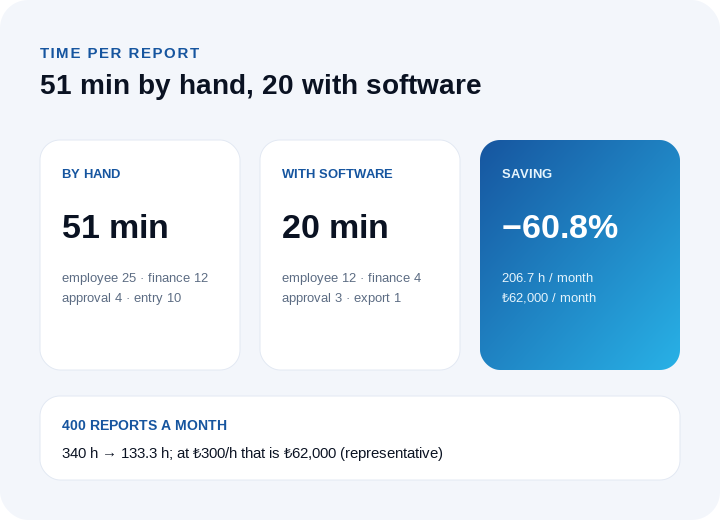
Monthly time: by hand, 400 × 51 = 20,400 min = 340 h; with software, 400 × 20 = 8,000 min ≈ 133.3 h. The gain is 206.7 h × ₺300 = ₺62,000. The per-report reduction is (51 − 20) ÷ 51 = 60.8%.
| Benefit line | Monthly (₺) |
|---|---|
| Time savings | 62,000 |
| Out-of-policy spending prevented (₺16,000 × 50%) | 8,000 |
| Duplicates prevented (₺7,500 − ₺1,000) | 6,500 |
| Gross benefit | 76,500 |
| Monthly running cost (licence, maintenance, support) | −12,000 |
| Monthly net benefit | 64,500 |
With an investment of ₺420,000, payback is 420,000 ÷ 64,500 ≈ 6.5 months. Conservative scenarios: counting time savings only gives a net of ₺62,000 − ₺12,000 = ₺50,000 and 8.4 months; if every benefit halves, the net is ₺38,250 − ₺12,000 = ₺26,250 and payback is 16.0 months. Freed-up time does not turn into cash by itself. Recalculate with your own figures.
Which Indicators Should You Track?
Five indicators describe the health of the expense process.
- Return rate: The share of reports sent back for missing documents or policy breaches. Example: if 52 of 400 reports are returned, 52 ÷ 400 = 13.0%; with a submission-time check it falls to 24, or 6.0%.
- Approval cycle time: The average hours from submission to final approval (14.95 in the example).
- Card match rate: The share of card transactions matched to a claim (90.0%).
- Open advance age: The overdue advance share (25%) and amount (₺54,000).
- Out-of-policy share: The percentage of lines that are justified exceptions or breaches (5%).
An indicator turned into a lone target gets distorted: loosening checks to cut the return rate is an example.
How Is Expense Management Software Rolled Out?
A six-step path works well.
- Write the policy: Fix category, limit, document and approval threshold on a single page; a vague rule cannot be coded.
- Category and account mapping: With your financial advisor, tie each expense category to an account code and a VAT treatment.
- Approval and permissions: Define thresholds, delegation and escalation; keep segregation of duties.
- Card and advance: Link card transactions and advances to the same employee record.
- Pilot: Run with one department for 4–6 weeks; measure the return rate and approval time.
- Rollout: Add departments with training, a support channel and a monthly indicator review.
What Mistakes Are Common in Expense Management?
- Buying software before writing the policy: Without rules, the software is just a box that collects receipts.
- Blocking every breach: Too many hard rules push people to split lines and hoard receipts.
- Managing card and out-of-pocket spending separately: The same purchase is entered twice and duplicates grow.
- Ignoring advances: Open advances age and distort the closing entries.
- Leaving accounting mapping to the end: Without a category-to-account mapping, finance keeps writing entries by hand.
- Trusting time savings alone: Most of the payback is in control quality; saved time may not turn into cash.
We recommend reading: How to build a mobile app: the basics behind field screens such as receipt capture
Custom Software and Process Digitisation with İnovabil
At İnovabil our focus is building bespoke software from scratch for your company: custom software, ERP, CRM, e-commerce, web, mobile and integration. If part of your expense process can be covered by off-the-shelf tools, we suggest comparing that against cost in a written requirements analysis; if your approval flow, policy rules and accounting export are specific to you, custom software offers firmer ground.
We built CRM, purchasing and mobile for Avcılar İnşaat; a purchasing system for İZBAN; logistics and shipment planning with wholesale order management for Karyak; and warehouse management plus a complaint and support management system for Sleepy. These are not expense management applications; still, our experience with approval flows, mobile screens and passing data to accounting is useful when analysing a system like this. Send us a short summary of your current expense process and we will write the requirements together first.
We recommend reading: Our software development process: from analysis to launch, step by step
Frequently Asked Questions
What is expense management software?
It is an application where employees submit work-related spending, which is checked against policy, approved, reimbursed and exported to accounting. Receipts, advances, corporate card transactions and cost centres live in one record.
Is expense management the same as accounts payable automation?
No. Accounts payable automation processes invoices a supplier issues to the company; expense management handles small purchases employees make out of pocket or with a corporate card. Both feed the same accounting system, but the processes and controls differ.
How are duplicate receipts detected?
If vendor, date, amount and document number are identical, it is stopped as an exact match; if the date differs by a day or the receipt image fingerprint is the same, it is warned as a fuzzy match. Overlap with a card transaction is flagged separately.
How are advances and settlement calculated?
The amount payable to the employee is documented spending plus the policy allowance minus the advance. In the example, ₺13,200 of expense against a ₺12,000 advance means the employee is paid ₺1,200; if the result is negative, the employee returns the difference.
Who should be asked about the tax and VAT side of expense software?
Document validity, VAT deduction and the tax and payroll effect of a daily allowance depend on your financial advisor and GİB rules. The software collects and stores the document and applies the category-to-account mapping; the advisor makes the decision.