

When a month ends, the first question is nearly always the same: when will the management report be ready? For some teams the answer is the eighth business day, and until then finance moves back and forth between reconciliation, corrections and approvals. The month-end close is the process in which a period's records are cut off, reconciled, accrued, approved, locked and reported. Speeding it up does not mean making people work faster; it means removing waiting, rework and the pile-up of tasks at the end of the month.
This guide explains how to build a close calendar, what the checklist should contain, what slows the close down and the action for each cause, the continuous-close principle, the effect of automatic reconciliation, period locking, the metrics to watch and the payback calculation. All figures are illustrative; none is an accounting rule, standard or tax advice. Please consult your accountant on those matters.
What Is the Month-End Close and Why Is It Slow?
The close is the final step in which the accuracy of the period's transactions is confirmed together. It has four groups of work: cutting records at the period boundary (cut-off), comparing records with outside sources (reconciliation), reflecting expenses and income that belong to the period but have no document yet (accruals), and approving and reporting the result.
The main reason it is slow is that these four groups run in sequence and start at month end. Documents are chased after the month closes, reconciliation starts then, and differences surface then. Everything is squeezed into the same five days. The daily work that feeds the close is covered in our guides on customer account tracking and pre-accounting; the close is the collective verification of those.
We recommend reading: What Is Pre-Accounting?
How Do You Build a Close Calendar?
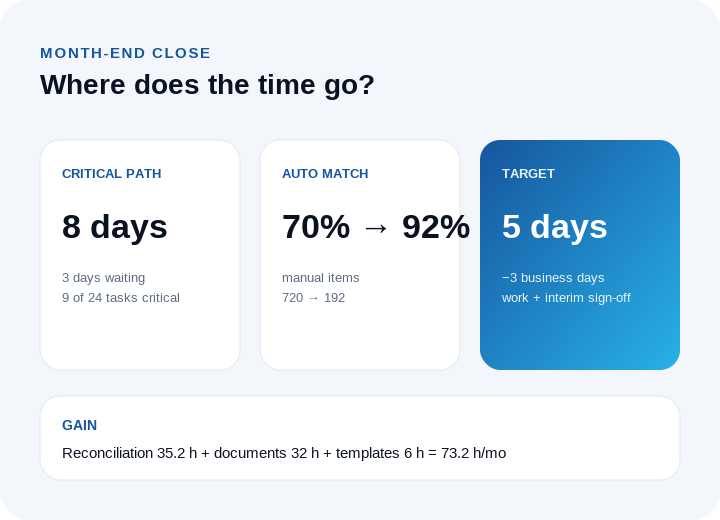
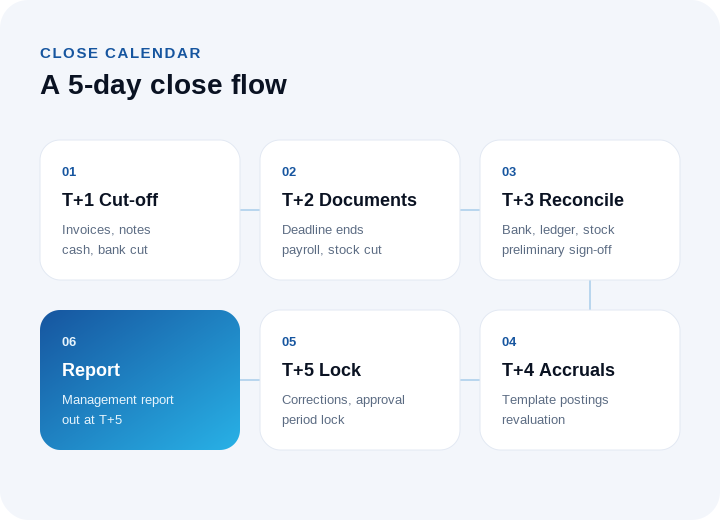
A calendar divides the close into business days (T+1, T+2 and so on, where T is the last day of the period) and records each task's owner and dependency. The example team has 24 tasks; 9 of them are on the critical path, meaning that if one slips, the close slips. The critical path totals 8 business days, of which 3 are waiting: one person waiting for another's answer, document or approval.
| Day | Task group | Owner | Dependency |
|---|---|---|---|
| T+1 | Cut-off: invoices, delivery notes, cash, bank | Accountant | Period-end system cut |
| T+2 | Document deadline ends; payroll and stock cut | Unit owners | T+1 cut-off |
| T+3 | Reconciliations; preliminary sign-off | Accountant, manager | T+2 documents |
| T+4 | Accruals and currency revaluation | Accountant | T+3 reconciliations |
| T+5 | Corrections, interim approval, period lock | Finance manager | T+4 accruals |
| T+5 | Management report published (target) | Finance manager | Period lock |
The target is the fifth business day, while the current state is the eighth. The most useful column is the dependency column, which shows who and which day a delay will affect. The 15 non-critical tasks can slip without delaying the close, so the team's attention belongs on the 9 critical ones. To draw the process step by step, the method in our process mapping guide can be used.
What Should the Close Checklist Contain?
A checklist is the close's memory; it writes down knowledge that otherwise lives in one person's head. It has four sections.
- Cut-off: invoices issued up to the period end, delivery notes shipped but not invoiced, stock count and movement cut, payroll accrual, cash and bank balances.
- Reconciliations: bank, customer and supplier accounts, stock, intercompany balances and fixed asset records, each with the difference amount and its explanation.
- Accruals and deferrals: expenses without an invoice yet, prepayments that belong to later periods, recurring monthly items.
- Revaluation and report: revaluing foreign-currency balances at the period-end rate, interim approval, locking and the management report.
The accounting rule and tax effect of these items are outside this article. Their details are in the related guides and with your accountant: fixed assets, inventory valuation and multi-currency and exchange differences. For eliminations in a multi-entity group, see multi-company ERP.
What Slows the Close Down, and What Is the Action for Each Cause?
Measuring the duration is not enough. Break it down by cause. In the example, the 8 days split as follows.
| Cause | Impact (business days) | Action |
|---|---|---|
| Late documents and missing cut-off | 1.0 | Document deadline at T+2, reminder to unit owners |
| Manual reconciliation | 1.5 | Automatic matching, daily reconciliation |
| Correction loop | 1.5 | Interim checks, T+3 preliminary sign-off |
| Waiting for approval | 1.0 | Delegation, approval limits, parallel approval |
| Differences between systems | 1.0 | Single data source, daily difference report |
| Core processing | 2.0 | Templates and recurring-entry automation |
| Total | 8.0 |
You can also split the same eight days by phase: preparation 2 days (25%), reconciliation 3 days (37.5%), correction 1.5 days (18.75%), approval 1 day (12.5%) and reporting 0.5 day (6.25%). Reconciliation and correction together consume more than 56% of the time; this is where an acceleration effort should start.
The target distribution is 5 days: preparation 1, reconciliation 1.5, correction 1, approval 1 and reporting 0.5. In total 3 days (37.5%) are saved; 2.5 of them (83%) come from preparation and reconciliation and 0.5 from correction.
What Is a Continuous Close?
In a continuous close, work is done during the month instead of at its end. Bank transactions are matched daily, documents are booked on the day they arrive and recurring accruals are posted automatically from templates. A weekly interim close (for example, a Friday review of open reconciliation items) breaks the end-of-month load into pieces.
In the example there are 2,400 bank items a month; spread over 22 business days that is about 109 a day. If reconciliation waits until month end, all 2,400 items remain at once; if it is done daily, only the last two days' items, about 218, are still open at month end. The pile-up shrinks about elevenfold. Even so, a weekly interim close is the more realistic first step.
We recommend reading: How to Manage Cash Flow
How Do You Set Cut-Off Rules and the Document Deadline?
The biggest input to the close is the document. A cut-off rule states up to which date a document enters which period; the document deadline is the time units have to deliver documents to accounting. The example team has 1,200 documents a month and 12% of them (144 documents) arrive after T+2. Each late document means a post-close correction; at an average of 20 minutes per document that is 144 × 20 = 2,880 minutes, or 48 hours.
If the late share falls to 4%, 48 documents remain; 48 × 20 = 960 minutes, or 16 hours, is enough. The gain is 32 hours a month. What makes this happen is not a software setting but a rule: a document that arrives after T+2 goes into the next period, and an exception is made with manager approval and is counted.
How Does the Automatic Reconciliation Rate Affect Close Time?
Reconciliation matches two sources (such as a bank statement and the records). Automation matches most items by amount, date and description rules; the rest are reviewed by hand. Suppose there are 2,400 bank items a month. At a 70% automatic match rate, 720 items stay manual; at 92%, 192 do. The difference is 528 items.
At an average of 4 minutes of review per item, manual effort falls from 720 × 4 = 2,880 minutes (48 hours) to 192 × 4 = 768 minutes (12.8 hours). The gain is 35.2 hours a month. Sorting unmatched items into classes such as "amount difference", "date difference" and "no counterpart" shortens review time. For matching specific to payment channels, see our guide on online payment reconciliation.
Accrual Templates and Post-Close Corrections
Items that repeat every month (rent, subscriptions, monthly service fees) are posted from a template. The example has 18 recurring accruals; entered by hand each takes 25 minutes (7.5 hours in total), from a template 5 minutes (1.5 hours). The gain is 6 hours a month. Templates carry the rule, not the amount: a threshold is defined that asks for approval when the amount changes.
The best indicator of close quality is the post-close correction rate. In the example, 36 of 480 close items were corrected afterwards: 36 ÷ 480 = 7.5%. Put differently, the first-time-right rate is 92.5%. The target is 12 corrections, or 2.5% (first-time-right 97.5%). If speed rises without the correction rate falling, the close has only been moved earlier, not improved.
How Do You Set Up Interim Approvals, Roles and Delegation?
A single final approval pushes every error to the last day. Instead, a preliminary sign-off is held at T+3: reconciliations are complete, difference explanations are written and large items have been reviewed. After it, entries are made only with written exception approval. The final approval at T+5 then approves a picture that is already known.
Roles assign an owner and a backup to each critical task. Holidays and leave can fall on the close; a task with no backup ties the critical path to one person's calendar. Delegation, approval limits and time spans are defined for approval authority. The general principles of authority design are in our guide on role-based access control.
Close Dashboard and Period Locking
A close dashboard shows task status at a glance: task completion percentage, number of overdue tasks, number of open reconciliation items and the time of the preliminary sign-off. It is not meant to apply pressure but to make visible who is waiting for what. For indicator design see what is a KPI.
Period locking prevents entries into a closed period in the system. After the lock, necessary corrections are made through an exception request, with approval, a stated reason and an audit trail. In the example, 8 exception requests arrive each month after the lock; all are recorded and their count is added to the close-quality indicator. Without a period lock in the system, the "close" remains only an intention.
Should the Management Report Be On Time? How Do You Choose a Target Day?
The target day is chosen by stakeholders' expectations and current capacity. Ask when they can first use the management report; the expectation is often around the fifth business day. The gap between the current 8 days and 5 is 3 business days. You see the value of those three days in management deciding sooner: stock, collection and spending variances are known three days earlier. How to examine variances after the close is in our budgeting and variance analysis guide.
Move toward the target gradually: 8, then 6, then 5 days, measuring which cause closed at each step.
How Do You Balance Month-End Workload and Overtime?
Close week is the finance team's busiest. In the example, a team of 6 works 14 hours of overtime per person during the close: 6 × 14 = 84 hours. In the target process it is 5 hours per person: 6 × 5 = 30 hours. The difference is 54 hours a month, or 54 × 12 = 648 hours a year. At an illustrative hourly cost of ₺350, 648 × 350 = ₺226,800. The legal limits of overtime and leave arrangements are matters for HR and your legal adviser; here it is counted only as a workload indicator.
More important, an exhausted team makes more corrections; easing the pressure protects quality.
How Do You Build a 90-Day Improvement Plan?
- Days 1–30, measure: Measure this month's close task by task; write down the 24 tasks, their owners and durations. Find the critical path. Classify causes using the table above.
- Days 31–60, set the rules: Publish the document deadline and cut-off rule. Set up accrual templates. Write the bank matching rules; put the preliminary sign-off meeting at T+3.
- Days 61–90, automate: Measure the automatic reconciliation rate and add queue classes. Put the close dashboard and period lock into use. After the second month-end, move the target to 6 days, then 5.
If you run the plan like a software project, scope, owner and schedule become clear; for similar management on the ERP side see running an ERP implementation.
Which Metrics Do You Track, and How Is Payback Calculated?
| Metric | Current | Target |
|---|---|---|
| Close duration (business days) | 8 | 5 |
| Automatic reconciliation rate | 70% | 92% |
| Late document share | 12% | 4% |
| Post-close corrections | 7.5% | 2.5% |
| Management report on time | Not measured | At T+5, 100% |
Let us calculate payback from hours saved (illustrative). Late documents 32 hours, reconciliation 35.2 hours, accrual templates 6 hours; total 73.2 hours a month. At ₺350 an hour, 73.2 × 350 = ₺25,620. With ₺3,000 monthly running cost, net benefit is ₺22,620. Suppose the investment in matching automation, templates, the dashboard and period lock is ₺230,000: 230,000 ÷ 22,620 ≈ 10.2 months. If only half the gain materialises, net benefit is 12,810 − 3,000 = ₺9,810 and payback stretches to about 23.4 months. Overtime and earlier-decision benefits are not included.
We recommend reading: What Is Expense Management Software? Receipts, Policy, Advances, Approval and Accounting Export
Software Controls Tied to the Close with İnovabil
İnovabil focuses on bespoke software built from scratch for the company. The software needs that speed up the close (a daily difference report across data sources, period lock, approval flow, integration) are written down in requirements analysis; we have built CRM, purchasing and mobile for Avcılar İnşaat, a purchasing system for İZBAN, logistics and shipment planning with wholesale order management for Karyak, and warehouse management with a complaint and support management system for Sleepy. This article is not a commitment to provide a close service; close rules and the recording structure are set with your accountant.
Send a one-page summary of which data from your current systems is collected by hand at close; in analysis we will first separate which control is solved by software and which by process.
We recommend reading: Our software development process: step by step from analysis to launch
Frequently Asked Questions
What is the month-end close?
It is the process in which a period's records are cut off at the period boundary, reconciliations and accruals are completed, and the result is approved, locked and reported. The aim is an accurate and timely picture for management decisions.
How do you speed up the month-end close?
First split the time by cause: late documents, manual reconciliation, correction loop, waiting for approval. Then apply a cut-off rule, automatic matching, accrual templates and a T+3 preliminary sign-off. In the example, 8 business days become 5.
How many days should the close take?
There is no single right number; it depends on stakeholder expectations and team capacity. In the illustrative example the target is the fifth business day, and moving gradually, such as 8, 6, then 5, is recommended.
What is a continuous close?
It means doing reconciliation, posting and accrual work during the month rather than at its end. Starting with a weekly interim close is a realistic first step for most teams; the number of items left open at month end drops noticeably.
Why is period locking needed?
It prevents uncontrolled entries into a closed period. Necessary corrections are made through an exception request, with approval and an audit trail. For rules on the accounting arrangement, consult your accountant.