

A mobile app idea often starts with a single sentence: "Let our customers place orders from their phones," or "Our field team should stop filling in paper forms." As the idea becomes clearer, the questions multiply: iOS, Android or both? Where will the app get its data? How will it get into the store? The answer to how to build a mobile app lies in answering these questions in the right order. A mobile app is more than screens: the server services behind it, the admin panel, the integrations and post-launch maintenance are all part of the project.
In this guide we walk through the steps from idea to store launch, the difference between native, cross-platform and web-based apps, why the backend and admin panel matter as much as the app, what drives cost and timeline, how store launch works, and the mistakes we see most often.
How Do You Build a Mobile App?
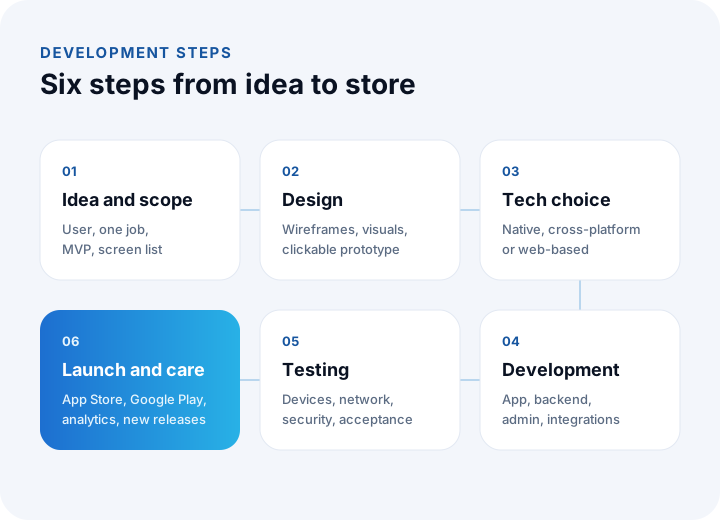
A mobile app is built through these steps: clarifying the idea and the target user, defining the scope, user experience and interface design, choosing the technology, developing the app and its backend, testing, store launch and post-launch maintenance. The steps run in order but feed each other: a finding in testing can send you back to design, and feedback from store review can send you back to development.
That is why a mobile app project is a process that moves in short cycles, not a one-off "delivery". Every step should end with something tangible: a scope document, a clickable design, a testable build, a first store release. This way the project owner sees where the work is heading and can change direction early.
We recommend reading: Our mobile app development service
How Do You Clarify the App Idea and Scope?
An idea is clarified by writing down who will use it, which problem it solves and at what moment the user will open the app. The scope is then limited to the features the first release absolutely needs to solve that problem. Projects that start with "let's have everything" both run late and feel complicated to users.
Define the target user and the one job
The user of a customer app and the user of a field team app are very different. A customer deletes the app if they cannot find what they want on first use. A field worker uses it every day, often wearing gloves, in the sun or with a weak connection. This shapes decisions from button size to offline operation. Once you know the user, complete this sentence: "This app lets the user do ... instead of ... by using ...".
Draw the scope of the first release (MVP)
An MVP (Minimum Viable Product) is the smallest version that gives the user value. It lets you test the idea with real users early and base later development on data, not guesses. When defining scope, features are split into "must have", "nice to have" and "later"; only the first group goes into the first release. In an ordering app, for example, a product list, cart, payment and order tracking are must-haves; favorites, promo codes and loyalty points can be left to later releases.
Write the screen list and the flow
Once the scope is clear, the app's screens and the transitions between them are listed: launch, login, home, list, detail, form, confirmation, profile, settings. This list is the basis of the design and of any budget or timeline estimate; a price given without it is only a guess.
How Is a Mobile App Designed?
Mobile app design is done first with simple sketches that show the user flows (wireframes), then with a visual design that includes color, type and components, and finally with a clickable prototype. A prototype lets you test the app with real users without writing a single line of code, and prevents expensive changes during development.
Some principles to keep in mind in design:
- Follow platform conventions: iOS and Android users have different habits for going back, menus and notifications. The design guidelines published by
- Thumb reach: Frequently used actions should sit in the lower half of the screen, where the thumb reaches easily.
- Few, clear form fields: Typing on a phone is tedious. Remove unnecessary fields and use the right keyboard and autofill.
- Empty, error and loading states: What the user sees when a list has no records, when the connection drops or while data is loading is designed up front.
- Accessibility: Enough color contrast, scalable text and screen reader labels reach more users and ease store review.
What Is the Difference Between Native, Cross-Platform and Web-Based Apps?
A native app is built separately for each platform in that platform's own language; a cross-platform app produces both an iOS and an Android version from a single codebase; a web-based app (PWA) is a website that runs in the browser and can be added to the home screen.
| Topic | Native | Cross-platform | Web-based (PWA) |
|---|---|---|---|
| Codebase | Separate for each platform | One codebase, two platforms | One web app |
| Performance | Highest | Sufficient for most business apps | Depends on the browser |
| Access to device features | Full | Broad; a native module is added in special cases | Limited and varies by platform |
| Development and maintenance load | Two separate teams or two separate jobs | Lower | Lowest |
| Presence in the store | Yes | Yes | Usually no |
| Best suited for | Heavy graphics, camera, sensors and hardware use | The vast majority of customer and business apps | Simple content and form apps, quick experiments |
In practice the decision comes down to these questions: How heavily will the app use the device's hardware (camera, Bluetooth, sensors, background location)? Is an identical experience required on both platforms? Is being in the store a must? Can the team and budget carry two separate codebases in the long run? For most customer and business apps cross-platform wins on time and maintenance; for hardware-intensive apps, native may be preferred.
Why Do a Mobile App's Backend and Admin Panel Matter?
Because every product, price, order and notification the app shows actually comes from the backend. The backend covers the database where data is stored, the API services the app talks to, user login and permissions, notification delivery and integrations with other systems. The admin panel is the screen where this data is managed without technical knowledge. If the app is the storefront, the backend is the warehouse and cash register.
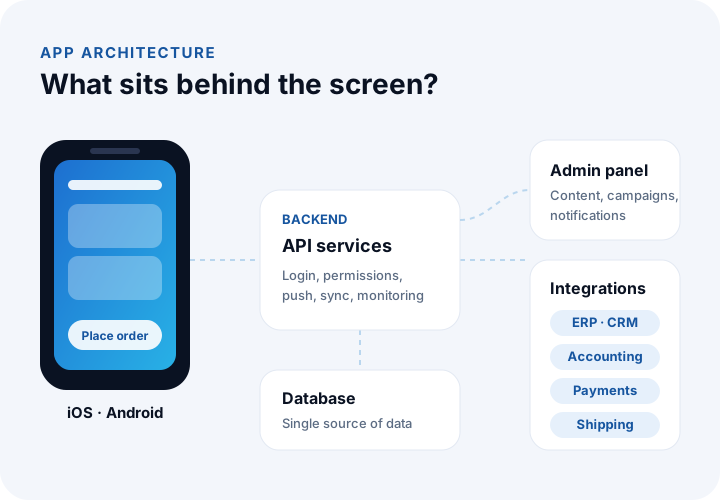
When the backend is designed, these topics are handled up front:
- API design: The rules of the conversation between the app and the server. A well-designed API can later also serve a website, a dealer portal or a second app.
- Authentication and permissions: Verifying who the user is and ensuring they can access only their own data.
- Push notifications: Making sure notifications such as order status, appointment reminders or new tasks reach the right person at the right time.
- Integrations: Data exchange with existing systems such as ERP, CRM, accounting, payment, shipping and marketplaces. Stock and price information should come from the source system, not be updated by hand elsewhere.
- Offline operation and sync: Especially in field apps, data entered without a connection is stored on the device and transferred to the server without conflicts when the connection returns.
We recommend reading: What is API integration? A guide to connecting systems
How Does the Mobile App Development Process Work?
Development works through a process in which the scope is broken into small pieces and each piece is completed in short cycles (usually a few weeks) and shared as a test build. At the end of each cycle the project owner tries the app on their own phone and gives feedback, and the priorities of the next cycle are set accordingly.
This has two benefits: misunderstandings surface within weeks, not months, and because the most important features come first, you have a releasable product even if time or budget shrinks. The app and backend move together; a screen is finished only when its service works too.
The project owner has responsibilities too: preparing content (text, images, product data) on time, trying test builds, and deciding on store accounts and legal texts (privacy policy, KVKK privacy notice, terms of use). When these are late, the launch is late even if the software is ready.
We recommend reading: Our project process: step by step from analysis to go-live
How Is a Mobile App Tested?
A mobile app is tested on different screen sizes and operating system versions, on weak or dropping connections, with real user scenarios, and with both automated and manual tests.
- Functional tests: Whether each feature produces the expected result; critical flows such as login, order, payment and notifications are tried end to end.
- Device and version tests: Small and large screens, tablets, older and newer operating system versions.
- Connectivity tests: Mobile data, weak signal, airplane mode and the connection dropping in the middle of an operation.
- Performance tests: Launch time, smoothness of long lists, battery and data consumption.
- Security tests: Data encrypted on the device and in transit, sessions closing properly, the API refusing unauthorized requests.
- User acceptance testing: The project owner and selected users trying the app in their real work.
Apple's TestFlight and Google Play's closed testing tracks let you distribute the app to a limited group of users without making it public in the store.
How Is an App Uploaded to the App Store and Google Play?
The app is uploaded through developer accounts opened with the Apple Developer Program and Google Play Console, by preparing the store listing information (name, description, screenshots, icon, privacy details) and submitting a compiled build. Both stores review the app first; apps that break the rules are rejected with a reason and resubmitted after fixes.
The main points to watch in the launch process:
- Account ownership: We recommend opening store accounts in the name of the company that owns the app. Then the app remains the company's asset, independent of the developer firm. Current fees and company verification steps are on Apple's and Google's official pages.
- Privacy declarations: What data the app collects and for what purpose is declared in the store forms. The declaration must match the app's actual behavior.
- Review rules: Unfinished features, broken links, login without a demo account for reviewers, and payment flows that break store rules for digital content are common reasons for rejection.
- Store listing: Screenshots and description directly affect the download rate. The name and description should contain the words users search for.
What Determines the Cost and Timeline of a Mobile App?
A mobile app's cost and timeline are determined by the number of screens and features, how original the design is, the platform choice, the scope of the backend and admin panel, the number of integrations and the need for maintenance after launch. That is why "how much does an app cost?" has no single answer; it can be given only once the scope and screen list exist.
| Factor | Increases cost and time | Reduces it |
|---|---|---|
| Scope | Putting every feature in the first release | Starting with an MVP and growing release by release |
| Platform | Separate native development for two platforms | Cross-platform where it fits |
| Design | Original interactions and animation on every screen | A consistent design system based on platform components |
| Backend | Many services built from scratch | Using the APIs of existing systems |
| Integration | Connecting to old systems with poor documentation | Documented, standard APIs |
| Offline operation | Full offline mode that needs conflict handling | Read-only cache |
| Content and decision speed | Late content, long approval chains | A single decision maker, ready content |
When planning the budget, you should account not only for the first release but for the period after launch. Apple and Google release new operating system versions every year; compatibility, security updates, server costs and feedback-driven improvements are ongoing needs.
We recommend reading: Off-the-shelf or custom software? A decision guide
What Happens After a Mobile App Launches?
After launch, the app's usage is measured, errors and crashes are monitored, user reviews are evaluated, compatibility with new operating system versions is maintained and new releases are published in priority order. Reaching the store is the start of learning from real users, not the end of the project.
- Measurement: Which screens are used, at which step users give up and how often they come back to the app are tracked. Set this up in line with KVKK and store privacy rules.
- Error monitoring: Crashes and errors are reported with device, version and screen information and fixed before users complain.
- Reviews: Store reviews feed product development, and answering them builds trust.
What Are the Most Common Mistakes in Mobile App Projects?
The most common mistakes are putting too many features in the first release, leaving the backend and admin panel for later, not testing with real users and not planning for after launch. Most can be avoided by asking a few right questions at the start.
- Treating the app as a copy of the website: A mobile user wants to finish the job quickly, with one hand and on the move. Moving every website menu into the app weighs the experience down.
- Keeping data in a second place: If the app's product, stock or customer data is kept separate from the main system, inconsistencies start quickly. Data should come from a single source.
- Forgetting the admin panel: An app that needs a developer every time content, a campaign or a notification changes slows the business down.
- Leaving store rules to the end: Not considering rules such as payment flow, account deletion and privacy at the design stage leads to rejection on launch day.
- Opening accounts in the developer's name: The store account and source code must belong to the company, or moving the app later becomes hard.
- Not budgeting for maintenance: An app that is not updated breaks on new operating system versions.
Which Questions Should You Answer Before Starting a Mobile App Project?
Before starting, answer the questions that clarify the user, the problem, the first release, the data source and post-launch responsibility. The table below shows how each answer affects the project.
| Question | Impact of the answer |
|---|---|
| Who will open the app, at what moment and for what? | The basis of design and feature priorities |
| Which three to five features are must-haves in the first release? | Scope, timeline and budget |
| Which systems will the app get data from? | Backend and integration scope |
| Does it need device features such as camera, location or Bluetooth? | The native or cross-platform decision |
| Does it need to work without a connection? | Offline architecture and sync |
| Who will manage content and campaigns? | Scope of the admin panel |
| Will payments be taken inside the app? | Payment infrastructure and store rules |
| Who will make updates after launch? | Maintenance plan and budget |
We recommend reading: Our e-commerce software service: website and mobile store on the same infrastructure
We recommend reading: How to Do UX Design: A Step-by-Step Course from User Research to Usability Testing
We recommend reading: What Is Custom Software? Types, Examples, Advantages and Which Businesses It Suits
We recommend reading: Mobile App Development Cost: A Guide to Effort, Scope, MVP and Three-Year Total Cost
We recommend reading: How to secure an API: authentication, authorization, tokens and rate limiting
Recommended reading: What Is an MVP?
Recommended reading: What Is a Web Application?
Mobile Apps with İnovabil
At İnovabil, we develop a mobile app not just as screens on a phone, but as a whole together with the systems behind it. First we clarify the user, the job to be solved and the scope of the first release with you, and we test decisions with a clickable prototype before writing code. Then, as one team, we develop the iOS and Android app, its backend and your content panel.
We build customer apps, field and team apps and mobile stores on the same infrastructure as your e-commerce site, connect them to your ERP, CRM, accounting, payment and shipping systems, manage the App Store and Google Play launch, and stay with you afterwards.
Describe your app idea, who will use it and which systems it should get data from in a few sentences, and we will prepare a scope and roadmap tailored to you.
Frequently Asked Questions
How do you build a mobile app, and what are the steps in short?
A mobile app is built through these steps: clarifying the idea and target user, defining the scope of the first release (MVP), design and prototype, platform choice, developing the app and backend, testing, App Store and Google Play launch, and post-launch maintenance.
Do you need to build separate apps for both iOS and Android?
Not always. Cross-platform technologies produce an app for two platforms from a single codebase and are sufficient for most customer and business apps. For apps that use device hardware heavily or need the highest performance, native development for each platform may be preferred.
Does a mobile app also need a server and an admin panel?
Any app that stores data, has user login or has changing content needs a backend. The admin panel lets you manage products, content, campaigns and notifications without a developer. If the app will connect to an existing ERP, CRM or e-commerce infrastructure, the backend also takes care of integration with those systems.
Is the job done once the app is in the store?
No. Apple and Google release new operating system versions and update store rules every year. Keeping the app compatible with these changes, monitoring and fixing errors, security updates and adding new features based on user feedback are needs that continue after launch.
If I already have a website, do I also need a mobile app?
A mobile app makes a difference if your users interact with you often (regular orders, appointments, tracking, field work) or if you need features such as push notifications, camera, location and offline operation. For an informational site that is visited occasionally, a fast, mobile-friendly website is often enough.