

A business lives through dozens of small financial events every day: an invoice goes out to a customer, goods arrive from a supplier, cash lands in the till, a bank transfer comes in, a cheque nears its due date. If each of these is not recorded at the right time and in the right place, you cannot know at month end how much you are owed, how much you owe, or how much money is actually in the till. Pre-accounting is the process of recording, documenting and tracking a business's day-to-day commercial and financial transactions, essentially day-to-day bookkeeping and invoicing. It forms the foundation of the official accounting kept by your financial advisor (certified accountant) and lets the owner see cash, receivables and payables at any moment.
In this guide we explain what pre-accounting is, how it differs from general accounting, which transactions it covers, where e-documents such as e-invoices (e-Fatura) and e-archive invoices (e-Arşiv) fit in, which features a pre-accounting program should have, how to work with your accountant, the difference between off-the-shelf programs and custom accounting software, and the mistakes we see most often.
What Is Pre-Accounting?
Pre-accounting is the process in which a business records, every day, its purchase and sales invoices, customer and supplier accounts, receipts and payments, cash and bank movements, cheques and promissory notes and, in most cases, stock in and out. These records are the base data both for the business's own tracking and for the official books kept by the accountant.
The word "pre" says that these transactions come before general accounting. A sales invoice is first issued in pre-accounting and posted as a debit to the customer's account; when payment arrives, the account is closed and the cash or bank balance rises. At month end the records go to the accountant, who turns them into journal entries according to the chart of accounts, posts them to the statutory books and prepares the tax returns.
In small businesses, pre-accounting is often run with a notebook, a few Excel files and bank statements. As transaction volume grows, this approach produces errors, delays and invisible receivables. That is the point where a pre-accounting program, or custom accounting software built around your business, comes in.
We recommend reading: Our accounting and pre-accounting software service
What Is the Difference Between Pre-Accounting and General Accounting?
Pre-accounting is the operational record in which a business follows its daily commercial activity for its own use; general accounting is the official accounting in which those transactions are posted to the statutory books under the Uniform Chart of Accounts and financial statements and tax returns are prepared. The business's own team usually runs pre-accounting, while the accountant runs general accounting.
| Topic | Pre-accounting | General accounting |
|---|---|---|
| Purpose | Daily tracking and business management | Statutory records, financial statements and tax |
| Who runs it? | Business owner or finance team | Accountant or accounting department |
| Record language | Account, invoice, receipt, cash, bank | Chart of accounts, debit-credit, journal entry |
| Timing | When the event happens, every day | Periodic, usually monthly |
| Outputs | Statement, receivables-payables list, cash position | Journal and ledger, balance sheet, income statement, tax returns |
| Users | Owner, sales, purchasing, finance | Accountant, tax authority, auditors |
The two are not alternatives; one continues the other. The more orderly your pre-accounting, the faster and cleaner your accountant's work, and the owner sees the financial position without waiting for month end.
Which Transactions Does Pre-Accounting Cover?
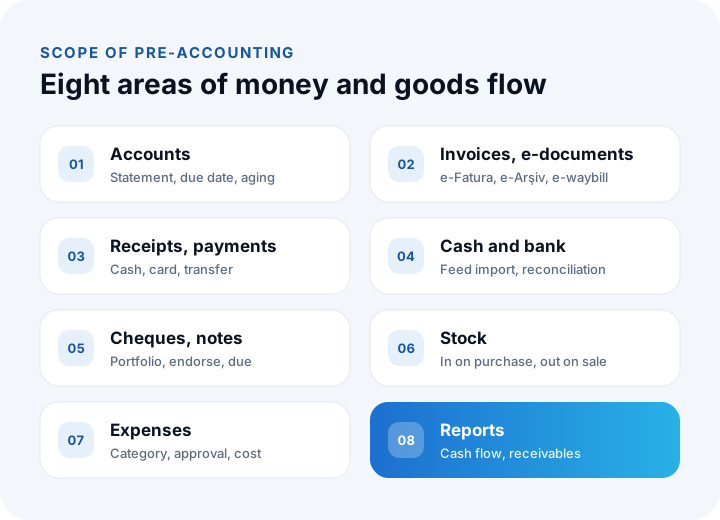
Pre-accounting covers customer and supplier account tracking, purchase and sales invoices, e-documents, receipts and payments, cash and bank movements, cheque and note tracking, expense records and, in most businesses, stock in and out. Each area follows one part of the business's flow of money and goods.
Customer and supplier account tracking
A customer/supplier account (current account) holds every debit and credit movement with one customer or supplier. A sales invoice is posted as a debit to the customer's account and a receipt as a credit; the difference is the customer's balance. Due dates, credit limits, discount terms and the account statement are the basic parts of account tracking. An aging report showing which customers are late is the most important tool for collections.
Invoices and e-documents
Issuing sales invoices and recording purchase invoices sits at the center of pre-accounting. Today a large share of invoices is issued electronically as e-invoices (e-Fatura) or e-archive invoices (e-Arşiv) instead of on paper; e-waybills (e-İrsaliye) are used for shipments and e-self-employment receipts (e-SMM) for freelance earnings. Issuing these documents directly from the pre-accounting program prevents entering the same information twice.
Receipts and payments
Every receipt and payment made in cash, by card, by bank transfer, cheque or note is posted to the relevant account and to the relevant cash or bank account. The list of receipts and payments about to fall due is the basis of cash planning.
Cash and bank
The cash account tracks the cash on hand and the bank accounts track balances held at banks. Automatically importing bank movements and matching incoming transfers to the right customer account is among the biggest time-savers in pre-accounting. Comparing the balance in your records with the bank statement is called bank reconciliation.
Cheques and notes
Cheques and promissory notes received and issued are tracked in a portfolio: which is in the safe, which was sent for collection, which was endorsed, which has fallen due. Cheques and notes whose due dates are not tracked cause unexpected gaps in the cash plan.
Stock and expenses
In trading businesses, pre-accounting usually follows stock in and out as well: a purchase invoice raises stock and a sales invoice lowers it. Expenses such as rent, payroll, energy and logistics are recorded by category, so profitability and cost become clearer.
What Does Pre-Accounting Do for a Business?
Well-kept pre-accounting gives you an instant view of cash, timely collection of receivables, planned payments, fast and error-free work with your accountant, and decisions based on records rather than guesses.
- Cash visibility: How much money is in the till and in the bank, and how much you expect to collect and pay in the coming weeks, is visible on one screen.
- Faster collection: Overdue receivables are listed and customers receive statements and reminders; collection no longer depends on anyone's memory.
- Correct pricing and profitability: Because purchase costs and expenses are recorded, you can see which product or customer actually leaves a profit.
- Alignment with your accountant: Documents arrive complete and on time; month-end crunch and late surprises shrink.
- Fewer errors: When invoices, accounts and cash live in one system, information is entered once and manual transfer errors disappear.
- Readiness for credit and investment: The financial information asked for in bank or investor meetings can be prepared quickly.
We recommend reading: What is business intelligence (BI)? A guide from data to decisions
How Do e-Invoices and e-Archive Invoices Fit into Pre-Accounting?
The e-invoice and the e-archive invoice mean issuing, delivering and storing an invoice electronically, in line with the standards set by the Revenue Administration (GİB), instead of on paper. The moment you issue the invoice, the pre-accounting program sends it to the buyer through a private integrator or the Revenue Administration's system, and automatically receives incoming e-invoices.
If the buyer is registered in the e-invoice system, the invoice is issued as an e-invoice; if not (for example an individual customer), it is issued as an e-archive invoice. A good pre-accounting program makes this distinction automatically by checking the buyer's registration. The obligation to move to e-documents depends on criteria such as turnover and line of business; you should confirm which documents are mandatory for your business, and the current thresholds, from Revenue Administration announcements and your financial advisor.
Which Features Should a Pre-Accounting Program Have?
A pre-accounting program should offer customer and supplier accounts with statements, invoice and e-document issuing, receipts and payments, cash and bank accounts, cheque and note tracking, stock, expense management, reports, user permissions and export to your accountant's software. On top of that, connecting to the other systems your business uses is becoming increasingly important.
| Feature | Why it matters |
|---|---|
| Accounts, statements and aging | Shows how much you are owed and which payments are late |
| e-Invoice, e-archive, e-waybill | Documents are issued and delivered directly from the program |
| Bank movement import | Cuts manual entry and matching errors |
| Cheque and note portfolio | Makes due-date tracking and cash planning possible |
| Stock and warehouse tracking | Stock updates itself with purchases and sales |
| User permissions | Everyone sees only the screens that belong to their job |
| Export to accounting software | Records reach your accountant without re-entry |
| E-commerce and marketplace connection | Invoices and stock movements are created from online orders |
| Cloud access and backup | Records are reachable anywhere and data-loss risk drops |
| Reports and cash flow | Shows the financial position without waiting for month end |
When choosing a program, think not only about today's transaction volume but also about a few years ahead: whether the program can carry growth in branches or companies, sales channels and users matters at least as much as the feature list.
How Do You Work with Your Accountant When Doing Pre-Accounting?
The business keeps daily records in the pre-accounting program; the accountant either logs in as an authorized user and sees them directly, or receives them as vouchers exported into the accounting software they use. Which method to use and how often to export should be agreed together at the start of the cooperation.
- Chart-of-accounts mapping: The accounts, expense categories, cash and bank accounts in pre-accounting are mapped once to their equivalents in the accountant's chart of accounts, so each month's export needs no manual correction.
- Document flow: E-documents already travel electronically; build a regular habit of collecting and scanning paper documents, expense receipts and contracts.
- Period locking: Changes to a month the accountant has closed are blocked; corrections are made in a controlled way.
- Regular reconciliation: Cash, bank and key account balances are compared with the accountant's records at set intervals.
We recommend reading: What is API integration? A guide to connecting your systems
Off-the-Shelf Pre-Accounting Program or Custom Accounting Software?
For businesses with standard commercial transactions, a single company and processes that fit common patterns, an off-the-shelf pre-accounting program is a fast and affordable solution; if you need multi-company structures, custom approval flows, industry-specific documents or deep integration with ERP, production and e-commerce, custom accounting software is the better fit.
| Topic | Off-the-shelf pre-accounting program | Custom accounting software |
|---|---|---|
| Getting started | Usable immediately | Needs analysis and development time |
| Processes | You adapt to the patterns the program offers | Built around the business's own flow |
| Company and branch structure | Usually single-company focused | Multi-company, branches and consolidation can be designed |
| Approval flows | Limited or none | Payment, expense and invoice approvals are defined to order |
| Integration | Limited to the connections the program offers | Designed two-way with ERP, production, e-commerce and CRM |
| Best suited to | Standard needs, one company, quick start | Complex structure, unique processes, deep integration |
For standard needs we recommend NetKasam, the cloud pre-accounting program we developed ourselves. The pre-accounting side of NetKasam is free and covers core needs such as accounts, stock, cash, bank, e-invoicing and marketplace invoicing. If your processes go beyond these patterns, building the accounting software around your own flow is more efficient.
We recommend reading: Off-the-shelf or custom software? A decision guide
How Do You Move to Pre-Accounting?
Moving to a pre-accounting program involves collecting existing records, setting opening balances, transferring accounts and stock cards, setting up e-document and bank connections, agreeing the export routine with your accountant and getting the team used to the system with short training.
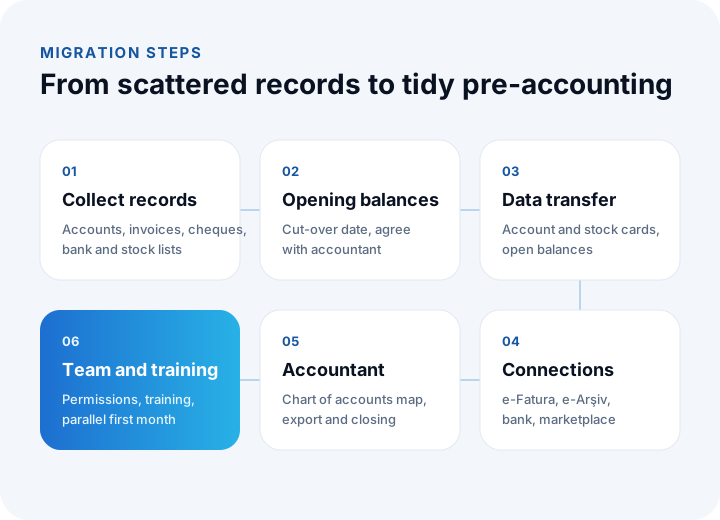
- Collect your records: Customer and supplier lists, open invoices, the cheque and note portfolio, bank accounts and the stock list are gathered in one place.
- Set opening balances: Choose a cut-over date; the account, cash, bank and stock balances on that date are agreed with your accountant.
- Transfer the data: Account and stock cards, open balances and cheques and notes in the portfolio are loaded into the program.
- Set up connections: e-invoice and e-archive, bank movements and, where relevant, e-commerce and marketplace connections are configured.
- Agree the routine with your accountant: Chart-of-accounts mapping is done and the export frequency and period-closing rules are clarified.
- Get the team used to it: Decide who does which transaction, define permissions and give short training. Running a comparison check against the old method in the first month builds confidence.
What Are Common Pre-Accounting Mistakes?
The most common mistakes are leaving records until month end, not matching receipts to the right account, neglecting cash and bank reconciliation, mixing personal and business spending and not tracking cheque and note due dates.
- Letting records pile up: Records made in bulk at month end are both error-prone and useless for decisions during the month.
- Unmatched receipts: If a bank transfer is recorded without saying which invoice it settles, account balances look wrong.
- Skipping reconciliation: Without a cash count and bank reconciliation, small differences grow until their source can no longer be found.
- Mixing personal and business spending: Especially common in small businesses; it distorts the expense and profitability picture.
- Neglecting due-date tracking: Missing the due date of a cheque or note leads to cash squeezes and avoidable costs.
- Unauthorized corrections: Uncontrolled changes in closed periods contradict the accountant's records.
We recommend reading: What Is E-Invoice Integration and How Is It Done? A Guide for Orders, ERP and Accounting
We recommend reading: How to move from Excel to software: signs, cost and data migration
Recommended reading: How to Track Customer Accounts
Accounting Software with İnovabil
At İnovabil we support pre-accounting in two ways. For standard needs we recommend NetKasam, the cloud program we develop and run ourselves, whose pre-accounting side is free. For businesses whose processes go beyond standard patterns, we develop custom accounting software that builds accounts, invoices and e-documents, receipts and payments, cash and bank, cheques and notes, expense management and financial reports around the business's own flow.
We connect accounting software two-way with your ERP, production, e-commerce, marketplace and CRM systems; we automate e-invoice, e-archive, e-waybill and e-SMM processes through private integrators; and we set up the export to the accounting software your financial advisor uses. That way information is entered once and your financial position is visible without waiting for month end.
Tell us in a few sentences how many companies or branches you run, which programs you use today and where you lose the most time at month end; let us work out the right path together.
Frequently Asked Questions
What is pre-accounting, in short?
Pre-accounting is the process in which a business records and tracks, every day, its invoices, customer and supplier accounts, receipts and payments, cash and bank movements, cheques and notes and stock movements. It forms the base data for general accounting and tax returns.
Who does pre-accounting, the accountant?
Pre-accounting is usually run by the business itself, that is, the owner or the finance team. The accountant takes these records, posts them to the statutory books and prepares the tax returns. Some businesses leave pre-accounting work to their accountant or to an outside service.
Is it mandatory to use a pre-accounting program?
There is no obligation to use a program; however, businesses that must issue e-documents such as e-invoices and e-archive invoices need a system that can issue them. As transaction volume grows, tracking with a ledger and Excel causes errors and lost time; a program reduces that load noticeably. To start, you can use NetKasam, whose pre-accounting side is free.
What is the difference between pre-accounting and ERP?
Pre-accounting focuses on financial movements (accounts, invoices, cash, bank, cheques and notes). ERP unites all business processes such as production, purchasing, stock, sales, quality and finance in one system; pre-accounting functions are part of an ERP's finance module. Businesses with production and multi-warehouse operations generally need ERP.
Do I need a pre-accounting program to use e-invoices?
E-invoices can be issued through the Revenue Administration's portal or through private integrators. Issuing invoices from a pre-accounting program, however, creates the account, stock and accounting records at the same time and prevents entering the same information twice. Confirm with your financial advisor which documents are mandatory for your business.